forked from codenamedevan/pinescriptv6
-
Notifications
You must be signed in to change notification settings - Fork 0
Expand file tree
/
Copy pathdocs-language
More file actions
635 lines (595 loc) · 104 KB
/
docs-language
File metadata and controls
635 lines (595 loc) · 104 KB
1
2
3
4
5
6
7
8
9
10
11
12
13
14
15
16
17
18
19
20
21
22
23
24
25
26
27
28
29
30
31
32
33
34
35
36
37
38
39
40
41
42
43
44
45
46
47
48
49
50
51
52
53
54
55
56
57
58
59
60
61
62
63
64
65
66
67
68
69
70
71
72
73
74
75
76
77
78
79
80
81
82
83
84
85
86
87
88
89
90
91
92
93
94
95
96
97
98
99
100
101
102
103
104
105
106
107
108
109
110
111
112
113
114
115
116
117
118
119
120
121
122
123
124
125
126
127
128
129
130
131
132
133
134
135
136
137
138
139
140
141
142
143
144
145
146
147
148
149
150
151
152
153
154
155
156
157
158
159
160
161
162
163
164
165
166
167
168
169
170
171
172
173
174
175
176
177
178
179
180
181
182
183
184
185
186
187
188
189
190
191
192
193
194
195
196
197
198
199
200
201
202
203
204
205
206
207
208
209
210
211
212
213
214
215
216
217
218
219
220
221
222
223
224
225
226
227
228
229
230
231
232
233
234
235
236
237
238
239
240
241
242
243
244
245
246
247
248
249
250
251
252
253
254
255
256
257
258
259
260
261
262
263
264
265
266
267
268
269
270
271
272
273
274
275
276
277
278
279
280
281
282
283
284
285
286
287
288
289
290
291
292
293
294
295
296
297
298
299
300
301
302
303
304
305
306
307
308
309
310
311
312
313
314
315
316
317
318
319
320
321
322
323
324
325
326
327
328
329
330
331
332
333
334
335
336
337
338
339
340
341
342
343
344
345
346
347
348
349
350
351
352
353
354
355
356
357
358
359
360
361
362
363
364
365
366
367
368
369
370
371
372
373
374
375
376
377
378
379
380
381
382
383
384
385
386
387
388
389
390
391
392
393
394
395
396
397
398
399
400
401
402
403
404
405
406
407
408
409
410
411
412
413
414
415
416
417
418
419
420
421
422
423
424
425
426
427
428
429
430
431
432
433
434
435
436
437
438
439
440
441
442
443
444
445
446
447
448
449
450
451
452
453
454
455
456
457
458
459
460
461
462
463
464
465
466
467
468
469
470
471
472
473
474
475
476
477
478
479
480
481
482
483
484
485
486
487
488
489
490
491
492
493
494
495
496
497
498
499
500
501
502
503
504
505
506
507
508
509
510
511
512
513
514
515
516
517
518
519
520
521
522
523
524
525
526
527
528
529
530
531
532
533
534
535
536
537
538
539
540
541
542
543
544
545
546
547
548
549
550
551
552
553
554
555
556
557
558
559
560
561
562
563
564
565
566
567
568
569
570
571
572
573
574
575
576
577
578
579
580
581
582
583
584
585
586
587
588
589
590
591
592
593
594
595
596
597
598
599
600
601
602
603
604
605
606
607
608
609
610
611
612
613
614
615
616
617
618
619
620
621
622
623
624
625
626
627
628
629
630
631
632
633
634
635
Okay, I will create a downloadable markdown file containing the entire document with the Pine Script v6 code blocks properly formatted and enclosed in code fences.
Here is the content for the markdown file:
```markdown
# Language / Execution model
URL Source: https://www.tradingview.com/pine-script-docs/language
[Introduction](https://www.tradingview.com/pine-script-docs/language#introduction)
----------------------------------------------------------------------------------
Pine Script® relies on an event-driven, sequential execution model to control how a script’s compiled source code runs in charts, [alerts](https://www.tradingview.com/pine-script-docs/concepts/alerts/), [Deep Backtesting](https://www.tradingview.com/support/solutions/43000666199-what-is-deep-backtesting/) mode, and the [Pine Screener](https://www.tradingview.com/support/solutions/43000742436-tradingview-pine-screener-key-features-and-requirements/).
In contrast to the traditional execution model of most programming languages, Pine’s runtime system executes a script _repeatedly_ on the sequence of _historical bars_ and _realtime ticks_ in the dataset on which it runs, performing _separate_ calculations for _each bar_ as it progresses. After each execution on a closed bar, the necessary data from that execution becomes part of an internal [time series](https://www.tradingview.com/pine-script-docs/language/execution-model/#time-series), and the script can use that data in its calculations on subsequent bars.
This combination of sequential executions and storage enables programmers to use minimal code to write scripts with dynamic calculations that advance across a dataset bar by bar.
The execution model and time series structure closely connect to the [type system](https://www.tradingview.com/pine-script-docs/language/type-system/) — together, they define how a script behaves as it runs on a dataset. Although it’s possible to write simple scripts without understanding these foundational topics, learning about them and their nuances is key to becoming proficient in Pine Script.
This page explains the execution model in two parts: [The basics](https://www.tradingview.com/pine-script-docs/language/execution-model/#the-basics) and [The details](https://www.tradingview.com/pine-script-docs/language/execution-model/#the-details). The first part provides quick, actionable information about the model for beginners. The second part offers an _advanced_, in-depth breakdown of the model’s workings and unique behaviors. To make the most of the information on this page, we recommend that newcomers to Pine Script start with [The basics](https://www.tradingview.com/pine-script-docs/language/execution-model/#the-basics), learn about other topics in this manual, and then come back to this page for the advanced details.
[The basics](https://www.tradingview.com/pine-script-docs/language#the-basics)
------------------------------------------------------------------------------
The following sections outline core principles of the execution model for beginners. If you are new to Pine Script, start here.
### [Bar-by-bar execution](https://www.tradingview.com/pine-script-docs/language#bar-by-bar-execution)
The dataset for a symbol on a given timeframe, as shown on a chart, consists of a sequence of bars representing a _time series_. Each bar in the sequence represents the price and volume for a specific time period. The first (leftmost) bar on a chart corresponds to the _earliest_ period, and the last (rightmost) bar corresponds to the _most recent_ period.
Much of the power of Pine Script stems from its ability to process this time series data efficiently. When a user runs a script, its code does _not_ execute just once; it executes from start to end on _each bar_ in the symbol’s dataset individually, progressing from the first available bar to the most recent bar. Each separate script execution performs calculations or generates outputs (e.g., [plots](https://www.tradingview.com/pine-script-docs/concepts/plots/)) for a _specific bar_ using the data available on that bar.
A script can retrieve price, volume, and other essential data for each bar on which it executes by using the [built-in variables](https://www.tradingview.com/pine-script-docs/language/built-ins/#built-in-variables) that hold bar information, such as [open](https://www.tradingview.com/pine-script-reference/v6/#var_open), [high](https://www.tradingview.com/pine-script-reference/v6/#var_high), [low](https://www.tradingview.com/pine-script-reference/v6/#var_low), [close](https://www.tradingview.com/pine-script-reference/v6/#var_close), and [volume](https://www.tradingview.com/pine-script-reference/v6/#var_volume). These variables automatically _update_ before each new execution to store the values for the _current bar_.
For example, the simple script below uses the [plot()](https://www.tradingview.com/pine-script-reference/v6/#fun_plot) function to display the series of [close](https://www.tradingview.com/pine-script-reference/v6/#var_close) values (i.e., the closing price of each bar) on the chart:
```pinescript
//@version=6
indicator("Bar-by-bar execution demo", overlay = true, behind_chart = false)
// Plot the `close` series on the chart.
// This call defines the plotted point for the current bar on each execution.
plot(close, "Close price", chart.fg_color, 5)
```
When a user first adds this script to their chart, its code executes _once_ for _every bar_ in the available dataset. As the script runs on the data, two primary steps occur on each bar:
1. The [close](https://www.tradingview.com/pine-script-reference/v6/#var_close) variable automatically updates to hold the current bar’s latest price.
2. The [plot()](https://www.tradingview.com/pine-script-reference/v6/#fun_plot) function call plots the updated [close](https://www.tradingview.com/pine-script-reference/v6/#var_close) value at the current bar’s position.
When the script finishes its run from the first bar to the most recent bar, the result is a simple _line plot_ showing the progression of closing prices across the chart’s history:
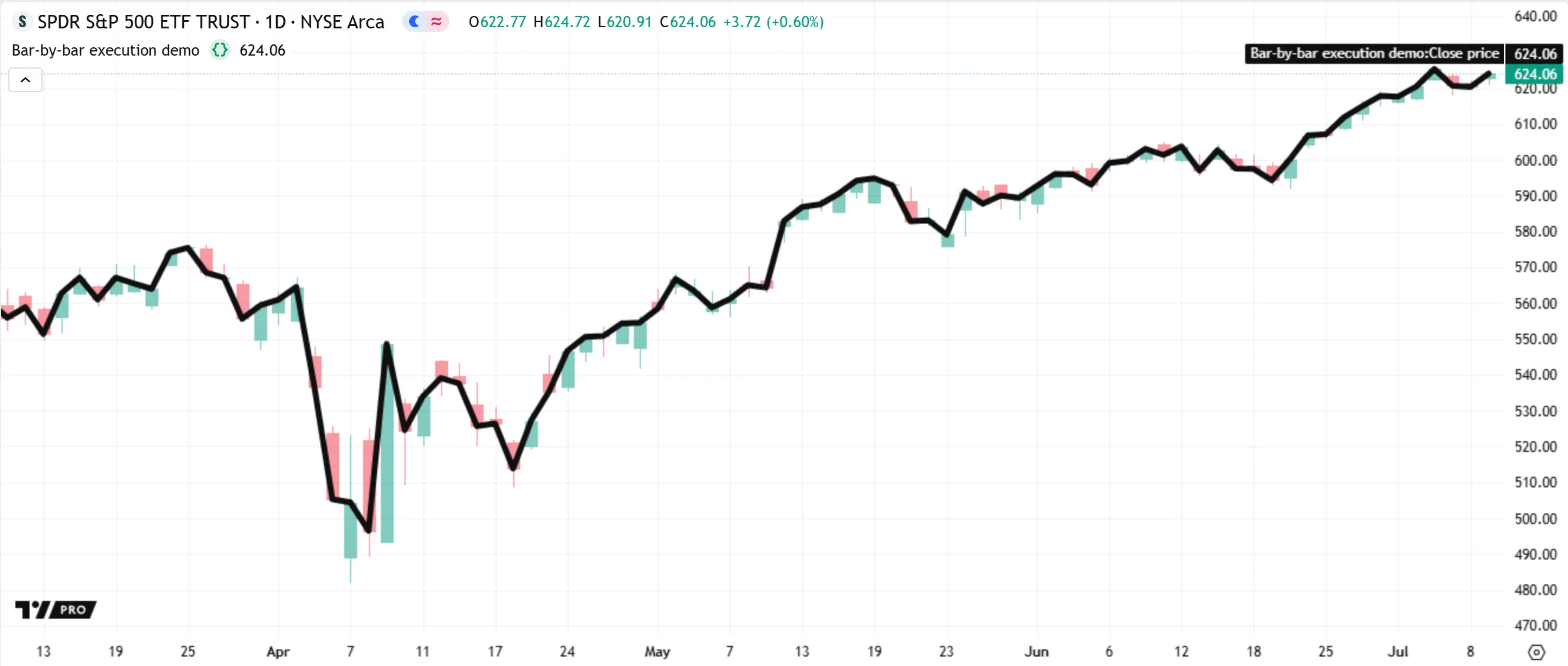
Note that the above script evaluates the [plot()](https://www.tradingview.com/pine-script-reference/v6/#fun_plot) function call once for every bar on the chart, not just once in total. On each separate execution, the call defines the plotted point for the current bar: the chart’s first bar during the first execution, the second bar during the next, and so on.
This pattern illustrates a key principle of Pine’s execution model: on each successive execution, a script _re-evaluates_ function calls and other expressions within its required _scopes_ to perform separate calculations for the current bar.
Repeated code evaluation also applies to [variable declarations](https://www.tradingview.com/pine-script-docs/language/variable-declarations/). By default, a script does not declare a variable only once throughout its runtime; the script _re-declares_ that variable and assigns an initial value based on the current bar’s data during _each_ new evaluation of its scope.
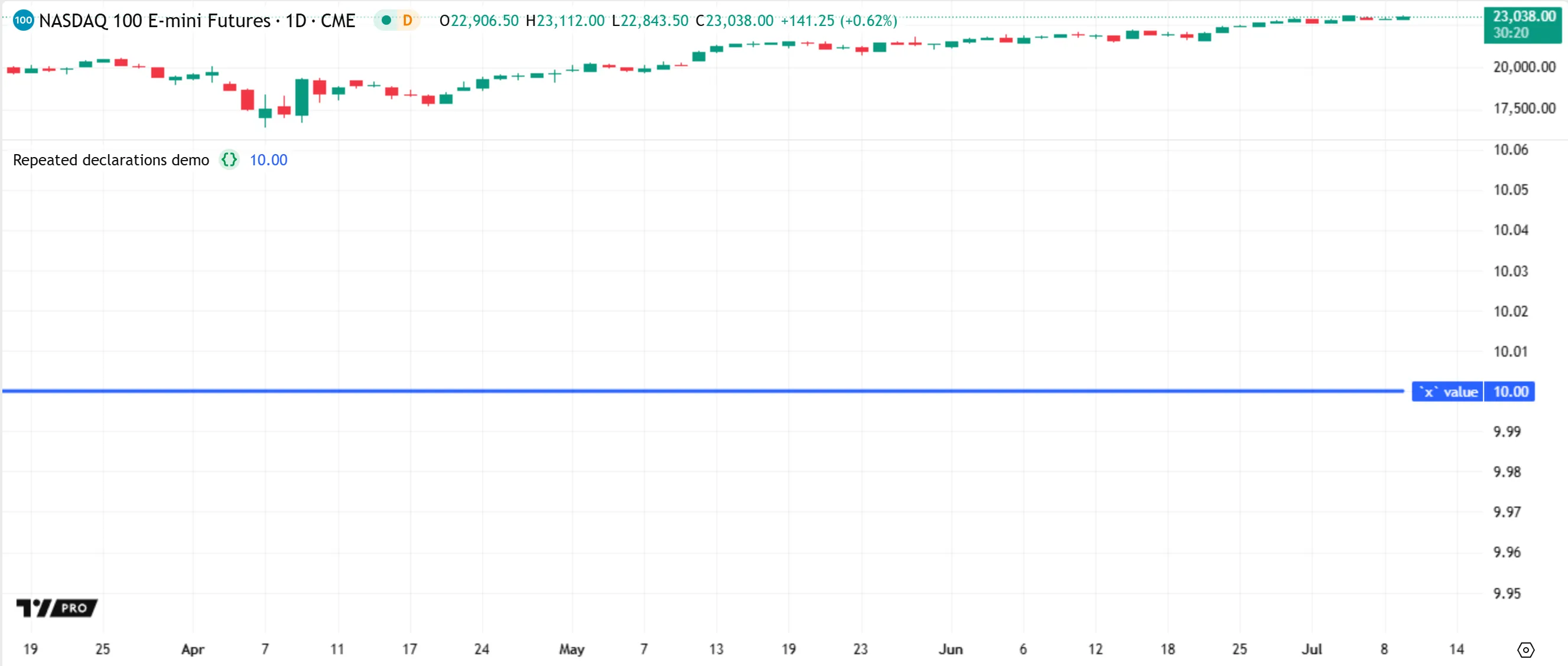
Let’s look at a simple example. The following script declares an `x` variable of the “int” [type](https://www.tradingview.com/pine-script-docs/language/type-system/#types) with an initial value of 0. Then, it increases the variable’s value by 10 with the addition assignment operator ([+=](https://www.tradingview.com/pine-script-reference/v6/#op_+=)). The script calls [plot()](https://www.tradingview.com/pine-script-reference/v6/#fun_plot) to display the value of `x` on each bar in a separate pane:
```pinescript
//@version=6
indicator("Repeated declarations demo")
//@variable A user-defined variable. The script declares this variable and initializes it to 0 on *every* execution.
int x = 0
// Increase the value of `x` by 10 on every bar.
x += 10
// Plot the value of `x`.
// Because `x` begins at 0 on every execution, and the script adds 10 to that value, the plotted value is always 10.
plot(x, "`x` value", color.blue, 3)
```
As shown above, the script plots a value of 10 on every bar, because the `x` variable _does not_ carry over from bar to bar; the script declares the variable _repeatedly_. On each bar, the script re-declares `x` with an initial value of 0, then adds 10 to that value, resulting in a final value of 10 for every plotted point.
Programmers can change the behavior of a variable, enabling it to _persist_ and preserve updates to its value _across bars_, by including the [var](https://www.tradingview.com/pine-script-reference/v6/#kw_var) keyword in its declaration, as described in the [Declaration modes](https://www.tradingview.com/pine-script-docs/language/variable-declarations/#declaration-modes) section of the [Variable declarations](https://www.tradingview.com/pine-script-docs/language/variable-declarations/) page.
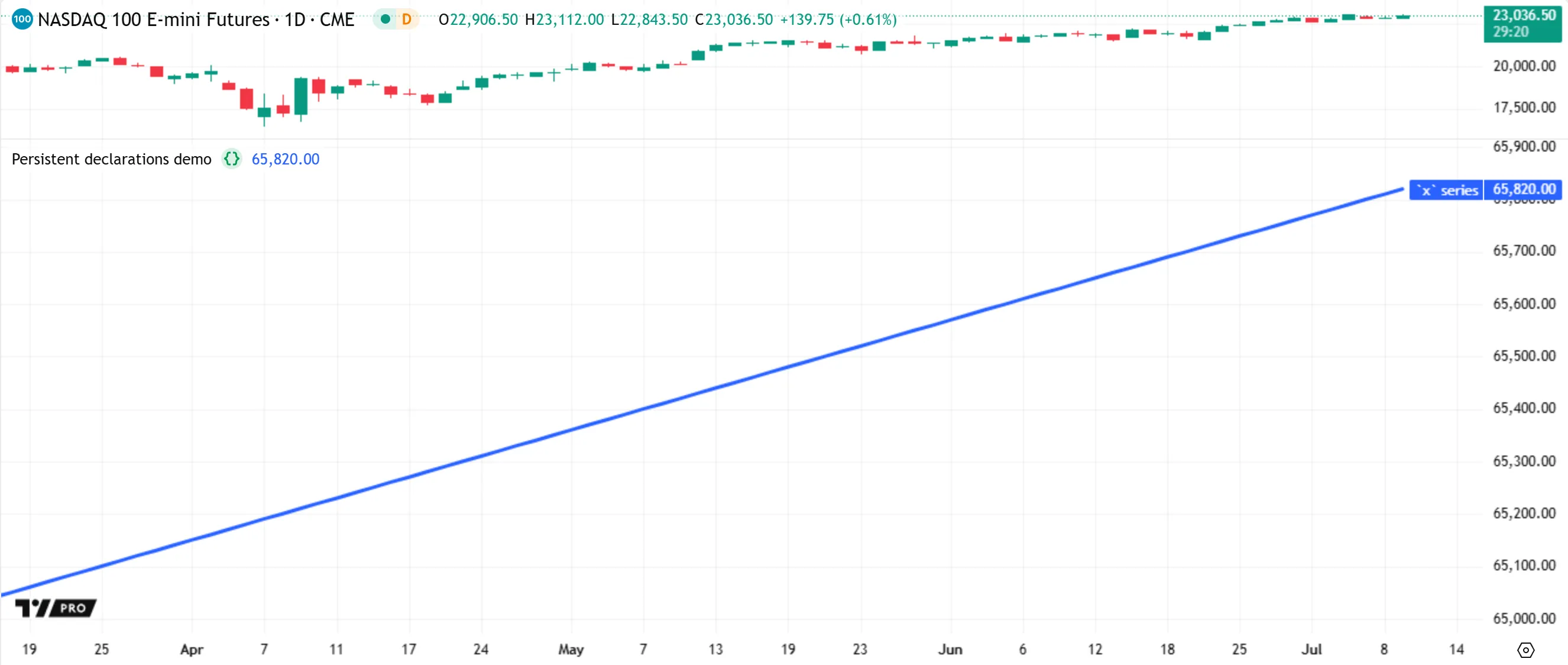
Below, we modify the previous script by adding [var](https://www.tradingview.com/pine-script-reference/v6/#kw_var) to the `x` declaration. Now, the script declares and initializes `x` only _once_ — on the _first bar_ — and that variable persists across _all_ bars that follow. The script now plots a line that _increases_ by 10 on each bar, because `x` preserves the result from each addition across the chart’s history. The value changes from 0 to 10 on the first bar, then to 20 on the second, and so on:
```pinescript
//@version=6
indicator("Persistent declarations demo")
//@variable A *persistent* variable. The script initializes this variable only on the *first execution*.
// The variable preserves all changes to its value on each closed bar.
var int x = 0
// Increase the value of `x` by 10 on every bar.
x += 10
// Plot the `x` series on the chart.
// Because the script declares `x` using `var` and then increments its value, the value never resets to 0.
// The plotted value is 10 on the first bar, 20 on the next, and so on.
plot(x, "`x` series", color.blue, 3)
```
### [Storing and using data from previous bars](https://www.tradingview.com/pine-script-docs/language#storing-and-using-data-from-previous-bars)
As a script runs on a dataset, the states of its variables, function calls, and other expressions are automatically _committed (saved)_ to an internal _time series_ on each bar, creating historical trails of previous bar values that the script can access during its calculations on the current bar. The script can use these previous values by doing either of the following:
* Using the [[] history-referencing operator](https://www.tradingview.com/pine-script-docs/language/operators/#-history-referencing-operator). The number in the square brackets represents how many _bars back_ from the current bar the script looks to retrieve a past value. For instance, `close[1]` retrieves the [close](https://www.tradingview.com/pine-script-reference/v6/#var_close) value from _one bar before_ the current bar, and `close[100]` retrieves the value from _100 bars back_.
* Calling the [built-in functions](https://www.tradingview.com/pine-script-docs/language/built-ins/#built-in-functions) that calculate on past values internally, such as `ta.*()` functions. For instance, `ta.change(close, 10)` calculates the difference between the current value of [close](https://www.tradingview.com/pine-script-reference/v6/#var_close) and its value from 10 bars back.
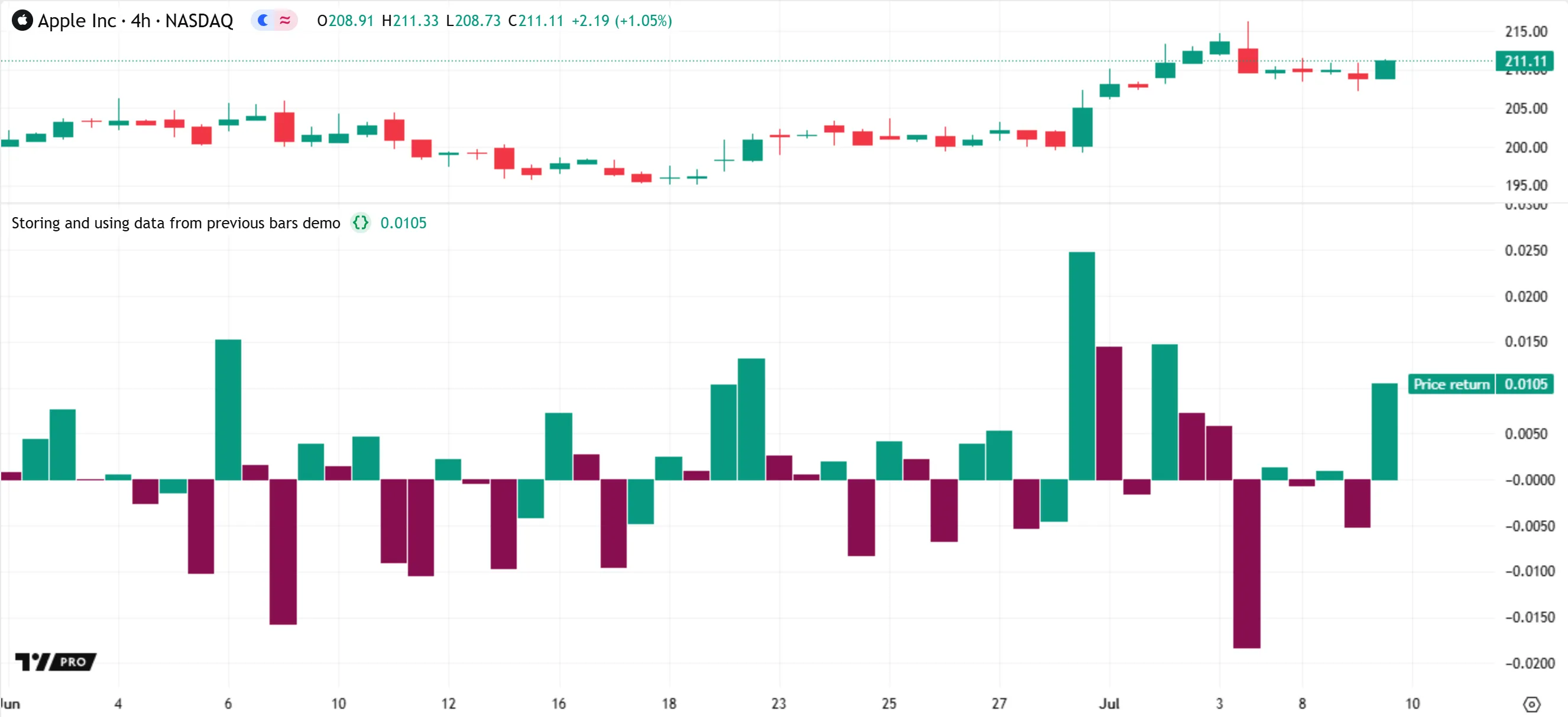
The example below uses both of the above techniques to perform calculations based on data from previous bars. The script calculates a series of bar-by-bar price returns and plots the result as color-coded columns. It declares two global variables on each bar: `priceReturn` for the calculated returns, and `returnColor` for the plot’s color. The `priceReturn` value is the result of dividing the current one-bar change in closing prices (`ta.change(close, 1)`) by the previous bar’s closing price (`close[1]`). The `returnColor` value is [color.teal](https://www.tradingview.com/pine-script-reference/v6/#const_color.teal) if the current value of `priceReturn` is higher than the value from the previous bar (`priceReturn[1]`), and [color.maroon](https://www.tradingview.com/pine-script-reference/v6/#const_color.maroon) otherwise:
```pinescript
//@version=6
indicator("Storing and using data from previous bars demo")
//@variable The one-bar price return, based on the current and *previous* bars' `close` values.
// This variable's final value on each bar automatically becomes part of the internal time series.
float priceReturn = ta.change(close, 1) / close[1]
//@variable Is `color.teal` if the `priceReturn` value is above the value on the previous bar; `color.maroon` otherwise.
color returnColor = priceReturn > priceReturn[1] ? color.teal : color.maroon
// Plot the current `priceReturn` value as a column, colored using the value of `returnColor`.
plot(priceReturn, "Price return", returnColor, 1, plot.style_columns)
```
Note that:
* This script does _not_ plot a column on bar 0 (the _first_ bar). The `priceReturn` value is [na](https://www.tradingview.com/pine-script-reference/v6/#var_na) on that bar, because there is _no previous bar_ available for the script to reference at that point.
### [Realtime bars](https://www.tradingview.com/pine-script-docs/language#realtime-bars)
When a script first runs on a chart, all _closed_ bars in the accessed dataset are _historical bars_. These bars represent data for elapsed time periods where the final price and volume are _confirmed_. All indicators execute **once** per historical bar.
When the rightmost bar on the chart is _open_, it is a _realtime bar_. Unlike a historical bar, whose values are final, a realtime bar _updates_ its values as new price or volume data becomes available. After the bar closes, it becomes an _elapsed realtime bar_, which is then no longer subject to change as the script runs.
Because the final values for a realtime bar are _unknown_ until the bar closes, an indicator executes differently on that bar than it does on historical bars. The script executes not once, but **repeatedly** on the realtime bar — once for each new _update (tick)_ — to _recalculate_ its results using the latest data.
Before each recalculation on the realtime bar, the data for a script’s variables, expressions, and outputs on that bar is _cleared_, or _reset_. We refer to this process as _rollback_. The purpose of rollback is to revert the script to the same confirmed state it had when the realtime bar opened. This process ensures that the script’s calculations for the bar operate only on the latest available data, without relying on _temporary data_ from the bar’s _previous ticks_.
Let’s look at rollback and recalculation in action. The following script uses [ta.stoch()](https://www.tradingview.com/pine-script-reference/v6/#fun_ta.stoch) to calculate the [Stochastic oscillator](https://www.tradingview.com/support/solutions/43000502332-stochastic-stoch/) based on the [close](https://www.tradingview.com/pine-script-reference/v6/#var_close), [high](https://www.tradingview.com/pine-script-reference/v6/#var_high), and [low](https://www.tradingview.com/pine-script-reference/v6/#var_low) values over a specified number of bars, then plots the result in a separate pane. It also calls [bgcolor()](https://www.tradingview.com/pine-script-reference/v6/#fun_bgcolor) to highlight the background on each realtime bar — where [barstate.isrealtime](https://www.tradingview.com/pine-script-reference/v6/#var_barstate.isrealtime) is `true` — for visual reference:
```pinescript
//@version=6
indicator("Recalculation on realtime bars demo")
//@variable The number of bars in the Stochastic calculation. Users can change this value in the "Settings/Inputs" tab.
int lengthInput = input.int(10, "Length", 1)
//@variable The Stochastic oscillator, based on the `close`, `high`, and `low` values over `lengthInput` bars.
float stochastic = ta.stoch(close, high, low, lengthInput)
// Plot the `stochastic` value for each bar.
plot(stochastic, "Stochastic %K", color.teal, 3)
// Highlight the background of each realtime bar.
bgcolor(barstate.isrealtime ? color.new(color.purple, 80) : na, title = "Realtime background highlight")
```
When we add the script to our chart, it executes once per bar in the chart’s history, from the leftmost bar to the rightmost bar. However, the rightmost bar on our chart is still _open_. Therefore, it is a _realtime bar_, not a historical bar. After the script reaches that bar, it begins executing once for _every new update_ to the bar’s data. Each new script execution calculates on the latest available prices and _replaces_ the bar’s previous result.
For instance, in the initial image below, the oscillator’s value 10 seconds into the open realtime bar (the one with the purple background) is 32.08:
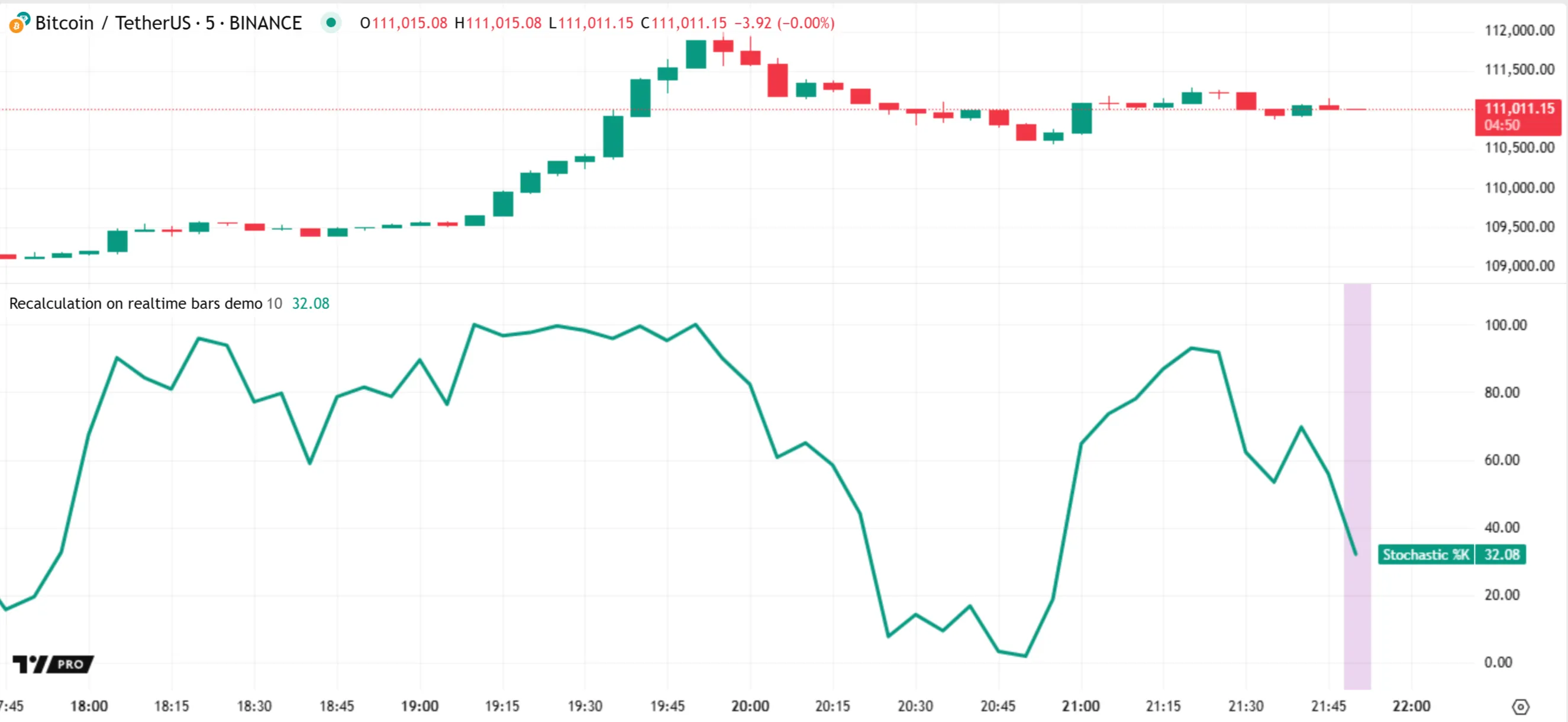
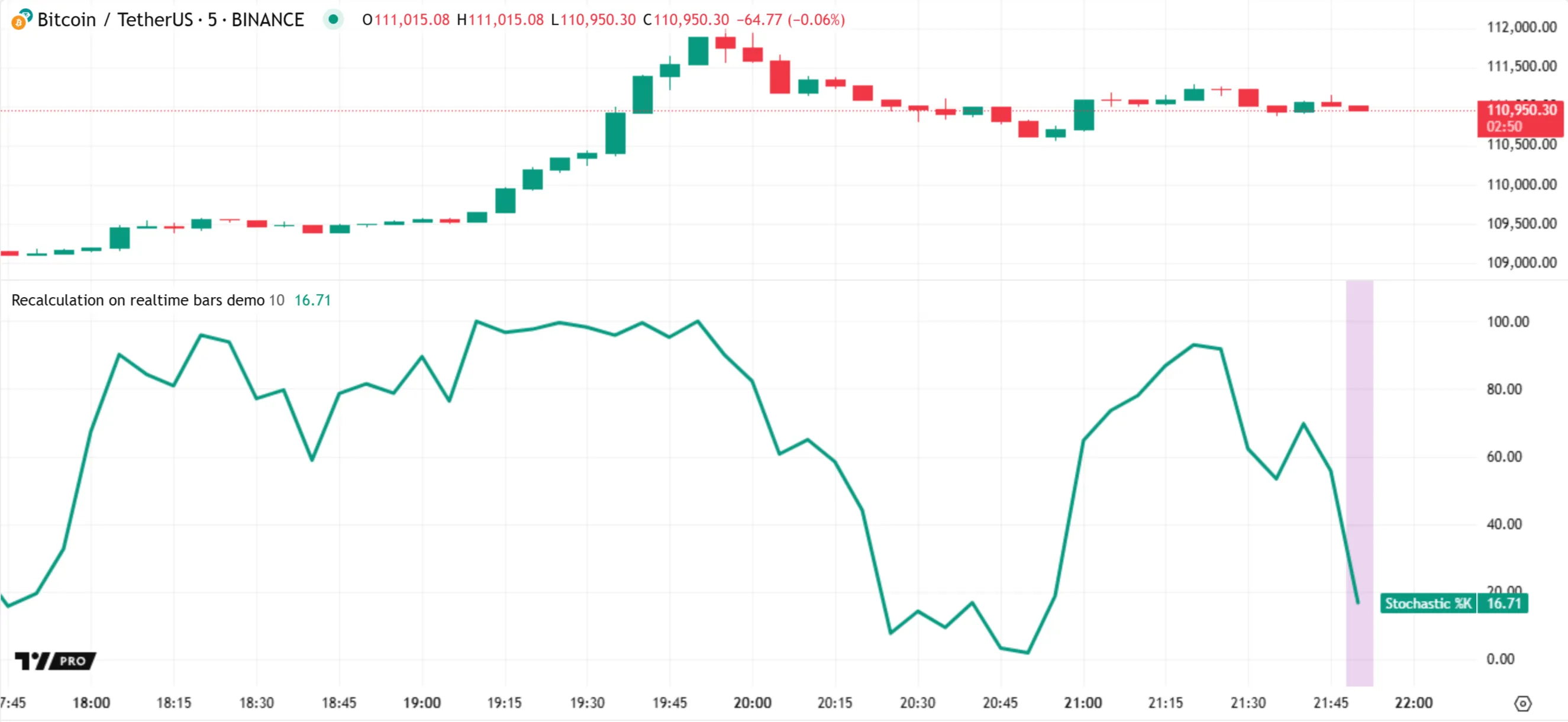
Every time the bar updates, rollback _resets_ the script’s data for that bar, and the script _recalculates_ its result using the latest [high](https://www.tradingview.com/pine-script-reference/v6/#var_high), [low](https://www.tradingview.com/pine-script-reference/v6/#var_low), and [close](https://www.tradingview.com/pine-script-reference/v6/#var_close) values. Here, halfway through the realtime bar’s period, the oscillator’s plot now shows a value of 16.71:
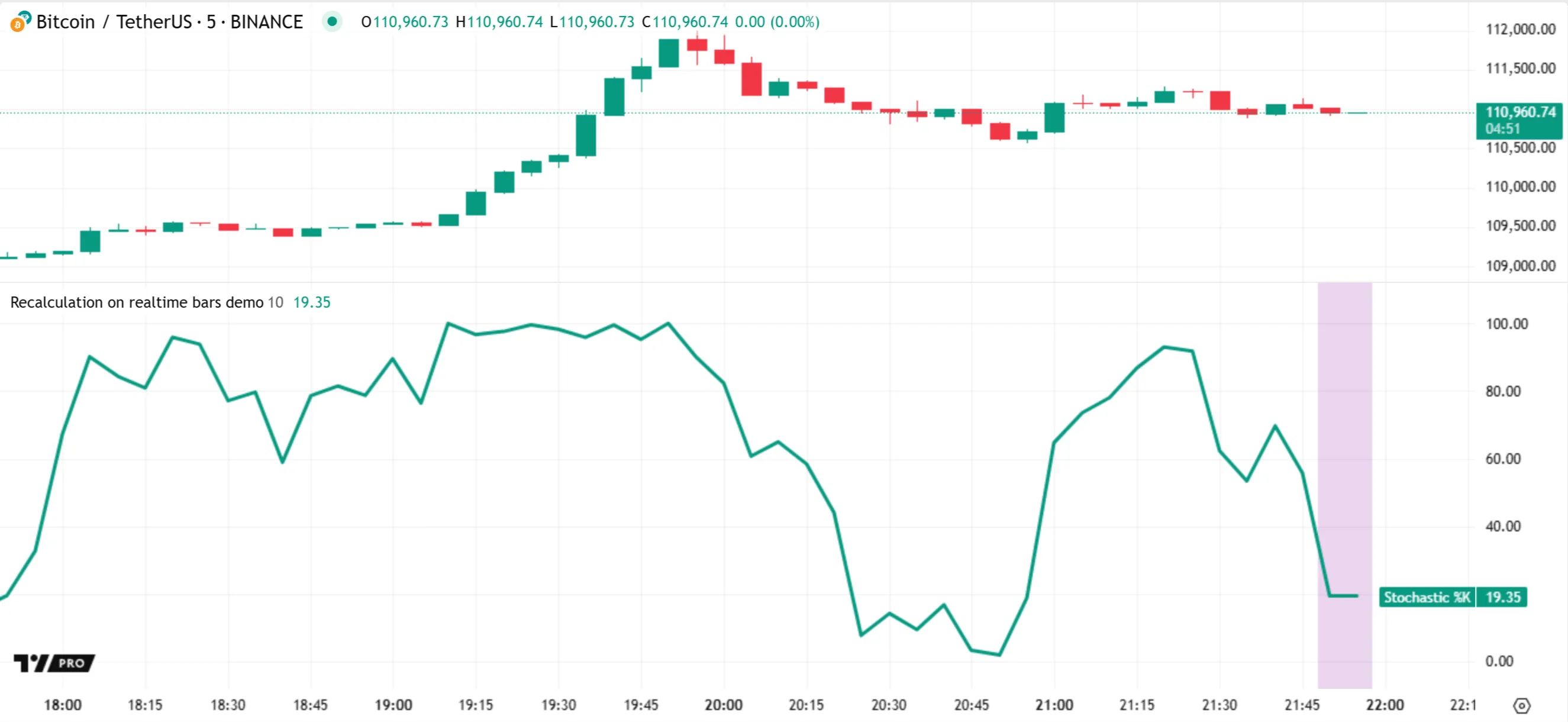
Recalculation continues for each successive update to the bar. Then, the script reaches the bar’s closing tick, where the prices become _confirmed_. On that tick, the script calculates the oscillator’s final value of 19.35. Afterward, another realtime bar opens, and the pattern of rollback and recalculation continues on that bar:
Note that:
* Only the values for a realtime bar’s _final tick_ become part of the internal time series. The values from ticks _before_ the bar’s close are **not** saved.
* The [input.int()](https://www.tradingview.com/pine-script-reference/v6/#fun_input.int) function returns a value of the “input int” _qualified type_. Values qualified as “input” are established _before_ the first script execution, and they remain consistent throughout the script’s runtime. If the user changes the “Length” input to a new value, the script _restarts_ to perform new calculations across the dataset using that value. See the [Inputs](https://www.tradingview.com/pine-script-docs/concepts/inputs/) page and the [Qualifiers](https://www.tradingview.com/pine-script-docs/language/type-system/#qualifiers) section of the [Type system](https://www.tradingview.com/pine-script-docs/language/type-system/) page to learn more about script inputs and the “input” qualifier.
* If the script restarts, all the realtime bars from the previous script run become _historical bars_ in the new run. Therefore, after restarting, the script executes only **once** on each of those bars and does _not_ highlight their background.
[The details](https://www.tradingview.com/pine-script-docs/language#the-details)
--------------------------------------------------------------------------------
The following sections provide in-depth details about Pine’s execution model, including the mechanics of executions on [historical bars](https://www.tradingview.com/pine-script-docs/language/execution-model/#executions-on-historical-bars) and [realtime bars](https://www.tradingview.com/pine-script-docs/language/execution-model/#executions-on-realtime-bars), which [events](https://www.tradingview.com/pine-script-docs/language/execution-model/#events-that-trigger-script-executions) trigger script executions, and how the runtime system maintains data across executions in a [time series](https://www.tradingview.com/pine-script-docs/language/execution-model/#time-series) format.
### [Executions on historical bars](https://www.tradingview.com/pine-script-docs/language#executions-on-historical-bars)
When a script loads on the chart or in another location after an [execution-triggering event](https://www.tradingview.com/pine-script-docs/language/execution-model/#events-that-trigger-script-executions), its compiled source code executes on _every_ accessible bar in the current dataset in order, starting with the first bar.
While the script loads, the runtime system performs the following steps for _each bar_ that it accesses:
1. It updates the built-in variables that hold bar information. For instance, the system sets the [open](https://www.tradingview.com/pine-script-reference/v6/#var_open), [high](https://www.tradingview.com/pine-script-reference/v6/#var_high), [low](https://www.tradingview.com/pine-script-reference/v6/#var_low), and [close](https://www.tradingview.com/pine-script-reference/v6/#var_close) variables to hold the OHLC price values of the bar _before_ each execution.
2. It executes the script’s compiled code from start to end using the data available as of the current bar.
3. After the execution ends, the system commits (saves) all necessary data for the current bar to the [time series](https://www.tradingview.com/pine-script-docs/language/execution-model/#time-series). The script can then access that data from [historical buffers](https://www.tradingview.com/pine-script-docs/language/execution-model/#historical-buffers) during its executions on subsequent bars by using the [history-referencing operator](https://www.tradingview.com/pine-script-docs/language/operators/#-history-referencing-operator) or the built-in functions that reference past bars internally.
These steps repeat for every successive bar up to the most recent bar. After the runtime system completes this process across the dataset, the script’s committed _outputs_ — such as [plots](https://www.tradingview.com/pine-script-docs/concepts/plots/), [drawings](https://www.tradingview.com/pine-script-docs/language/type-system/#drawing-types), [Pine Logs](https://www.tradingview.com/pine-script-docs/writing/debugging/#pine-logs), and [Strategy Tester](https://www.tradingview.com/pine-script-docs/concepts/strategies/#strategy-tester) results — become available to the user.
All the closed bars on which the script executes while loading are _historical_, because they represent data points that were confirmed before the [event](https://www.tradingview.com/pine-script-docs/language/execution-model/#events-that-trigger-script-executions) that triggered the loading process. By default, all scripts execute **once** for each historical bar.
Let’s examine a simple indicator to understand how script executions work on historical bars.
The script below calculates the 20-bar moving average of [close](https://www.tradingview.com/pine-script-reference/v6/#var_close) values and plots the result on the chart. The color of the plot depends on whether the average is above or below the value on the previous bar. The script also increments an `executionNum` variable to count code executions, then plots the result alongside [bar_index](https://www.tradingview.com/pine-script-reference/v6/#var_bar_index) for comparison. Additionally, it highlights the background of historical bars in orange for visual reference:
```pinescript
//@version=6
indicator("Executions on historical bars demo")
//@variable The average of the latest 20 `close` values.
float sma = ta.sma(close, 20)
//@variable Is `color.green` if the `sma` value is above the value on the previous bar; `color.red` otherwise.
color plotColor = sma > sma[1] ? color.green : color.red
//@variable Tracks the current execution number, where 0 represents the first execution.
varip int executionNum = -1
// Add 1 to the `executionNum` value.
executionNum += 1
// Display the `sma` as a line plot on the main chart pane, colored by the `plotColor`.
plot(sma, "SMA", plotColor, 3, force_overlay = true)
// Display the `executionNum` and `bar_index` series in a separate pane.
plot(executionNum, "Execution number", color.purple, 5)
plot(bar_index, "Bar index", color.aqua, 2)
// Highlight the chart's background in translucent orange when `barstate.ishistory` is `true`.
bgcolor(barstate.ishistory ? color.new(color.orange, 70) : na, title = "Historical highlight", force_overlay = true)
```
The statements and expressions in this source code might appear static at first glance. However, they have _dynamic_ behavior across bars because the system executes the script _repeatedly_ — once for each successive data point. Below, we inspect the code step by step to explain how the script works during its historical executions.
The [indicator()](https://www.tradingview.com/pine-script-reference/v6/#fun_indicator) call at the top of the code is a [declaration statement](https://www.tradingview.com/pine-script-docs/language/script-structure/#declaration-statement) that defines the script’s type and properties once, at _compile time_. This statement does not execute as the script runs on the dataset:
`indicator("Executions on historical bars demo")`
_Before_ each script execution on a bar, the runtime system updates the built-in [bar_index](https://www.tradingview.com/pine-script-reference/v6/#var_bar_index) and [close](https://www.tradingview.com/pine-script-reference/v6/#var_close) variables required in the calculations. The [bar_index](https://www.tradingview.com/pine-script-reference/v6/#var_bar_index) value is the bar’s global _time series index_, where 0 represents the first bar, 1 represents the second, and so on. The [close](https://www.tradingview.com/pine-script-reference/v6/#var_close) variable holds the bar’s _latest price_. For historical bars, its value is the _final price_ at the bar’s closing time.
Each time that the script executes, it declares and initializes a global `sma` variable of the “float” [type](https://www.tradingview.com/pine-script-docs/language/type-system/#types). This [variable declaration](https://www.tradingview.com/pine-script-docs/language/variable-declarations/) happens on _every_ execution because the code line does not specify a [declaration mode](https://www.tradingview.com/pine-script-docs/language/variable-declarations/#declaration-modes). The variable’s assigned value is the result of a [ta.sma()](https://www.tradingview.com/pine-script-reference/v6/#fun_ta.sma) function call. The call returns the average of the latest 20 [close](https://www.tradingview.com/pine-script-reference/v6/#var_close) values as of the current bar, or [na](https://www.tradingview.com/pine-script-reference/v6/#var_na) if fewer than 20 bars are available. After the execution ends, the system commits the new value of `sma` to the [time series](https://www.tradingview.com/pine-script-docs/language/execution-model/#time-series):
`//@variable The average of the latest 20 `close` values.float sma = ta.sma(close, 20)`
Note that:
* The `//@variable` comment above the `sma` declaration is an [annotation](https://www.tradingview.com/pine-script-docs/language/script-structure/#compiler-annotations) that _documents_ the variable in the code. The Pine Editor displays the comment in a pop-up window when the user hovers the mouse pointer over the variable.
During each execution, the script also initializes a `plotColor` variable of the “color” type. The script uses a [ternary operation](https://www.tradingview.com/pine-script-docs/language/operators/#-ternary-operator) that compares the current `sma` value to `sma[1]` — the _last committed value_ for `sma` as of the _previous bar_ — to determine the `plotColor` variable’s assigned value. If the current `sma` value is higher than the last committed value, the `plotColor` value is [color.green](https://www.tradingview.com/pine-script-reference/v6/#const_color.green). Otherwise, it is [color.red](https://www.tradingview.com/pine-script-reference/v6/#const_color.red):
`//@variable Is `color.green` if the `sma` value is above the value on the previous bar; `color.red` otherwise.color plotColor = sma > sma[1] ? color.green : color.red`
In contrast to the variables above, the script _does not_ initialize the `executionNum` variable on every execution. Instead, initialization happens only _once_ — on the _first_ bar — because the variable declaration is in the _global scope_ and uses the [varip](https://www.tradingview.com/pine-script-reference/v6/#kw_varip) keyword. Once initialized, the variable _persists_ across all subsequent bars and the ticks within those bars. Only the reassignment or compound assignment [operators](https://www.tradingview.com/pine-script-docs/language/operators/) can change its value:
`//@variable Tracks the current execution number, where 0 represents the first execution.varip int executionNum = -1`
The code following the `executionNum` declaration uses the addition assignment operator ([+=](https://www.tradingview.com/pine-script-reference/v6/#op_+=)) to increase the variable’s value by one on each new execution. Starting from -1, the value increases to 0 on the first execution after initialization, then 1 on the second, and so on:
`// Add 1 to the `executionNum` value.executionNum += 1`
The script evaluates the [plot()](https://www.tradingview.com/pine-script-reference/v6/#fun_plot) and [bgcolor()](https://www.tradingview.com/pine-script-reference/v6/#fun_bgcolor) calls on every execution. Each [plot()](https://www.tradingview.com/pine-script-reference/v6/#fun_plot) call creates a new point on a line plot at the bar’s location on the time axis. The [bgcolor()](https://www.tradingview.com/pine-script-reference/v6/#fun_bgcolor) call creates a background color for the bar based on a ternary expression. The background is translucent orange if [barstate.ishistory](https://www.tradingview.com/pine-script-reference/v6/#var_barstate.ishistory) is `true`. Otherwise, it is [na](https://www.tradingview.com/pine-script-reference/v6/#var_na) (no color):
`// Display the `sma` as a line plot on the main chart pane, colored by the `plotColor`.plot(sma, "SMA", plotColor, 3, force_overlay = true)// Display the `executionNum` and `bar_index` series in a separate pane.plot(executionNum, "Execution number", color.purple, 5)plot(bar_index, "Bar index", color.aqua, 2)// Highlight the chart's background in translucent orange when `barstate.ishistory` is `true`.bgcolor(barstate.ishistory ? color.new(color.orange, 70) : na, title = "Historical highlight", force_overlay = true)`
Note that:
* The [plot()](https://www.tradingview.com/pine-script-reference/v6/#fun_plot) and [bgcolor()](https://www.tradingview.com/pine-script-reference/v6/#fun_bgcolor) calls that include `force_overlay = true` display their visuals on the main chart pane. The other [plot()](https://www.tradingview.com/pine-script-reference/v6/#fun_plot) calls output visuals in a separate pane, because the [indicator()](https://www.tradingview.com/pine-script-reference/v6/#fun_indicator) call does not include `overlay = true`.
After the system executes the script on all available data points and finishes loading, the script’s outputs then become visible on the chart:
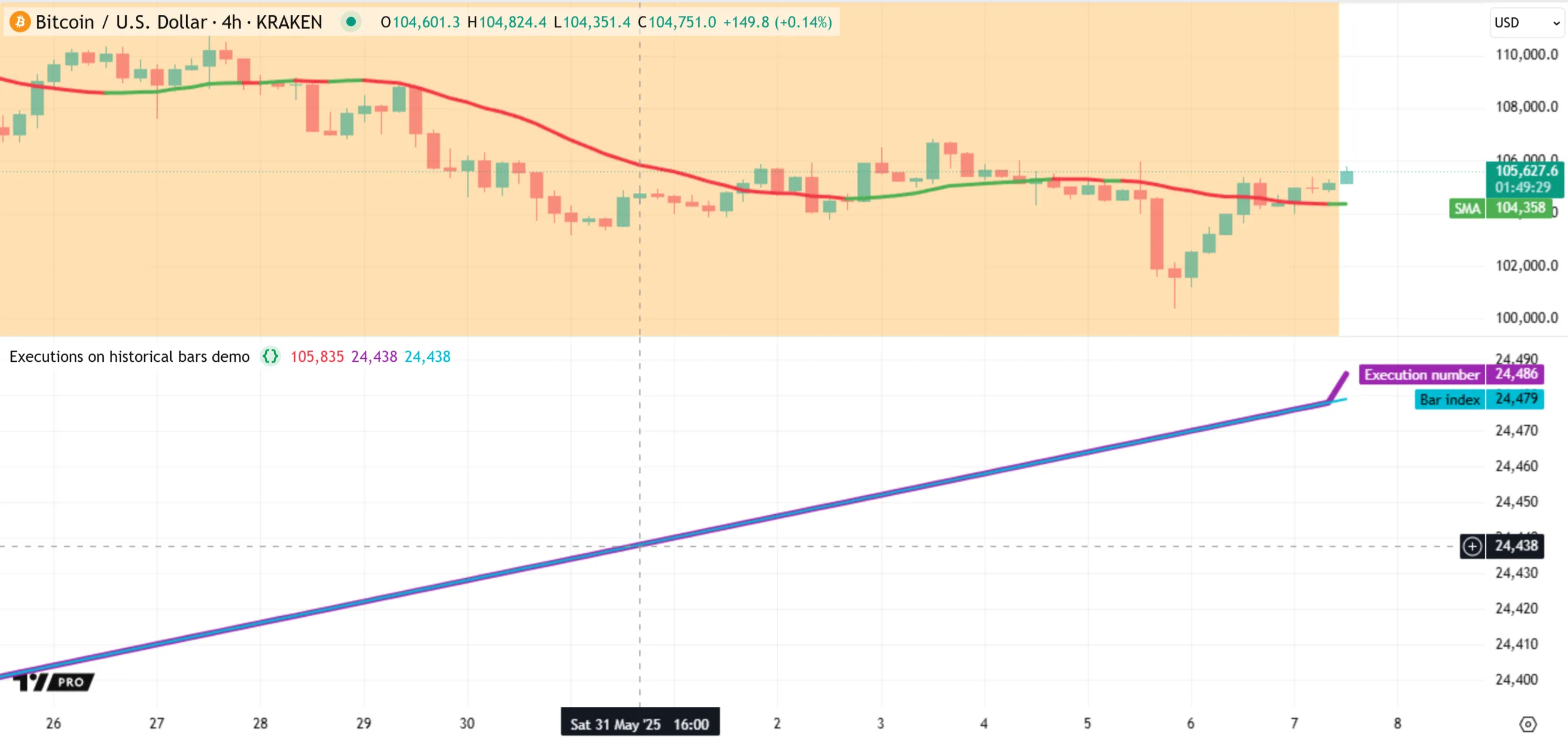
Note that:
* When the script first loads, _all_ bars, including the latest one, have an orange background because they initially represent _historical_ data. However, the latest bar on our chart is still open, meaning it is a _realtime bar_. After a new tick arrives from the realtime data feed, the bar’s values update, and the script executes _again_ on that bar. The orange background for the bar then _disappears_ because the system sets the value of [barstate.ishistory](https://www.tradingview.com/pine-script-reference/v6/#var_barstate.ishistory) to `false`.
* The `executionNum` and [bar_index](https://www.tradingview.com/pine-script-reference/v6/#var_bar_index) values are identical on historical bars because the script executes _once per bar_ on that part of the dataset. However, they begin to differ on the realtime bar. On that bar, the script executes after _every new update_ to recalculate its results, and the `executionNum` value increases each time. See the [Executions on realtime bars](https://www.tradingview.com/pine-script-docs/language/execution-model/#executions-on-realtime-bars) section to learn more.
* An alternative, more robust method to track code executions is to use the [Pine Profiler](https://www.tradingview.com/pine-script-docs/writing/profiling-and-optimization/#pine-profiler). The profiler analyzes the total runtime and execution count of every significant part of the source code. To learn more about this feature, see the [Profiling and optimization](https://www.tradingview.com/pine-script-docs/writing/profiling-and-optimization/) page.
It’s important to note that, unlike indicators, [strategies](https://www.tradingview.com/pine-script-docs/concepts/strategies/) can execute _more than once_ per historical bar, depending on the specified [calculation behavior](https://www.tradingview.com/pine-script-docs/concepts/strategies/#altering-calculation-behavior). If the [strategy()](https://www.tradingview.com/pine-script-reference/v6/#fun_strategy) declaration statement includes `calc_on_order_fills = true`, or if the user selects the “After order is filled” checkbox in the “Settings/Properties” tab, the runtime system executes the script on _each available tick_ where the [broker emulator](https://www.tradingview.com/pine-script-docs/concepts/strategies/#broker-emulator) fills an order, or once per bar when there is no order to fill.
Let’s look at a simple example. The following strategy changes the direction of its simulated position on each execution. If there is an open short position or no position, the strategy places a [market order](https://www.tradingview.com/pine-script-docs/concepts/strategies/#market-orders) to close all short trades and enter a long trade. If a long position is open, the strategy places a market order to close it and open a short trade.
As with the previous example, this script increments an `executionNum` variable declared with [varip](https://www.tradingview.com/pine-script-reference/v6/#kw_varip) to count new executions, plots the result alongside [bar_index](https://www.tradingview.com/pine-script-reference/v6/#var_bar_index) for comparison, and highlights the background of historical bars in orange with [bgcolor()](https://www.tradingview.com/pine-script-reference/v6/#fun_bgcolor):

```pinescript
//@version=6
strategy("Default strategy behavior on historical bars demo")
// Place a market order to close short trades and enter a long trade when there is a short position or no position.
// Otherwise, if a long position is open, place a market order to close the long trades and enter a short trade.
if strategy.position_size <= 0
strategy.entry("Long", strategy.long)
else
strategy.entry("Short", strategy.short)
//@variable Tracks the current execution number, where 0 represents the first execution.
varip int executionNum = -1
// Add 1 to the `executionNum` value.
executionNum += 1
// Display the `executionNum` and `bar_index` series in a separate pane.
plot(executionNum, "Execution number", color.purple, 5)
plot(bar_index, "Bar index", color.aqua, 2)
// Highlight the chart's background in translucent orange when `barstate.ishistory` is `true`.
bgcolor(barstate.ishistory ? color.new(color.orange, 70) : na, title = "Historical highlight", force_overlay = true)
```
Note that:
* The [strategy.entry()](https://www.tradingview.com/pine-script-reference/v6/#fun_strategy.entry) command creates entry orders. By default, a long entry using this command reverses an open short position, and a short entry reverses an open long position. See the [Reversing positions](https://www.tradingview.com/pine-script-docs/concepts/strategies/#reversing-positions) section of the [Strategies](https://www.tradingview.com/pine-script-docs/concepts/strategies/) page to learn more.
The script above uses the default calculation behavior: it places a new order only at the close of each bar. The broker emulator fills the order at the next bar’s opening price, as the trade markers on the chart above indicate. The `executionNum` and [bar_index](https://www.tradingview.com/pine-script-reference/v6/#var_bar_index) plots show the same values because the script executes only once per bar.
If we include `calc_on_order_fills = true` in the [strategy()](https://www.tradingview.com/pine-script-reference/v6/#fun_strategy) declaration statement, the runtime system _re-executes_ the script on a bar after each new order fill to update the calculations. Our script’s logic generates a new order on _every_ execution, and the broker emulator considers historical bars to have _four ticks_ for filling orders by default (the open, high, low, and close). Therefore, with this change, the script executes **four times** per historical bar instead of only once. As shown below, the strategy now shows four trade markers on each historical bar, and the `executionNum` value is four times that of the [bar_index](https://www.tradingview.com/pine-script-reference/v6/#var_bar_index) variable:

```pinescript
//@version=6
strategy("Calculation after order fill on historical bars demo", calc_on_order_fills = true)
// Place a market order to close short trades and enter a long trade when there is a short position or no position.
// Otherwise, if a long position is open, place a market order to close the long trades and enter a short trade.
if strategy.position_size <= 0
strategy.entry("Long", strategy.long)
else
strategy.entry("Short", strategy.short)
//@variable Tracks the current execution number, where 0 represents the first execution.
varip int executionNum = -1
// Add 1 to the `executionNum` value.
executionNum += 1
// Display the `executionNum` and `bar_index` series in a separate pane.
plot(executionNum, "Execution number", color.purple, 5)
plot(bar_index, "Bar index", color.aqua, 2)
// Highlight the chart's background in translucent orange when `barstate.ishistory` is `true`.
bgcolor(barstate.ishistory ? color.new(color.orange, 70) : na, title = "Historical highlight", force_overlay = true)
```
Note that:
* This script can execute _more than four_ times per bar if it uses [Bar Magnifier](https://www.tradingview.com/pine-script-docs/concepts/strategies/#bar-magnifier) mode, because this mode enables the broker emulator to fill orders on historical bars using intrabar prices from a _lower timeframe_.
* The script can execute numerous times on a _realtime_ bar, depending on the updates from the data feed, because _each new update_ to the bar is a valid tick for filling the strategy’s orders.
* An alternative way to confirm the script’s increased execution count is to select and clear the “After order is filled” checkbox in the “Settings/Properties” tab while [profiling](https://www.tradingview.com/pine-script-docs/writing/profiling-and-optimization/#profiling-a-script) the code.
### [Executions on realtime bars](https://www.tradingview.com/pine-script-docs/language#executions-on-realtime-bars)
After a script running on the chart or in an alert executes across all historical bars in a dataset, the runtime system continues to execute the script on the current bar, if it is open, and on any new bars that form later. We refer to these bars as _realtime bars_, because they represent incoming data from a separate data feed that the script can access only _after_ it finishes loading.
As explained in the previous section, historical bars represent confirmed data points. By contrast, a realtime bar represents an initially _unconfirmed_ data point that evolves as new updates (ticks) arrive from the realtime data feed. With each new tick, the bar’s [high](https://www.tradingview.com/pine-script-reference/v6/#var_high), [low](https://www.tradingview.com/pine-script-reference/v6/#var_low), [close](https://www.tradingview.com/pine-script-reference/v6/#var_close), [volume](https://www.tradingview.com/pine-script-reference/v6/#var_volume), and other values update to represent the latest data while the bar remains open. After the bar closes, it becomes an _elapsed realtime bar_, whose values no longer change. Then, a new realtime bar opens after another tick arrives, and that bar updates as new data becomes available.
As an [indicator](https://www.tradingview.com/pine-script-reference/v6/#fun_indicator) or [library](https://www.tradingview.com/pine-script-reference/v6/#fun_library) script runs on an open realtime bar, its compiled code executes once after **every new update** from the data feed. With each new execution, the script recalculates its results for that bar using the latest data. Consequently, the states of the script’s variables, expressions, and objects can _change_ with each new execution while the bar remains open. The system _commits_ the script’s data for the realtime bar only after the bar closes.
After each script execution that occurs _before_ a bar’s closing tick, the runtime engine executes a _rollback_ process. Rollback _resets_ applicable script data to the latest committed states in the [time series](https://www.tradingview.com/pine-script-docs/language/execution-model/#time-series). This process enables the script to recalculate the bar’s results using only the latest available data — without the influence of _temporary_ data from executions on the bar’s previous ticks.
Below, we explain how recalculation and rollback affect a script’s data and outputs, along with some notable exceptions to this process:
**Reinitialize variables**
The runtime system erases the states of any variables that the script initializes during its executions before a bar’s close, excluding those declared using the [varip](https://www.tradingview.com/pine-script-reference/v6/#kw_varip) keyword. When the script executes again after rollback, it _reinitializes_ the variables with new values or references based on the latest available data.
Likewise, the system does not preserve the _temporary_ states of built-in variables that hold values for the current bar. Before the new script execution, it sets the variables to use the bar’s most recent data. For instance, the system updates [close](https://www.tradingview.com/pine-script-reference/v6/#var_close), [high](https://www.tradingview.com/pine-script-reference/v6/#var_high), and [low](https://www.tradingview.com/pine-script-reference/v6/#var_low) with the latest, highest, and lowest prices reported since the bar’s opening time.
**Reset changes to `var` variables**
Variables that use the [var](https://www.tradingview.com/pine-script-reference/v6/#kw_var) keyword in their declaration are initialized only _once_ — during the _first_ execution of their scopes on a _closed bar_. Variables that use the [var](https://www.tradingview.com/pine-script-reference/v6/#kw_var) keyword in their declaration remain initialized after the _first_ time that their scopes execute on a bar’s _closing tick_. Their assigned values or references _persist_ across subsequent bars, changing only after [reassignment](https://www.tradingview.com/pine-script-docs/language/variable-declarations/#variable-reassignment) or compound assignment operations.
Although these variables preserve data across successive bars, they **do not** preserve data across executions on the _ticks_ of an open bar. Rollback reverts all variables declared with [var](https://www.tradingview.com/pine-script-reference/v6/#kw_var) before the current bar to the last committed states in the time series as of the previous bar.
For instance, if a variable declared with [var](https://www.tradingview.com/pine-script-reference/v6/#kw_var) has a value of 20 on the open bar and 19 on the previous bar, the variable’s value reverts to 19 before the script executes on the next tick of the same bar. The temporary value of 20 does not persist.
**Replace plotted outputs**
The `plot*()`, [bgcolor()](https://www.tradingview.com/pine-script-reference/v6/#fun_bgcolor), [barcolor()](https://www.tradingview.com/pine-script-reference/v6/#fun_barcolor), and [fill()](https://www.tradingview.com/pine-script-reference/v6/#fun_fill) functions create visual outputs on _every bar_. These outputs are _temporary_ on the open realtime bar. When the script executes again after rollback, the new outputs for the bar from calls to these functions _replace_ the ones from the previous tick.
For example, when the expression `plot(close)` executes on the open bar, it displays the bar’s latest [close](https://www.tradingview.com/pine-script-reference/v6/#var_close) value as of the current execution. However, the plotted result is **temporary** until the bar closes. After rollback, the [close](https://www.tradingview.com/pine-script-reference/v6/#var_close) variable updates, then the script calls [plot()](https://www.tradingview.com/pine-script-reference/v6/#fun_plot) again on the next execution to replace the output from the previous tick and display the new value.
**Remove and revert objects**
[User-defined types (UDTs)](https://www.tradingview.com/pine-script-docs/language/type-system/#user-defined-types) and special types such as [collections](https://www.tradingview.com/pine-script-docs/language/type-system/#collections) and [drawing types](https://www.tradingview.com/pine-script-docs/language/type-system/#drawing-types) are _reference types_. They define structures from which scripts create _objects_ — independent entities that store data elsewhere in memory. Variables of these types hold _references_ that provide access to specific objects and their data; the variables do **not** store objects directly.
If a script creates objects on an open bar and does not assign their references to variables declared with the [varip](https://www.tradingview.com/pine-script-reference/v6/#kw_varip) keyword, the rollback process _removes_ those objects. During the next execution on the open bar, the script creates _new objects_ if the updated logic allows it.
For example, if a script calls [label.new()](https://www.tradingview.com/pine-script-reference/v6/#fun_label.new) to create a [label](https://www.tradingview.com/pine-script-reference/v6/#type_label) object on the open bar, the system _deletes_ that object during rollback. On the next execution, the script evaluates [label.new()](https://www.tradingview.com/pine-script-reference/v6/#fun_label.new) again, creating a _new_ label that replaces the output. The label created on the previous tick no longer exists.
Similarly, for objects of built-in or user-defined types with references assigned to [var](https://www.tradingview.com/pine-script-reference/v6/#kw_var) variables, the rollback process reverts any changes to those objects that occur on the open bar. The only exception is for [UDTs](https://www.tradingview.com/pine-script-docs/language/type-system/#user-defined-types) with _fields_ that include the [varip](https://www.tradingview.com/pine-script-reference/v6/#kw_varip) keyword. See the [Objects](https://www.tradingview.com/pine-script-docs/language/objects/) page for more information.
**Exceptions**
The runtime system does not revert _all_ the data from script executions on an open bar. The following are notable exceptions to the rollback process:
* Variables or fields declared with the [varip](https://www.tradingview.com/pine-script-reference/v6/#kw_varip) keyword **do not** revert to a previously committed state. They persist across _all_ script executions after initialization, even those on the ticks of an open realtime bar.
* Logged messages in the [Pine Logs](https://www.tradingview.com/pine-script-docs/writing/debugging/#pine-logs) pane do not disappear after rollback. The messages from any `log.*()` calls during executions on the ticks of realtime bars remain in the pane until the script reloads.
* The data from [strategy orders](https://www.tradingview.com/pine-script-docs/concepts/strategies/#orders-and-trades) placed or filled on the ticks within a bar is not subject to rollback. If a strategy script creates orders or the [broker emulator](https://www.tradingview.com/pine-script-docs/concepts/strategies/#broker-emulator) fills orders on an open bar, the data from those events persists.
* Rollback does not erase logs for [alerts](https://www.tradingview.com/pine-script-docs/concepts/alerts/) from the “Alerts” menu. All messages from a script alert remain visible until the user restarts the alert.
* Runtime errors from the system or the [runtime.error()](https://www.tradingview.com/pine-script-reference/v6/#fun_runtime.error) function completely _stop_ script executions. If an error occurs at any point while a script executes on an open bar, the system halts the script and does not revert the error after new updates from the data feed.
Let’s inspect the behavior of a simple indicator on realtime bars. The following script calculates an [RSI](https://www.tradingview.com/support/solutions/43000502338-relative-strength-index-rsi/) of [close](https://www.tradingview.com/pine-script-reference/v6/#var_close) values using [ta.rsi()](https://www.tradingview.com/pine-script-reference/v6/#fun_ta.rsi) and displays the result with a [plot()](https://www.tradingview.com/pine-script-reference/v6/#fun_plot) call. To track the number of executions that occur _per bar_, the script increments an `executions` variable declared with [varip](https://www.tradingview.com/pine-script-reference/v6/#kw_varip) and calculates its one-bar change using [ta.change()](https://www.tradingview.com/pine-script-reference/v6/#fun_ta.change). The script converts each bar’s execution count to a string with [str.tostring()](https://www.tradingview.com/pine-script-reference/v6/#fun_str.tostring), then displays the result in a color-coded [label](https://www.tradingview.com/pine-script-reference/v6/#type_label) at the bar’s [high](https://www.tradingview.com/pine-script-reference/v6/#var_high). The label is purple if the bar is open. Otherwise, it is gray. The script also highlights the background of realtime bars in orange using [bgcolor()](https://www.tradingview.com/pine-script-reference/v6/#fun_bgcolor):
```pinescript
//@version=6
indicator("Executions on realtime bars demo")
//@variable The 14-bar RSI of `close` prices.
float rsi = ta.rsi(close, 14)
//@variable Tracks the number of script executions, where 1 represents the first execution.
varip int executions = 0
// Add 1 to the `executions` value.
executions += 1
//@variable Is `color.gray` if the bar is confirmed (closed); `color.purple` otherwise.
color labelColor = barstate.isconfirmed ? color.gray : color.purple
// Calculate the one-bar change in `executions`, then convert the value to a string and display the result in a label.
// Each call to `label.new()` creates a *new* `label` object.
label.new(
bar_index, high, str.tostring(ta.change(executions)),
color = labelColor, textcolor = color.white, size = 20, force_overlay = true
)
// Plot the `rsi` value with colors based on whether the value is above 50 or not.
plot(rsi, "RSI", rsi > 50 ? color.teal : color.maroon, 3)
// Highlight the chart's background in translucent orange when `barstate.isrealtime` is `true`.
bgcolor(barstate.isrealtime ? color.new(color.orange, 70) : na, title = "Realtime highlight", force_overlay = true)
```
When we first add the script to the chart, it does _not_ add an orange background to any bar because it calculates only on data that exists at the script’s loading time. This data is _historical_. Each bar’s label shows a value of 1 because indicators always execute _once_ per historical bar:
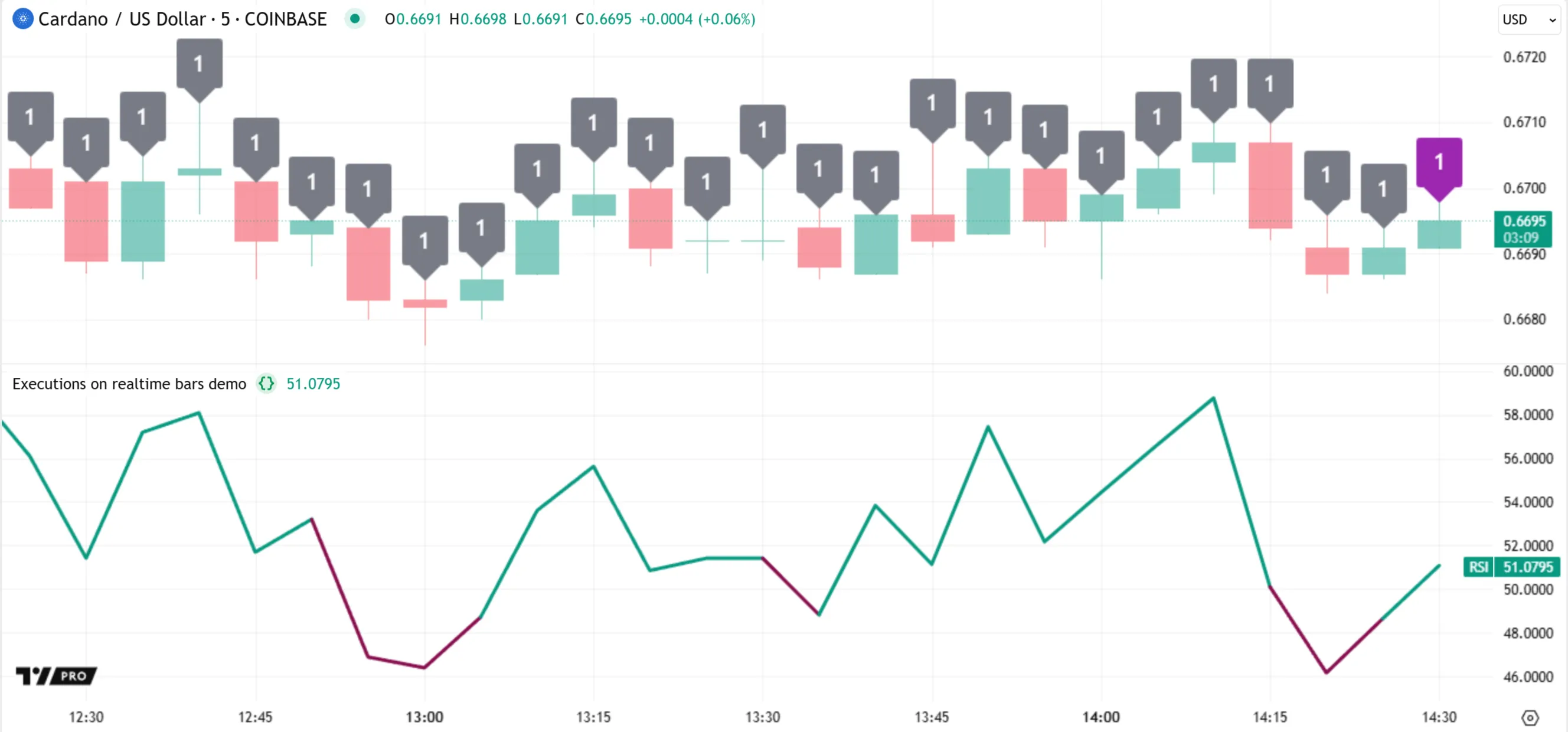
Notice the countdown timer and the _purple_ label for the latest bar in the chart above. These both indicate that the bar is _open_ and subject to changes. A new update from the data feed affects the bar’s values, triggering rollback and a new script execution to recalculate the results.
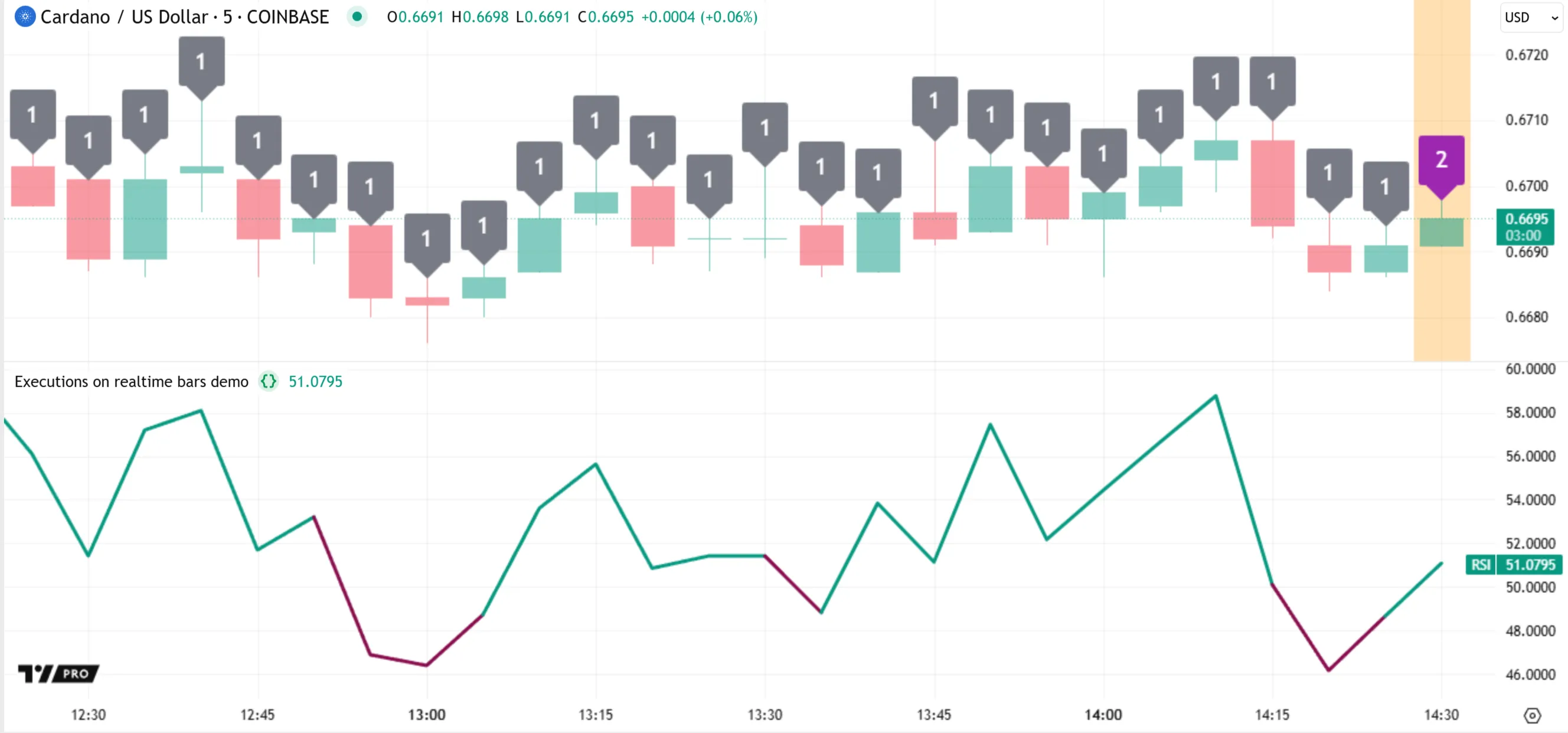
When rollback occurs, the runtime system reverts the internal data of the [ta.rsi()](https://www.tradingview.com/pine-script-reference/v6/#fun_ta.rsi) call to its last committed state, erases the state of the `rsi` variable, and deletes the latest [label](https://www.tradingview.com/pine-script-reference/v6/#type_label) object. However, the system does not revert the `executions` variable because it uses the [varip](https://www.tradingview.com/pine-script-reference/v6/#kw_varip) keyword.
After rollback, the system updates the built-in [close](https://www.tradingview.com/pine-script-reference/v6/#var_close), [high](https://www.tradingview.com/pine-script-reference/v6/#var_high), and `barstate.*` variables using the current bar’s latest data, and the new execution begins. The script evaluates the [ta.rsi()](https://www.tradingview.com/pine-script-reference/v6/#fun_ta.rsi) call using the new [close](https://www.tradingview.com/pine-script-reference/v6/#var_close) price and reinitializes the `rsi` variable with the returned value. Then, it increases the `executions` value by one, evaluates [ta.change()](https://www.tradingview.com/pine-script-reference/v6/#fun_ta.change) again, and creates a new label at the bar’s current high price to show the updated result. Lastly, it evaluates the [plot()](https://www.tradingview.com/pine-script-reference/v6/#fun_plot) and [bgcolor()](https://www.tradingview.com/pine-script-reference/v6/#fun_bgcolor) calls to replace the bar’s plotted visuals. The last bar’s label remains purple because the bar is still open, but the background color is now _orange_ because [barstate.isrealtime](https://www.tradingview.com/pine-script-reference/v6/#var_barstate.isrealtime) is `true`:
As subsequent updates become available from the data feed, the pattern of rollback and re-execution continues, and the script’s outputs for the bar update with each new execution:

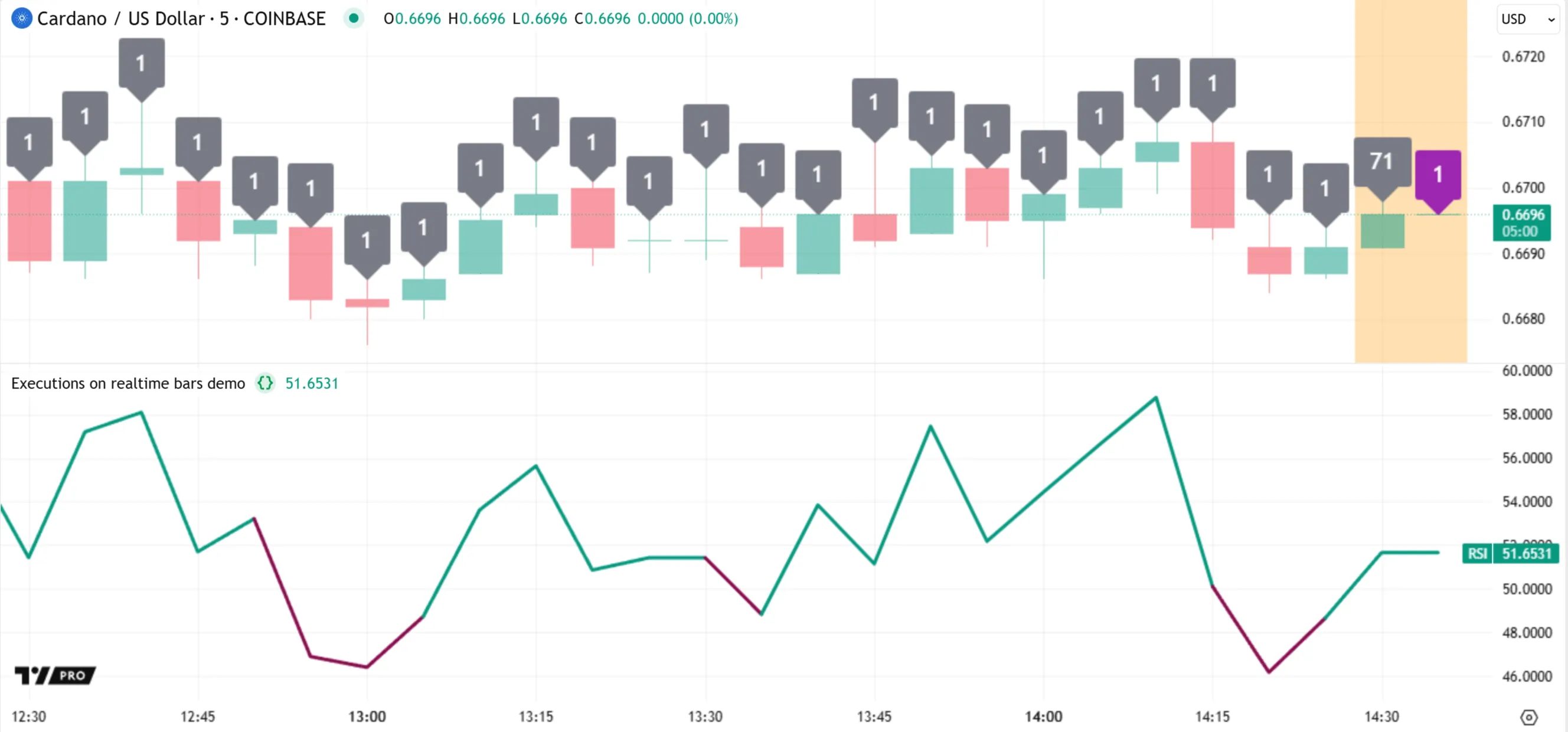
The last time that rollback and another execution occur on this bar is after the _closing tick_, when the bar becomes an _elapsed_ realtime bar. After the final execution, the bar’s label is _gray_ because [barstate.isconfirmed](https://www.tradingview.com/pine-script-reference/v6/#var_barstate.isconfirmed) is `true`. The runtime system then _commits_ necessary data from this execution to the [time series](https://www.tradingview.com/pine-script-docs/language/execution-model/#time-series) for calculations on future bars.
Then, a new realtime bar opens after another update from the data feed, and the execution pattern continues:
Note that:
* Although the previous bar is now confirmed, it still has an orange background corresponding to a _realtime_ state because it closed **after** the script’s loading time. When the script later reloads after an [execution-triggering event](https://www.tradingview.com/pine-script-docs/language/execution-model/#events-that-trigger-script-executions), that bar becomes _historical_.
It’s important to note that [strategies](https://www.tradingview.com/pine-script-docs/concepts/strategies/) often execute differently than indicators on realtime bars. By default, they execute only **once** per bar at each _closing tick_ without undergoing rollback. However, users can modify a strategy’s [calculation behavior](https://www.tradingview.com/pine-script-docs/concepts/strategies/#altering-calculation-behavior) to allow rollback and re-execution on a bar before its closing tick.
If the [strategy()](https://www.tradingview.com/pine-script-reference/v6/#fun_strategy) statement includes `calc_on_every_tick = true`, or if the user selects the “On every tick” checkbox in the “Settings/Properties” tab, the script executes on a realtime bar after _each new update_ from the data feed, similar to an indicator.
Additionally, if the [strategy()](https://www.tradingview.com/pine-script-reference/v6/#fun_strategy) statement includes `calc_on_order_fills = true` or the user selects “After order is filled” in the “Settings/Properties” tab, the script executes on _each tick_ where the [broker emulator](https://www.tradingview.com/pine-script-docs/concepts/strategies/#broker-emulator) fills an order. With this behavior, the system can execute the script multiple times on the open bar, but only on the ticks where an _order fill_ occurs.
To summarize the general process for script executions on realtime bars:
* An [indicator](https://www.tradingview.com/pine-script-reference/v6/#fun_indicator) or [library](https://www.tradingview.com/pine-script-reference/v6/#fun_library) script executes on the _first available tick_ in an open realtime bar, then _once per update_ to recalculate the results for the bar using the latest data. A [strategy](https://www.tradingview.com/pine-script-reference/v6/#fun_strategy) script executes only on the bar’s _closing tick_ by default, but users can modify its calculation behavior to allow executions while the bar is open.
* Before each new script execution on an open bar, the runtime system executes a _rollback_ process, which _reverts_ all applicable variables, expressions, and objects to their _last committed states_ as of the previous bar’s close.
* After the script executes on an _elapsed_ realtime bar’s closing tick, the system _commits_ necessary data from that execution to the [time series](https://www.tradingview.com/pine-script-docs/language/execution-model/#time-series) for access on later bars. It does **not** commit the data from executions on the bar’s _unconfirmed_ values from previous ticks.
### [Events that trigger script executions](https://www.tradingview.com/pine-script-docs/language#events-that-trigger-script-executions)
Several events cause a script to load and execute across all the available bars in a dataset. The specific events that trigger the loading process depend on where the script runs.
For a script on the [chart](https://www.tradingview.com/chart/), the following events always cause the script to load and perform _new executions_ on every bar:
* The user adds the script to the chart for the first time from the Pine Editor or the “Indicators, metrics, and strategies” menu.
* The user saves an update to the script while it is active on the chart.
* The chart is refreshed while the script is active.
Other events also trigger the loading process for a script on the chart. However, these events do not _always_ cause new script executions on past bars. The results from running a script with a unique combination of settings are often temporarily _cached_. If cached data exists for a selected combination of settings, the system loads the script using that data. See the [Caching](https://www.tradingview.com/pine-script-docs/language/execution-model/#caching) section for more information.
Below are the additional events that cause a script to load on the chart, either by performing new executions across the dataset or by using available cached data:
* The user selects new values for the [inputs](https://www.tradingview.com/pine-script-docs/concepts/inputs/) or [strategy properties](https://www.tradingview.com/support/solutions/43000628599-strategy-properties/) in the script’s “Settings” menu.
* The script uses the [chart.left_visible_bar_time](https://www.tradingview.com/pine-script-reference/v6/#var_chart.left_visible_bar_time) or [chart.right_visible_bar_time](https://www.tradingview.com/pine-script-reference/v6/#var_chart.right_visible_bar_time) variable, and the visible chart range changes.
* The script uses the [chart.fg_color](https://www.tradingview.com/pine-script-reference/v6/#var_chart.fg_color) or [chart.bg_color](https://www.tradingview.com/pine-script-reference/v6/#var_chart.bg_color) variable, and the user changes the chart’s background color.
* The chart loads a new dataset with a different _timeframe_ or _ticker identifier_. Several user actions affect a chart’s ticker ID, such as selecting a symbol from the “Symbol Search” menu, changing the chart type, toggling data modifications in the chart’s settings, and activating [Bar Replay](https://www.tradingview.com/support/solutions/43000712747-bar-replay-how-and-why-to-test-a-strategy-in-the-past/) mode.
* The user opens or closes the [Pine Logs](https://www.tradingview.com/pine-script-docs/writing/debugging/#pine-logs) pane.
* The user activates or deactivates the [Pine Profiler](https://www.tradingview.com/pine-script-docs/writing/profiling-and-optimization/#pine-profiler).
For scripts used in other locations, the following events trigger the loading process:
* The user creates a new script [alert](https://www.tradingview.com/pine-script-docs/concepts/alerts/) from the “Create Alert” dialog box.
* The user pauses and restarts an alert instance from the “Alerts” menu.
* The user clicks the “Generate report” button in the [Strategy Tester](https://www.tradingview.com/pine-script-docs/concepts/strategies/#strategy-tester) while [Deep Backtesting](https://www.tradingview.com/support/solutions/43000666199-what-is-deep-backtesting/) mode is enabled.
* The user clicks the “Scan” button in the [Pine Screener](https://www.tradingview.com/support/solutions/43000742436-tradingview-pine-screener-key-features-and-requirements/) to run the script on the datasets from a chosen watchlist.
_After_ a script loads, either of the following causes new script executions on an _open bar_:
* One of the events above causes the script to load again and execute across the _entire dataset_ up to the bar.
* The script runs on the chart or in an alert, and the bar updates after new data becomes available. The system performs _rollback_ and re-executes the script on that bar using the latest data. The only exception is if the script is a strategy that does not allow recalculation on the new tick.
When a script completely reloads on the chart or in an alert after an applicable event, all the [elapsed realtime bars](https://www.tradingview.com/pine-script-docs/language/execution-model/#executions-on-realtime-bars) from the script’s previous run become [historical bars](https://www.tradingview.com/pine-script-docs/language/execution-model/#executions-on-historical-bars) in the new run, because they represent _confirmed_ data points that the script accesses from _a different data feed_ as it loads.
The bars in a symbol’s dataset come from two distinct data feeds: the _historical_ feed and the _realtime_ feed. The historical feed reports only the _final_ values for each bar, whereas the realtime feed includes the _temporary_ values from all available ticks. When a realtime bar becomes historical after a script restarts, the values from the bar’s previous ticks are no longer accessible; only the **final** price, volume, and other values remain. Therefore, if a script relies on temporary data from realtime bars in its calculations, it might behave differently after reloading.
For example, the following script calculates the one-bar arithmetic return of the [close](https://www.tradingview.com/pine-script-reference/v6/#var_close) series and displays the result as a line plot. On each realtime bar, the script updates three variables declared with [varip](https://www.tradingview.com/pine-script-reference/v6/#kw_varip) to track the first, highest, and lowest return values calculated during executions across the bar’s ticks, then calls [plotcandle()](https://www.tradingview.com/pine-script-reference/v6/#fun_plotcandle) to plot a candle showing the values. Additionally, it uses [bgcolor()](https://www.tradingview.com/pine-script-reference/v6/#fun_bgcolor) to highlight the background of realtime bars in orange:
```pinescript
//@version=6
indicator("Reloading a script demo", precision = 5)
//@variable The one-bar arithmetic return of the `close` series.
float priceReturn = ta.change(close, 1) / close[1]
// Declare persistent variables to track the first, highest, and lowest `priceReturn` values across ticks in
// each realtime bar.
varip float o = na
varip float h = na
varip float l = na
if barstate.isrealtime
// On the first tick in the realtime bar, reassign `o`, `h`, and `l` to hold the value of `priceReturn`.
if barstate.isnew
o := priceReturn
h := priceReturn
l := priceReturn
// Otherwise, reassign `h` and `l` to the bar's highest and lowest `priceReturn` value as of the current tick.
else
h := math.max(h, priceReturn)
l := math.min(l, priceReturn)
// Plot candles to display the `o`, `h`, `l`, and `priceReturn` values for each realtime bar.
// The candles do not appear on historical bars, because `o`, `h`, and `l` are `na` on those bars.
plotcandle(o, h, l, priceReturn, "Return candles", color.blue, chart.fg_color, bordercolor = chart.fg_color)
// Dispaly the `priceReturn` series as a purple line plot.
plot(priceReturn, "Return plot", color.purple, 3)
// Highlight the background of all realtime bars in orange.
bgcolor(barstate.isrealtime ? color.new(color.orange, 70) : na, title = "Realtime highlight")
```
After the script loads on the chart and executes on several realtime bars, all the elapsed realtime bars, as well as the open realtime bar, include plotted return candles and an orange background color:
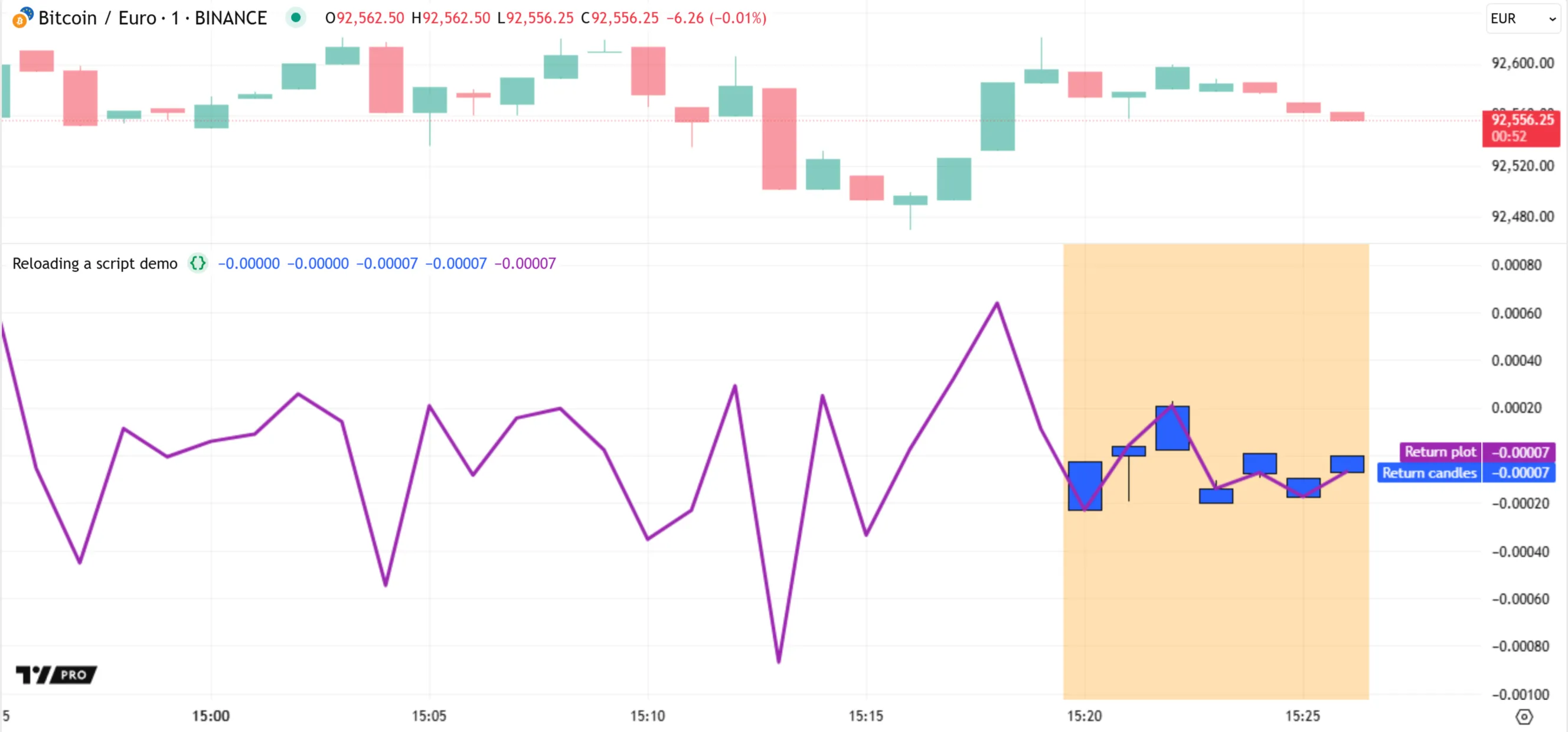
After an applicable event, such as a chart refresh, the script _reloads_ and executes across the dataset again. All the closed bars with a realtime state in the previous run become _historical_ bars in the new run. The results thus change because our script relies on realtime data. As shown below, the script does not display candles or background colors for previous bars after we refresh the chart. Those outputs appear only for the latest bar, after new ticks become available, because that bar is now the **only** one with a realtime state:
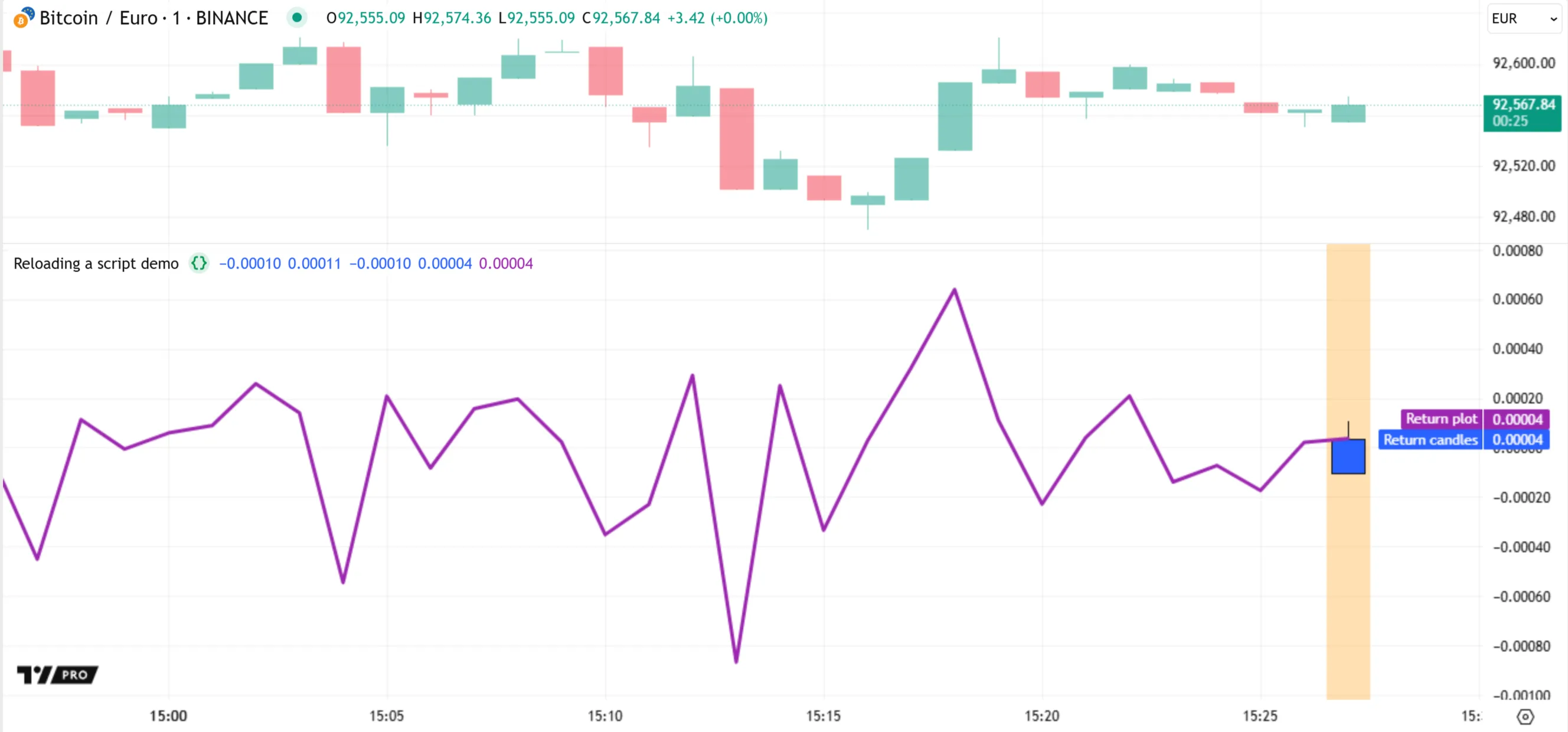
Note that:
* The [barstate.isnew](https://www.tradingview.com/pine-script-reference/v6/#var_barstate.isnew) variable has a value of `true` when a realtime bar opens, and `false` on all subsequent updates to the bar. If the script reloads midway through a realtime bar’s progression, only the background color appears on that bar. The script does not show a candle on the first realtime bar in that case, because its `o`, `h`, and `l` variables hold [na](https://www.tradingview.com/pine-script-reference/v6/#var_na) until the first time that [barstate.isnew](https://www.tradingview.com/pine-script-reference/v6/#var_barstate.isnew) is `true`.
#### [Caching](https://www.tradingview.com/pine-script-docs/language#caching)
When a script runs on a chart for the _first time_ using a _unique configuration_, the data from that run is often temporarily cached for reuse. The cached data is erased after the chart is refreshed or the user updates the script’s source code.
In this context, the configuration refers to the combined state of all script, chart, and developer tool settings that can affect the script’s executions. This combination includes:
* The values of [inputs](https://www.tradingview.com/pine-script-docs/concepts/inputs/) in the script’s “Settings/Inputs” tab.
* The values of the [strategy properties](https://www.tradingview.com/support/solutions/43000628599-strategy-properties/) in the “Settings/Properties” tab.
* The values of the `chart.*` variables whose [qualifiers](https://www.tradingview.com/pine-script-docs/language/type-system/#qualifiers) are “input” ([chart.left_visible_bar_time](https://www.tradingview.com/pine-script-reference/v6/#var_chart.left_visible_bar_time), [chart.right_visible_bar_time](https://www.tradingview.com/pine-script-reference/v6/#var_chart.right_visible_bar_time), [chart.fg_color](https://www.tradingview.com/pine-script-reference/v6/#var_chart.fg_color), and [chart.bg_color](https://www.tradingview.com/pine-script-reference/v6/#var_chart.bg_color)).
* The chart’s timeframe.
* The chart’s ticker identifier.
* Whether the [Pine Logs](https://www.tradingview.com/pine-script-docs/writing/debugging/#pine-logs) pane is open or closed.
* Whether the [Pine Profiler](https://www.tradingview.com/pine-script-docs/writing/profiling-and-optimization/#pine-profiler) is active or not.
Each time that a script runs using a unique combination of settings, it executes from start to end on each bar in the dataset to perform new calculations. If possible, the script’s data from the run is then cached. If cached data is available on past bars for a selected combination of settings, the runtime system loads the script using that data.
This behavior enables users to change a script’s inputs, alter the chart, and toggle developer tools without losing information — including [bar states](https://www.tradingview.com/pine-script-docs/concepts/bar-states/) — from previous script runs using different settings. Additionally, caching helps reduce loading times and resource requirements when switching between settings or adding multiple instances of the same script to the chart.
To understand this behavior, let’s revisit the script from the [previous section](https://www.tradingview.com/pine-script-docs/language/execution-model/#events-that-trigger-script-executions). The script has different behaviors on historical and realtime bars. In the version below, we’ve added a `lengthInput` variable that holds the value from an [input.int()](https://www.tradingview.com/pine-script-reference/v6/#fun_input.int) call. The script uses this variable to define the length of the [ta.change()](https://www.tradingview.com/pine-script-reference/v6/#fun_ta.change) calculation and the offset of the [history-referencing operator](https://www.tradingview.com/pine-script-docs/language/operators/#-history-referencing-operator):
```pinescript
//@version=6
indicator("Caching demo", precision = 5)
//@variable The bar span of the `priceReturn` calculation.
int lengthInput = input.int(5, "Length", 1)
//@variable The arithmetic return of the `close` series across `lengthInput` bars.
float priceReturn = ta.change(close, lengthInput) / close[lengthInput]
// Declare persistent variables to track the first, highest, and lowest `priceReturn` values across ticks in
// each realtime bar.
varip float o = na
varip float h = na
varip float l = na
if barstate.isrealtime
// On the first tick in the realtime bar, reassign `o`, `h`, and `l` to hold the value of `priceReturn`.
if barstate.isnew
o := priceReturn
h := priceReturn
l := priceReturn
// Otherwise, reassign `h` and `l` to the bar's highest and lowest `priceReturn` value as of the current tick.
else
h := math.max(h, priceReturn)
l := math.min(l, priceReturn)
// Plot candles to display the `o`, `h`, `l`, and `priceReturn` values for each realtime bar.
// The candles do not appear on historical bars, because `o`, `h`, and `l` are `na` on those bars.
plotcandle(o, h, l, priceReturn, "Return candles", color.blue, chart.fg_color, bordercolor = chart.fg_color)
// Dispaly the `priceReturn` series as a purple line plot.
plot(priceReturn, "Return plot", color.purple, 3)
// Highlight the background of all realtime bars in orange.
bgcolor(barstate.isrealtime ? color.new(color.orange, 70) : na, title = "Realtime highlight")
```
After we add the script to our 1m chart and let it run for a few minutes with a “Length” input value of 5, the script plots candles and highlights the background for the latest few bars, because [barstate.isrealtime](https://www.tradingview.com/pine-script-reference/v6/#var_barstate.isrealtime) is `true` on those bars:
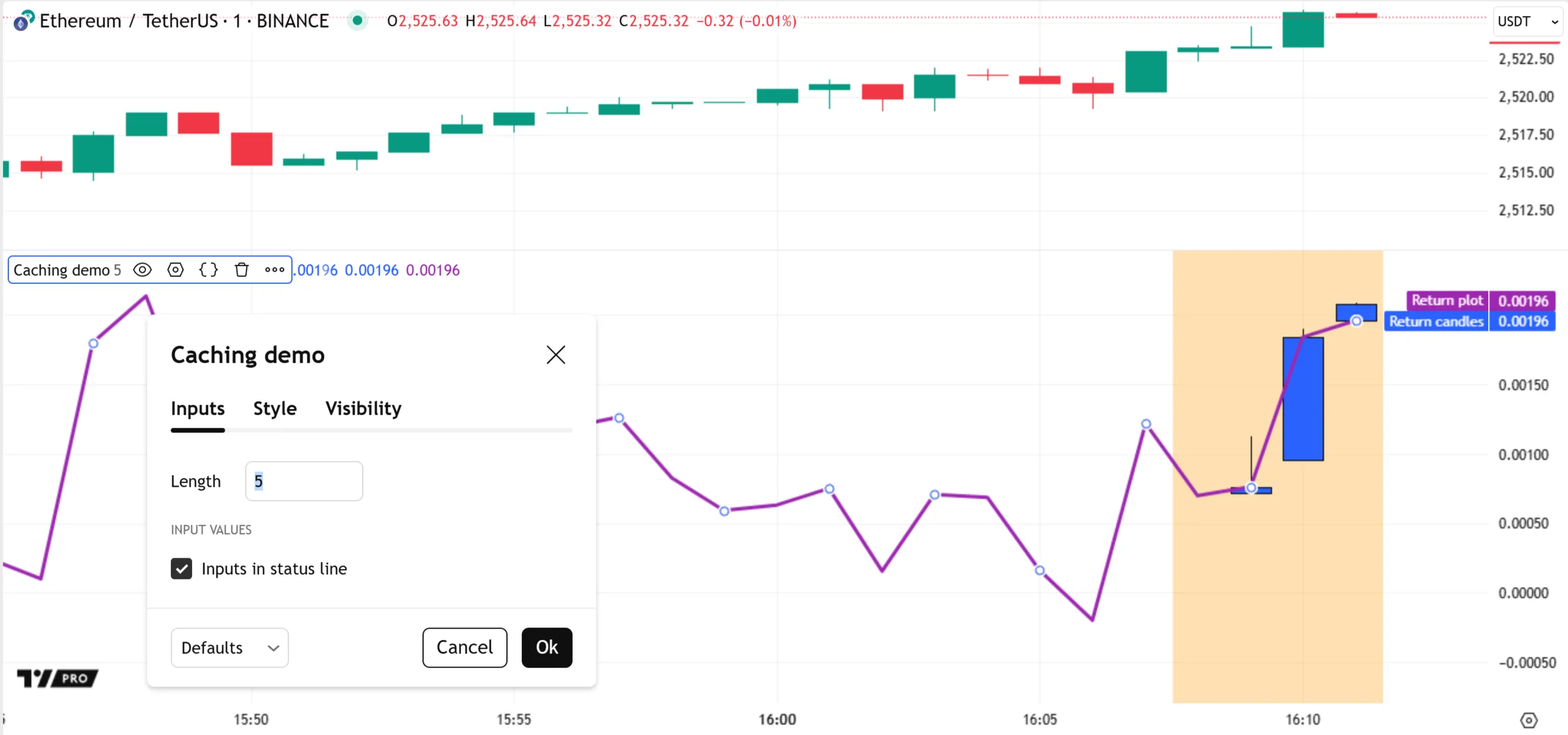
Let’s change the “Length” input to a new value, causing the script to reload and execute across the dataset again. Here, we changed the value from 5 to 10 and let the script execute on some new ticks. The script no longer displays candles and background colors for the same bars after restarting, because it now accesses the data for those formerly realtime bars from the _historical_ data feed:
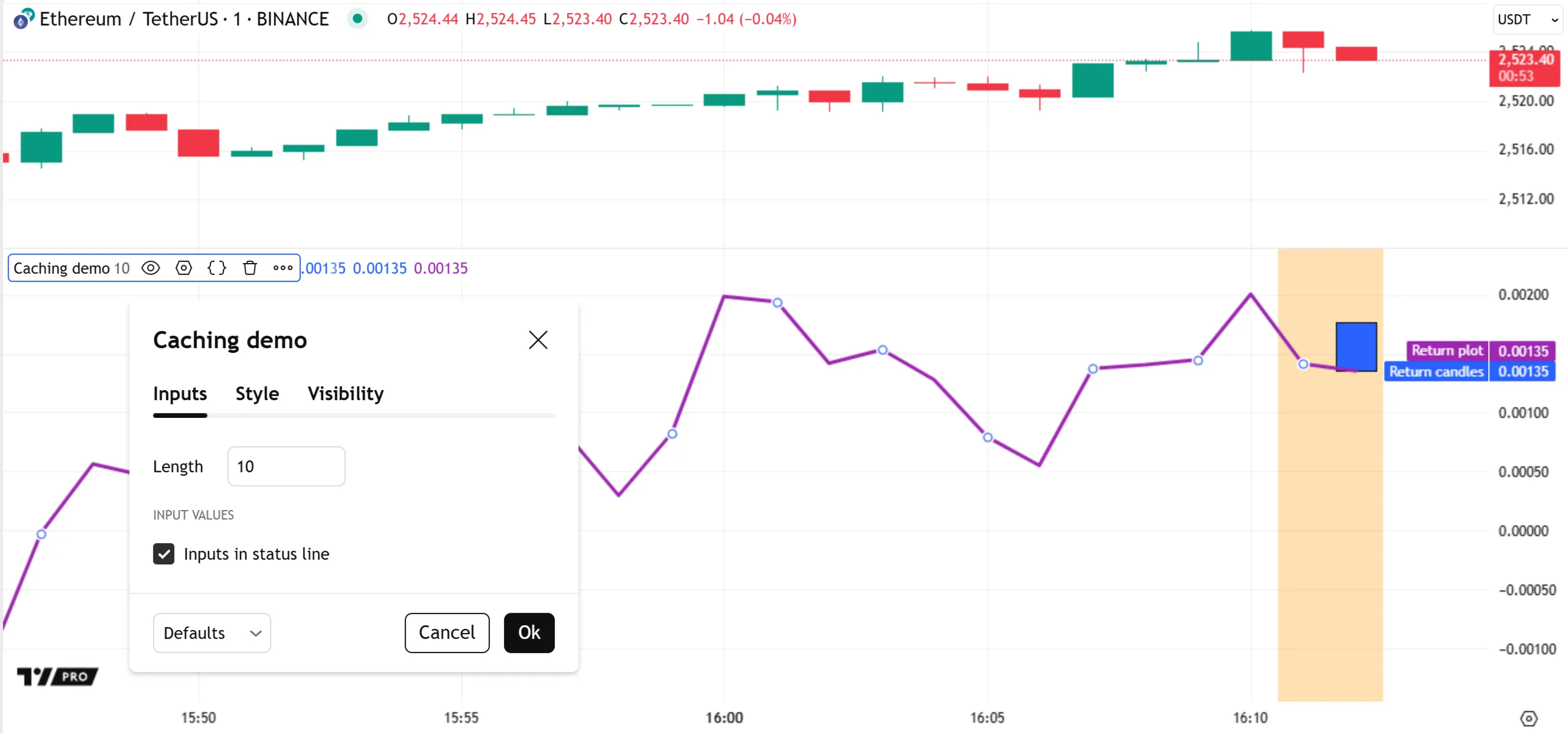
As shown above, the realtime bar information from the first run is _not available_ when we change the script’s input to a new value. However, the data from that previous run still exists in memory. If we revert the “Length” input’s value to 5, the candle plot and background colors start on the same bar as the first run:
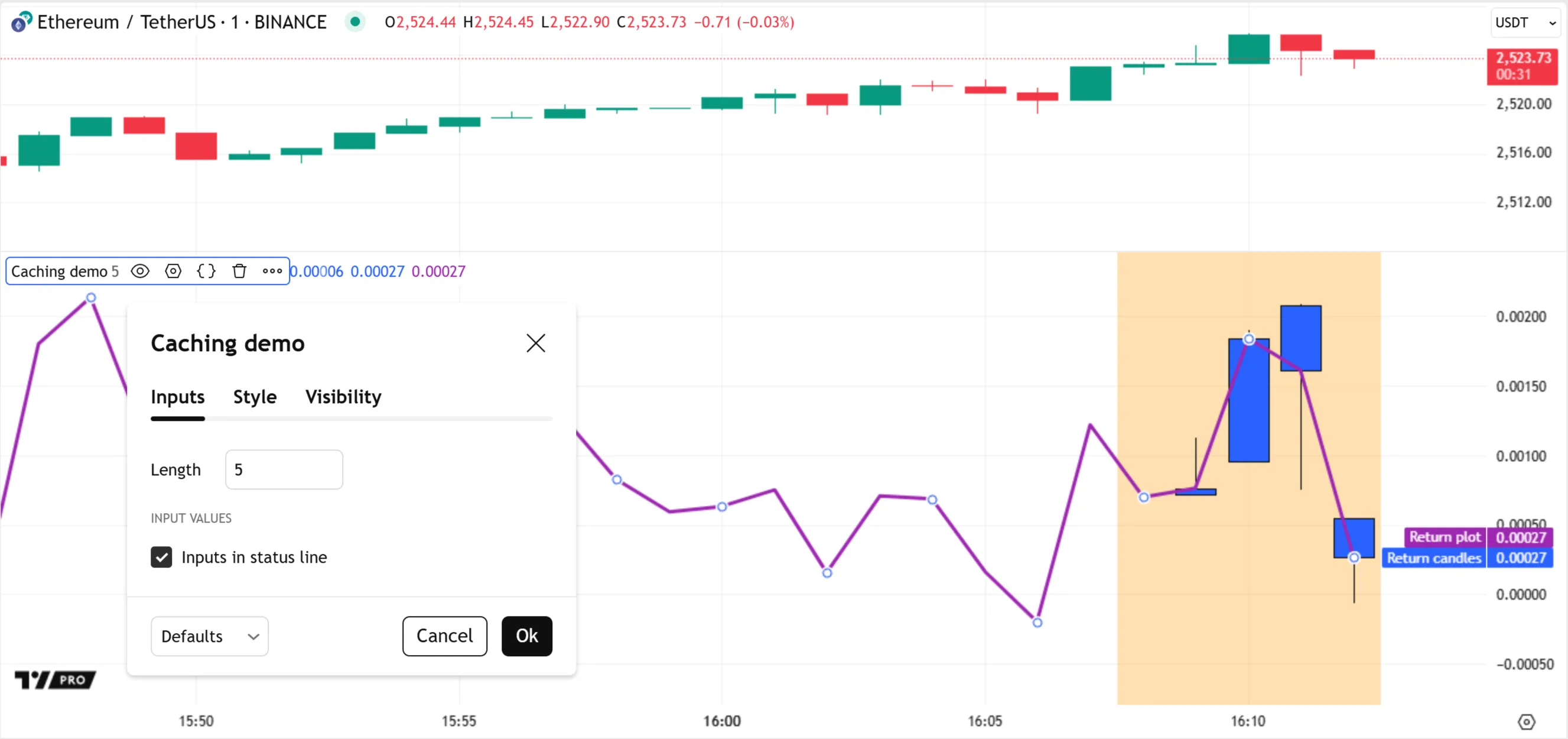
If we add a second instance of the script to the chart, using the same settings, the runtime system loads the new instance using the cached data instead of executing it entirely from scratch. As such, its outputs are _identical_ to those from the first script instance, even though we added it to the chart a few bars later:
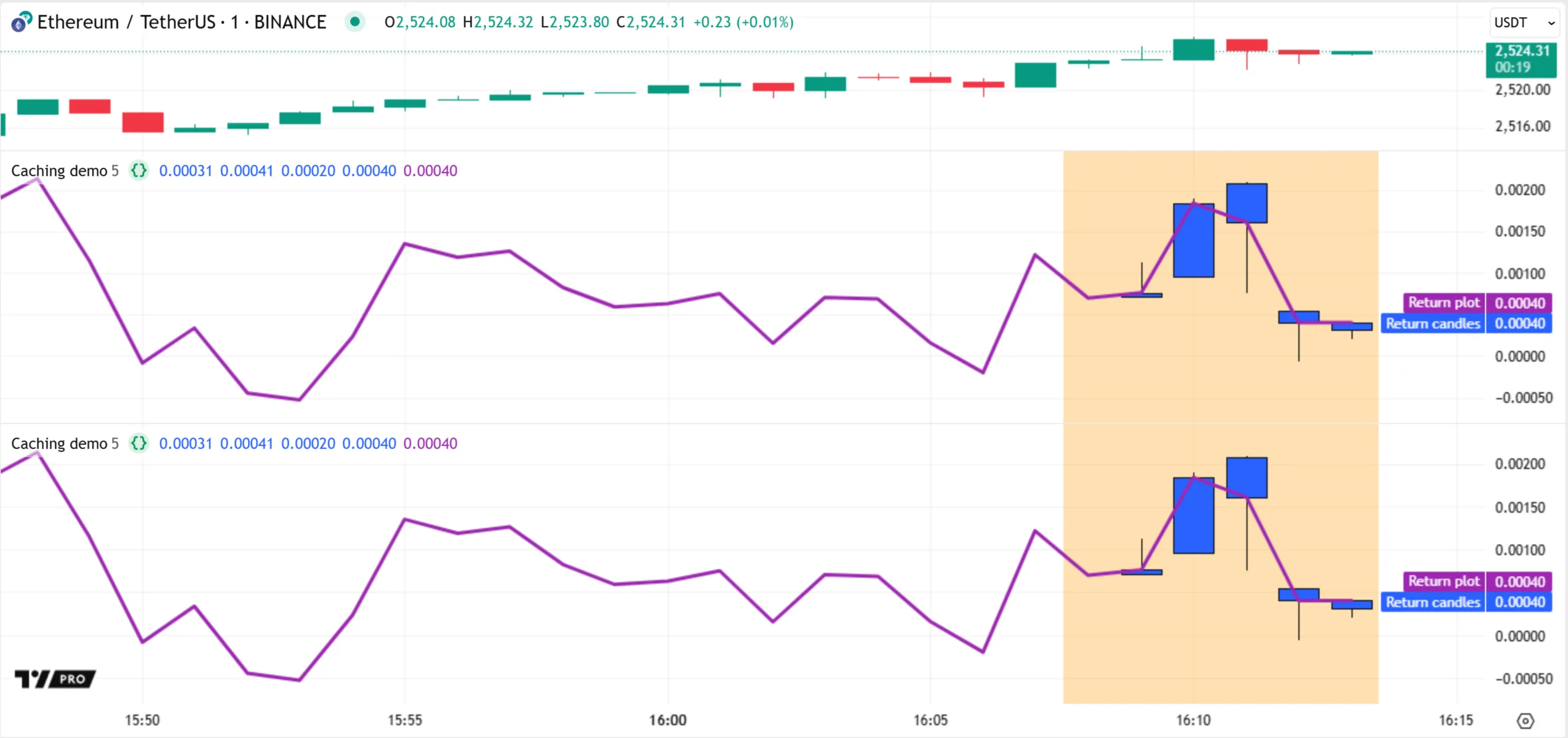
Similarly, cached data usually remains available even if we remove the script from our chart and add it again.
### [Time series](https://www.tradingview.com/pine-script-docs/language#time-series)
A symbol’s dataset is a form of _time series_ — a sequence of collected values indexed by time. Each bar represents a distinct data point, anchored to a specific time, that contains price and volume data for a particular period. This data format thus shows how a symbol’s values progress across time in successive periodic steps.
Pine Script’s internal time series structure follows a similar format. After executing a script on a closed bar’s confirmed values, the runtime system _commits (saves)_ the results of the script’s statements and expressions to internal time series for later use. Each bar with committed data has an assigned _index_ in the series, where 0 represents the first bar, 1 represents the second, and so on. Scripts can retrieve this index with the [bar_index](https://www.tradingview.com/pine-script-reference/v6/#var_bar_index) variable.
Scripts can access the data committed to the time series on past bars by using the [[] history-referencing operator](https://www.tradingview.com/pine-script-docs/language/operators/#-history-referencing-operator). The value between the operator’s square brackets specifies the position of the referenced bar in the time series as a _relative offset_ behind the current bar. For variables and expressions in the global scope, an offset value of 1 refers to the previous bar at `bar_index - 1` (one bar back), a value of 2 refers to the bar at `bar_index - 2` (two bars back), and so on. An offset of 0 always refers to the _current bar_.
For example, consider the [open](https://www.tradingview.com/pine-script-reference/v6/#var_open) variable, which holds the opening price of the current bar on which the script executes. Before each script execution on a new bar, the runtime system commits the [open](https://www.tradingview.com/pine-script-reference/v6/#var_open) value from the last execution on the previous bar. Then, it updates the variable to hold the current bar’s opening price. To access the committed [open](https://www.tradingview.com/pine-script-reference/v6/#var_open) value for the previous bar, we can use the expression `open[1]`. To access the committed value from 10 bars back, we use `open[10]`.
The script below performs three history-referencing operations to retrieve the current bar’s [open](https://www.tradingview.com/pine-script-reference/v6/#var_open) value, the value from one bar back, and the value from a user-specified number of bars back. Then, it plots the retrieved values on the chart for comparison:

```pinescript
//@version=6
indicator("History referencing demo", overlay = true, behind_chart = false)
//@variable The number of bars back from which to retrieve the `open` price for `pastOpen`.
int offsetInput = input.int(10, "Bar offset", 0)
//@variable The current bar's opening price. `open[0]` is equivalent to using `open` without the `[]` operator.
float currOpen = open[0]
//@variable The last committed `open` value. Represents the previous bar's value, or `na` if no previous bar exists.
float prevOpen = open[1]
//@variable The `open` value committed `offsetInput` bars back, or `na` if no bar exists at that offset.
float pastOpen = open[offsetInput]
// Plot `currOpen`, `prevOpen`, and `pastOpen` for comparison.
plot(currOpen, "Current `open`", color.blue, 2)
plot(prevOpen, "Previous bar `open`", color.purple, 3)
plot(pastOpen, "Past `open` from custom offset", color.orange, 4)
```
Note that:
* The expression `open[0]` is equivalent to using [open](https://www.tradingview.com/pine-script-reference/v6/#var_open) without the history-referencing operator, because an offset of 0 refers to the current bar.
* At the beginning of the chart’s dataset, the expressions `open[1]` and `open[offsetInput]` return [na](https://www.tradingview.com/pine-script-reference/v6/#var_na) because they refer to previous bars that are unavailable.
* Each history-referencing expression also leaves a trail of values in the time series. Therefore, it is possible to retrieve past states of the expression using another history-referencing operation, e.g., `(open[offsetInput])[1]`.
* Internally, the system maintains a _limited amount_ of time series data for variables and expressions in fixed-length _historical buffers_. These buffers define the _maximum offsets_ allowed for history-referencing operations. See the next section, [Historical buffers](https://www.tradingview.com/pine-script-docs/language/execution-model/#historical-buffers), to learn more.
Another way that scripts use committed values from a time series is by calling the built-in functions that reference history internally, such as those in the `ta.*` namespace. For example, the expression `ta.highest(high, 20)` calculates the highest value from the [high](https://www.tradingview.com/pine-script-reference/v6/#var_high) series over a 20-bar window. It compares the series’ current value to the committed values from the previous 19 bars to determine the result. The script below executes this call on each bar and plots the resulting series on the chart. Additionally, the script colors the background of the last 20 bars on the chart to highlight the bars used in the latest execution’s [ta.highest()](https://www.tradingview.com/pine-script-reference/v6/#fun_ta.highest) call:
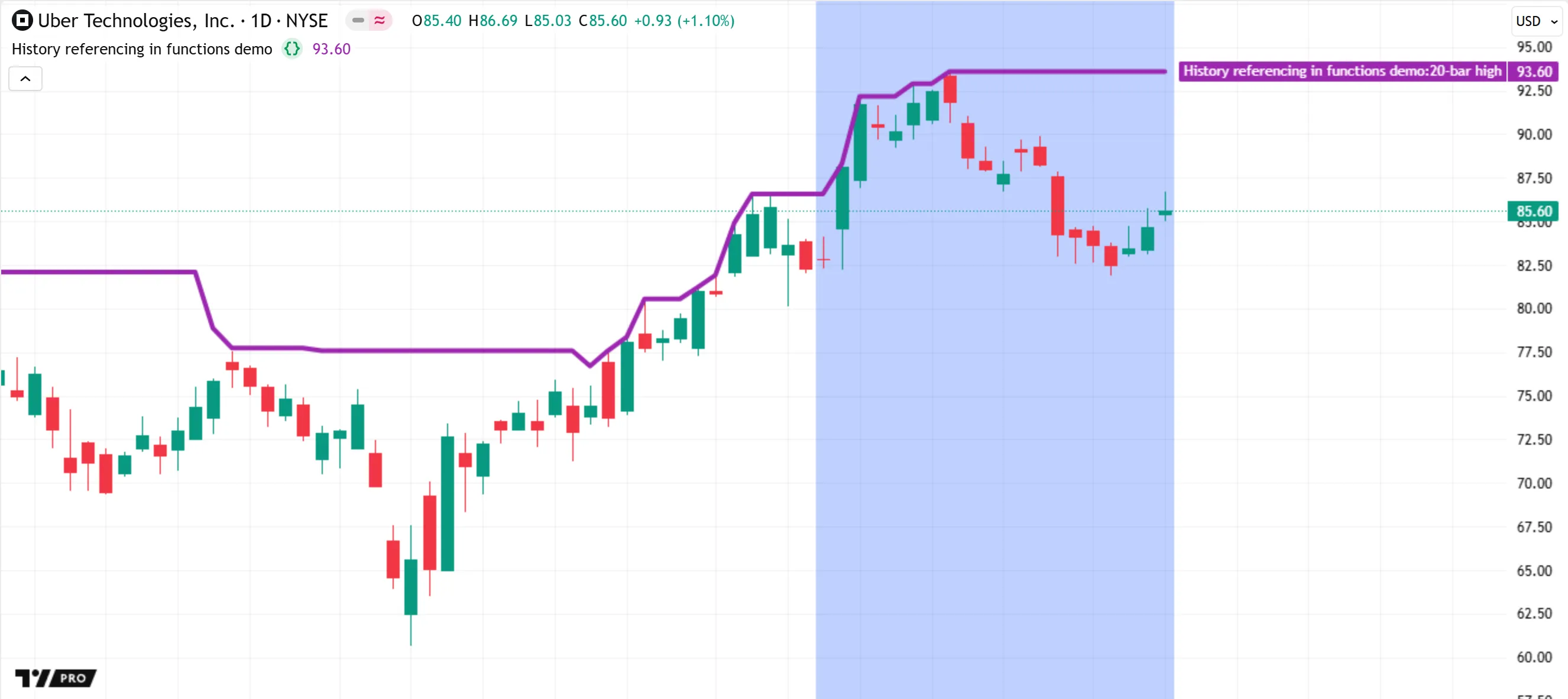
```pinescript
//@version=6
indicator("History referencing in functions demo", overlay = true, behind_chart = false)
//@variable The highest value from the `high` series across the 20 most recent bars.
// The `ta.highest()` call compares the current `high` to the last 19 committed values.
float highest = ta.highest(high, 20)
// Plot the `highest` series on the chart.
plot(highest, "20-bar high", color.purple, 3)
// Color the background of the last 20 bars, i.e., the bars used by the latest execution's `ta.highest()` call.
bgcolor(color.new(color.blue, 70), show_last = 20, title = "Last 20 bar highlight")
```
Note that:
* The first 19 bars of the chart have a plotted value of [na](https://www.tradingview.com/pine-script-reference/v6/#var_na), because the [ta.highest()](https://www.tradingview.com/pine-script-reference/v6/#fun_ta.highest) function call requires the [high](https://www.tradingview.com/pine-script-reference/v6/#var_high) values from the current bar and 19 previous bars to calculate the result.
* All function calls and expressions that do not return “void” leave historical trails in the time series, just like variables. Therefore, scripts can use an expression such as `ta.highest(high, 20)[10]` to retrieve the 20-bar high from 10 bars back.
* The [ta.highest()](https://www.tradingview.com/pine-script-reference/v6/#fun_ta.highest) function and other functions that access past values from a time series must execute in the **global scope** for consistent calculations. Time series storage for variables and expressions in local scopes works _differently_ than that for global values. See the [Time series in scopes](https://www.tradingview.com/pine-script-docs/language/execution-model/#time-series-in-scopes) section for more information.
#### [Historical buffers](https://www.tradingview.com/pine-script-docs/language#historical-buffers)
To promote efficiency and help ensure computing resources remain available for all users, the Pine Script runtime system uses fixed-length _historical buffers_ to maintain a _limited amount_ of time series data for all variables and expressions. These historical buffers define the _maximum_ number of committed data points that a script can access on any bar via the [history-referencing operator](https://www.tradingview.com/pine-script-docs/language/operators/#-history-referencing-operator) or the built-in functions that reference past bars internally.
For most series, the underlying historical buffer can contain data from up to **5000** past bars. The only exception is for some built-in series such as [open](https://www.tradingview.com/pine-script-reference/v6/#var_open), [close](https://www.tradingview.com/pine-script-reference/v6/#var_close), and [time](https://www.tradingview.com/pine-script-reference/v6/#var_time), whose buffers can store data for _more_ than 5000 bars.
Although these buffers can contain thousands of data points at their maximum size, a script might not _require_ that much past data for its calculations on any bar. Therefore, the runtime system automatically optimizes the size of each series’ historical buffer based on the historical references that the script performs as it loads on the dataset. Each resulting buffer contains _only_ the amount of past data required by the script’s calculations and _not more_.
For instance, if the maximum number of bars back for which a script references the value of a variable on historical bars is 500, the system maintains a historical buffer that includes only the latest 500 committed values of that variable. The buffer does not store 5000 committed values, because the script _does not_ require all that extra data. This behavior thus helps to minimize a script’s resource requirements while preserving the integrity of its calculations.
To determine the sufficient buffer size for each variable and expression in a script, the runtime system performs the following process during the script’s loading time:
1. It analyzes all the historical references that occur while executing the script on the dataset’s first **244 bars**, then sets the initial size of each buffer to the minimum size that accommodates those references.
2. While executing the script on subsequent bars, it checks if the script attempts to access data from previous bars that are beyond the limits of the defined buffers. If the script’s historical references exceed the buffer limits on any bar, the system restarts the loading process and tries a larger buffer size.
3. In the rare case that a historical buffer’s size remains insufficient after several calculation attempts, the system stops the script and raises a runtime error.
It’s crucial to emphasize that the runtime system defines the sizes of all historical buffers only while executing a script on _historical bars_. It does **not** adjust any historical buffers during executions on _new bars_ from the realtime data feed. If a script references past data from beyond a historical buffer’s limits while executing on a realtime bar, it causes a [runtime error](https://www.tradingview.com/pine-script-docs/error-messages/#the-requested-historical-offset-x-is-beyond-the-historical-buffers-limit-y).
For example, the script below retrieves a past value from the [close](https://www.tradingview.com/pine-script-reference/v6/#var_close) series using the [history-referencing operator](https://www.tradingview.com/pine-script-docs/language/operators/#-history-referencing-operator) with an offset of 100 bars back on historical bars and 150 bars back on realtime bars. Because the script references data from 100 bars back during all [historical executions](https://www.tradingview.com/pine-script-docs/language/execution-model/#executions-on-historical-bars), the system sets the [close](https://www.tradingview.com/pine-script-reference/v6/#var_close) buffer’s size to include only 100 past values. Consequently, an error occurs when the script executes on the open realtime bar, because a historical offset of 150 is _beyond_ the buffer’s limit:
```pinescript
//@version=6
indicator("Max bars back error demo", overlay = true)
// @variable The historical offset for retrieving past values from the `close` series.
// If the bar is historical, the offset is 100. Otherwise, the offset is 150.
int offset = barstate.ishistory ? 100 : 150
// @variable The value of `close` from `offset` bars back.
// This code causes a *runtime error* on a realtime bar. During all code executions on historical bars,
// the script requires only the latest 100 past values of `close`, so the system sets the buffer size to
// include only the past 100 values. The offset of 150 is thus *out of bounds*.
float pastClose = close[offset]
// Plot the `pastClose` series.
plot(pastClose, "Past `close`", chart.fg_color, 3)
// Highlight the background of all realtime bars in orange.
bgcolor(barstate.isrealtime ? color.new(color.orange, 70) : na, title = "Realtime highlight")
```
For cases like these, programmers can _manually_ set the size of a historical buffer to ensure it contains a sufficient amount of data by doing any of the following:
* Modify the script to reference the maximum required number of bars back with the [[]](https://www.tradingview.com/pine-script-reference/v6/#op_%5B%5D) operator during its execution on the _first bar_.
* Call the [max_bars_back()](https://www.tradingview.com/pine-script-reference/v6/#fun_max_bars_back) function to explicitly set the historical buffer size for a _specific_ series.
* Include a `max_bars_back` argument in the [indicator()](https://www.tradingview.com/pine-script-reference/v6/#fun_indicator) or [strategy()](https://www.tradingview.com/pine-script-reference/v6/#fun_strategy) declaration statement to set the initial size of _all_ historical buffers.
Below, we modified the script by including the expression `max_bars_back(close, 150)`, which sets the size of the [close](https://www.tradingview.com/pine-script-reference/v6/#var_close) buffer to include 150 past values. With the appropriate buffer size manually defined, the script’s history-referencing operation no longer causes an error on realtime bars:
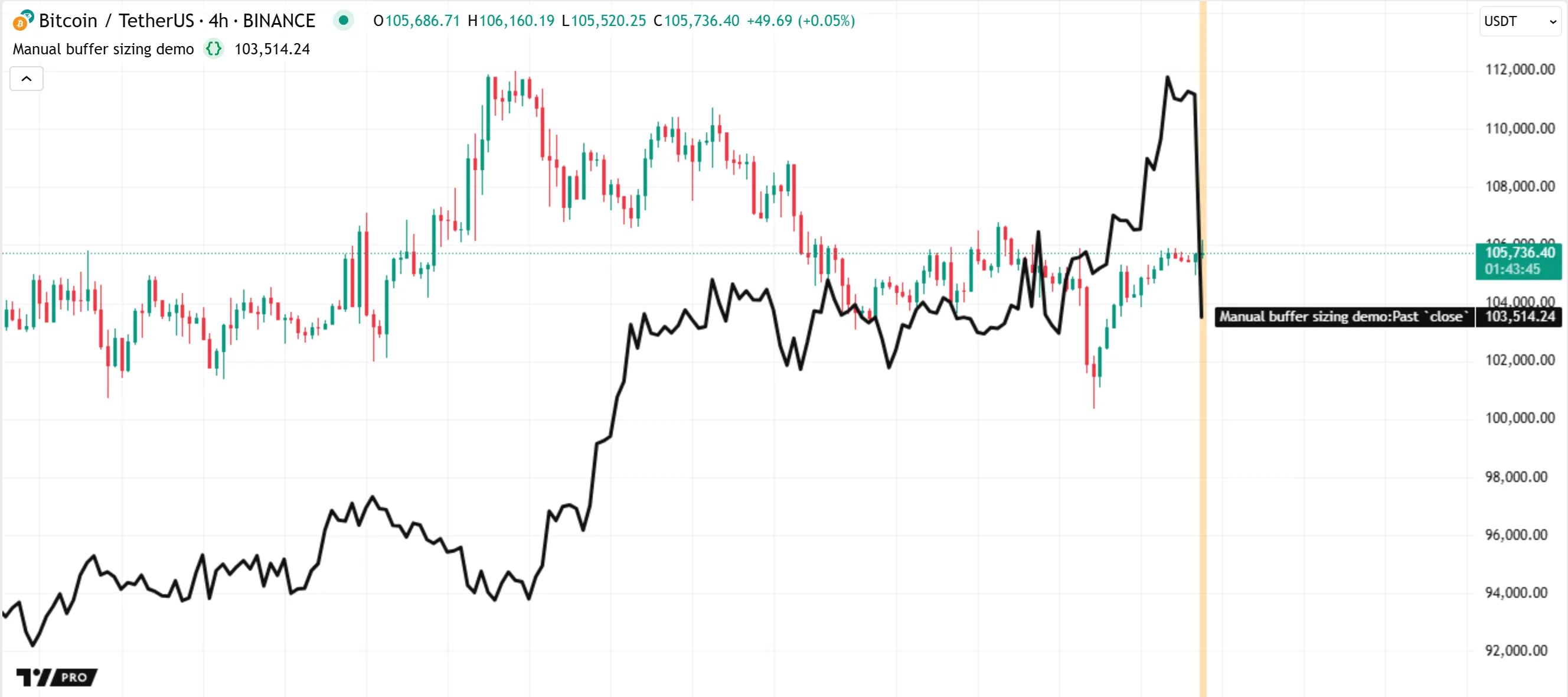
```pinescript
//@version=6
indicator("Manual buffer sizing demo", overlay = true)
// @variable The historical offset for retrieving past values from the `close` series.
// If the bar is historical, the offset is 100. Otherwise, the offset is 150.
int offset = barstate.ishistory ? 100 : 150
// Set the size of the `close` historical buffer to include 150 past values, ensuring the script has exactly
// the amount of history that it requires on realtime bars.
max_bars_back(close, 150)
// @variable The value of `close` from `offset` bars back.
// This code no longer causes an error when it executes on a realtime bar, because the historical
// buffer has an appropriate size defined in advance.
float pastClose = close[offset]
// Plot the `pastClose` series.
plot(pastClose, "Past `close`", chart.fg_color, 3)
// Highlight the background of all realtime bars in orange.
bgcolor(barstate.isrealtime ? color.new(color.orange, 70) : na, title = "Realtime highlight")
```
#### [Time series in scopes](https://www.tradingview.com/pine-script-docs/language#time-series-in-scopes)
The _scope_ of a variable or expression refers to the part of the script where it is defined and accessible in the code. Every script has one _global_ scope and zero or more _local_ scopes.
All variables and expressions in a script that are outside [user-defined functions](https://www.tradingview.com/pine-script-docs/language/user-defined-functions/) or [methods](https://www.tradingview.com/pine-script-docs/language/methods/#user-defined-methods), [conditional structures](https://www.tradingview.com/pine-script-docs/language/conditional-structures/), [loops](https://www.tradingview.com/pine-script-docs/language/loops/), and [user-defined type](https://www.tradingview.com/pine-script-docs/language/type-system/#user-defined-types) or [enum type](https://www.tradingview.com/pine-script-docs/language/type-system/#enum-types) declarations belong to the _global scope_. The script evaluates variables and expressions from this scope _once_ for _every execution_ across bars and ticks in the dataset.
All functions, methods, conditional structures, and loops create their own _local scopes_. The variables and expressions defined within a local scope belong exclusively to that scope. In contrast to the global scope, a script does _not_ always evaluate a local scope once per execution; the script might evaluate the scope _zero_, _one_, or _several_ times per execution, depending on its logic.
For the runtime system to commit data from a variable or expression and queue that data into a [historical buffer](https://www.tradingview.com/pine-script-docs/language/execution-model/#historical-buffers) on any bar, a script must _evaluate_ the scope of that variable or expression once when it executes on the bar’s _closing tick_. If the script does not evaluate the scope, the runtime system _cannot_ update the historical buffer for the variable or expression. Similarly, if the script evaluates the scope repeatedly within a loop, the historical buffer cannot store series data for _each_ separate iteration, because each entry in the time series corresponds to a single bar.
Therefore, time series behave differently in global and local scopes: the historical buffers for global variables and expressions _always_ contain committed data for _consecutive_ past bars, whereas the buffers for local variables often contain an **inconsistent** history of committed data.
When a script references the history of a global variable using an expression such as `myVariable[1]`, the historical offset of 1 always refers to the confirmed `myVariable` value from the _previous bar_. In contrast, when using such an expression with a local variable, the offset of 1 refers to the most recent bar where the script executed the scope. It **does not** represent a specific number of bars back. Therefore, referencing the history of a local variable can cause _unintended results_.
The following example demonstrates how the historical buffers for a user-defined function’s local scope behave when a script does not call the function on _every_ bar. The script below contains a custom `upDownColor()` function, which compares the current value of its `source` parameter to the last committed value (`source[1]`). The function returns [color.blue](https://www.tradingview.com/pine-script-reference/v6/#const_color.blue) if the current `source` value is higher than the previous value. Otherwise, it returns [color.orange](https://www.tradingview.com/pine-script-reference/v6/#const_color.orange).
The script uses this function _conditionally_, inside a [ternary operation](https://www.tradingview.com/pine-script-docs/language/operators/#-ternary-operator), to determine the color of a plot that shows the remainder from dividing [bar_index](https://www.tradingview.com/pine-script-reference/v6/#var_bar_index) by a specified value. If the `remainder` variable’s value is nonzero, the operation calls `upDownColor(remainder)` to calculate the color (blue or orange). If the value is 0, the operation does _not_ use the call and instead returns [color.gray](https://www.tradingview.com/pine-script-reference/v6/#const_color.gray). The `remainder` value _increases_ on each bar, except for when it returns to 0 — causing the gray color. Therefore, a user might expect the plot’s color to be only blue or gray on every bar. However, the color changes to _orange_ on each bar after the one where the color is gray, even though the `remainder` value on that bar is _higher_ than the value on the previous bar:
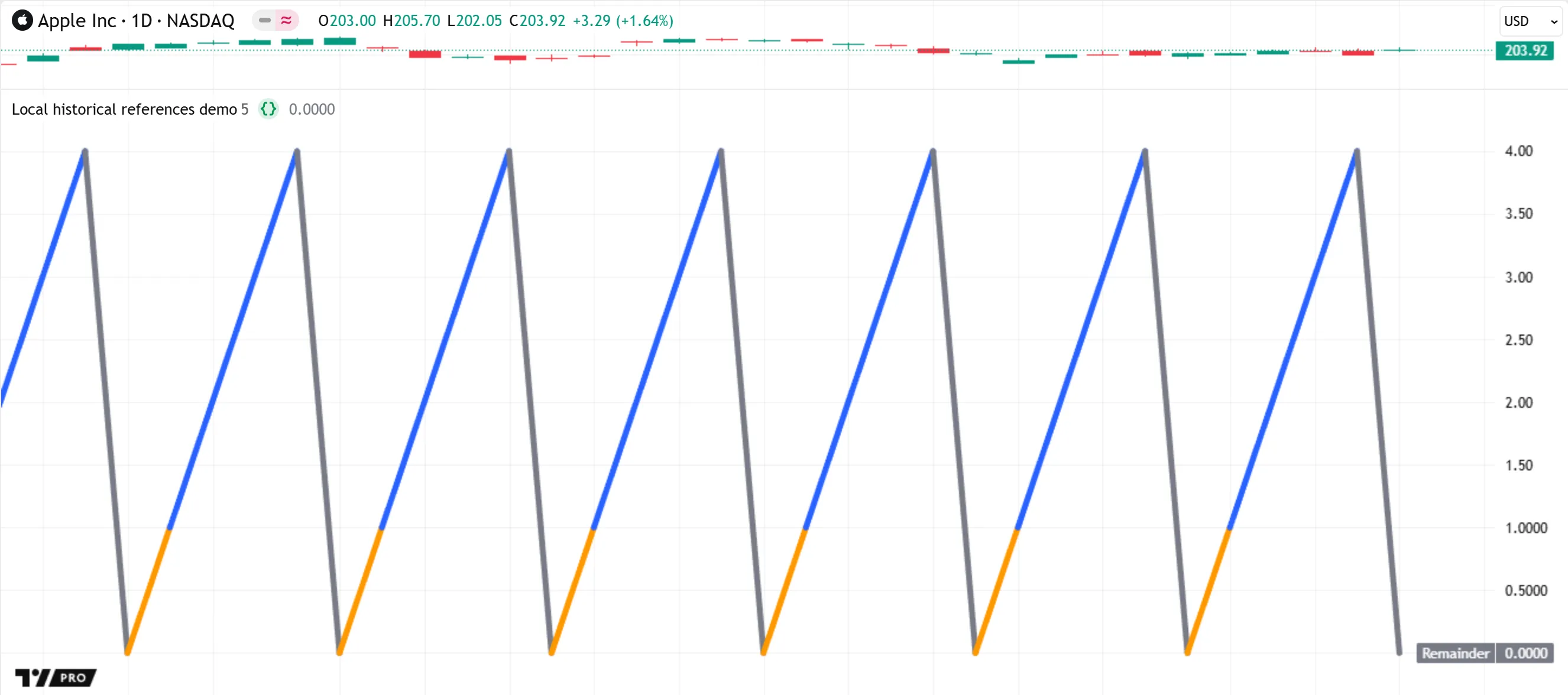
```pinescript
//@version=6
indicator("Local historical references demo")
//@function Returns `color.blue` if `source` is above its last committed value; `color.orange` otherwise.
// For consistent results, this function should execute on *every bar*, because it uses the
// history-referencing operator on the `source` series.
//
// Even if the argument supplied to `source` comes from a global variable, the `source` parameter remains
// part of the function's *local scope*. The system maintains a *separate historical buffer* for the `source`
// series in each function call instance. The buffer contains only the committed `source` values from the bars
// where the function call occurs. If the call does not occur on a bar, the buffer for `source` contains
// **no data** for that bar.
upDownColor(float source) =>
source > source[1] ? color.blue : color.orange
//@variable The value by which to divide the `bar_index` value.
int divisorInput = input.int(5, "Divisor", 1)
//@variable The remainder of dividing `bar_index` by `divisorInput`.
float remainder = bar_index % divisorInput
//@variable Is `color.orange` if `remainder` equals 0, and the result of `upDownColor(remainder)` otherwise.
// The `upDownColor()` call does not execute on every bar. Therefore, it does *not* always compare the
// `remainder` value from one bar back to calculate the color. Instead, the function compares the current
// `remainder` to the value from the last bar where `remainder` is nonzero.
color plotColor = remainder == 0 ? color.gray : upDownColor(remainder)
// Plot the `remainder` series and color it using `plotColor`. The plot is orange after each bar where `remainder == 0`,
// because the `upDownColor()` function call does not have data for that bar to use in its logic.
plot(remainder, "Remainder", plotColor, 5)
```
The script behaves this way because `upDownColor()` uses the [history-referencing operator](https://www.tradingview.com/pine-script-docs/language/operators/#-history-referencing-operator) on the `source` series, which is _local_ to the function’s scope, and the script does not call the function on _every_ execution. When the value of `remainder` is zero, the _first_ expression in the ternary condition evaluates to `true`, and therefore the second branch of the ternary expression, which contains the function call, does _not_ execute.
The compiler issues the following warning about the function directly in the Pine Editor:
`The function `upDownColor()` should be called on each calculation for consistency. It is recommended to extract the call from the ternary operator or from the scope.`
The runtime system maintains a separate [historical buffer](https://www.tradingview.com/pine-script-docs/language/execution-model/#historical-buffers) for the local `source` series, but it cannot update that buffer unless the script _calls_ the function. On each bar where `remainder` is 0, the call does not occur, and the system has no new value to commit to the time series. Therefore, the `source` buffer does _not_ contain the value of `remainder`, or even an [na](https://www.tradingview.com/pine-script-reference/v6/#var_na) value, for that bar. On the bar that follows, the local expression `source[1]` refers to the `source` value from the last bar where the `upDownColor()` call occurs — _two bars back_ — and not the value of `remainder` from the previous bar. Because the value from two bars back is _higher_ than the current value, the returned color is [color.orange](https://www.tradingview.com/pine-script-reference/v6/#const_color.orange) instead of [color.blue](https://www.tradingview.com/pine-script-reference/v6/#const_color.blue).
We can fix this script’s behavior by following the instructions in the compiler warning. Below, we modified the script by moving the `upDownColor()` call _outside_ the ternary expression, enabling the script to execute it on _every bar_. The historical buffer for the function’s `source` series now contains `remainder` values from _consecutive_ bars. With this change, an orange color does not appear because the function consistently compares values from _one_ bar back:
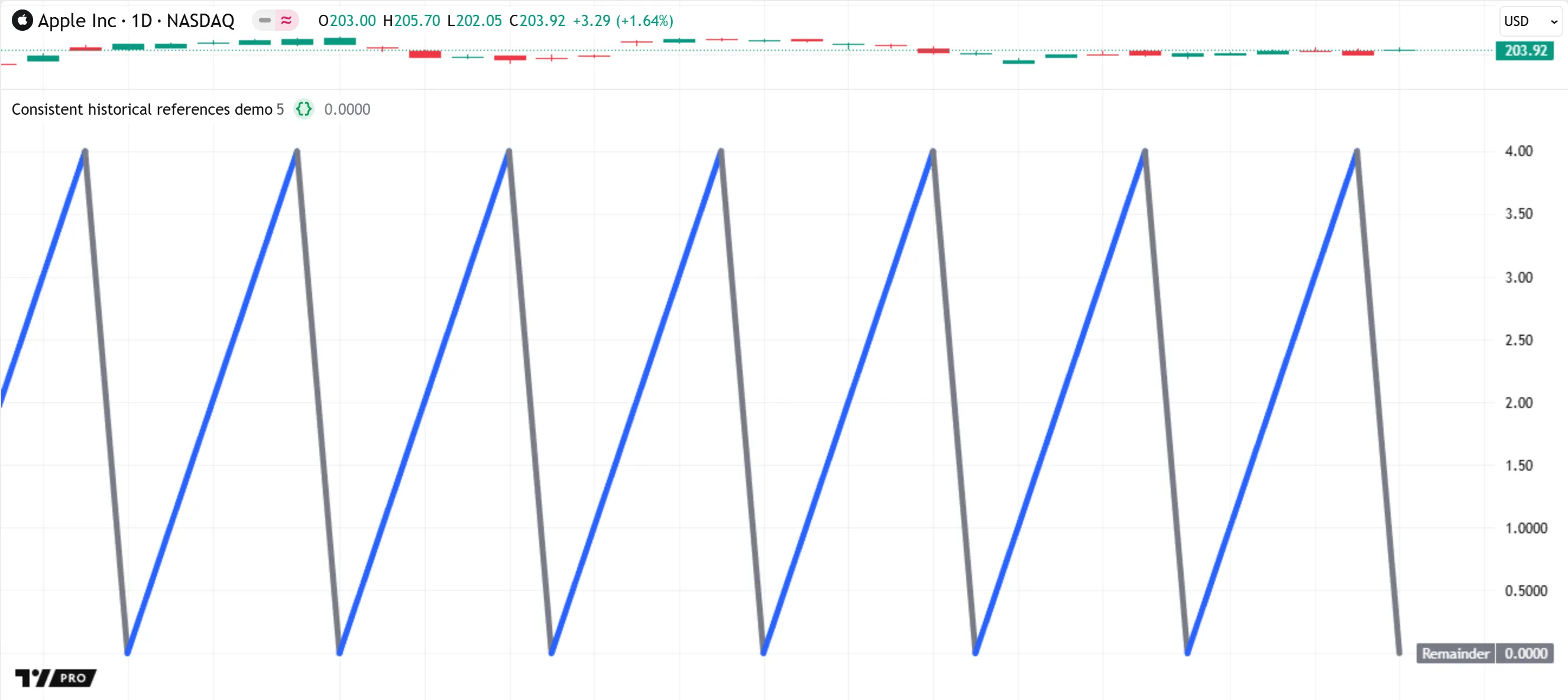
```pinescript
//@version=6
indicator("Consistent historical references demo")
//@function Returns `color.blue` if `source` is above its last committed value; `color.orange` otherwise.
// For consistent results, this function should execute on *every bar*, because it uses the
// history-referencing operator on the `source` series.
upDownColor(float source) =>
source > source[1] ? color.blue : color.orange
//@variable The value by which to divide the `bar_index` value.
int divisorInput = input.int(5, "Divisor", 1)
//@variable The remainder of dividing `bar_index` by `divisorInput`.
float remainder = bar_index % divisorInput
//@variable Is `color.blue` if `remainder` is above its previous value, and `color.orange` otherwise.
color secondColor = upDownColor(remainder)
//@variable `color.orange` if `remainder` equals 0, and `secondColor` otherwise.
// This ternary operation no longer causes a warning. The scope of the `upDownColor()` call executes on
// every bar, meaning its historical buffer consistently includes data for consecutive past bars.
color plotColor = remainder == 0 ? color.gray : secondColor
// Plot the `remainder` series and color it using `plotColor`. The plot is now blue or gray, but never orange.
plot(remainder, "Remainder", plotColor, 5)
```
This behavior also applies to all built-in functions that reference past values internally, such as those in the `ta.*` namespace. For example, the [ta.sma()](https://www.tradingview.com/pine-script-reference/v6/#fun_ta.sma) function uses the current value of a `source` series and `length - 1` past values from that series to calculate a [moving average](https://www.tradingview.com/support/solutions/43000696841-simple-moving-average/). If a script calls this function only on _some_ bars instead of on _every_ bar, the historical buffer for `source` does not contain values for consecutive past bars. Therefore, such a call can cause unintended results, because the call calculates the returned average using an inconsistent history of values from previous bars.
The script below demonstrates how the results of the [ta.sma()](https://www.tradingview.com/pine-script-reference/v6/#fun_ta.sma) function can vary with the scope in which the function call occurs. The script declares three global variables to hold calculated SMA values: `controlSMA`, `localSMA`, and `globalSMA`. The script initializes `controlSMA` using the result of a [ta.sma()](https://www.tradingview.com/pine-script-reference/v6/#fun_ta.sma) function call, and it initializes the other two variables with [na](https://www.tradingview.com/pine-script-reference/v6/#var_na). Within the [if](https://www.tradingview.com/pine-script-reference/v6/#kw_if) structure, the script updates the value of `globalSMA`, and it updates `localSMA` using the result of another [ta.sma()](https://www.tradingview.com/pine-script-reference/v6/#fun_ta.sma) call with the same arguments as the first call.
As shown below, the `controlSMA` and `globalSMA` have the same value. Both use the result of the _global_[ta.sma()](https://www.tradingview.com/pine-script-reference/v6/#fun_ta.sma) call, which executes on _every bar_. The internal historical buffer for `source` in that call thus includes committed values for consecutive past bars. In contrast, the `localSMA` value differs, because the [ta.sma()](https://www.tradingview.com/pine-script-reference/v6/#fun_ta.sma) call for that variable does _not_ execute on every bar. The buffer for that call’s local `source` series contains only the values from bars with an _even_[bar_index](https://www.tradingview.com/pine-script-reference/v6/#var_bar_index) value:
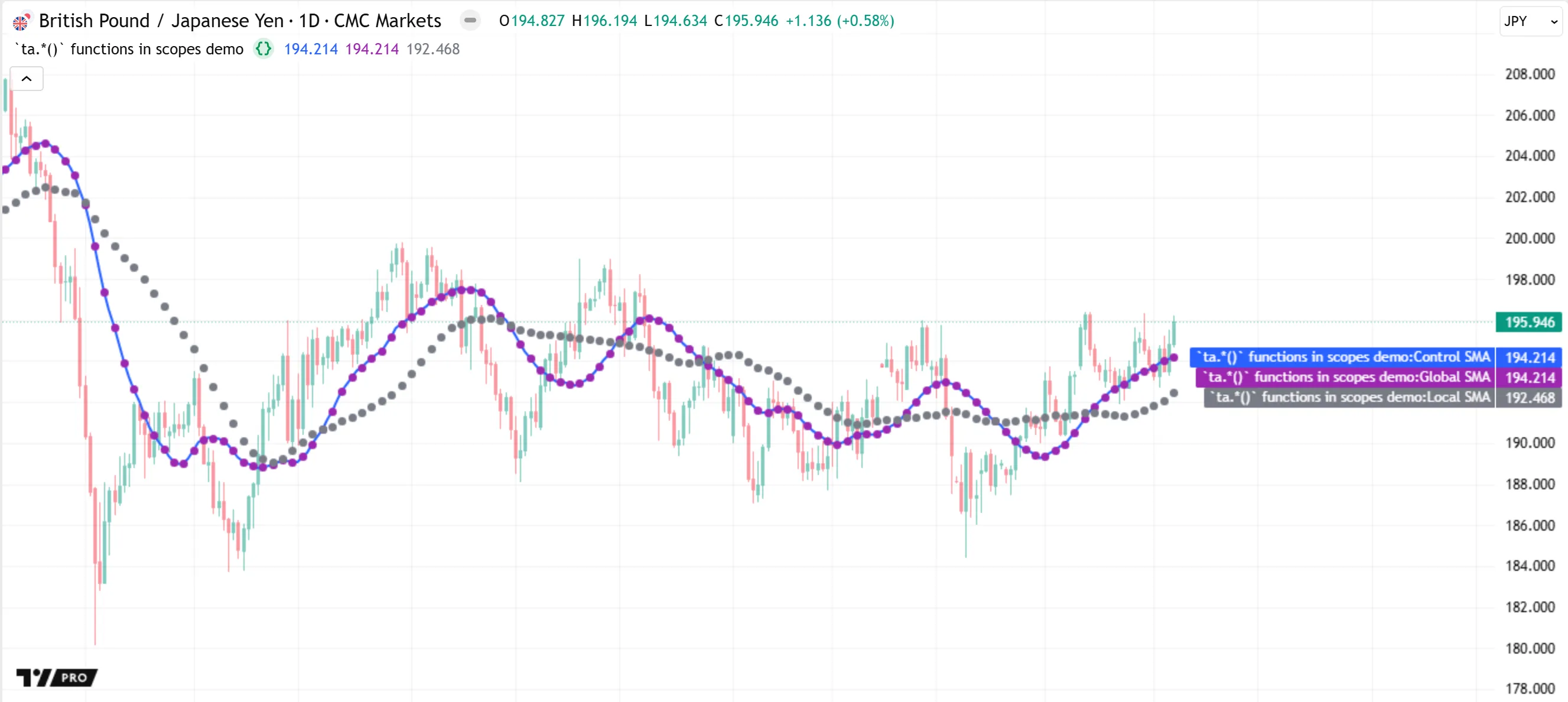
```pinescript
//@version=6
indicator("`ta.*()` functions in scopes demo", overlay = true, behind_chart = false)
//@variable Is `true` if the `bar_index` is divisible by 2, and `false` otherwise.
bool condition = bar_index % 2 == 0
//@variable The 20-bar moving average of `close` values.
// This `ta.sma()` call executes in the global scope, so the script evaluates it on every bar.
float controlSMA = ta.sma(close, 20)
// Declare two additional variables to modify later within the `if` structure's scope.
float globalSMA = na
float localSMA = na
if condition
// Assign the `controlSMA` value to `globalSMA`. This code does not cause a warning.
globalSMA := controlSMA
// Call `ta.sma()` with the same arguments as before within this block and assign the result to `localSMA`.
// The function call causes a warning, because it does not execute in the global scope.
// The historical buffers for this `ta.sma()` call contain data only for the bars where `condition` is `true`,
// thus leading to a *different* result.
localSMA := ta.sma(close, 20)
// Plot `controlSMA`, `globalSMA`, and `localSMA` for comparison.
plot(controlSMA, "Control SMA", color.blue, 2)
plot(globalSMA, "Global SMA", color.purple, 3, style = plot.style_circles)
plot(localSMA, "Local SMA", color.gray, 3, style = plot.style_circles)
```
To summarize the behavior of time series in a script’s scopes:
* A script evaluates its global scope once on _every execution_. After each script execution on a bar’s closing tick, the system commits the data for variables and expressions in the global scope and updates their [historical buffers](https://www.tradingview.com/pine-script-docs/language/execution-model/#historical-buffers). The resulting buffers thus include data for consecutive past bars, ensuring consistent results for operations and functions that rely on past data.
* A script evaluates local scopes _zero_, _one_, or _several_ times per execution. The runtime system **cannot** maintain consistent bar-by-bar historical buffers for scopes that a script does _not_ evaluate on every bar, or for scopes that the script evaluates _more than once_ on a bar’s closing tick. Therefore, using the [[]](https://www.tradingview.com/pine-script-reference/v6/#op_%5B%5D) operator on local variables and expressions, or not calling functions that access past data once on each closing tick, can cause **unintended results**.
```
You can copy this content and save it as a `.md` file (e.g., `pine_script_execution_model.md`) to download and use.