JAMstack websites don’t use the microservices architecture, but they go for the micro frontends architecture. Each static page with HTML…
JAMstack websites don’t use the microservices architecture, but they go for the micro frontends architecture. Each static page with HTML and JavaScript is a micro frontend. And they can use any REST API, including the one built on the microservices architecture.
ALLOFMYOTHERARTICLES
bryanguner.medium.com
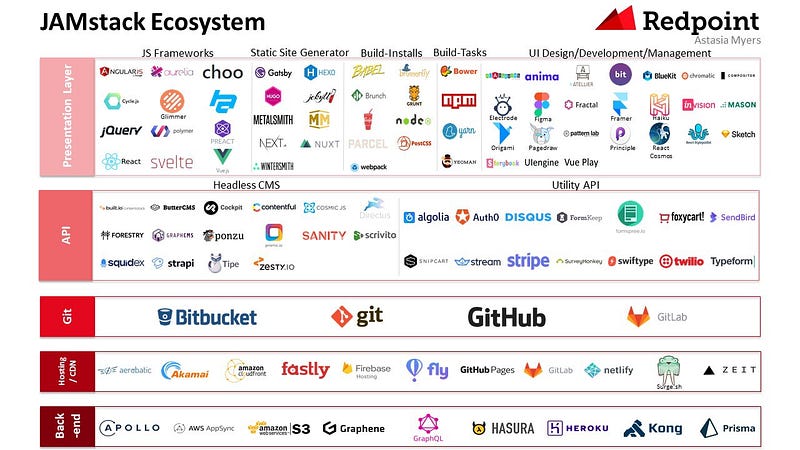

“A modern web development architecture based on client-side JavaScript, reusable APIs, and prebuilt Markup”
— Mathias Biilmann (CEO & Co-founder of Netlify).
Dynamic functionalities are handled by JavaScript. There is no restriction on which framework or library you must use.
Server side operations are abstracted into reusable APIs and accessed over HTTPS with JavaScript. These can be third party services or your custom function.
Websites are served as static HTML files. These can be generated from source files, such as Markdown, using a Static Site Generator.
API is the acronym for Application Programming Interface. It defines interactions that allows two applications to talk to each other.

- You don’t generally do anything that consumes enough volume of static assets to cause your application to struggle with performance at least sometimes.
- Your development team is used to different tech, and the cost of migration is higher than the reward.
- You are dealing with tons of real-time/user data, (i.e. audio or video processing in real time)
- In most cases, it does not make sense to migrate a legacy project that is functioning just fine with no signs of depreciation on the horizon.
Jamstack is an architecture designed to make the web faster, more secure, and easier to scale.The core tenants of pre-rendering, and decoupling, enable sites and applications to be delivered with greater confidence and resilience than ever before.
Explore more of the benefits of Jamstack.
With Jamstack, the entire front end is prebuilt into highly optimized static pages and assets during a build process. This process of pre-rendering results in sites which can be served directly from a CDN, reducing the cost, complexity and risk, of dynamic servers as critical infrastructure.
With so many popular tools for generating sites, like Gatsby, Hugo, Jekyll, Eleventy, NextJS, and very many more, many web developers are already familiar with the tools needed to become productive Jamstack developers.
With the markup and other user interface assets of Jamstack sites served directly from a CDN, they can be delivered very quickly and securely. On this foundation, Jamstack sites can use JavaScript and APIs to talk to backend services, allowing experiences to be enhanced and personalized.
The thriving API economy has become a significant enabler for Jamstack sites. The ability to leverage domain experts who offer their products and service via APIs has allowed teams to build far more complex applications than if they were to take on the risk and burden of such capabilities themselves. Now we can outsource things like authentication and identity, payments, content management, data services, search, and much more.
Jamstack sites might utilise such services at build time, and also at run time directly from the browser via JavaScript. And the clean decoupling of these services allows for greater portability and flexibility, as well as significantly reduced risk.

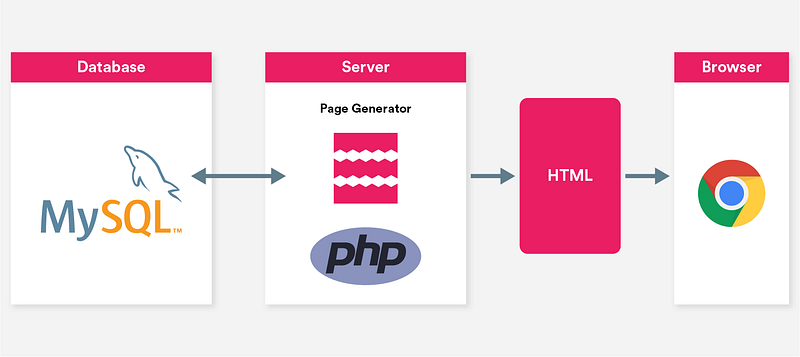
But why does this templating operation need to happen on the server? Do we really need databases and server-side software (which opens up dozens of security holes along the way) just to create a simple blog? At a time when browsers themselves have become operating systems, capable of interacting with countless APIs and running complex applications client-side, and when front-end development is dominated by JavaScript-based automation using npm, haven’t we outgrown this model?
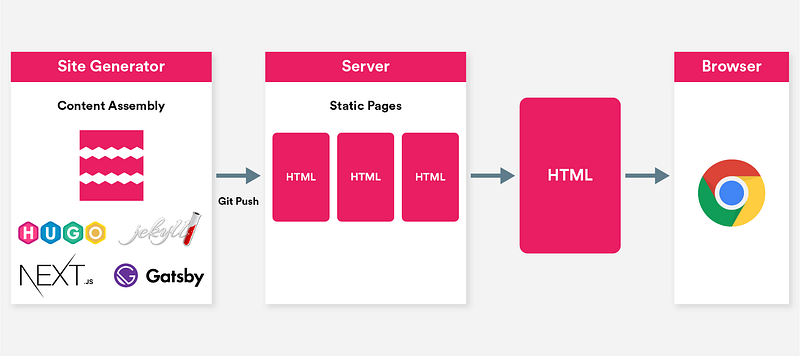
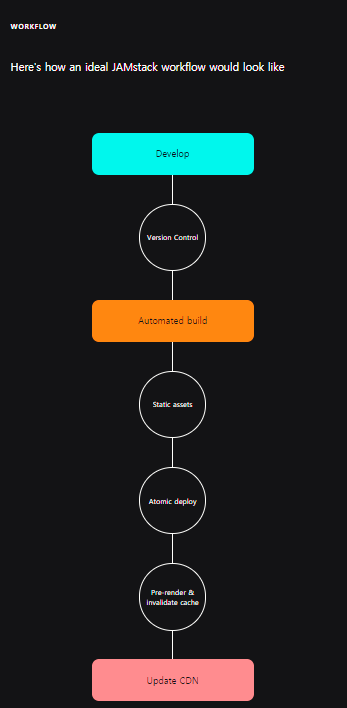
Since all the markup and assets are pre-built, they can be served via CDN. This provides better performance and easier scalability.
Each deploy is a full snapshot of the site. This helps guarantee a consistent version of the site globally.
Once your build is uploaded, the CDN invalidates its cache. This means that your new build is live in an instant.
Your codebase lives in Version Control System, such as Git. The main benefits are: change history of every file, collaborators and traceability.
Your server is notified when a new build is required, typically via webhooks. Server builds the project, updates the CDNs and the site is live.
However you decide to generate your HTML assets is up to you. The three most common approaches are:
Simple and effective method of writing HTML, it’s ideal for super simple pages.
Most JAMstack sites are powered by a static site generator. There’s no enforcement on which SSG you decide to use.
Most frameworks don’t output static HTML files, however it is possible to do that but it requires more tooling experience and maintenance.
Your built site needs to be hosted somewhere. There are great services that provides this for free and with ease.
JAMstack websites don’t have to be static. There are great services available to help bring some dynamic data to your product.
You can also abstract your own functions into reusable APIs. For this you can use AWS lambda functions or Netlify Functions
As you add features to your site, you may want to store user profiles, shopping cart data, game levels, or other dynamic data. Get started for free with FaunaDB Serverless GraphQL
Many JAMstack products have dynamic comment sections. These are typically used on blogs
A great way to interact with your audience
Setting up an online store on the JAMstack has never been easier
Rely on third party services to integrate a search functionality
JAMstack sites can also be controlled via a Content Management System, these are typically known as Headless CMS. Once a change in the CMS is made, a new build of your site will be triggered and then deployed as static assets.
- Netlify CMS
- Contentful
- Headless WordPress
- Ghost
- Strapi
- Forestry
- Sanity.io
- Kontent
- GraphCMS
- TakeShape
- Using CDNs for hosting. Using content delivery networks improves performance and scalability.
- Atomic deploys. Deploying lots of static files can be time-consuming. But with atomic deploys, you can forget about downtimes. Your app is always available to users, even when a new deployment is being executed. Besides, with each deploy being a full snapshot of your website, it guarantees global consistency.
- Instant cache invalidation. CDNs store sites in their local caches. Thus, when you change something on your website, your CDN invalidates the affected files and replaces them with the new ones. However, the process can take hours. To avoid this, it’s recommended to choose CDNs with instant cache validation.
- Version control systems. A version control system, such as Git, is a cloud for your code. It hosts your source code, keeps track of all changes, and streamlines collaboration. If a mistake is made, developers can easily compare the current code from its previous versions and identify the cause.
- Automated builds. In terms of web development, build is a process of converting files and other assets into a final software product ready for deployment. Automating this process eliminates the risk of variation and defects. Besides, whenever a new build is required, your CDN is notified using webhooks.
Here’s a list of hand-picked JAMstack resources ranging from learning materials to third party services.
- Awesome Static Website Services
- A List of Content Management Systems for JAMstack Sites
- A List of Static Site Generators for JAMstack Sites
- A List of Themes and Starters for JAMstack Sites
- A curated collection of tools and services
- New to JAMstack? Everything You Need to Know to Get Started
- What is the concept behind JAMstack
- JAMstack modern web development
- Smashing Magazine just got 10x faster
- Ghost on the JAMstack
- JAMstack with Gatsby, Netlify and Netlify CMS
- Moving to Gatsby by Jules Forrest
- Migrate from Jekyll to Gatsby by Nahuel Scotti
- JAMstack website
- Smashing Magazine just got 10x faster
- Image Optimization Made Easy with Gatsby.js by Kyle Gill
- Page loading bar with gatsy-plugin-nprogress
- Support for SASS/SCSS with gatsby-plugin-sass
- Default Netlify CMS implementation with gatsby-plugin-netlify-cms
- React Google Analytics module with react-ga
- Code images by Carbon
By Bryan Guner on July 7, 2021.
Exported from Medium on August 6, 2021.