This is an example of multiplatform Kotlin/Native project. The whole business logic is written in Kotlin and shared between iOS and Android apps.
The project contains the common module named common and have support for iOS by common-ios and Android platforms.
Install Gradle for macOS with the following command or read manual installation here.
$ brew install gradleCreate a folder to be your project with any name, in my case is kotlin-native-multiplatform. Open folder in shell and run
$ gradle initThen create another folder for your common framework, it could be named common.
Inside the common folder:
- Create another
build.gradle - A tree of folders like
src/main/kotlin/com/example
After all, do the same to create the iOS and the Android framework, you could named as common-ios and common-android
The result should be as following:
├── build.gradle
├── gradle
├── gradlew
├── gradlew.bat
├── settings.gradle
└── shared
    ├── common
    │   ├── build.gradle
    │   └── src
    │       └── main
    │           └── kotlin
    │               └── com
    │                   └── example
    ├── common-android
    │   ├── build.gradle
    │   └── src
    │       └── main
    │           └── kotlin
    │               └── com
    │                   └── example
    └── common-ios
        ├── build.gradle
        └── src
            └── main
               └── kotlin
                   └── com
└── exampleAdd the following code to settings.gradle file
include ':shared:common'
include ':shared:common-ios'
include ':shared:common-android'
To configure your project build.gradle
// Set up a buildscript dependency on the Kotlin plugin.
buildscript {
    // Specify a Kotlin version you need.
    ext.kotlin_version = '1.2.31'

    repositories {
        jcenter()
        maven { url "https://dl.bintray.com/jetbrains/kotlin-native-dependencies" }
    }

    // Specify all the plugins used as dependencies
    dependencies {
        classpath "org.jetbrains.kotlin:kotlin-gradle-plugin:$kotlin_version"
        classpath "org.jetbrains.kotlin:kotlin-native-gradle-plugin:0.7-dev-1613"

    }
}

// Set up compilation dependency repositories for all projects.
subprojects {
    repositories {
        jcenter()
    }
}Add this code to shared/common/build.gradle
apply plugin: 'kotlin-platform-common'

group = 'com.example'
version = 1.0

dependencies {
    compile "org.jetbrains.kotlin:kotlin-stdlib-common:$kotlin_version"
}
The konan plugin creates a nice interface between gradle and the Kotlin/Native compiler.
Add this code to shared/common-ios/build.gradle
apply plugin: 'konan'

// Specify targets to build the framework: iOS and iOS simulator
konan.targets = ['iphone', 'iphone_sim']

konanArtifacts {
    framework('Common') {
        enableDebug true
        enableMultiplatform true
    }
}

dependencies {
    expectedBy project(':shared:common')
}To compile and test if everything is running fine, go to root directory project and run this code to output a number of tasks preconfigured by Gradle
./gradlew tasksAfter that, compile common-ios framework
./gradlew compileKonan-
Create a new Xcode project in the root directory of project.
-
Add a new framework in the project with the same framework name as in
shared/common-ios/build.gradle:Common
Go
File->New->Target->Cocoa Touch Framework
- Choose the new framework in the
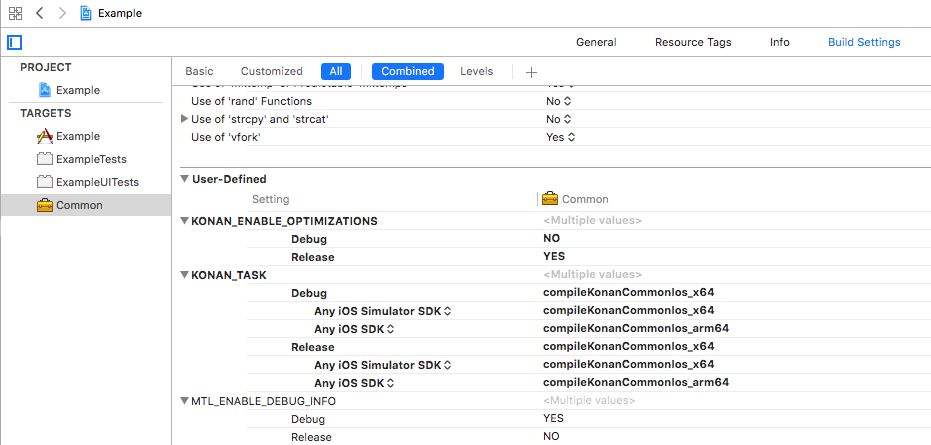
Project Navigatorand open theBuild Settingstab and add the followingUser-Defined:
-
KONAN_ENABLE_OPTIMIZATIONS
Debug:NORelease:YES
-
KONAN_TASK
Any iOS simulator SDK:compileKonan<framework name>Ios_x64Any iOS SDK:compileKonan<framework name>Ios_arm64
Replace <framework name> with the name you specified in the library's common-ios/build.gradle. It will be like that:
- Ensure that the framework is still selected in the
Project Navigatorand open theBuild phasestab. Remove all default phases exceptTarget Dependencies. - Add a new
Run Scriptbuild phase and put the following code into the script field:
"$SRCROOT/../../gradlew" -p "$SRCROOT/../../shared/common-ios" "$KONAN_TASK" \
-Pkonan.configuration.build.dir="$SRCROOT/build" \
-Pkonan.debugging.symbols="$DEBUGGING_SYMBOLS" \
-Pkonan.optimizations.enable="$KONAN_ENABLE_OPTIMIZATIONS"
This script executes gradle build to compile common-ios library into a framework, copy the framework from origin build folder and paste to ios project root directory.
- Add Kotlin sources into the framework
File->Add files to <name of your Xcode project>
- Choose the directory with Kotlin sources (
sharedfolder in this sample). - Add
Headerfolder created bycommon-iosframework as sources.
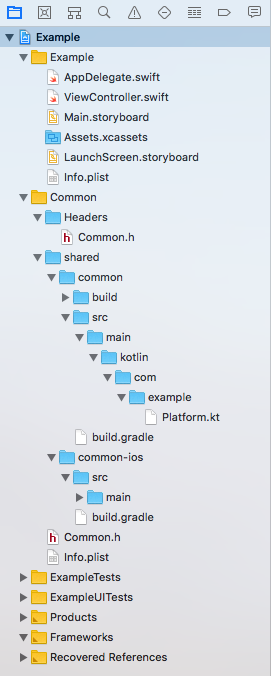
Now the framework is added and all Kotlin API are available from Swift code (note that you need to build the framework in order to get code completion).
To use Kotlin code import your framework, in our case is Common. Look that all Kotlin classes have the framework name as prefix:
import UIKit
import Common

class ViewController: UIViewController {

    override func viewDidLoad() {
        super.viewDidLoad()
        print(CommonMain().sayHello())
    }
}apply plugin: 'kotlin-platform-jvm'
group = 'com.example'
version = 1.0
dependencies {
implementation "org.jetbrains.kotlin:kotlin-stdlib-jdk7:$kotlin_version"
expectedBy project(':shared:common')
}If something went wrong or you want to study more about, you may follow the instructions here.