An in-depth performance analysis comparing a single Docker container against a horizontally scaled Kubernetes cluster for a high-concurrency FastAPI application. This project demonstrates the practical benefits of Kubernetes HPA (Horizontal Pod Autoscaler) for handling significant traffic loads
This project provides a hands-on demonstration of building a resilient and performant FastAPI application and evaluating its scalability characteristics when deployed using Docker and Kubernetes. It's designed to illustrate key concepts such as:
- Containerization : Packaging the application into a portable
Dockerimage. - Orchestration : Managing and scaling the application using local
Minikubecluster,KubernetesandHPA. - Asynchronous Programming : Leveraging Python's
asyncioandaiohttpfor high-concurrency client requests. - Performance Benchmarking : Measuring and comparing throughput and response times under various loads.
- FastAPI : Modern, fast (high-performance) web framework for building APIs.
- Docker : For containerizing the
FastAPIapplication. - Kubernetes (Minikube) : For local cluster orchestration, deployment, service exposure, and
HPA. - NumPy : Initially used to simulate CPU-bound computational load.
- Aiohttp : Asynchronous HTTP client for concurrent load generation in scraper scripts.
- Astral uv: An extremely fast Python package dependency manager.
- Tmux : For managing multiple terminal panes to observe and run benchmarks concurrently.
- YAML Manifests : For defining Kubernetes Deployments, Services, and Horizontal Pod Autoscalers.
.
├── .gitignore
├── LICENSE
├── README.md
│
├── Dockerfile
│
├── conf.py
├── docker_async_scraper.py
├── k8s_async_scraper.py
│
├── fastapi_app
│   └── server_api.py
│
├── manifest-files
│   ├── deployment.yaml
│   ├── fastAPI-hpa.yaml
│   └── service.yaml
│
├── tmux-docker.sh
├── tmux-k8s.sh
│
├── benchmark_k8s.txt
├── benchmark_docker.txt
│
├── pyproject.toml
├── .python-version
└── uv.lock
Follow these instructions to replicate the project setup and run the benchmarks on your local machine.
- Docker :
Docker version 28.3.3 - Minikube :
minikube version: v1.36.0 - Kubectl :
Client Version: v1.33.1 - Astral uv :
uv 0.7.8 - tmux :
tmux 3.4
This project uses Docker daemon. Ensures we have a local image:
docker build -t fast_app:0.2 -f Dockerfile .First, start your Minikube cluster.
minikube start --driver=dockerImportant: The Horizontal Pod Autoscaler (HPA) requires a metrics source to function. We must enable the metrics-server addon in Minikube.
minikube addons enable metrics-serverYou can verify that the metrics server is running after a minute or two:
kubectl get pods -n kube-system | grep metrics-server
# or
minikube addons list | grep metrics-serverLoad the local Docker image into Minikube environment. The imagePullPolicy: Never in our Kubernetes manifests ensures it uses this local image.
minikube image load fast_app:0.2Apply the Kubernetes manifests to deploy the application, service, and HPA.
# Apply all at onec

kubectl apply -f manifest-files/
# Apply all indeividually
kubectl apply -f manifest-files/deployment.yaml
kubectl apply -f manifest-files/service.yaml
kubectl apply -f manifest-files/fastAPI-hpa.yamlVerify that the deployment is running:
kubectl get allThis project uses tmux to run multiple load-testing clients simultaneously against both the Docker and Kubernetes environments.
The script will stop any running containers, start a new one, and launch 3 clients against it.
# Ensure you are in the project's root directory

bash tmux-docker.sh
This will open a separate tmux session for the Docker test. Results will be saved to benchmark_docker.txt.
The script will automatically get the service URL from Minikube and launch 3 asynchronous clients.
# Ensure you are in the project's root directory

uv sync --locked --no-cache # Sync dependencies for scrapers
bash tmux-k8s.sh
This will open a tmux session. You can watch the pods scale in one pane and the scrapers run in the others. The results will be saved to benchmark_k8s.txt.
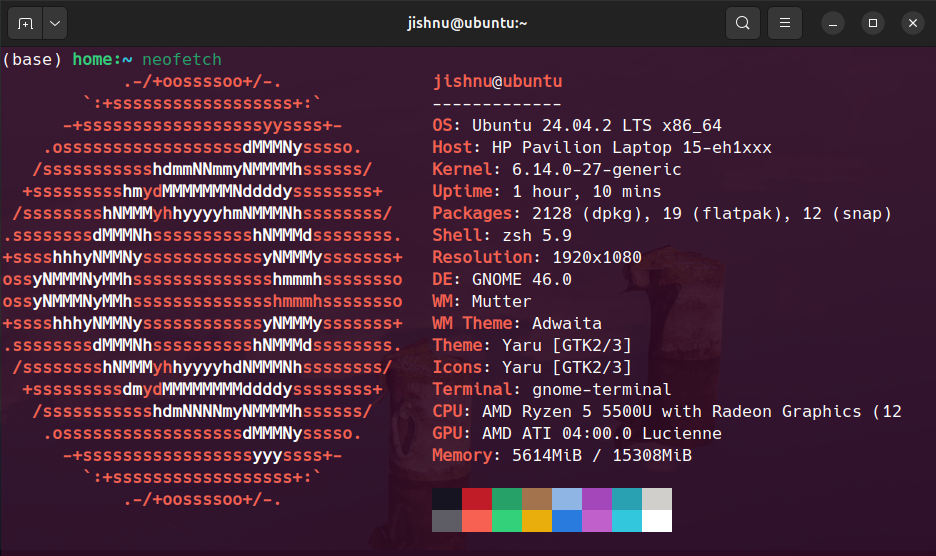
The benchmarks were executed on the following system configuration:
The benchmarks clearly demonstrate the superiority of the auto-scaling Kubernetes deployment under a high-concurrency load of 300,000 requests (3 clients x 100,000 requests each).
| Deployment | Average Time Taken (seconds) | Performance Gain |
|---|---|---|
| Single Docker | ~207s | Baseline |
| Kubernetes + HPA | ~123s | ~68% Faster |
The single Docker container becomes a bottleneck, whereas the Kubernetes deployment scales to 5 pods, distributing the load efficiently and completing the same workload significantly faster.
- Resource Limits vs. Raw Power : Kubernetes does not scale well under artificial CPU overloads, scales based on its own resource requests and limits.
- I/O-Bound Scaling : True scaling is observed under I/O-bound workloads and horizontal pod autoscaling
- Docker vs. Kubernetes Trade-offs : Docker will always have native CPU advantage locally, but K8s is built for distributed load
- Real-Time Monitoring: Integrating Prometheus and Grafana to visualize real-time performance metrics, request latency, and pod resource consumption during load tests.
- Advanced Load Testing: Replace the custom scripts with industry-standard tools like Locust or k6 for more control over test scenarios and user behavior.
- CI/CD Pipeline: Implementing GitHub Actions to automatically build the Docker image and deploy updates to the Kubernetes cluster on every push to the main branch.
Contributions are welcome! If you have a suggestion or find a bug, please follow these steps:
- Open an Issue : Discuss the change you wish to make by creating a new issue.
- Fork the Repository : Create your own copy of the project.
- Create a Pull Request : Submit your changes for review.
This project is licensed under the ISC License - see the LICENSE file for details.