
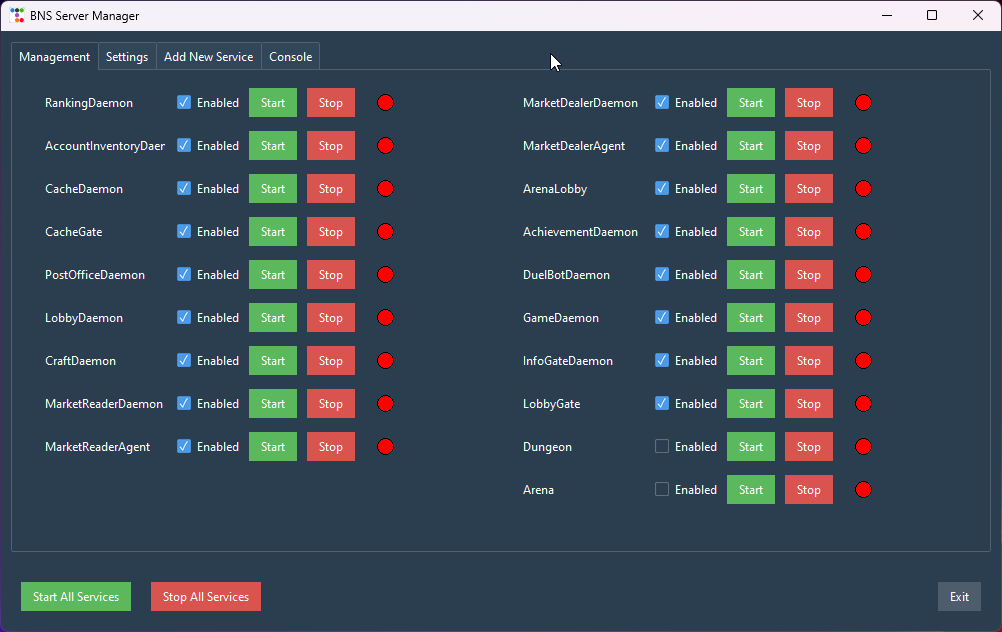
BNS Server Manager is a tool for managing services of the Blade & Soul game server.
It allows administrators and developers to effectively manage all aspects of server processes through a user-friendly graphical interface.
Key features include:
- Starting and stopping game server services.
- Setting auto-start intervals.
- Adding new services to the list of managed components.
- Editing server configurations through the
config.jsonfile. - Viewing logs of all executed operations.
The program is designed to simplify management of the Blade & Soul server architecture, providing intuitive tools for centralized control.
- Python 3.8+
- Dependencies:
ttkbootstrap
To install the required libraries, run the command:
pip install ttkbootstrap- Save the program code to the file
bns_server_manager.py. - Execute the command:
python bns_server_manager.py- Manage service states (Start, Stop, Enable/Disable).
- Display all added services.
- Buttons for bulk starting/stopping all services.
- Modify paths to executable files.
- Configure auto-start intervals.
- Save changes.
- Add new services to the system.
- Fields to input the name and path to the executable file.
- Log all operations performed in the application.
- Display the status of command execution.
The configuration file contains a list of services in JSON format. Example:
[
    {
        "name": "RankingDaemon",
        "path": "D:\\service\\RankingDaemon\\bin\\RankingDaemon.exe",
        "interval": 10,
        "enabled": true
    },
    {
        "name": "AccountInventoryDaemon",
        "path": "D:\\service\\AccountInventoryDaemon\\bin\\AccountInventoryDaemon.exe",
        "interval": 15,
        "enabled": false
    }
]name— The name of the service.path— The path to the executable file.interval— The auto-start interval (in seconds).enabled— The activation flag (enabled/disabled).
The program uses the following libraries:
ttkbootstrap— for creating a modern and intuitive interface.tkinter— a standard library for creating graphical interfaces in Python.json— for working with the configuration file.subprocess— for managing processes (starting and stopping services).
To create an executable file (.exe) without the console window from your Python script, follow these steps:
If you haven’t installed PyInstaller yet, run the following command:
pip install pyinstallerMake sure the icon file icon.ico is in the same folder as your script BNS-Server-Manager.py. If you have an image in another format, convert it to .ico.
pyinstaller --onefile --windowed --icon=icon.ico BNS-Server-Manager.py--onefile— packs all files into one executable file.--windowed— excludes the console window.--icon=icon.ico— adds a custom icon.
After running the command, PyInstaller will create a dist folder where you will find the BNS-Server-Manager.exe file.
Go to the dist folder and run BNS-Server-Manager.exe to check if it works correctly.
The program is distributed freely. You can use and modify it according to your needs.