
Universal operating system for a selection of ARM single board computers. It's more or less pure Debian / Ubuntu with dedicated kernel and small modifications to operating system.
Currently supported boards / kernels:
- Cubieboard 1,2,3				3.4.x and mainline
- BananaPi / PRO / R1			3.4.x and mainline
- Cubox, Hummingboard			3.14.x and mainline
- Linksprite Pcduino3 nano		3.4.x and mainline
- Olimex Lime, Lime 2, Micro 	3.4.x and mainline
- Orange Pi						3.4.x and mainline
- Udoo quad						4.0.8
- Udoo Neo						3.14.x
- Debian Wheezy, Jessie or Ubuntu Trusty based.
- Community backed kernel in most cases with large hardware support and headers.
- Board / wireless firmware included where needed.
- Build ready – possible to compile external modules.
- apt-upgrade ready for kernel, u-boot and other customizations.
- Distributions upgrade ready
- hostapd ready with optimized configuration and manually build binaries
- ethernet adapter with DHCP and SSH server ready on default port (22) with regenerated keys @ first boot
- SD image is big as actual size (around 1G) and auto resized to maximum size @first boot
- graphics desktop environment upgrade ready, some with hardware acceleration.
- SATA & USB install script included (/root)
- serial console enabled
- root password is 1234. You will be prompted to change it at first login
- enabled automatic security updating and ready for kernel apt-get updating
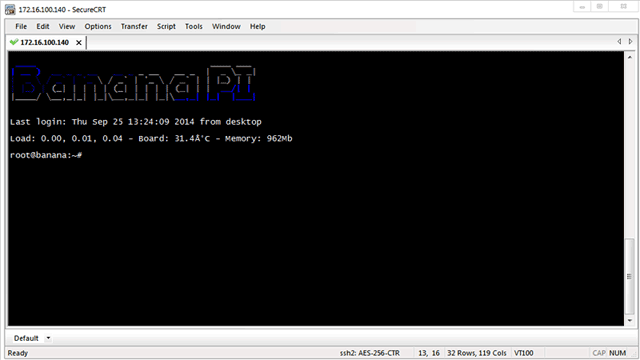
- login script shows board MOTD with current board temp (if avaliable), hard drive temp, ambient temp from Temper(if avaliable) and battery charge ratio (if avaliable) & actual free memory
- Performance tweaks:
- /tmp & /log = RAM, ramlog app saves logs to disk daily and on shut-down (ramlog is only in Wheezy, others have default logger)
- automatic IO scheduler. (check /etc/init.d/armhwinfo)
- journal data writeback enabled. (/etc/fstab)
- commit=600 to flush data to the disk every 10 minutes (/etc/fstab)
- eth0 interrupts are using dedicated core (some boards)
- stable,
- supported,
- minimalistic,
- The operating system is free,
- Upgrade is free,
- Technical support is free.
It's your call.

Thank you!
Armbian is avaliable as SD card image.

Note: each image have more download options:
- Separate images for Debian Wheezy, Jessie and Ubuntu Trusty
- [M]irror download
- [R]oot filesystem deb package (for manual upgrading from previous versions)
- Different kernel options and archive with u-boot, dtbs and firmware packages.
Major difference between old and new kernel is hardware support. They are both stable but older kernel is usually fully supported while in new some things are missing. (audio, HW graphics acceleration, ...)
You will need to setup development environment within Ubuntu 14.04 LTS x64 server image and cca. 20G of free space.
nano compile.sh
with this content:
#!/bin/bash
#
# 	Edit and execute this script - Ubuntu 14.04 x86/64 recommended
#
#   Check https://github.com/igorpecovnik/lib for possible updates
#

# method
KERNEL_ONLY="no"                            # build kernel only
SOURCE_COMPILE="yes"                        # force source compilation
KERNEL_CONFIGURE="no"                       # change default configuration
KERNEL_CLEAN="yes"                          # MAKE clean before compilation
USEALLCORES="yes"                           # Use all CPU cores
BUILD_DESKTOP="no"                          # desktop with hw acceleration for some boards

# user
DEST_LANG="en_US.UTF-8"                     # sl_SI.UTF-8, en_US.UTF-8
CONSOLE_CHAR="UTF-8" 						# console charset
TZDATA="Europe/Ljubljana"                   # time zone
ROOTPWD="1234"                              # forced to change @first login
SDSIZE="1500"                               # SD image size in MB
AFTERINSTALL=""                             # command before closing image
MAINTAINER="Igor Pecovnik"                  # deb signature
MAINTAINERMAIL="igor.pecovnik@****l.com"    # deb signature
GPG_PASS=""                                 # set GPG password for non-interactive packing

# advanced
KERNELTAG="v4.1.1"                          # kernel TAG - valid only for mainline
UBOOTTAG="v2015.04"							# kernel TAG - valid for all sunxi
FBTFT="yes"                                 # https://github.com/notro/fbtft
EXTERNAL="yes"                              # compile extra drivers
FORCE="yes"									# ignore manual changes to source

# source is where we start the script
SRC=$(pwd)
# destination
DEST=$(pwd)/output
# get updates of the main build libraries
if [ -d "$SRC/lib" ]; then
	cd $SRC/lib
	git pull
else
	# download SDK
	apt-get -y -qq install git
	git clone https://github.com/igorpecovnik/lib
fi
source $SRC/lib/main.sh
Make it executable.
chmod +x compile.sh
./compile.sh
Build process summary:
- creates development environment on the top of X86/AMD64 Ubuntu 14.04 LTS,
- download proven sources, applies patches and use tested configurations,
- cross-compile universal boot loader (u-boot), kernel and other tools and drivers,
- pack kernel, uboot, dtb and root customizations into debs,
- debootstrap minimalistic Debian Wheezy, Jessie and Ubuntu Trusty into SD card image,
- install additional packets, apply customizations and shrink image to it's actual size.
Additional clarification:
- KERNEL_ONLY - if we want to compile kernel, u-boot, headers and dtbs package only. The output is .tar file in target subdirectory. By default this is output/kernel.
- SOURCE_COMPILE is useful switch when we are building images and we already compiled kernel before. All kernel builds are cached in output/kernel by default until they are removed manually. If we choose this option, we will be selecting one of previously compiled kernels.
- KERNEL_CONFIGURE will bring up kernel configurator otherwise kernel will be compiled with script presets located in lib/config/linux-*.config
- KERNEL_CLEAN executes "MAKE clean" on sources before compilation.
- USEALLCORES is here to tweak host CPU power consumption
- BUILD_DESKTOP is an experimental feature to build a desktop on the top of the system with hw acceleration for some boards.
- AFTERINSTALL is a variable with command executed in a process of building just before closing image to insert some of your custom applications or fixes.
- KERNELTAG is a TAG for specific kernel source. Some sources doesn't have that.
- UBOOTTAG is a TAG for specific u-boot source. Some sources doesn't have that.
- FBTFT is a driver for small displays. Only applicable for old kernels (3.4-3.14)
- EXTERNAL compiles custom drivers
- FORCE ignore manual changes to source
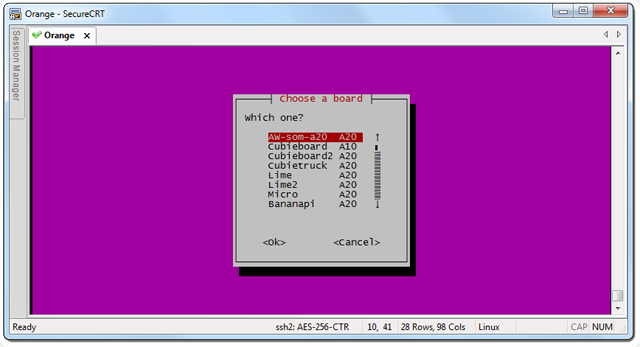
- Choose board:
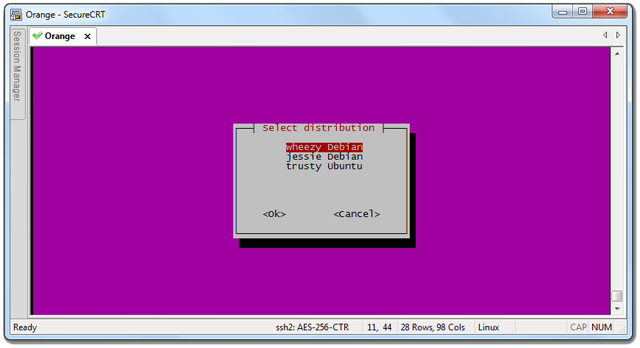
- Choose distribution:
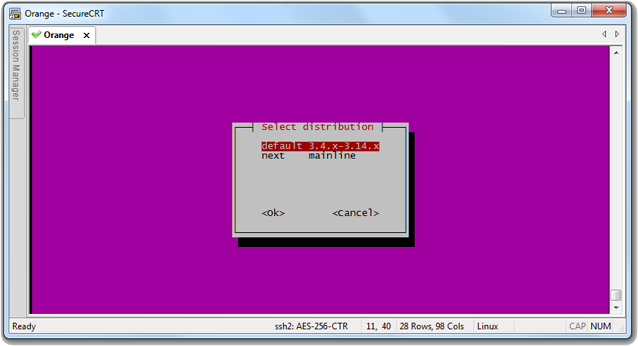
- Choose kernel:
- 3.4 - 3.14 (old stable)
- latest stable from www.kernel.org
At first run we are downloading all necessary dependencies. Those packets are going to be installed:
device-tree-compiler pv bc lzop zip binfmt-support bison build-essential ccache debootstrap
flex gawk gcc-arm-linux-gnueabihf lvm2 qemu-user-static u-boot-tools uuid-dev zlib1g-dev unzip
libusb-1.0-0-dev parted pkg-config expect gcc-arm-linux-gnueabi libncurses5-dev
We need to get some predefined variables about selected board. Which kernel & uboot source to use, modules to load, which is the build number, do we need to have a single partition or dual with boot on fat, which extra drivers to compile out of the kernel tree, ...
Board configuration example:
REVISION="1.1"												# Version number is altered by board maintainer
BOOTSIZE="16"												# Size of FAT boot partition. If not defined it's not used.
BOOTLOADER="https://github.com/UDOOboard/uboot-imx"			# Uboot source location
BOOTSOURCE="u-boot-neo"										# Local folder where to download it
BOOTCONFIG="udoo_neo_config"								# Which compile config to use
CPUMIN="198000"												# CPU minimum frequency
CPUMAX="996000"												# CPU minimum frequency
MODULES="bonding"											# old kernel modules
MODULES_NEXT=""												# new kernel modules
LINUXKERNEL="https://github.com/UDOOboard/linux_kernel"		# kernel source location
LINUXCONFIG="linux-udoo-neo"								# kernel configuration
LINUXSOURCE="linux-neo"										# Local folder where to download it
This isn't ment to be user configurable but you can alter variables if you really know what you are doing.
When we know where are the sources and where they need to be the download / update process starts. This might take from several minutes to several hours.
In patching process we are appling patches to sources. The process is defined in:
lib/patching.sh
- compile from scratch with additional source cleaning and menu config.
- select cached / already made kernel
Debootstrap creates fresh Debian / Ubuntu root filesystem templates or use cached under:
output/rootfs/$DISTRIBUTION.tgz
To recreate those files you need to remove them manually.
Those packets are installed on the top of basic system. There are some small differences between distributions:
alsa-utils automake btrfs-tools bash-completion bc bridge-utils bluez build-essential cmake
cpufrequtils curl device-tree-compiler dosfstools evtest figlet fbset fping git haveged hddtemp
hdparm hostapd htop i2c-tools ifenslave-2.6 iperf ir-keytable iotop iw less libbluetooth-dev
libbluetooth3 libtool libwrap0-dev libfuse2 libssl-dev lirc lsof makedev module-init-tools mtp
tools nano ntfs-3g ntp parted pkg-config pciutils pv python-smbus rfkill rsync screen stress
sudo sysfsutils toilet u-boot-tools unattended-upgrades unzip usbutils vlan wireless-tools wget wpasupplicant
When root filesystem is ready we need to instal kernel image with modules, board definitions, firmwares. Along with this we set the CPU frequency min/max, hostname, modules, network interfaces templates. Here is also the place to install headers and fix + native compile them on the way.
Each distributin has it's own way of doing things:
- serial console
- different packets
- configuration locations
Each board has their own tricks: different device names, firmware loaders, configuration (de)compilers, hardware configurators
You can build a desktop withing the image. Consider this feature as experimental. Hardware acceleration on Allwinner boards is working within kernel 3.4.x only.
This place is reserved for custom applications. There is one example of application - USB redirector.
There is an option to add some extra commands just before closing an image which is also automaticaly shrink to it's actual size with some small reserve.
It will be something like this:
compile.sh
lib/bin/				blobs, firmwares, static compiled, bootsplash
lib/config/				kernel, board, u-boot, hostapd, package list
lib/documentation/		user and developers manual
lib/patch/				collection of kernel and u-boot patches
lib/scripts/			firstrun, arm hardware info, firmware loaders
lib/LICENSE				licence description
lib/README.md			quick manual
lib/boards.sh			board specfic installation, kernel install, desktop install
lib/common.sh			creates environment, compiles, shrink image
lib/configuration.sh	boards presets - kernel source, config, modules, ...
lib/deboostrap.sh		basic system template creation
lib/distributions.sh	system specific installation and fixes
lib/main.sh				user input and script calls
lib/patching.sh			board and system dependend kernel & u-boot patch calls
output/linux-sunxi		downloaded kernel source
output/u-boot			downloaded u-boot source
output/output/kernel	tar packed kernel, uboot, dtb and firmware debs
output/output/rootfs	cache for root filesystem
output/output/u-boot	deb packed uboot
output/output/			zip packed RAW image
Have fun with building ;)