
The plugin provides a simple command, :Linediff, which is used to diff two separate blocks of text.
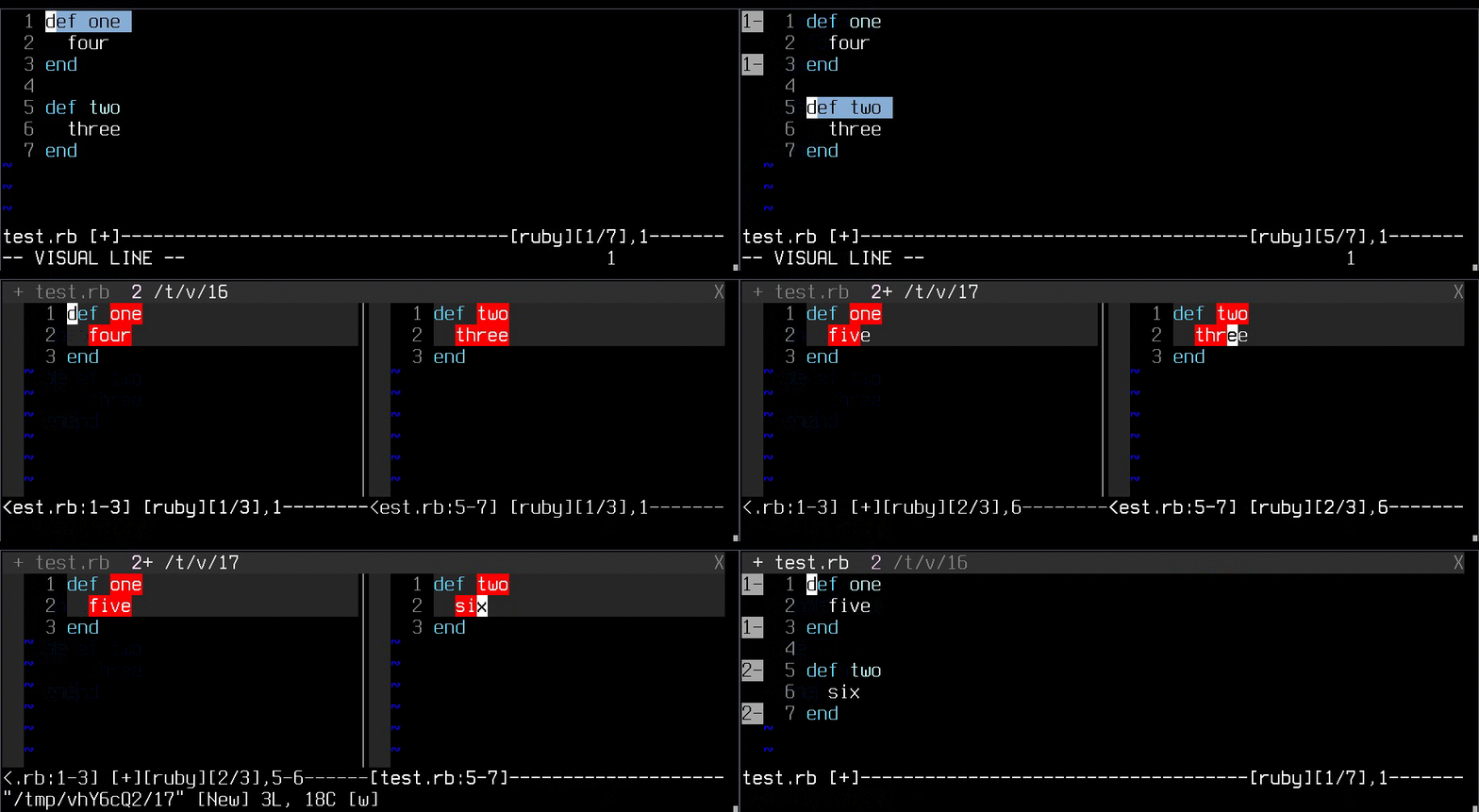
A simple example:
def one
  two
end

def two
  three
end
If we mark the first three lines, starting from "def one", in visual mode, and execute the :Linediff command, the signs "1-" will be placed at the start and at the end of the visual mode's range. Doing the same thing on the bottom half of the code, starting from "def two", will result in the signs "2-" placed there. After that, a new tab will be opened with the two blocks of code in vertical splits, diffed against each other.
The two buffers are temporary, but when any one of them is saved, its original buffer is updated. Note that this doesn't save the original buffer, just performs the change. Saving is something you should do later.
Executing the command :LinediffReset will delete the temporary buffers and remove the signs. Executing a new :Linediff will do the same as :LinediffReset, but will also initiate a new diff process.
The statuslines of the two temporary buffers will be changed to contain:
- The original buffer
- The starting line of the selected segment
- The ending line of the selected segment
If you're using a custom statusline and it contains "%f" (the current file's name), that token will simply be substituted by the above data. Otherwise, the entire statusline will be set to a custom one.
If you'd rather the statusline is left untouched, you can set the g:linediff_modify_statusline setting to 0. You can still access the buffer description via b:differ.description.
If you'd like to do some additional setup on the buffers, you can hook into the LinediffBufferReady User autocommand. For instance, in order to stop the linediff with a q, try:
autocmd User LinediffBufferReady nnoremap <buffer> q :LinediffReset<cr>If you'd like to diff more than two areas of code, you can use the :LinediffAdd command after the first :Linediff to mark more areas. You can then call :LinediffShow to open the diff:
:1,2Linediff
:3,4LinediffAdd
:5,6LinediffAdd
:LinediffShow
This will diff the three specified areas. Alternatively, you can use the :LinediffLast command to add and show the differ. So, the above code is equivalent to:
:1,2Linediff
:3,4LinediffAdd
:5,6LinediffLast
Note that there's a hard limit of 8 diffs set by Vim, so you can't diff more areas than that.
If you have a merge conflict like this one:
def one
<<<<<<< main
  "first"
=======
  "second"
>>>>>>> branch
end
You can easily start a diff between the two variants of the code by executing the :LinediffMerge command. You can use the diffed buffers the same way, or, you can use :LinediffPick to choose one buffer whose contents will replace the entire merge conflict. This also works with three-way diffs:
def one
<<<<<<< master
  "first"
|||||||
  "second"
=======
  "third"
>>>>>>> branch
end
The statuslines of the diff buffers will hold the label of the merge parent for convenience. Also for convenience, executing :LinediffPick directly on the merge area will pick the area without going through the merge buffers first.
:[range]LinediffThe main interface of the plugin. Needs to be executed on a range of lines, which will be marked with a sign. On the selection of the second such range, the command will open a tab with the two ranges in vertically split windows and perform a diff on them. Saving one of the two buffers will automatically update the original buffer the text was taken from.
When executed for a third time, a new line diff is initiated, and the current process is reset, much like the effect of |LinediffReset| would be.
:LinediffReset[!]Removes the signs denoting the diffed regions and deletes the temporary buffers, used for the diff. The original buffers are untouched by this, which means that any updates to them, performed by the diff process will remain. Specifying ! discards unsaved changes made in the temporary buffers.
:[range]LinediffAddAdds a buffer to be diffed later. This is an interface that allows diffing more than two areas. Should be followed by another "Add", or by "Show" or "Last" to finish the process of adding areas.
:LinediffShowShows the diff between all of the marked areas. This is useful if you've been
adding areas with :LinediffAdd and you're ready to see their diff.
:[range]LinediffLastPerforms a combination of :LinediffAdd and :LinediffShow. Considers the
marked area to be the last one added to the diff buffers and opens the diff.
:LinediffMergeLooks for merge markers around the cursor, takes their contents and renders
them in a diff. The diff buffers act like normal diff buffers, updating their
parent buffer, but you can call :LinediffPick to pick one of them to replace
the entire merge conflict area.
:LinediffPickAfter a :LinediffMerge, in a diff buffer -- picks the diff buffer you're in
as the "correct" one to replace the entire merge conflict area in the parent
buffer.
Without a :LinediffMerge -- picks the area within a merge to replace the
entire merge with.
<Plug>(linediff-operator){motion}: Performs:Linediffto {motion} lines.<Plug>(linediff-add-operator){motion}: Performs:LinediffAddto {motion} lines.<Plug>(linediff-last-operator){motion}: Performs:LinediffLastto {motion} lines.
Pull requests are welcome, as long as they did not involve LLM usage. Be sure to abide by the CODE_OF_CONDUCT.md as well.