A Python-based solution for detecting objects in video streams using Ultralytics YOLOv8. Detects 80+ common objects (people, vehicles, animals, etc.) and displays them with bounding boxes and labels.
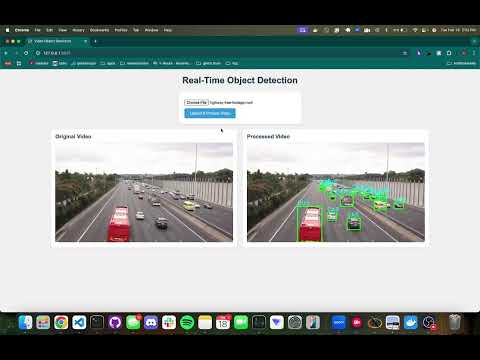
Click the image above to watch the demo video
Backend:
- Python 3.8+
- Flask (Web Framework)
- YOLOv8 (Object Detection)
- OpenCV (Video Processing)
- PyTorch (Deep Learning Backend)
Frontend:
- HTML5/CSS3
- JavaScript
Dataset:
- COCO (Common Objects in Context) 80-class
Deployment:
- Docker
- Kubernetes
- Virtual Environment
- Video Input: Reads video frames using OpenCV
- Object Detection:
- Uses YOLOv8n (nano version) for fast inference
- Processes each frame through the neural network
- Visualization:
- Draws bounding boxes around detected objects
- Labels objects with text
-
Clone Repository
-
Choose a Deployment Method:
Option 1: Using Kubernetes
- Pull Docker Image:
docker pull ghcr.io/aryanp123/myapp:1.0.0
-
Apply Deployment and Service:
kubectl apply -f deployment.yaml
kubectl apply -f service.yaml
-
Access Web Interface: Open
http://localhost
Option 2: Using Docker Compose
-
Start Application:
docker-compose up -d
-
Access Web Interface: Open
http://localhost:3000in your browser.
Option 3: Using a Virtual Environment (without Docker)
-
Set Up Virtual Environment:
python -m venv venv
source venv/bin/activate  # Linux/MacOS
venv\Scripts\activate     # Windows
-
Install Dependencies:
pip install --no-cache-dir \
  flask \
  ultralytics \
  torch \
  opencv-python-headless
-
Start Development Server:
python app.py
-
Access Web Interface: Open
http://localhost:3000in your browser.
-
Upload & Process Video
- Click "Choose File" and select an MP4 video.
- Click "Upload & Process".
- View real-time detection results.
- YOLOv8 by Ultralytics
- COCO Dataset by Microsoft
- OpenCV for video processing