- Overview
- User Stories
- Screen Archetypes
- Navigation
- Wireframes
- Schema
- Sprint 1 Updates
- Sprint 2 Updates
- Sprint 3 Updates
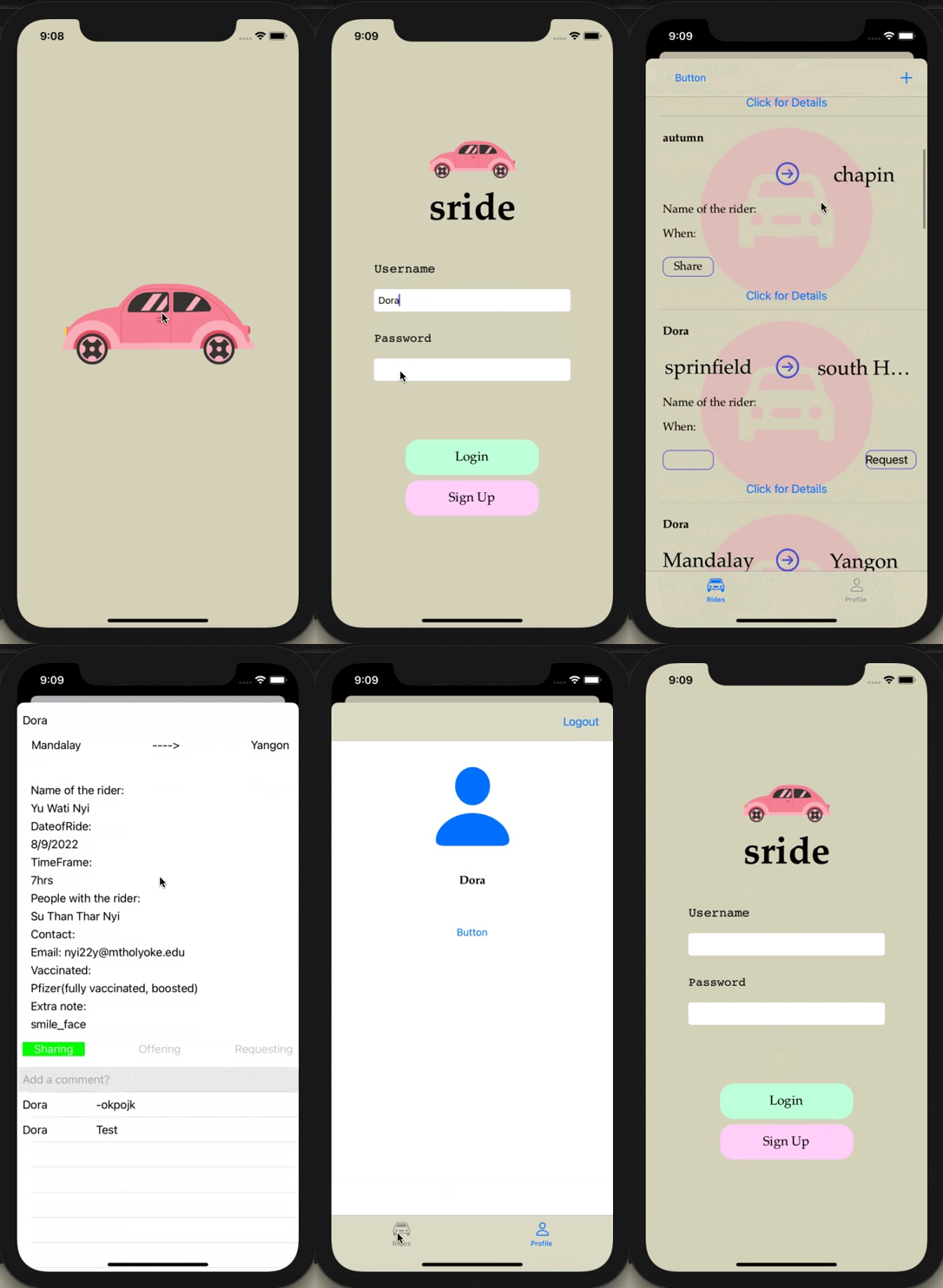
- Final Demo Video
- Technologies
- Authors
- Acknowledgement
Sride is an iOS app that aims to promote ride-sharing by providing a platform dedicated for ride-sharing information among primarily the college students community. On Sride, users can see others' ride-sharing offers and requests, and filter out the posts in the category they're interested in. They can create posts and make comments on others' posts.
We, the three developers of this project, were all first-year college students when we created this app. When we left home to college for the first time, one of the biggest shocks we encountered was how hard it was to get to places when our parents were not there to drive us here and there anymore. Most college students don’t have a car. Many of us don’t even have a driver license. There are taxis, Uber, Lyft, but unless big groups of friends are going together, those means of travel are too expensive for college students. That’s why it’s very valuable to have people to share ride with.
Usually in a college or college area, there is an account on Instagram or a group on Facebook that serves as a place for people to share ride information. We notice that, however, people have a hard time finding ride-share partners on those platforms because there would be so many posts about different topics mixing together, which makes it difficult to find the information we’re looking for, and to make our request reach the right people. Also, with so much notification on Instagram/Facebook, it's easy to miss a response about the ride that you're interested in sharing. We aspire to bring a solution to our community: Sride, a systematic and organized app for students to find rideshare partners and keep track of all the rides they’ve shared.
On Sride, most of the posts will be categorized into Share, Request, or Offer, making it easier for users to find the information they need. We provide a template for creating new posts so that it's quicker and easier for the user to create a post, and so that the posts on the platform look more organized and uniform, thus easier for users to scan for information when scrolling through the feed.
More details about our categories: Share means that the user is going to travel by Uber, Lyft, taxi - any third-party vehicle - and they want to share the ride with others. Request means that the user doesn't already have any means of traveling, and is asking if someone can drive them or take them along to their desired destination. Offer means the user has a car and is willing to take some other people along to the location they're driving to.
- Category: Social media, transportation
- Platform: This application is primarily developed for mobile (iOS), but the idea can be further developed on a website, or desktop application as well.
- Market: Aiming primarily towards communities of college students in rural or suburban areas, where public transporation is not as developed and the distances between places are much further than in cities. Applications like UberX Share are usually only available in highly populated urban areas.
- Habit: Users will check the app when they are thinking of going somewhere that requires car travelling.
Must-have Stories
- User can sign up
- User can sign in to the feed screen
- User can see posts on the feed screen. The most recent posts will appear first.
- User can click on a post and see the Details view of that post
- Users can see comments and add comments in the Details view
- User can create new posts
- User can navigate between tabs: Main Feed tab, and Profile tab.
- User can see their Profile screen when switching to the Profile tab.
- User can log out from their Profile screen
- User can see the record of their past posts.
Nice-to-have Stories
- User can edit and delete their posts and comments.
- User can filter out posts based on the ride's characteristic (share, offer, or request).
- User can search for posts using keyword search bar
- User can receive in-app and/or mobile notification when people comment on their post or reply to their comments.
- User can set up their notification setting so that they're notified when there are posts mentioning something they're interested in (e.g. location, date, etc.)
- User can upvote a post and a user (review/rating)
- User can chat with other users in the app
- User can add a profile picture
- User can see posts on the feed screen in the order of urgency (rides with the date closest to current system date will appear first)
- User can see their new post on the feed screen immediately after creation
- User can scroll to reload the feed
-
Login Screen
- User can sign up
- User can log in
-
Feed Screen
- User can scroll through all ride share posts
- (Future step): posts will have a color tint based on the type of post.
-
Detail screen
- Read full post
- See all comments
-
Create post screen
- User can insert text in the text boxs
- User can set the category of their post: share ride (using a third-party vehicle like Uber), offer ride (using the user's vehicle), or request ride (using the request accepter's vehicle)
-
Profile screen
- User can log out
- User can see the record of their past posts
- Optional: Notifications (someone comments on the user's post or the post that the user turns on their notifications for, someone replies to the user's comment, someone posts mentioning the user's interests, etc.)
Tab Navigation (Tab to Screen)
- Rides Tab -> Feed Screen
- Profile Tab -> Profile Screen
Flow Navigation (Screen to Screen)
- Login Screen
- Login Screen -> Feed Screen
- Feed Screen
- Feed Screen -> Create Ride
- Feed Screen -> Details Screen
- Profile Screen
- Profile Screen -> User's posts Screen
- User's posts Screen
- User's posts Screen -> Details Screen

This was the original wireframe we drew at the beginning. Throughout the process of writing the app, there have been some changes. Most significant is the replacement of the three category tabs (Share, Offer, Request) by the Filtering button, which helps the app look cleaner and enables more advanced filtering functions, like filtering posts based on dates, locations, etc.
| Property | Type | Description |
|---|---|---|
| objectId | String | unique id for the user post (default field) |
| accountOwner | Pointer to User | the author of the post |
| destination | String | destination of the ride |
| departure | String | departure location of the ride |
| dateOfRide | String | date when the user wants to get a ride |
| createdAt | DateTime | date when the post is created |
| updatedAt | DateTime | date when post is last updated (default field) |
| share | Bool | if the user is sharing the ride |
| offer | Bool | if the user is offering the ride |
| request | Bool | if the user is requesting the ride |
| comments | Pointer to the comment(s) | the comment(s) on the post |
One of our future plans is changing the type of dateOfRide from String to DateTime by allowing the user to input the date, maybe using the PopUp Date Picker.
| Property | Type | Description |
|---|---|---|
| objectId | String | unique id for the comment (default field) |
| author | Pointer to User | the author of the comment |
| ride | Pointer to Ride | the ride post that the comment is made on |
| text | String | the content of the comment |
| createdAt | DateTime | date when the post is created |
| updatedAt | DateTime | date when post is last updated (default field) |

Screen.Recording.2022-04-02.at.2.28.36.PM.mov

- Swift: our main coding language and application logic
- XCode: the software we use to build the app
- Parse: our custom backend database
- MessageInputBar: the Cocoapods pod that we use to implement the comment input bar
We are three close friends who all were first year students when we did this project. We are Computer Science majors at Mount Holyoke College!
- Codepath iOS University Spring 2022: We learned iOS development mainly from Codepath excellent content which were available for us at no cost!
- Joeun Park and Afeya Jahin: two mentors whose advice and feedback were invaluable throughout our process of building this first app, which was the first app that each of three of us had ever attempted to build.