Exception when launching demo #3


Description

I have cloned repository using --recursive . Opened solution and built it in Visual Studio.
When launching and compiling Demo project I get such exception:
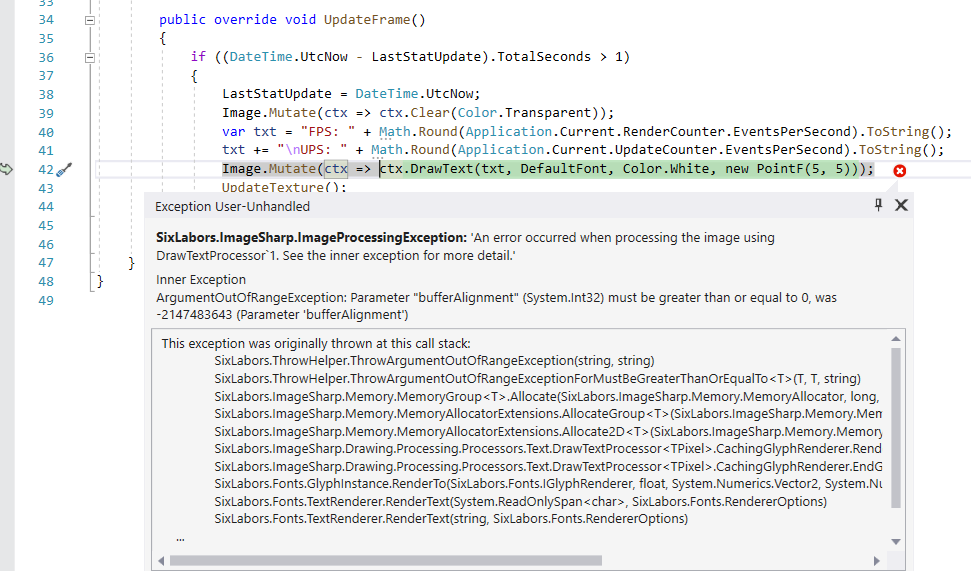
SixLabors.ImageSharp.ImageProcessingException
  HResult=0x80131500
  Message=An error occurred when processing the image using DrawTextProcessor`1. See the inner exception for more detail.
  Source=SixLabors.ImageSharp
  StackTrace:
   at SixLabors.ImageSharp.Processing.Processors.ImageProcessor`1.SixLabors.ImageSharp.Processing.Processors.IImageProcessor<TPixel>.Execute()
   at SixLabors.ImageSharp.Processing.DefaultImageProcessorContext`1.ApplyProcessor(IImageProcessor processor, Rectangle rectangle)
   at SixLabors.ImageSharp.Processing.DefaultImageProcessorContext`1.ApplyProcessor(IImageProcessor processor)
   at SixLabors.ImageSharp.Drawing.Processing.DrawTextExtensions.DrawText(IImageProcessingContext source, TextGraphicsOptions options, String text, Font font, IBrush brush, IPen pen, PointF location)
   at SixLabors.ImageSharp.Drawing.Processing.DrawTextExtensions.DrawText(IImageProcessingContext source, TextGraphicsOptions options, String text, Font font, Color color, PointF location)
   at SixLabors.ImageSharp.Drawing.Processing.DrawTextExtensions.DrawText(IImageProcessingContext source, String text, Font font, Color color, PointF location)
   at Aximo.Engine.Components.Geometry.StatsComponent.<>c__DisplayClass4_0.<UpdateFrame>b__1(IImageProcessingContext ctx) in C:\SOFTWARE_LIBRARIES\AxEngineSource\AxEngine\Engine\Components\Geometry\StatsComponent.cs:line 42
   at SixLabors.ImageSharp.Processing.ProcessingExtensions.Mutate[TPixel](Image`1 source, Configuration configuration, Action`1 operation)
   at SixLabors.ImageSharp.Processing.ProcessingExtensions.Mutate[TPixel](Image`1 source, Action`1 operation)
   at Aximo.Engine.Components.Geometry.StatsComponent.UpdateFrame() in C:\SOFTWARE_LIBRARIES\AxEngineSource\AxEngine\Engine\Components\Geometry\StatsComponent.cs:line 42
   at Aximo.Engine.ActorComponent.UpdateFrameInternal() in C:\SOFTWARE_LIBRARIES\AxEngineSource\AxEngine\Engine\Components\ActorComponent.cs:line 48
   at Aximo.Engine.SceneComponent.UpdateFrameInternal() in C:\SOFTWARE_LIBRARIES\AxEngineSource\AxEngine\Engine\Components\SceneComponent.cs:line 303
   at Aximo.Engine.Actor.UpdateFrameInternal() in C:\SOFTWARE_LIBRARIES\AxEngineSource\AxEngine\Engine\Actors\Actor.cs:line 128
   at Aximo.Engine.SceneContext.OnUpdateFrame() in C:\SOFTWARE_LIBRARIES\AxEngineSource\AxEngine\Engine\SceneContext.cs:line 133
   at Aximo.Engine.Application.OnUpdateFrameInternal(FrameEventArgs e) in C:\SOFTWARE_LIBRARIES\AxEngineSource\AxEngine\Engine\Application.cs:line 379
   at Aximo.Engine.Application.<RegisterWindowEvents>b__46_1(FrameEventArgs e) in C:\SOFTWARE_LIBRARIES\AxEngineSource\AxEngine\Engine\Application.cs:line 144
   at Aximo.Engine.Windows.WindowContext.OnUpdateFrameInternal(FrameEventArgs e) in C:\SOFTWARE_LIBRARIES\AxEngineSource\AxEngine\Engine\Windows\WindowContext.cs:line 79
   at OpenToolkit.Windowing.Desktop.GameWindow.OnUpdateFrame(FrameEventArgs args)
   at Aximo.Engine.Windows.RenderWindow.OnUpdateFrame(FrameEventArgs e) in C:\SOFTWARE_LIBRARIES\AxEngineSource\AxEngine\Engine\Windows\RenderWindow.cs:line 81
   at OpenToolkit.Windowing.Desktop.GameWindow.DispatchUpdateFrame()
   at OpenToolkit.Windowing.Desktop.GameWindow.Run()
   at Aximo.Engine.Windows.WindowContext.UIThread() in C:\SOFTWARE_LIBRARIES\AxEngineSource\AxEngine\Engine\Windows\WindowContext.cs:line 202
   at System.Threading.ThreadHelper.ThreadStart_Context(Object state)
   at System.Threading.ExecutionContext.RunInternal(ExecutionContext executionContext, ContextCallback callback, Object state)

  This exception was originally thrown at this call stack:
	SixLabors.ThrowHelper.ThrowArgumentOutOfRangeException(string, string)
	SixLabors.ThrowHelper.ThrowArgumentOutOfRangeExceptionForMustBeGreaterThanOrEqualTo<T>(T, T, string)
	SixLabors.ImageSharp.Memory.MemoryGroup<T>.Allocate(SixLabors.ImageSharp.Memory.MemoryAllocator, long, int, SixLabors.ImageSharp.Memory.AllocationOptions)
	SixLabors.ImageSharp.Memory.MemoryAllocatorExtensions.AllocateGroup<T>(SixLabors.ImageSharp.Memory.MemoryAllocator, long, int, SixLabors.ImageSharp.Memory.AllocationOptions)
	SixLabors.ImageSharp.Memory.MemoryAllocatorExtensions.Allocate2D<T>(SixLabors.ImageSharp.Memory.MemoryAllocator, int, int, SixLabors.ImageSharp.Memory.AllocationOptions)
	SixLabors.ImageSharp.Drawing.Processing.Processors.Text.DrawTextProcessor<TPixel>.CachingGlyphRenderer.Render(SixLabors.ImageSharp.Drawing.IPath)
	SixLabors.ImageSharp.Drawing.Processing.Processors.Text.DrawTextProcessor<TPixel>.CachingGlyphRenderer.EndGlyph()
	SixLabors.Fonts.GlyphInstance.RenderTo(SixLabors.Fonts.IGlyphRenderer, float, System.Numerics.Vector2, System.Numerics.Vector2, float)
	SixLabors.Fonts.TextRenderer.RenderText(System.ReadOnlySpan<char>, SixLabors.Fonts.RendererOptions)
	SixLabors.Fonts.TextRenderer.RenderText(string, SixLabors.Fonts.RendererOptions)
    ...
    [Call Stack Truncated]
Inner Exception 1:
ArgumentOutOfRangeException: Parameter "bufferAlignment" (System.Int32) must be greater than or equal to 0, was -2147483643 (Parameter 'bufferAlignment')