





✨ AiCore is a comprehensive framework for integrating various language models and embedding providers with a unified interface. It supports both synchronous and asynchronous operations for generating text completions and embeddings, featuring:
🔌 Multi-provider support: OpenAI, Mistral, Groq, Gemini, NVIDIA, and more 🤖 Reasoning augmentation: Enhance traditional LLMs with reasoning capabilities 📊 Observability: Built-in monitoring and analytics 💰 Token tracking: Detailed usage metrics and cost tracking ⚡ Flexible deployment: Chainlit, FastAPI, and standalone script support 🛠️ MCP Integration: Connect to Model Control Protocol servers via tool calling 🖥️ Claude Code provider: Use your Claude subscription locally or remotely via the Claude Agents Python SDK — no API key required
pip install git+https://github.com/BrunoV21/AiCoreor
pip install git+https://github.com/BrunoV21/AiCore.git#egg=core-for-ai[all]or
pip install core-for-ai[all]from aicore.llm import Llm
from aicore.llm.config import LlmConfig
import os
llm_config = LlmConfig(
provider="openai",
model="gpt-4o",
api_key="super_secret_openai_key"
)
llm = Llm.from_config(llm_config)
# Generate completion
response = llm.complete("Hello, how are you?")
print(response)from aicore.llm import Llm
from aicore.llm.config import LlmConfig
import os
async def main():
llm_config = LlmConfig(
provider="openai",
model="gpt-4o",
api_key="super_secret_openai_key"
)
llm = Llm.from_config(llm_config)
# Generate completion
response = await llm.acomplete("Hello, how are you?")
print(response)
if __name__ == "__main__":
asyncio.run(main())more examples available at examples/ and docs/exampes/
LLM Providers:
- Anthropic
- OpenAI
- Mistral
- Groq
- Gemini
- NVIDIA
- OpenRouter
- DeepSeek
- Claude Code (local — via Claude Agents Python SDK, no API key required)
- Remote Claude Code (remote — connects to a
aicore-proxy-serverover HTTP)
Embedding Providers:
- OpenAI
- Mistral
- Groq
- Gemini
- NVIDIA
Observability Tools:
- Operation tracking and metrics collection
- Interactive dashboard for visualization
- Token usage and latency monitoring
- Cost tracking
MCP Integration:
- Connect to multiple MCP servers simultaneously
- Automatic tool discovery and calling
- Support for WebSocket, SSE, and stdio transports
To configure the application for testing, you need to set up a config.yml file with the necessary API keys and model names for each provider you intend to use. The CONFIG_PATH environment variable should point to the location of this file. Here's an example of how to set up the config.yml file:
# config.yml
embeddings:
  provider: "openai" # or "mistral", "groq", "gemini", "nvidia"
  api_key: "your_openai_api_key"
  model: "text-embedding-3-small" # Optional

llm:
  provider: "openai" # or "mistral", "groq", "gemini", "nvidia"
  api_key: "your_openai_api_key"
  model: "gpt-o4" # Optional
  temperature: 0.1
  max_tokens: 1028
  reasonning_effort: "high"
  mcp_config: "./mcp_config.json" # Path to MCP configuration
  max_tool_calls_per_response: 3 # Optional limit on tool calls
config examples for the multiple providers are included in the config dir
from aicore.llm import Llm
from aicore.config import Config
import asyncio

async def main():
    # Load configuration with MCP settings
    config = Config.from_yaml("./config/config_example_mcp.yml")

    # Initialize LLM with MCP capabilities
    llm = Llm.from_config(config.llm)

    # Make async request that can use MCP-connected tools
    response = await llm.acomplete(
        "Search for latest news about AI advancements",
        system_prompt="Use available tools to gather information"
    )
    print(response)

asyncio.run(main())
Example MCP configuration (mcp_config.json):
{
  "mcpServers": {
    "search-server": {
      "transport_type": "ws",
      "url": "ws://localhost:8080",
      "description": "WebSocket server for search functionality"
    },
    "data-server": {
      "transport_type": "stdio",
      "command": "python",
      "args": ["data_server.py"],
      "description": "Local data processing server"
    },
    "brave-search": {
      "command": "npx",
      "args": [
        "-y",
        "@modelcontextprotocol/server-brave-search"
      ],
      "env": {
        "BRAVE_API_KEY": "SUPER-SECRET-BRAVE-SEARCH-API-KEY"
      }
    }
  }
}AiCore supports routing completions through your Claude subscription via the Claude Agents Python SDK. No Anthropic API key is required — auth is handled entirely by the Claude Code CLI. This is exposed through two providers and an optional proxy server:
| Component | Description |
|---|---|
claude_code |
Local provider — runs the Claude Code CLI on the same machine as AiCore |
remote_claude_code |
Remote provider — connects over HTTP to a aicore-proxy-server instance |
aicore-proxy-server |
Proxy server — wraps the local CLI as a FastAPI SSE service, shareable over a network |
Both providers share the same acomplete() / complete() interface and emit identical tool-call streaming events — you can switch between them with a single config change.
Runs claude-agent-sdk directly on the machine where AiCore is executing.
# 1. Install the Claude Code CLI (requires Node.js 18+)
npm install -g @anthropic-ai/claude-code

# 2. Authenticate once
claude login

# 3. Install AiCore (the Python SDK is included automatically)
pip install core-for-aifrom aicore.llm import Llm
from aicore.llm.config import LlmConfig
config = LlmConfig(
provider="claude_code",
model="claude-sonnet-4-5-20250929",
# No api_key needed — auth is handled by the CLI
)
llm = Llm.from_config(config)
response = await llm.acomplete("List all Python files in this project")
print(response)# config/config_example_claude_code.yml
llm:
provider: "claude_code"
model: "claude-sonnet-4-5-20250929"
# Optional
permission_mode: "bypassPermissions" # default — all tools allowed
cwd: "/path/to/your/project" # working directory for the CLI
max_turns: 10 # limit agentic turns
mcp_config: "./mcp_config.json" # pass through an MCP config file
cli_path: "/usr/local/bin/claude" # override if CLI is not on PATH
allowed_tools:
- "Read"
- "Write"
- "Bash"The proxy server wraps claude-agent-sdk in a FastAPI SSE service so Claude Code can be accessed remotely over HTTP. Useful when:
- The Claude Code CLI is authenticated on a different machine (e.g. a dev box, a server, or WSL)
- You want to share a single Claude subscription across multiple AiCore clients
- Your AiCore workload runs in a container or cloud environment that cannot run the CLI directly
# Install AiCore with the claude-server extras
pip install core-for-ai[claude-server]

# Also install the Claude Code CLI and authenticate
npm install -g @anthropic-ai/claude-code
claude login
The [claude-server] extra installs fastapi, uvicorn[standard], and python-dotenv. pyngrok is optional and only needed for the ngrok tunnel mode.
# Minimal — binds to 127.0.0.1:8080, prompts for tunnel choice interactively
aicore-proxy-server

# Fully configured
aicore-proxy-server \
  --host 0.0.0.0 \
  --port 8080 \
  --token my-secret-token \
  --tunnel none \
  --cwd /path/to/project \
  --log-level INFO

# Or via Python module
python -m aicore.scripts.claude_code_proxy_server --port 8080 --tunnel none
On first run the bearer token is auto-generated and printed. Set CLAUDE_PROXY_TOKEN in your environment or .env file to reuse it across restarts, or pass --token explicitly.
| Flag | Default | Description |
|---|---|---|
--host |
127.0.0.1 |
Bind address |
--port |
8080 |
TCP port |
--token |
(auto-generated) | Bearer token; also reads CLAUDE_PROXY_TOKEN env var |
--tunnel |
(prompt) | none / ngrok / cloudflare / ssh |
--tunnel-port |
same as --port |
Remote port for SSH tunnels |
--cwd |
(unrestricted) | Force a working directory for all Claude sessions |
--allowed-cwd-paths |
(any) | Whitelist of cwd values clients may request |
--log-level |
INFO |
DEBUG / INFO / WARNING / ERROR |
--cors-origins |
* |
Allowed CORS origins |
When --tunnel is omitted the server prompts interactively at startup.
| Mode | Requirement | Notes |
|---|---|---|
none |
— | Local network only |
ngrok |
pip install pyngrok |
Auth token is stored in the OS credential store on first run and loaded automatically on subsequent runs |
cloudflare |
cloudflared binary on PATH |
Quick tunnel, ephemeral URL |
ssh |
SSH access to a VPS | Prints the ssh -R command; no extra software needed |
| Method | Path | Auth | Description |
|---|---|---|---|
GET |
/health |
None | Server status, uptime, Claude CLI version, active stream count |
GET |
/capabilities |
Bearer | Supported options and server-enforced defaults |
POST |
/query |
Bearer | Stream a claude-agent-sdk query as SSE |
DELETE |
/query/{session_id} |
Bearer | (501 stub — reserved for future WebSocket-based cancellation) |
Connects AiCore to a running aicore-proxy-server over HTTP SSE. The remote provider reconstructs the SDK message stream locally, giving the same acomplete() / complete() interface as the local provider — no Claude Code CLI needed on the client side.
pip install core-for-ai # no CLI or claude-server extras requiredThe proxy server must be running and reachable before instantiating the provider (a GET /health check is performed automatically at startup, controllable via skip_health_check).
from aicore.llm import Llm
from aicore.llm.config import LlmConfig

config = LlmConfig(
    provider="remote_claude_code",
    model="claude-sonnet-4-5-20250929",
    base_url="http://your-proxy-host:8080",   # or a tunnel URL
    api_key="your_proxy_token",               # CLAUDE_PROXY_TOKEN from server startup
)

llm = Llm.from_config(config)
response = await llm.acomplete("Summarise this codebase")
print(response)# config/config_example_remote_claude_code.yml
llm:
provider: "remote_claude_code"
model: "claude-sonnet-4-5-20250929"
base_url: "http://your-proxy-host:8080" # or the ngrok / cloudflare tunnel URL
api_key: "your_proxy_token" # CLAUDE_PROXY_TOKEN printed at server startup
# Optional — forwarded to the proxy server
permission_mode: "bypassPermissions"
cwd: "/path/to/project" # must be in server's --allowed-cwd-paths
max_turns: 10
allowed_tools:
- "Bash"
- "Read"
- "Write"
# Skip the GET /health connectivity check at startup
skip_health_check: falseBoth claude_code and remote_claude_code emit identical tool-call events:
def on_tool_event(event: dict):
    if event["stage"] == "started":
        print(f"→ Calling tool: {event['tool_name']}")
    elif event["stage"] == "concluded":
        status = "✗" if event["is_error"] else "✓"
        print(f"{status} Tool finished: {event['tool_name']}")

llm.tool_callback = on_tool_event

response = await llm.acomplete("Find all TODO comments in the codebase")
TOOL_CALL_START_TOKEN / TOOL_CALL_END_TOKEN are also emitted via stream_handler, so any existing stream consumer works without changes.
| Model | Max Tokens | Context Window |
|---|---|---|
claude-sonnet-4-5-20250929 |
64 000 | 200 000 |
claude-opus-4-6 |
32 000 | 200 000 |
claude-haiku-4-5-20251001 |
64 000 | 200 000 |
claude-3-7-sonnet-latest |
64 000 | 200 000 |
claude-3-5-sonnet-latest |
8 192 | 200 000 |
Note:
temperature,max_tokens, andapi_keyare ignored by both providers — the Claude Code CLI controls model parameters internally. Cost is reported fromResultMessage.total_cost_usdrather than computed from a pricing table.
You can use the language models to generate text completions. Below is an example of how to use the MistralLlm provider:
from aicore.llm.config import LlmConfig
from aicore.llm.providers import MistralLlm

config = LlmConfig(
    api_key="your_api_key",
    model="your_model_name",
    temperature=0.7,
    max_tokens=100
)

mistral_llm = MistralLlm.from_config(config)
response = mistral_llm.complete(prompt="Hello, how are you?")
print(response)To load configurations from a YAML file, set the CONFIG_PATH environment variable and use the Config class to load the configurations. Here is an example:
from aicore.config import Config
from aicore.llm import Llm
import os

if __name__ == "__main__":
    os.environ["CONFIG_PATH"] = "./config/config.yml"
    config = Config.from_yaml()
    llm = Llm.from_config(config.llm)
    llm.complete("Once upon a time, there was a")
Make sure your config.yml file is properly set up with the necessary configurations.
AiCore includes a comprehensive observability module that tracks:
- Request/response metadata
- Token usage (prompt, completion, total)
- Latency metrics (response time, time-to-first-token)
- Cost estimates (based on provider pricing)
- Tool call statistics (for MCP integrations)
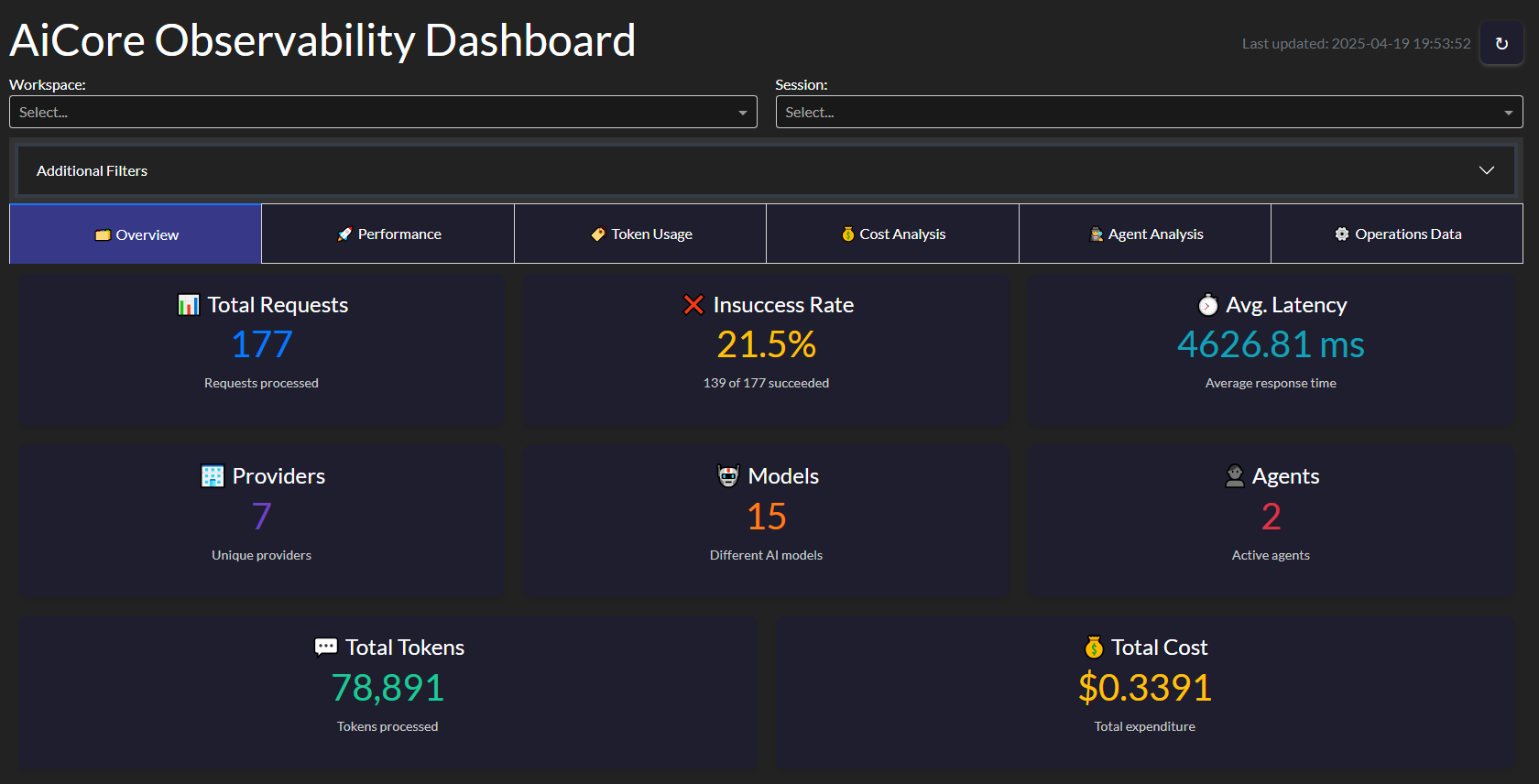
Key metrics tracked:
- Requests per minute
- Average response time
- Token usage trends
- Error rates
- Cost projections
from aicore.observability import ObservabilityDashboard

dashboard = ObservabilityDashboard(storage="observability_data.json")
dashboard.run_server(port=8050)Reasoner Augmented Config
AiCore also contains native support to augment traditional Llms with reasoning capabilities by providing them with the thinking steps generated by an open-source reasoning capable model, allowing it to generate its answers in a Reasoning Augmented way.
This can be usefull in multiple scenarios, such as:
- ensure your agentic systems still work with the propmts you have crafted for your favourite llms while augmenting them with reasoning steps
- direct control for how long you want your reasoner to reason (via max_tokens param) and how creative it can be (reasoning temperature decoupled from generation temperature) without compromising generation settings
To leverage the reasoning augmentation just introduce one of the supported llm configs into the reasoner field and AiCore handles the rest
# config.yml
embeddings:
  provider: "openai" # or "mistral", "groq", "gemini", "nvidia"
  api_key: "your_openai_api_key"
  model: "your_openai_embedding_model" # Optional

llm:
  provider: "mistral" # or "openai", "groq", "gemini", "nvidia"
  api_key: "your_mistral_api_key"
  model: "mistral-small-latest" # Optional
  temperature: 0.6
  max_tokens: 2048
  reasoner:
    provider: "groq" # or openrouter or nvidia
    api_key: "your_groq_api_key"
    model: "deepseek-r1-distill-llama-70b" # or "deepseek/deepseek-r1:free" or "deepseek/deepseek-r1"
    temperature: 0.5
max_tokens: 1024A Hugging Face Space showcasing reasoning-augmented models

Instant summaries of Git activity
🌐 Live App
📦 GitHub Repository
CodeTide is a fully local, privacy-first tool for parsing and understanding Python codebases using symbolic, structural analysis—no LLMs, no embeddings, just fast and deterministic code intelligence. It enables developers and AI agents to retrieve precise code context, visualize project structure, and generate atomic code changes with confidence.
AgentTide is a next-generation, precision-driven software engineering agent built on top of CodeTide. AgentTide leverages CodeTide’s symbolic code understanding to plan, generate, and apply high-quality code patches—always with full context and requirements fidelity. You can interact with AgentTide via a conversational CLI or a beautiful web UI.
Live Demo: Try AgentTide on Hugging Face Spaces: https://mclovinittt-agenttidedemo.hf.space/
AiCore was used to make LLM calls within AgentTide, enabling seamless integration between local code analysis and advanced language models. This combination empowers AgentTide to deliver context-aware, production-ready code changes—always under your control.
- Extended Provider Support: Additional LLM and embedding providers
- Add support for Speech: Integrate text2speech and speech to text objects with usage and observability4
For complete documentation, including API references, advanced usage examples, and configuration guides, visit:
This project is licensed under the Apache 2.0 License.