➕ Learnen is a place for passionate teachers and curious students to share knowledge!
➕ With learnen, skilled and experienced teachers can make a learning room for students and post various assignments and resources.
➕ Students can talk to other students in the learning room and help each other out.
➕ Students can visually track their progress and remove all ambiguity from their study.
➕ Students can track and organize their study with a TODO list.
➕ Maintain focus with the room timer!
➕ Students can note resources, track their studies, assignments and todo lists and talk to like-minded students, all in ONE PLACE !
✔️ Students
✔️ Professionals
✔️ Children
✔️ Teens
✔️ Adults
✔️ Newbies
✔️ Veterans
✔️ EVERYONE!!!
Learnen was made in:
- HTML
- CSS
- JavaScript
with:
Click for installation instructions on NodeJS.
Assuming you have already installed nodejs and node package manager on your device, Follow the steps below to install and use the source code on your laptop.
- Clone this repository:
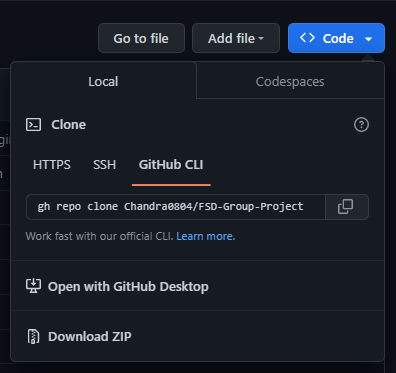
You can do that by using the GIT CLI or by downloading the ZIP folder.
- Install dependencies:
after running npm init on your terminal
in the current working directory, install:
- Express :
npm install express - EJS :
npm install ejs - Path :
npm install path - Body-Parser :
npm install body-parser - Mongoose :
npm install mongoose - Multer :
npm install multer - NodeMailer :
npm install nodemailer - Express-session:
npm install express-session
- Start the server:
Now, the setup is pretty much done. All you need to do is to start the server, and the website will be locally hosted on your device.
To start the server, you must run the nodeJS / Express App using the following command in the cwd terminal:
node app.js
- Open the hosted website:
The website is now up and running! Now, all you need to do is to access it.
Open a browser of your choice and enter the following:
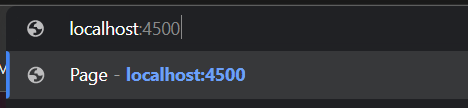
now, press ENTER.
There! You have Entered in to the world of Learnen!
Enjoy your learning!
🟠 Chandra A
🟢 Tarun P
🟡 Bhanu B
🔴 Sanjeev C
🟣 Hariprasad A
💬 Chat!
🎧 Music!
🌞 Light Mode!
🌜 Dark Mode!
🔥 Streaks!
(https://github.com/Chandra0804/FSD-Group-Project.git)