[Feature] Add TabbedCommandBar (ribbon) control #3551
Conversation


|
Thanks yoshiask for opening a Pull Request! The reviewers will test the PR and highlight if there is any conflict or changes required. If the PR is approved we will proceed to merge the pull request 🙌 |
 ghost
requested review from
ghost
requested review from

|
|

|
I am very happy with the name TabbedCommandBar - I would be happy if this control and name could make it's way to WinUI proper in the future. |
…ocs don't exist yet)

Started writing the documentation for [TabbedCommandBar](CommunityToolkit/WindowsCommunityToolkit#3551)

 michael-hawker
left a comment
michael-hawker
left a comment
michael-hawker
left a comment
There was a problem hiding this comment.
Did a quick review, will need to try out a bit more, but some general feedback on a couple of things to clean-up (like massive commented xaml sections?).
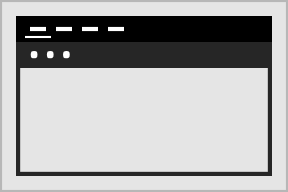
For the sample app control image, I was wondering if there should be the three white dots that represent the commandbar in the second row:
| {42CA4935-54BE-42EA-AC19-992378C08DE6}.Release|x64.Build.0 = Release|Any CPU | ||
| {42CA4935-54BE-42EA-AC19-992378C08DE6}.Release|x86.ActiveCfg = Release|Any CPU | ||
| {42CA4935-54BE-42EA-AC19-992378C08DE6}.Release|x86.Build.0 = Release|Any CPU | ||
| {A5E98964-45B1-442D-A07A-298A3221D81E}.Debug|Any CPU.ActiveCfg = Debug|Win32 |
There was a problem hiding this comment.
Any idea what these represent and why there are removed?
| <PopInThemeAnimation TargetName="PART_RibbonContent" /> | ||
| </Storyboard> | ||
| <Style TargetType="ComboBox" /> | ||
| <!--<Style TargetType="ComboBox"> |
There was a problem hiding this comment.
Any reason to keep these big comment blocks?
There was a problem hiding this comment.
The reason for this one (the ComboBox style) is because there's currently a bug that causes an unhandled native exception in WUX when the ComboBox style is overridden here. I've yet to make a minimum repo for it. Anyway, that style is supposed to make ComboBoxes look presentable in the primary commands space and also play nicely with overflow (because ATM they're completely unusable once they get put into the overflow menu).
Presumably that style should be placed in its own file and given a key (like ComboBoxAppBarStyle)?
There was a problem hiding this comment.
Also, I don't want to make too many changes to the ComboBox style. Is there any way to change parts of the template while leaving other parts of it as the default, or do I have to retemplate the entire control?
There was a problem hiding this comment.
@yoshiask not with ComboBox as it doesn't expose it's template as a key we can reference link you could with CommandBarRevealStyle. If it did and you were only adjusting properties, you could just modify the setters without the template....
Agree we should try and stick it in it's own file and then just merge in with the resource dictionary here.
| <!-- For some reason this code causes an exception at runtime, that String couldn't be turned into a Uri. --> | ||
| <!--<ResourceDictionary.MergedDictionaries> | ||
| <ResourceDictionary Source="ms-appx:///Microsoft.Toolkit.Uwp.UI.Controls.Ribbon/TabbedCommandBar/TabbedCommandBar.xaml" /> | ||
| <ResourceDictionary Source="ms-appx:///Microsoft.Toolkit.Uwp.UI.Controls.Ribbon/TabbedCommandBar/TabbedCommandBarItem.xaml" /> |
There was a problem hiding this comment.
We should have the Item style in it's own XAML file and merge it in here (see what we did for the Tokenizing Text Box).
| <Page Update="Ribbon\Ribbon.xaml"> | ||
| <Generator>MSBuild:Compile</Generator> | ||
| </Page> |
There was a problem hiding this comment.
| <Page Update="Ribbon\Ribbon.xaml"> | |
| <Generator>MSBuild:Compile</Generator> | |
| </Page> |
This looks extra?
| using Microsoft.Windows.Design.PropertyEditing; | ||
| using System.ComponentModel; | ||
|
|
||
| namespace Microsoft.Toolkit.Uwp.UI.Controls.Design |

Microsoft.Toolkit.Uwp.SampleApp/SamplePages/TabbedCommandBar/TabbedCommandBar.bind
Outdated
Show resolved
Hide resolved
 ghost
added
the
ghost
added
the
|
This PR has been marked as "needs attention 👋" and awaiting a response from the team. |

|
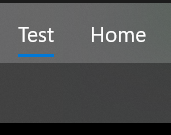
Few more comments. Where is 'Test' coming from??? (I can't find it.)
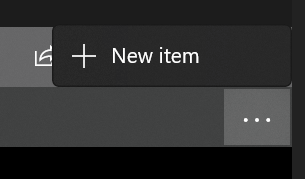
For the secondary commands:
Can we request the dropdown placement to go down vs. up? Also, is it easy to provide an option for the '...' to be either right-aligned to the panel like it is now OR to be next to the last item in the list if there's not enough to fill it? Have a few more inline code comments. It definitely looks like something is holding a reference to the items and not letting them go. I wonder if it has something to do with NavigationView itself as we aren't using NavigationViewItem directly? I was able to bind to |
michael-hawker
left a comment
michael-hawker
left a comment
There was a problem hiding this comment.
Forgot to submit my comments. 🤦♂️
| <ResourceDictionary Source="ms-appx:///Microsoft.Toolkit.Uwp.UI.Controls.Ribbon/TabbedCommandBar/TabbedCommandBarItem.xaml" /> | ||
| </ResourceDictionary.MergedDictionaries>--> | ||
|
|
||
| <Style BasedOn="{StaticResource CommandBarRevealStyle}" |
There was a problem hiding this comment.
Yeah, I'm going to say we should split this in the file and instead of referencing the template, copy it. As then we can expose the properties for configuring where the 'More' button is aligned, and then we won't be trying to grab them in the OnApplyTemplate to set properties in code-behind.
| <PopInThemeAnimation TargetName="PART_RibbonContent" /> | ||
| </Storyboard> | ||
| <Style TargetType="ComboBox" /> | ||
| <!--<Style TargetType="ComboBox"> |
There was a problem hiding this comment.
@yoshiask not with ComboBox as it doesn't expose it's template as a key we can reference link you could with CommandBarRevealStyle. If it did and you were only adjusting properties, you could just modify the setters without the template....
Agree we should try and stick it in it's own file and then just merge in with the resource dictionary here.
| </NavigationViewItem.Resources> | ||
| </NavigationViewItem> | ||
| </DataTemplate> | ||
| <controls:TabbedCommandBarItemTemplateSelector x:Key="DefaultTabbedCommandBarItemTemplateSelector" |
There was a problem hiding this comment.
I feel like we want to be using a container style selector vs a template one? Though I didn't see it duplicating NavigationViewItems so that was good. Not sure how easy it'd be to do the resource overrides like you're doing with a style selector vs. a template selector.
We should probably expose all these outside the Grid so that developers can override them, it's just going to be easier to expose them as Styles vs. DataTemplates for what developers are used to. (Like they'd probably expect them as style properties on the TabbedCommandBar to be able to override with their own style.)
| <controls:TabbedCommandBar.Resources> | ||
| <StaticResource x:Key="NavigationViewTopPaneBackground" ResourceKey="SystemControlChromeMediumLowAcrylicWindowMediumBrush" /> | ||
| <StaticResource x:Key="TabbedCommandBarContentBackground" ResourceKey="SystemControlChromeLowAcrylicWindowBrush" /> | ||
| </controls:TabbedCommandBar.Resources> |
There was a problem hiding this comment.
I didn't notice a big difference without these resources? We should just have the example be as default as possible.
|
Closing this now that #3556 is open. |


|
Dang that was quick 😆 |
<!-- 🚨 Please Do Not skip any instructions and information mentioned below as they are all required and essential to evaluate and test the PR. By fulfilling all the required information you will be able to reduce the volume of questions and most likely help merge the PR faster 🚨 -->

## Fixes #3259
<!-- Add the relevant issue number after the "#" mentioned above (for ex: Fixes #1234) which will automatically close the issue once the PR is merged. -->


<!-- Add a brief overview here of the feature/bug & fix. -->

## PR Type
What kind of change does this PR introduce?
<!-- Please uncomment one or more that apply to this PR. -->

<!-- - Bugfix -->
Feature
<!-- - Code style update (formatting) -->
<!-- - Refactoring (no functional changes, no api changes) -->
<!-- - Build or CI related changes -->
<!-- - Documentation content changes -->
Sample app changes
<!-- - Other... Please describe: -->


## What is the current behavior?
There is no ribbon or ribbon-like control for UWP. The current solution is to put CommandBars inside of a Pivot.

## What is the new behavior?
Adds a TabbedCommandBar, which internally is almost identical to the current solutions, but provides a much friendlier developer experience.


## PR Checklist

Please check if your PR fulfills the following requirements:

- [ ] Tested code with current [supported SDKs](../readme.md#supported)
- [ ] Pull Request has been submitted to the documentation repository [instructions](..\contributing.md#docs). Link: MicrosoftDocs/WindowsCommunityToolkitDocs#405
- [ ] Sample in sample app has been added / updated (for bug fixes / features)
    - [x] Icon has been created (if new sample) following the [Thumbnail Style Guide and templates](https://github.com/windows-toolkit/WindowsCommunityToolkit-design-assets)
- [ ] Tests for the changes have been added (for bug fixes / features) (if applicable)
- [ ] Header has been added to all new source files (run *build/UpdateHeaders.bat*)
- [x] Contains **NO** breaking changes

<!-- If this PR contains a breaking change, please describe the impact and migration path for existing applications below.
     Please note that breaking changes are likely to be rejected within minor release cycles or held until major versions. -->


## Other information
I forgot to do my work on a feature branch, so this PR is basically a duplicate of #3551, with a little bit of cleanup.

Started writing the documentation for [TabbedCommandBar](CommunityToolkit/WindowsCommunityToolkit#3551)
4 participants


Moved to #3556
Fixes
#3259
PR Type
What kind of change does this PR introduce?
Feature
Sample app changes
What is the current behavior?
There is no ribbon or ribbon-like control for UWP. The current solution is to put CommandBars inside of a Pivot.
What is the new behavior?
Adds a TabbedCommandBar, which internally is almost identical to the current solutions, but provides a much friendlier developer experience.
PR Checklist
Please check if your PR fulfills the following requirements:
Other information