Extending the awesome of Neo4jClient

Merge, match and create nodes or relationships using objects instead of typing pseudo Cypher.
Reduces mistakes and simplifies composition of queries. As well as some more advanced features, the following key extension methods are provided:
CreateEntity<T>CreateRelationship<T>MergeEntity<T>MergeRelationship<T>
Any object can be provided to these methods.
##Fluent Config Setup##
To allow unobtrusive usage the extension library with domain model projects which don't want a reference to Neo4j, a fluent config interface has been included to construct the model. Given a domain model like below:
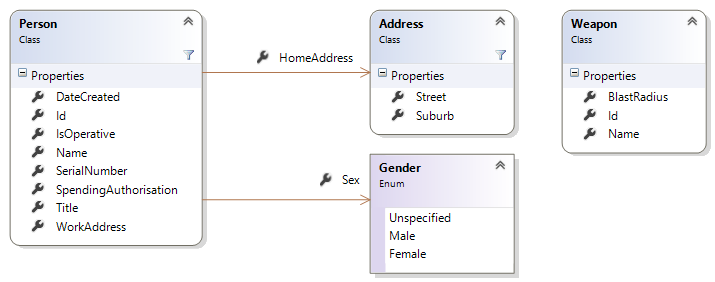
The person entity would be configured once per application lifetime scope like this:
FluentConfig.Config()
            .With<Person>("SecretAgent")
            .Match(x => x.Id)
            .Merge(x => x.Id)
            .MergeOnCreate(p => p.Id)
            .MergeOnCreate(p => p.DateCreated)
            .MergeOnMatchOrCreate(p => p.Title)
            .MergeOnMatchOrCreate(p => p.Name)
            .MergeOnMatchOrCreate(p => p.IsOperative)
            .MergeOnMatchOrCreate(p => p.Sex)
            .MergeOnMatchOrCreate(p => p.SerialNumber)
            .MergeOnMatchOrCreate(p => p.SpendingAuthorisation)
            .Set();
Note how we only set DateCreated when creating, not updating.
A relationship might be setup like this:
	FluentConfig.Config()
            .With<HomeAddressRelationship>()
            .MergeOnMatchOrCreate(hr => hr.DateEffective)
            .Set();
The address entity undergoes a similar setup - see the unit tests for the complete setup.
##Fluent Config Usage## Now that our model is configured, creating a weapon is as simple as:
	var weapon = SampleDataFactory.GetWellKnownWeapon(1);
	var q = GetFluentQuery()
            .CreateEntity(weapon, "w");
Creating a person, their two addresses and setting the relationships between the three nodes:
	var agent = SampleDataFactory.GetWellKnownPerson(7);

    var q = GetFluentQuery()
            .CreateEntity(agent, "a")
            .CreateEntity(agent.HomeAddress, "ha")
            .CreateEntity(agent.WorkAddress, "wa")
            .CreateRelationship(new HomeAddressRelationship("a", "ha"))
            .CreateRelationship(new WorkAddressRelationship("a", "wa"));
    		.ExecuteWithoutResults();
Easy. Here is some merge syntax just to show off:
	var person = SampleDataFactory.GetWellKnownPerson(7);

    var homeAddressRelationship = new HomeAddressRelationship("person", "address");

    homeAddressRelationship.DateEffective = DateTime.Parse("2011-01-10T08:00:00+10:00");

    var q = GetFluentQuery()
        .MergeEntity(person)
        .MergeEntity(person.HomeAddress)
        .MergeRelationship(homeAddressRelationship);
		.ExecuteWithoutResults();
Before Fluent Config there was Attribute Config. If you insist on decorating your models with attributes, you may use the following attributes on a domain model to control the generated query
CypherLabelPlaced at class level, controls the nodelabel, if unspecified then the class name is usedCypherMatchSpecifies that a property will be used in aMATCHstatementCypherMergeSpecifies that a property will be used in aMERGEstatementCypherMergeOnCreateSpecifies that a property will be used in theON CREATE SETportion of aMERGEstatementCypherMergeOnMatchSpecifies that a property will be used in theON MATCH SETportion of aMERGEstatement
Below is an example model decorated with the above attributes
public class CypherModel
{
    public CypherModel()
    {
        id = Guid.NewGuid();
    }

    [CypherMerge]
    public Guid id { get; set; }

    [CypherMergeOnCreate]
    [CypherMatch]
    public string firstName { get; set; }

    [CypherMergeOnCreate]
    public DateTimeOffset dateOfBirth { get; set; }

    [CypherMergeOnCreate]
    [CypherMergeOnMatch]
    public bool isLegend { get; set; }

    [CypherMergeOnCreate]
    public int answerToTheMeaningOfLifeAndEverything { get; set; }
}
Yes, we think you should use the Fluent Config too.
A full list of examples can be found in the unit tests within the solution.
build.ps1 is designed for myget compatibility.
The script can be run locally via powershell -f build.ps1. By default, it expects an environment variable named packageVersion.
Some default parameters may be overridden, for example:
powershell -f build.ps1 -configuration debug -sourceUrl https://github.com/your-username/Neo4jClient.Extension -packageVersion 5.0.0.1
Nuget packages are written to ./_output