
You can use the scripts to analyze and delete the emails you want, in this document you can know how to use it.
Explore the docs »
Table of Contents
Noticing that my Gmail inbox had a lot of things, some of which were not even read, I decided to look for a way to delete them all together without the need to select one by one (How long would it take?).
After seeing some articles, I had seen that I could do it through Python and its Imaplib library, which serves precisely to connect to the Gmail API. Since I'm studying Python and there was this need to use it, why not?
I separated 3 Jupyter Notebook scripts (You need to run them in this order):
- get_email_data: This script is for connecting and fetching email data such as sender and subject. Additionally, it treats this data and places it in a CSV file.
- analysis_my_gmail: As the name implies, it will do a little analysis with some graphs for interpretation.
- delete_emails: Here, the e-mails will be deleted according to the selected senders.
As you can see, a process was followed which will be explained part by part according to the next topics.
This project, in addition to being written in Python, used some of its libraries.





In addition to these you will have to use the libs wordcloud, yaml imaplib, email and concurrent.futures
In addition to installing the libraries as per the prerequisites subtopic below, you will need to enable IMAP in your Gmail and generate an app password, all shown below.
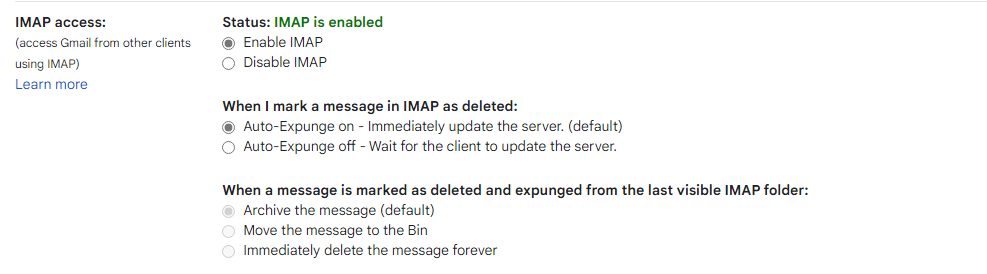
Fisrt of all you will need to activate the IMAP and create your APP password:
-
Settings
-
See all settings
-
Fowarding and POP/IMAP
-
At the last, enable the IMAP
[ ]
]
-
Access Google account
-
Security
-
App password
-
Save the password in a safe place
-
In your Python, install the libraries used in the scripts
pip install wordcloud yaml imaplib email concurrent.futures matplotlib pandas
-
Clone the repo
git clone https://github.com/DemikFR/Gmail_Manager_Scripts.git
-
Open the 'credentials.yaml' to enter your previously generated email and password
 user : "Your email"
 password : "Your password"
Now, you will be able to use this project to verify your emails on a large scale, in the next topic you will be able to understand how the scripts work.
After you complete the installation steps, you will be able to run the scripts.
You will get the email credentials placed in the YAML file.
 # Get the Credentials

 my_credentials = yaml.load(credentials, Loader = yaml.FullLoader)
 user, password = my_credentials['user'], my_credentials['password']
With the credentials, you can connect Python with Gmail
 # Connect your Gmail

 imap_url = 'imap.gmail.com'
 my_email = imaplib.IMAP4_SSL(imap_url)
 my_email.login(user, password)
Now, you will need to know and get the email ids, note that you can filter the search by sender, subjects and others. It will be mentioned in more detail in the 3rd script.
emails = my_email.search(None, 'ALL')Finally it is possible to fetch the emails from the IDs. In the code below it will fetch the date, sender (name and email address) and subject. Right after the search is done, each e-mail will be added to a list and then placed in a Pandas dataframe.
 #fetch e-mails

 def fetch(id):
   with concurrent.futures.ThreadPoolExecutor() as executor:
     data = executor.submit(my_email.fetch, str(id), '(RFC822)') # Get the message informations (Message, emails, ids, if errors, etc...)
     return data.result()[1][0][1] # Return only message and e-mail

 # Get the message and the email informations

 emails_list = []
 for i in emails_ids:
     msg = email.message_from_string(str(fetch(i),'ISO-8859-1')) # Transform the e-mails
     emails_list.append({'Date': msg['Date'], 'From': msg['From'], 'Subject': msg['Subject']})

 # Put email data in a dataframe

 df = pd.DataFrame(emails_list, columns=['Date', 'From', 'Subject'])
Before leaving the data ready for use, it was necessary to clean the data due to the encoding, in this case, the e-mails are extracted as 'ISO-8859-1', however, I have several e-mails in Portuguese, so it was necessary to convert to UTF-8.
In addition, to carry out the analysis of the emails, I had to create a new column for the email addresses of the senders, as the same comes in a column along with the name. To do so, it was necessary to use Python's extract method with a Regex expression, as shown below:
 # Take the email address and put it in a new column

 df1['Email'] = df1['From'].str.extract(r'<(.+)>')

 # Delete the e-mail from the name column

 df1['Sender'] = df1['From'].str.extract(r'(?:"|^)(.*?)(?:"|\s)(?:\s*<|$)')
With the data ready, you can save a .CSV file for later use in other scripts.
df1.to_csv('Emails_Dataset.csv', sep=';', encoding='utf-8')In this script, you will be able to generate 4 metrics and a graph for each, so you will have an overview of who and when you receive the emails, in addition to being able to know which are the main words said.
The analysis itself will be mentioned in the especially analysis topic.
Four questions were asked to carry out the analysis:
- Who are the senders who send the most emails? Using the Pandas values count and a horizontal bar chart, it was already possible to answer this question.
top_10_senders = df['Sender'].value_counts(sort=True).head(10).to_frame()- What were the years that the most email arrived? This question has been answered grouping by year and counting the years values.
year_values = df.groupby(df['Date'].dt.year, group_keys=False)['Date'].apply(lambda x: x.count()).to_frame()- What were the months that the most email arrived? This question has been answered grouping by months and counting the months values.
 month_values = df.groupby(df['Date'].dt.month, group_keys=False)['Date'].apply(lambda x: x.count()).to_frame()
 month_values.index = pd.to_datetime(month_values.index, format='%m').strftime('%b') #Tranform month numbers
Note that the months were numeric and were converted to alphabetic characters directly in the database.
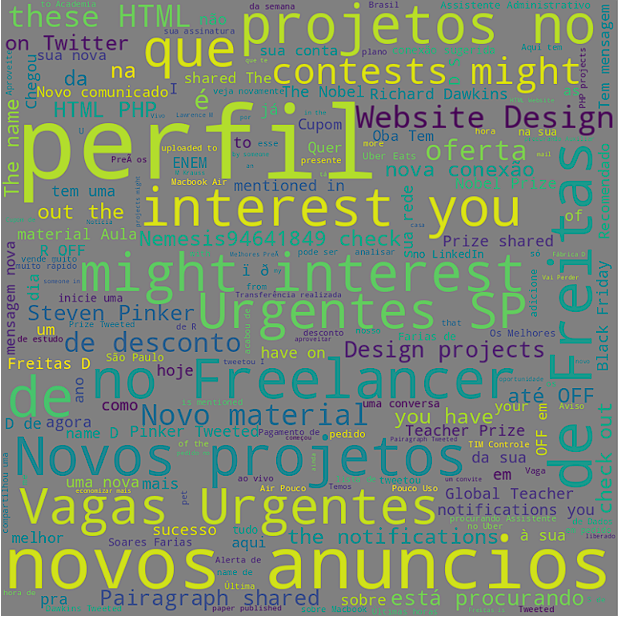
- What are the words that appear the most in emails? To perform the word cloud, all the Subject field records were concatenated to a string, in addition to some having to convert the encoding.
 Subject = df['Subject'].str.cat(sep=' ')
 Subject = Subject.encode('utf-8').replace(b'\xe2\x80\x8a', b'').replace(b'\r\n', b'').decode('utf-8')
After collecting the metrics, they were used to create graphs which will be discussed in a later topic.
This last script will look for the e-mails following a predefined pattern and delete them.
For this, you must connect to the email again and use the search command of Imap, it is there where you can define which emails will be deleted.
In my case, I created a list with the name of some senders, such as social networks and some stores and with that, I did a search for your email address in the dataframe created in script 1, below you can see how it was done.
 # Create the list

 senders = ['Instagram', 'Twitter', 'Facebook', 'LinkedIn', 'TikTok', 'Pinterest', 'Reddit', 'YouTube',
               'Telegram', 'Discord', 'Flickr', 'Twitch', 'Medium', 'Quora', 'Dafiti']

 # Creates a Regex expression to search the dataframe

 senders_regex = '|'.join(senders)
 senders_regex

 # Search the e-mail adress

 df_media = df[df['Sender'].str.contains(senders_regex, regex=True)]['Email'].drop_duplicates()
 df_media
With the e-mail addresses to be deleted, I was able to carry out the search through a Python code that runs through the series created by searching for each sender.
  emails_ids = []
  for i in df_media:
    emails = my_email.search(None, f'FROM "{i}"')
    emails_ids.extend(emails[1][0].decode().split())
Note that through the search command you can use different ways to find the emails to delete, in my case, I used the 'From' criterion which is precisely the email address, in others cases, you could, for example, put a pattern that if the message had "Announcement" or "Offer" it would look for it, so using 'From' would be 'Text.'
You can find all the criteria by clicking here.
Finally, you will be able to delete these emails.
  # Move selected emails to the deleted folder
  for i in emails_ids:
    my_email.store(i, '+FLAGS', '\\Deleted')
  # Permanently removing deleted items from the selected mailbox.
my_email.expunge()With the analysis of my emails, I was able to identify some of them, I will talk about each insight according to the graphs.
This chart served to list the top 10 email senders in ascending order.
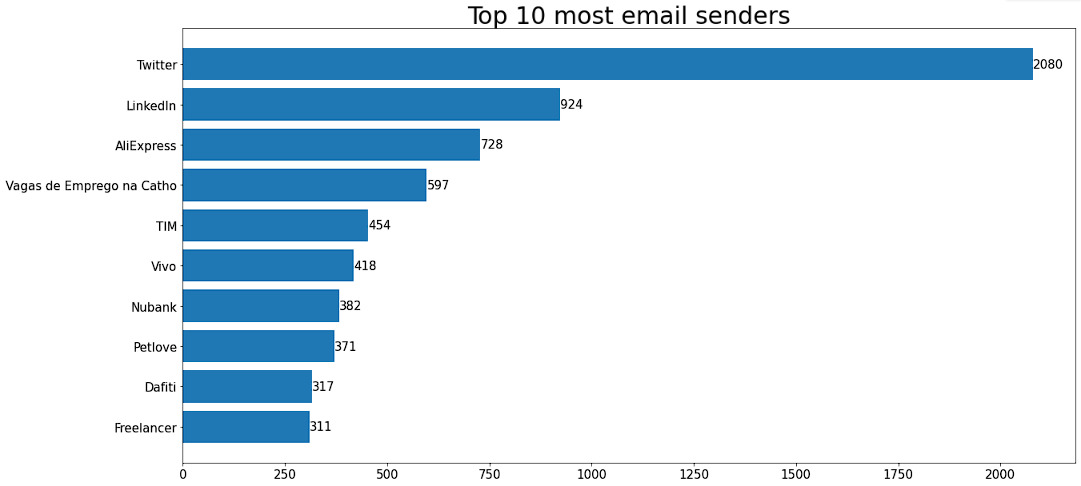
As shown in the graph, the biggest senders are the only two social networks I use, except for Reddit, which hardly sends emails to its users. After I did a quick search, I noticed that most social networks send mass emails to users that serve to show network updates.
Just with the top 10, it was noted that most emails are about promotions and sales of e-commerce or service companies, such as internet (Tim and Vivo).
Others that appeared were for employment, in this case Catho ((which is as "Vagas de Emprego na Catho" which means "Employment Vacancies in Catho").
Others that appear were employment, case by case (which is like "Vacancies for Employment in Catho" which means "Employment Vacancies in Catho") and my bank Nubank, which sends information about invoices, investments, changes in rates, etc.
The only ones on this list that I won't pay for are Nubank's e-mails, as there are often important things, unless a text pattern is used in subjects and messages.
Line charts served to measure the amount of e-mail received over time, in this case year and month.
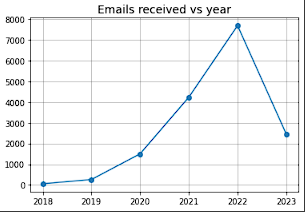
During the year, you could see an exponential increase in the emails received, because as the years go by, the more I subscribe and use services that will have my email address, I rarely unsubscribe from the lists.
Note that this year (2023), that number dropped dramatically, as only three months passed, while the others were 12.
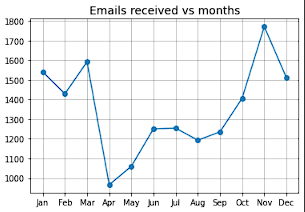
Regarding the months, it is possible to notice that in November there is a peak far from the other months, because that is the moment when there are the biggest sales of the year, in this case Black Friday and the end of year festivities.
With the word cloud, I could see that although e-commerce and social media emails are the biggest senders, they don't use repeated words, while job sites like Freelance use the same email template, making these texts more frequent.
Distributed under the MIT License. See LICENSE.txt for more information.
Demik Freitas - Linkedin - demik.freitast2d18@gmail.com
Project Link: https://github.com/DemikFR/Gmail_Manager_Scripts