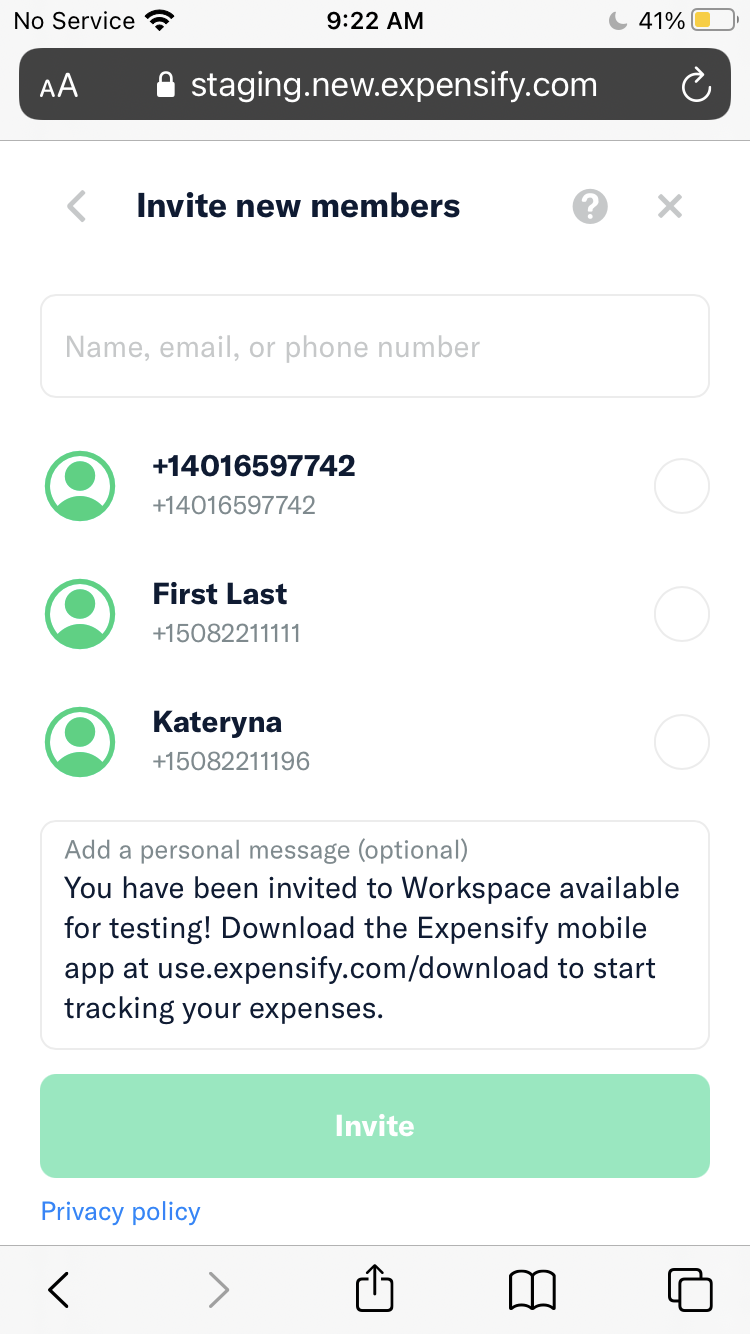
Workspace - Manage members - All the avatar icons are looking same in search screen to invite new members #8092


Description

If you haven’t already, check out our contributing guidelines for onboarding and email contributors@expensify.com to request to join our Slack channel!
Action Performed:
- Launch the app and log in with any account
- Go to Setting
- Tap on any Workspace you have in your account
- Go to Manage Members
- Tap the Invite button.
Expected Result:
After tap invite user, avatars icons are looking appropriate for each user
Actual Result:
After tap invite user, avatars icons are looking the same for each user
Workaround:
Unknown visual
Platform:
Where is this issue occurring?
- Web
- iOS
- Android
- Desktop App
- Mobile Web
Version Number: 1.1.42.3
Reproducible in staging?: Y
Reproducible in production?: N
Email or phone of affected tester (no customers):
Logs: https://stackoverflow.com/c/expensify/questions/4856
Notes/Photos/Videos:
Bug5487091_Screen_Recording_20220311-091226_New_Expensify.mp4
Expensify/Expensify Issue URL:
Issue reported by: Applause
Slack conversation: