Skip to content

Remove incorrect red brick indicator#12491

Merged
youssef-lr merged 2 commits intomainfrom
aldo_remove-incorrect-rbp
Nov 15, 2022
Merged

Remove incorrect red brick indicator#12491
youssef-lr merged 2 commits intomainfrom
aldo_remove-incorrect-rbp

Conversation

@aldo-expensify
Copy link
Contributor

@aldo-expensify aldo-expensify commented Nov 5, 2022

Details

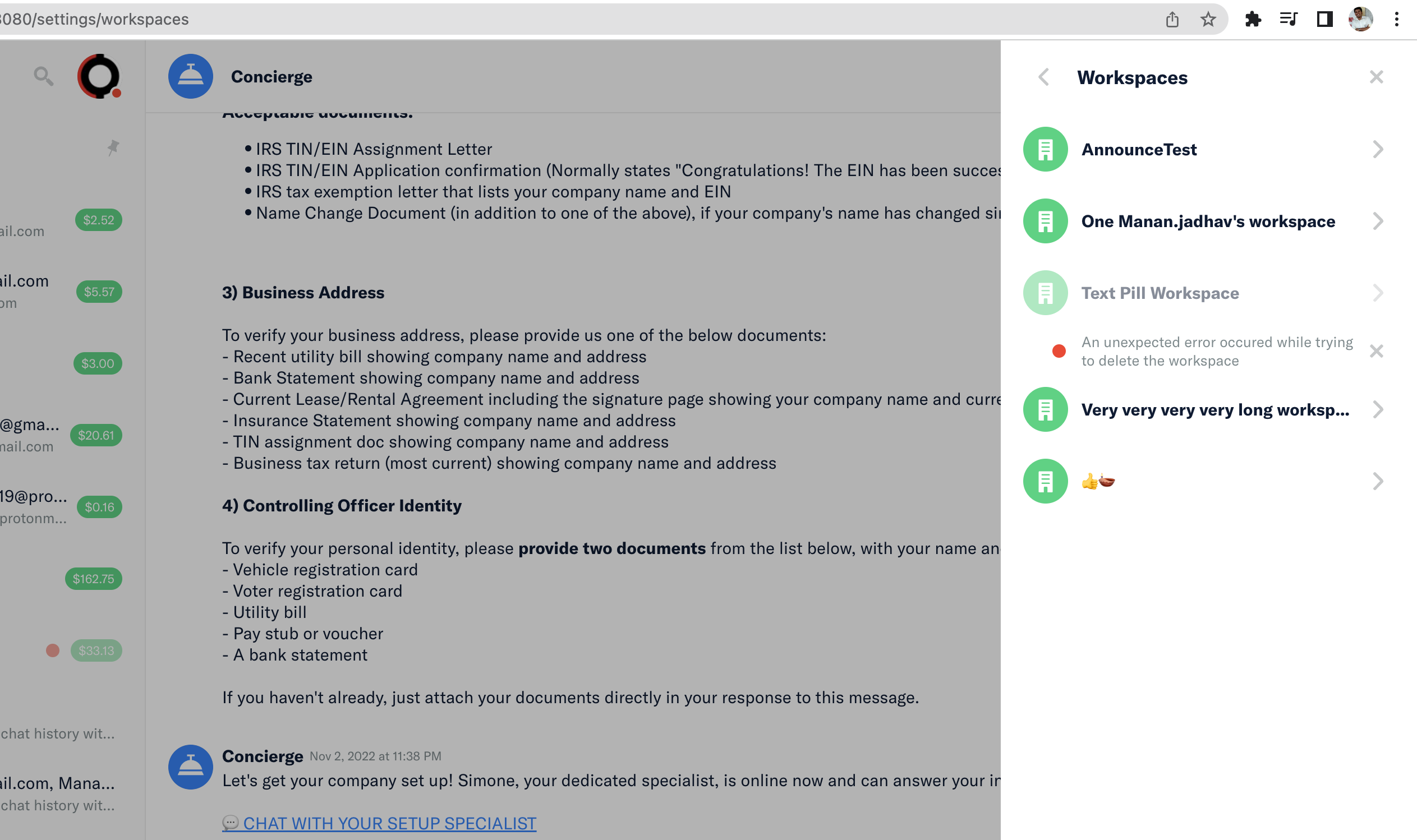
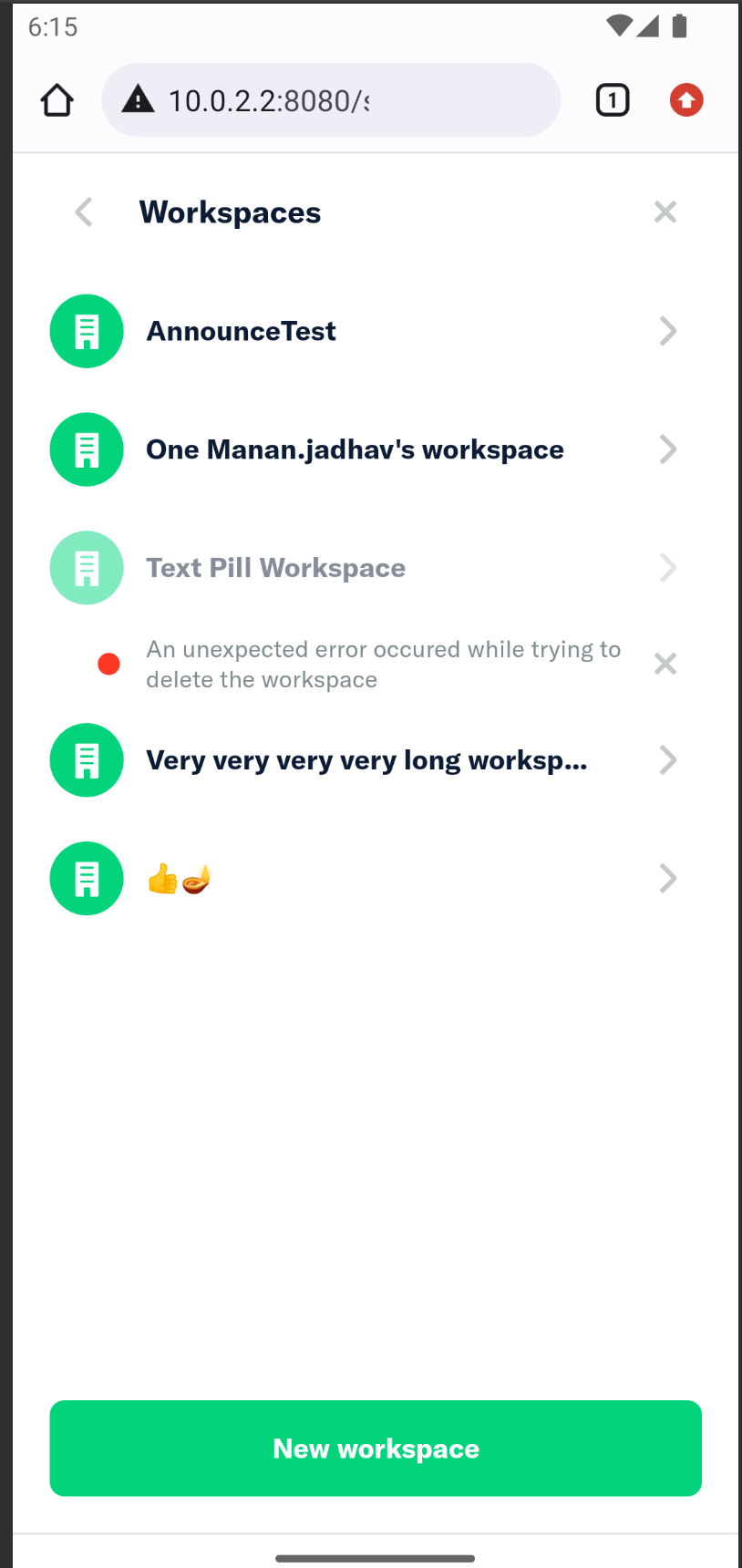
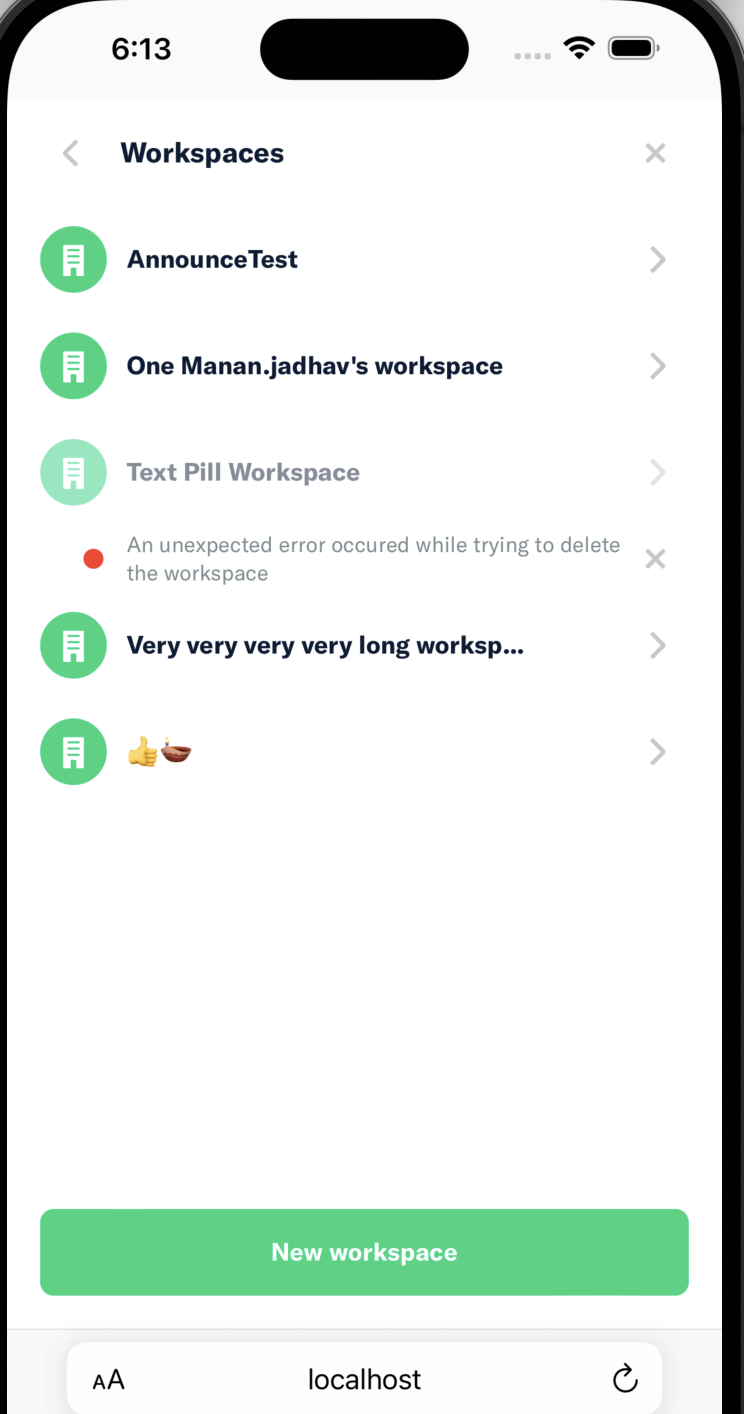
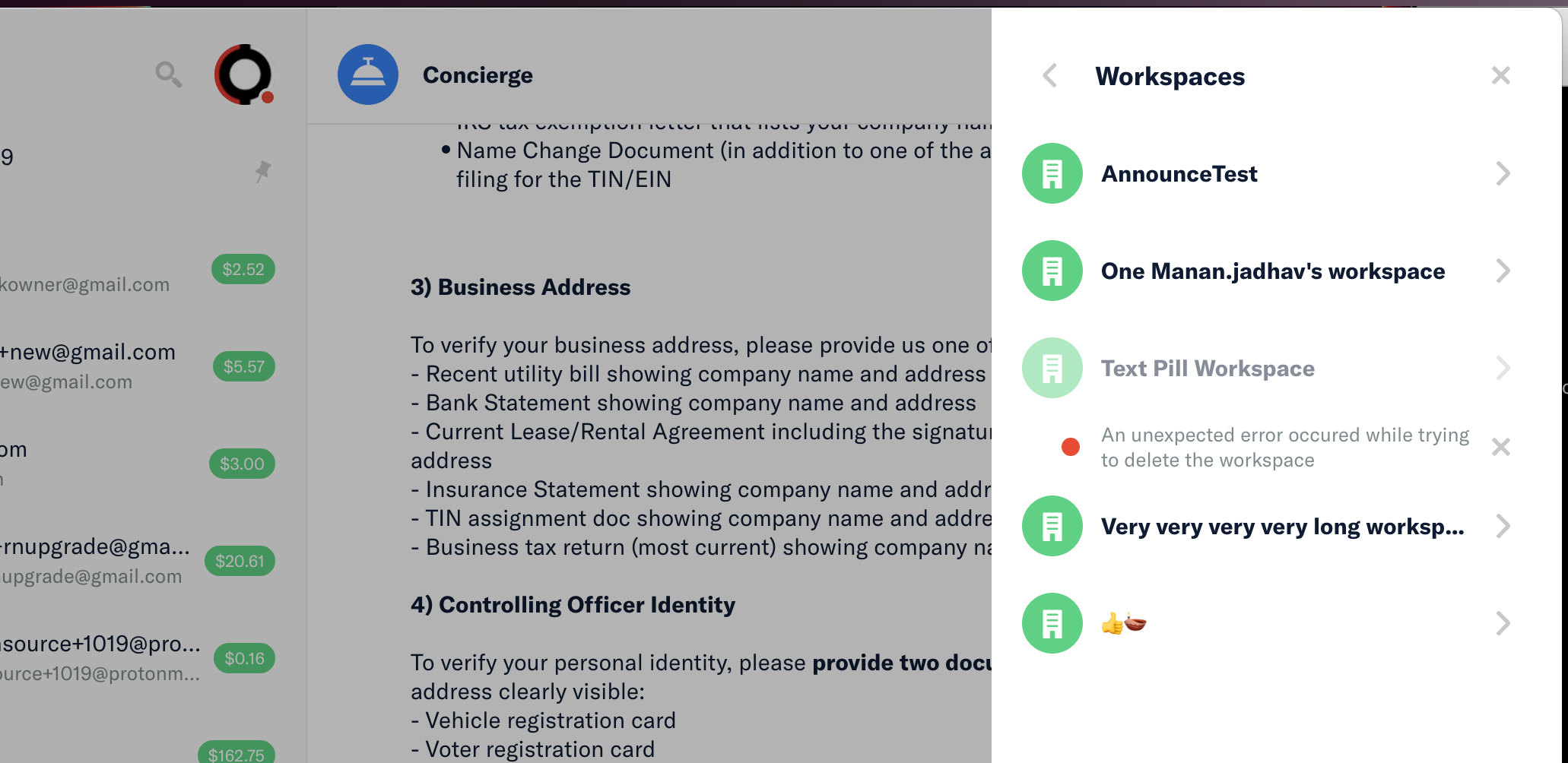
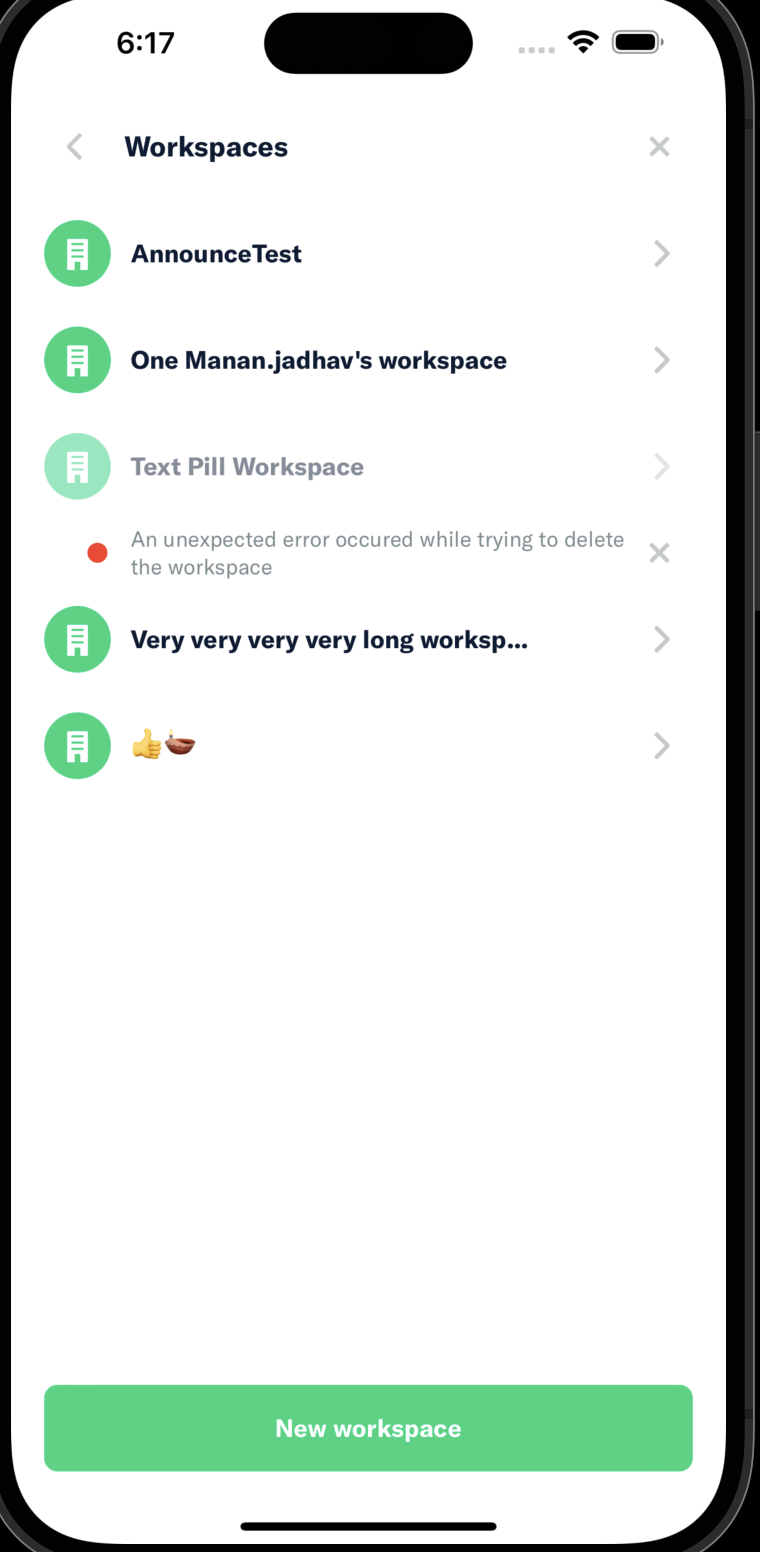
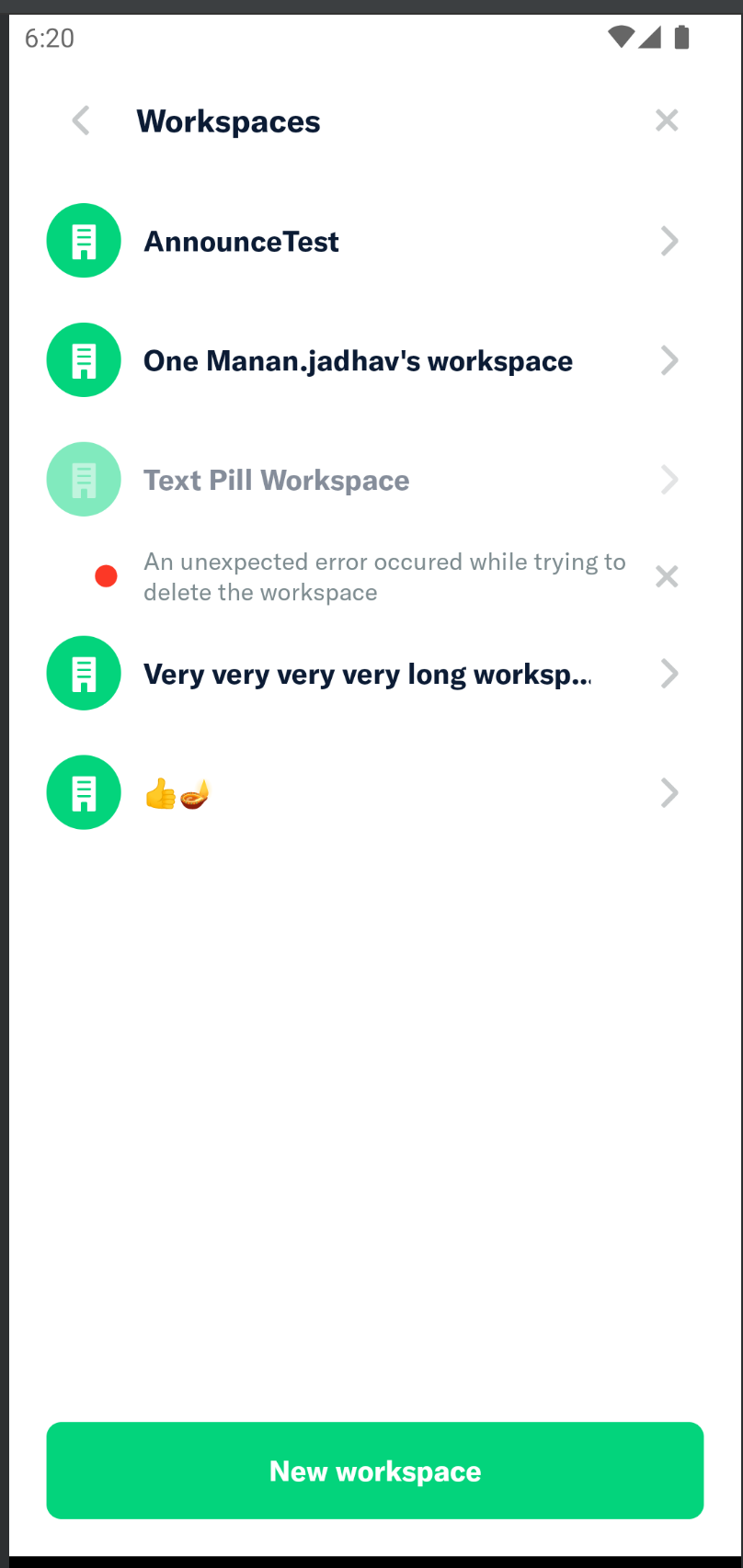
Removed red brick indicator from workspace entry in workspaces list if the error is in the workspace itself and not in policy member or custom unit.

Asked for confirmation that this is what we want here: https://expensify.slack.com/archives/C01GTK53T8Q/p1667605980573489?thread_ts=1666955764.560879&cid=C01GTK53T8Q

Before:

image

After:

image

Fixed Issues

$ #12327 (comment)

Tests

  1. Create a workspace in New Dot
  2. Go to old dot and set the workspace as the preferred policy of a domain's group
  3. In new dot, try to delete the workspace, this will cause the API to throw an error
  4. The workspace entry should have an error below, but it shouldn't have a red dot to the right.
  • Verify that no errors appear in the JS console

QA Steps

  1. Create a workspace in New Dot
  2. Go to old dot and set the workspace as the preferred policy of a domain's group
  3. In new dot, try to delete the workspace, this will cause the API to throw an error
  4. The workspace entry should have an error below, but it shouldn't have a red dot to the right.
  • Verify that no errors appear in the JS console

PR Author Checklist

  • I linked the correct issue in the ### Fixed Issues section above
  • I wrote clear testing steps that cover the changes made in this PR
    • I added steps for local testing in the Tests section
    • I added steps for Staging and/or Production testing in the QA steps section
    • I added steps to cover failure scenarios (i.e. verify an input displays the correct error message if the entered data is not correct)
    • I turned off my network connection and tested it while offline to ensure it matches the expected behavior (i.e. verify the default avatar icon is displayed if app is offline)
  • I included screenshots or videos for tests on all platforms
  • I ran the tests on all platforms & verified they passed on:
    • iOS / native
    • Android / native
    • iOS / Safari
    • Android / Chrome
    • MacOS / Chrome
    • MacOS / Desktop
  • I verified there are no console errors (if there's a console error not related to the PR, report it or open an issue for it to be fixed)
  • I followed proper code patterns (see Reviewing the code)
    • I verified that any callback methods that were added or modified are named for what the method does and never what callback they handle (i.e. toggleReport and not onIconClick)
    • I verified that comments were added to code that is not self explanatory
    • I verified that any new or modified comments were clear, correct English, and explained "why" the code was doing something instead of only explaining "what" the code was doing.
    • I verified any copy / text shown in the product was added in all src/languages/* files
    • I verified any copy / text that was added to the app is correct English and approved by marketing by adding the Waiting for Copy label for a copy review on the original GH to get the correct copy.
    • I verified proper file naming conventions were followed for any new files or renamed files. All non-platform specific files are named after what they export and are not named "index.js". All platform-specific files are named for the platform the code supports as outlined in the README.
    • I verified the JSDocs style guidelines (in STYLE.md) were followed
  • If a new code pattern is added I verified it was agreed to be used by multiple Expensify engineers
  • I followed the guidelines as stated in the Review Guidelines
  • I tested other components that can be impacted by my changes (i.e. if the PR modifies a shared library or component like Avatar, I verified the components using Avatar are working as expected)
  • I verified all code is DRY (the PR doesn't include any logic written more than once, with the exception of tests)
  • I verified any variables that can be defined as constants (ie. in CONST.js or at the top of the file that uses the constant) are defined as such
  • If a new component is created I verified that:
    • A similar component doesn't exist in the codebase
    • All props are defined accurately and each prop has a /** comment above it */
    • The file is named correctly
    • The component has a clear name that is non-ambiguous and the purpose of the component can be inferred from the name alone
    • The only data being stored in the state is data necessary for rendering and nothing else
    • For Class Components, any internal methods passed to components event handlers are bound to this properly so there are no scoping issues (i.e. for onClick={this.submit} the method this.submit should be bound to this in the constructor)
    • Any internal methods bound to this are necessary to be bound (i.e. avoid this.submit = this.submit.bind(this); if this.submit is never passed to a component event handler like onClick)
    • All JSX used for rendering exists in the render method
    • The component has the minimum amount of code necessary for its purpose, and it is broken down into smaller components in order to separate concerns and functions
  • If a new CSS style is added I verified that:
    • A similar style doesn't already exist
    • The style can't be created with an existing StyleUtils function (i.e. StyleUtils.getBackgroundAndBorderStyle(themeColors.componentBG)
  • If the PR modifies a generic component, I tested and verified that those changes do not break usages of that component in the rest of the App (i.e. if a shared library or component like Avatar is modified, I verified that Avatar is working as expected in all cases)
  • If the PR modifies a component related to any of the existing Storybook stories, I tested and verified all stories for that component are still working as expected.
  • I have checked off every checkbox in the PR author checklist, including those that don't apply to this PR.

PR Reviewer Checklist

The reviewer will copy/paste it into a new comment and complete it after the author checklist is completed

  • I have verified the author checklist is complete (all boxes are checked off).
  • I verified the correct issue is linked in the ### Fixed Issues section above
  • I verified testing steps are clear and they cover the changes made in this PR
    • I verified the steps for local testing are in the Tests section
    • I verified the steps for Staging and/or Production testing are in the QA steps section
    • I verified the steps cover any possible failure scenarios (i.e. verify an input displays the correct error message if the entered data is not correct)
    • I turned off my network connection and tested it while offline to ensure it matches the expected behavior (i.e. verify the default avatar icon is displayed if app is offline)
  • I checked that screenshots or videos are included for tests on all platforms
  • I included screenshots or videos for tests on all platforms
  • I verified tests pass on all platforms & I tested again on:
    • iOS / native
    • Android / native
    • iOS / Safari
    • Android / Chrome
    • MacOS / Chrome
    • MacOS / Desktop
  • If there are any errors in the console that are unrelated to this PR, I either fixed them (preferred) or linked to where I reported them in Slack
  • I verified proper code patterns were followed (see Reviewing the code)
    • I verified that any callback methods that were added or modified are named for what the method does and never what callback they handle (i.e. toggleReport and not onIconClick).
    • I verified that comments were added to code that is not self explanatory
    • I verified that any new or modified comments were clear, correct English, and explained "why" the code was doing something instead of only explaining "what" the code was doing.
    • I verified any copy / text shown in the product was added in all src/languages/* files
    • I verified any copy / text that was added to the app is correct English and approved by marketing by adding the Waiting for Copy label for a copy review on the original GH to get the correct copy.
    • I verified proper file naming conventions were followed for any new files or renamed files. All non-platform specific files are named after what they export and are not named "index.js". All platform-specific files are named for the platform the code supports as outlined in the README.
    • I verified the JSDocs style guidelines (in STYLE.md) were followed
  • If a new code pattern is added I verified it was agreed to be used by multiple Expensify engineers
  • I verified that this PR follows the guidelines as stated in the Review Guidelines
  • I verified other components that can be impacted by these changes have been tested, and I retested again (i.e. if the PR modifies a shared library or component like Avatar, I verified the components using Avatar have been tested & I retested again)
  • I verified all code is DRY (the PR doesn't include any logic written more than once, with the exception of tests)
  • I verified any variables that can be defined as constants (ie. in CONST.js or at the top of the file that uses the constant) are defined as such
  • If a new component is created I verified that:
    • A similar component doesn't exist in the codebase
    • All props are defined accurately and each prop has a /** comment above it */
    • The file is named correctly
    • The component has a clear name that is non-ambiguous and the purpose of the component can be inferred from the name alone
    • The only data being stored in the state is data necessary for rendering and nothing else
    • For Class Components, any internal methods passed to components event handlers are bound to this properly so there are no scoping issues (i.e. for onClick={this.submit} the method this.submit should be bound to this in the constructor)
    • Any internal methods bound to this are necessary to be bound (i.e. avoid this.submit = this.submit.bind(this); if this.submit is never passed to a component event handler like onClick)
    • All JSX used for rendering exists in the render method
    • The component has the minimum amount of code necessary for its purpose, and it is broken down into smaller components in order to separate concerns and functions
  • If a new CSS style is added I verified that:
    • A similar style doesn't already exist
    • The style can't be created with an existing StyleUtils function (i.e. StyleUtils.getBackgroundAndBorderStyle(themeColors.componentBG)
  • If the PR modifies a generic component, I tested and verified that those changes do not break usages of that component in the rest of the App (i.e. if a shared library or component like Avatar is modified, I verified that Avatar is working as expected in all cases)
  • If the PR modifies a component related to any of the existing Storybook stories, I tested and verified all stories for that component are still working as expected.
  • I have checked off every checkbox in the PR reviewer checklist, including those that don't apply to this PR.

Screenshots

Web

image

image

Mobile Web - Chrome

image image image
#### Mobile Web - Safari
image image image

Desktop

image image image

iOS

image image image

Android

image image image

@aldo-expensify aldo-expensify marked this pull request as ready for review November 7, 2022 23:35
@aldo-expensify aldo-expensify requested a review from a team as a code owner November 7, 2022 23:35
@melvin-bot melvin-bot bot requested review from mananjadhav and youssef-lr and removed request for a team November 7, 2022 23:35
@mananjadhav
Copy link
Collaborator

The change looks fine. As I had also mentioned in the previous PR, I don't have access to the domain group in the oldDot. Hence, I've forced an error for the given workspace and tested this.

@aldo-expensify @youssef-lr All yours.

🎀 👀 🎀 
C+ reviewed

  • I have verified the author checklist is complete (all boxes are checked off).
  • I verified the correct issue is linked in the ### Fixed Issues section above
  • I verified testing steps are clear and they cover the changes made in this PR
    • I verified the steps for local testing are in the Tests section
    • I verified the steps for Staging and/or Production testing are in the QA steps section
    • I verified the steps cover any possible failure scenarios (i.e. verify an input displays the correct error message if the entered data is not correct)
    • I turned off my network connection and tested it while offline to ensure it matches the expected behavior (i.e. verify the default avatar icon is displayed if app is offline)
  • I checked that screenshots or videos are included for tests on all platforms
  • I included screenshots or videos for tests on all platforms
  • I verified tests pass on all platforms & I tested again on:
    • iOS / native
    • Android / native
    • iOS / Safari
    • Android / Chrome
    • MacOS / Chrome
    • MacOS / Desktop
  • If there are any errors in the console that are unrelated to this PR, I either fixed them (preferred) or linked to where I reported them in Slack
  • I verified proper code patterns were followed (see Reviewing the code)
    • I verified that any callback methods that were added or modified are named for what the method does and never what callback they handle (i.e. toggleReport and not onIconClick).
    • I verified that comments were added to code that is not self explanatory
    • I verified that any new or modified comments were clear, correct English, and explained "why" the code was doing something instead of only explaining "what" the code was doing.
    • I verified any copy / text shown in the product was added in all src/languages/* files
    • I verified any copy / text that was added to the app is correct English and approved by marketing by adding the Waiting for Copy label for a copy review on the original GH to get the correct copy.
    • I verified proper file naming conventions were followed for any new files or renamed files. All non-platform specific files are named after what they export and are not named "index.js". All platform-specific files are named for the platform the code supports as outlined in the README.
    • I verified the JSDocs style guidelines (in STYLE.md) were followed
  • If a new code pattern is added I verified it was agreed to be used by multiple Expensify engineers
  • I verified that this PR follows the guidelines as stated in the Review Guidelines
  • I verified other components that can be impacted by these changes have been tested, and I retested again (i.e. if the PR modifies a shared library or component like Avatar, I verified the components using Avatar have been tested & I retested again)
  • I verified all code is DRY (the PR doesn't include any logic written more than once, with the exception of tests)
  • I verified any variables that can be defined as constants (ie. in CONST.js or at the top of the file that uses the constant) are defined as such
  • If a new component is created I verified that:
    • A similar component doesn't exist in the codebase
    • All props are defined accurately and each prop has a /** comment above it */
    • The file is named correctly
    • The component has a clear name that is non-ambiguous and the purpose of the component can be inferred from the name alone
    • The only data being stored in the state is data necessary for rendering and nothing else
    • For Class Components, any internal methods passed to components event handlers are bound to this properly so there are no scoping issues (i.e. for onClick={this.submit} the method this.submit should be bound to this in the constructor)
    • Any internal methods bound to this are necessary to be bound (i.e. avoid this.submit = this.submit.bind(this); if this.submit is never passed to a component event handler like onClick)
    • All JSX used for rendering exists in the render method
    • The component has the minimum amount of code necessary for its purpose, and it is broken down into smaller components in order to separate concerns and functions
  • If a new CSS style is added I verified that:
    • A similar style doesn't already exist
    • The style can't be created with an existing StyleUtils function (i.e. StyleUtils.getBackgroundAndBorderStyle(themeColors.componentBG)
  • If the PR modifies a generic component, I tested and verified that those changes do not break usages of that component in the rest of the App (i.e. if a shared library or component like Avatar is modified, I verified that Avatar is working as expected in all cases)
  • If the PR modifies a component related to any of the existing Storybook stories, I tested and verified all stories for that component are still working as expected.
  • I have checked off every checkbox in the PR reviewer checklist, including those that don't apply to this PR.

Screenshots

Web

web-redbrick

Mobile Web - Chrome

mweb-chrome-redbrick

Mobile Web - Safari

mweb-safari-redbrick

Desktop

desktop-redbrick

iOS

ios-redbrick

Android

android-redbrick

@aldo-expensify
Copy link
Contributor Author

Friendly bump @youssef-lr for review

@aldo-expensify
Copy link
Contributor Author

Friendly bump @youssef-lr for review

@youssef-lr
Copy link
Contributor

I could swear I sent a reply to this PR but maybe my connection was acting up. When I tested this, upon deleting the default workspace from NewDot I do not encounter any error, and it gets deleted in a clean way. Do you happen to know why?

@youssef-lr
Copy link
Contributor

Here's the recording from when I tested this.

Screen.Recording.2022-11-14.at.14.13.24.mov

@aldo-expensify
Copy link
Contributor Author

I could swear I sent a reply to this PR but maybe my connection was acting up. When I tested this, upon deleting the default workspace from NewDot I do not encounter any error, and it gets deleted in a clean way. Do you happen to know why?

Did you set the workspace as the preferred policy of a security group in a domain?

An easier way to test this, is to add a throw in the Web API to make sure the DeleteWorkspace command fails. I'm talking about adding throw new ExpError('1F136B68-0C7E-4AC2-9E5A-A0A0E835C447', 'An unexpected error occured while trying to delete the workspace.'); right before calling self::delete(...) here

@youssef-lr
Copy link
Contributor

Ok I forced the error in PHP and it tested well!

@youssef-lr youssef-lr merged commit 9bc7bc5 into main Nov 15, 2022
@youssef-lr youssef-lr deleted the aldo_remove-incorrect-rbp branch November 15, 2022 22:03
@melvin-bot melvin-bot bot added the Emergency label Nov 15, 2022
@melvin-bot
Copy link

melvin-bot bot commented Nov 15, 2022

@youssef-lr looks like this was merged without the checklist test passing. Please add a note explaining why this was done and remove the Emergency label if this is not an emergency.

@OSBotify
Copy link
Contributor

✋ This PR was not deployed to staging yet because QA is ongoing. It will be automatically deployed to staging after the next production release.

@youssef-lr
Copy link
Contributor

Checks were passing Melvin.

@OSBotify
Copy link
Contributor

🚀 Deployed to staging by @youssef-lr in version: 1.2.29-0 🚀

platform result
🤖 android 🤖 success ✅
🖥 desktop 🖥 success ✅
🍎 iOS 🍎 failure ❌
🕸 web 🕸 success ✅

@mvtglobally
Copy link

@aldo-expensify @mananjadhav @youssef-lr
We got the red dot in the correct place, but error is more detailed. PR is pass, right?

Screen Shot 2022-11-18 at 1 36 30 PM

@mananjadhav
Copy link
Collaborator

Yeah looks like it. Error is dynamic.

@aldo-expensify
Copy link
Contributor Author

@aldo-expensify @mananjadhav @youssef-lr We got the red dot in the correct place, but error is more detailed. PR is pass, right?

@mvtglobally Yes, it looks like a pass, the error text depends on the action you took to cause error. I'm curious about that steps did you take to get to this error. Can you give me the steps? I would have expected a different error message if the QA steps were followed.

@mvtglobally
Copy link

@aldo-expensify Here is a video. We were able to repro error in the PR as well, but this one also happened, so it wasn't consistent and I decided to check

Recording.2981.mp4

@aldo-expensify
Copy link
Contributor Author

Thanks @mvtglobally ! first time I see this way of creating a policy for another account, and, yeah, the different error looks very to this different steps.

@OSBotify
Copy link
Contributor

🚀 Deployed to production by @AndrewGable in version: 1.2.29-7 🚀

platform result
🤖 android 🤖 success ✅
🖥 desktop 🖥 success ✅
🍎 iOS 🍎 failure ❌
🕸 web 🕸 success ✅

function getPolicyBrickRoadIndicatorStatus(policy, policyMembers) {
const policyMemberList = lodashGet(policyMembers, `${ONYXKEYS.COLLECTION.POLICY_MEMBER_LIST}${policy.id}`, {});
if (hasPolicyMemberError(policyMemberList) || hasCustomUnitsError(policy) || hasPolicyError(policy)) {
if (hasPolicyMemberError(policyMemberList) || hasCustomUnitsError(policy)) {
Copy link
Member

Choose a reason for hiding this comment

The reason will be displayed to describe this comment to others. Learn more.

Hi, this PR caused a bug.

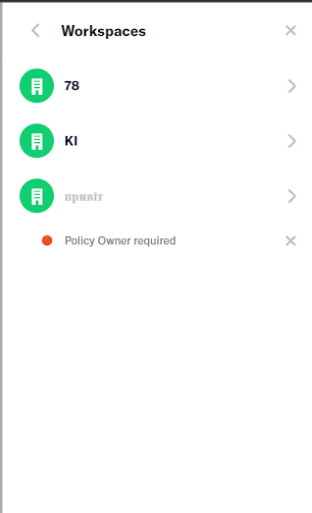
Assuming it's a Form validation error (all frontend) -
without the red dot, you can't tell which workspace has the error.

Copy link
Contributor Author

@aldo-expensify aldo-expensify May 25, 2023

Choose a reason for hiding this comment

The reason will be displayed to describe this comment to others. Learn more.

The problem is that we should have ignored !_.isEmpty(lodashGet(policy, 'errors', {})), but not _.some(lodashGet(policy, 'errorFields', {}), fieldErrors => !_.isEmpty(fieldErrors));, right?

These are the two checks in hasPolicyError

Copy link
Member

@rushatgabhane rushatgabhane May 25, 2023

Choose a reason for hiding this comment

The reason will be displayed to describe this comment to others. Learn more.

yes, precisely! (errorFields is a form error)

Sign up for free to join this conversation on GitHub. Already have an account? Sign in to comment

Labels

None yet

Projects

None yet

Development

Successfully merging this pull request may close these issues.

6 participants