Skip to content

Fix/12005: Settings navigation modal leaves empty space at the bottom#12509

Merged
chiragsalian merged 3 commits intoExpensify:mainfrom
VikalpP:fix/12005
Nov 15, 2022
Merged

Fix/12005: Settings navigation modal leaves empty space at the bottom#12509
chiragsalian merged 3 commits intoExpensify:mainfrom
VikalpP:fix/12005

Conversation

@VikalpP
Copy link
Contributor

@VikalpP VikalpP commented Nov 7, 2022

Details

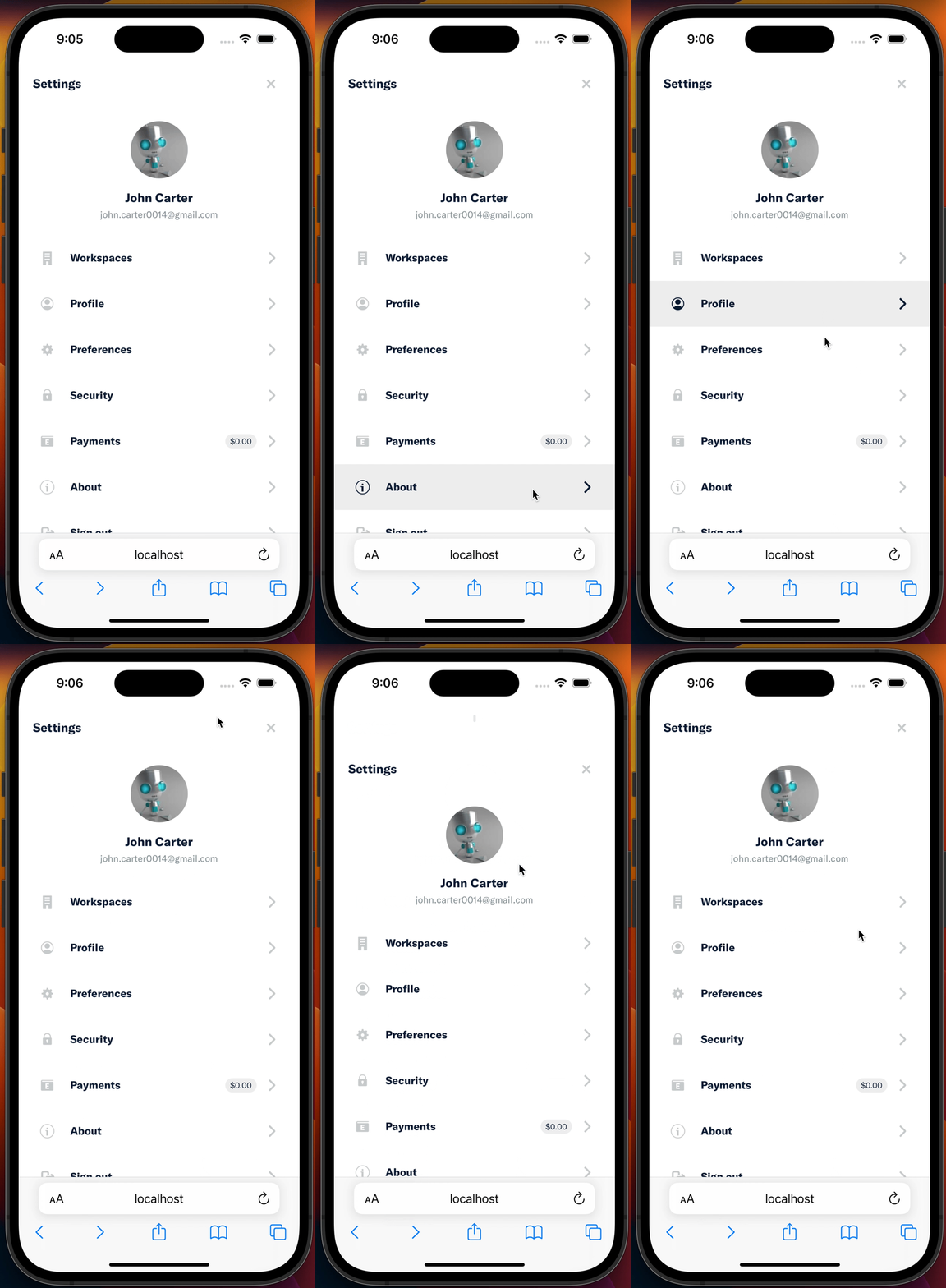
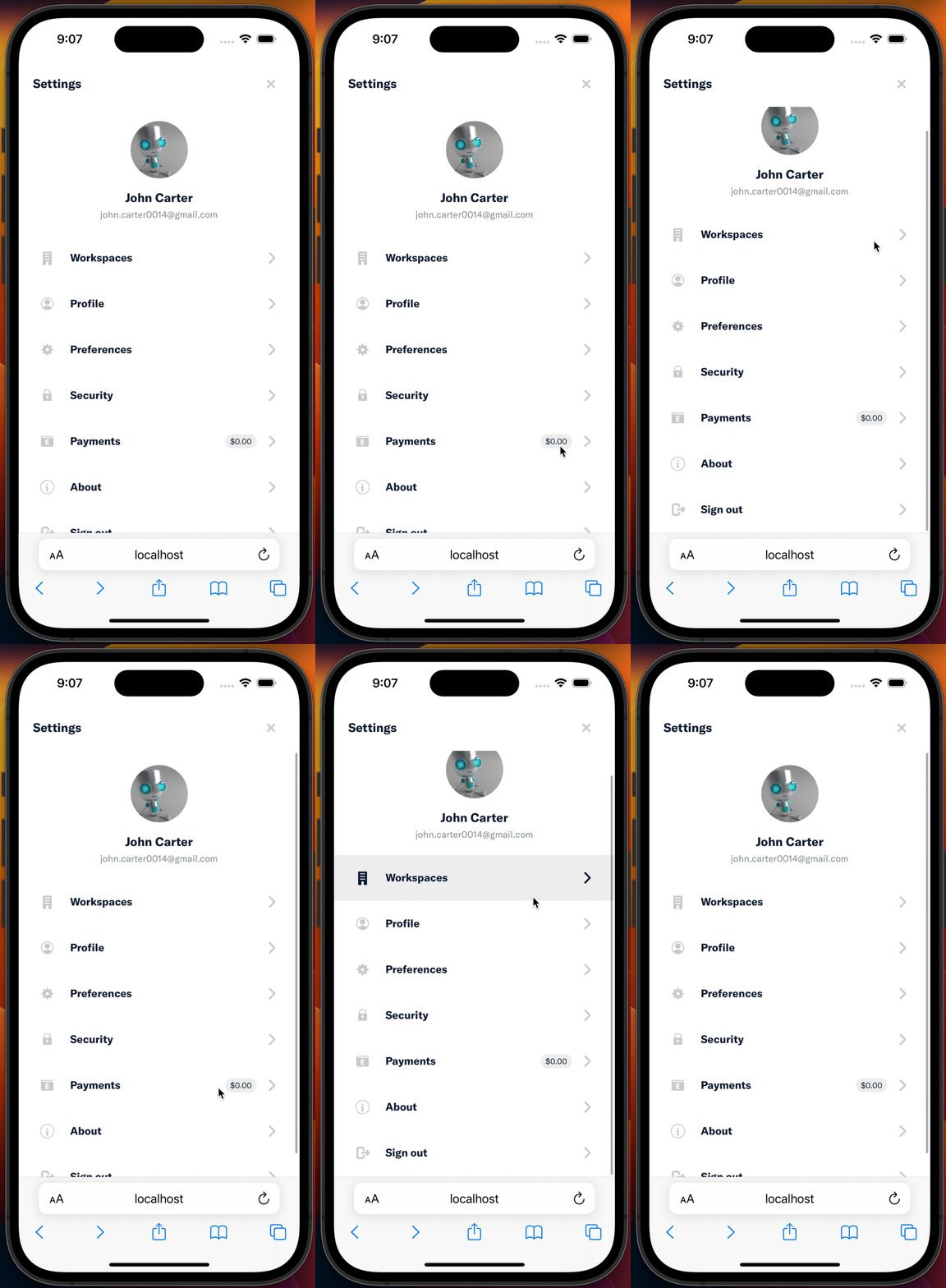
On Safari Desktop - the settings sidebar modal leaves an empty space at the bottom when the browser window's height changes.
Refactoring the Sidebar's height from 100% to 100vh would trigger Safari to re-paint the layout as needed.

Fixed Issues

$ #12005
PROPOSAL: #12005 (comment)
UPDATES IN PROPOSAL: #12005 (comment)

Tests

  1. Test on Safari Desktop Browser

    1. Open the Settings tab on Safari Desktop Browser (http://localhost:8080/settings)
    2. Resize the browser window by increasing the height.
    3. Verify that the Setting's sidebar is leaving no blank space at the bottom.
  2. Test on Safari Mobile Browser

    1. Open the Settings tab on Safari Mobile Browser possibly on iOS Emulator (http://localhost:8080/settings)
    2. Verify that the Setting's sidebar is leaving no blank space at the bottom.
    3. Verify that the Setting's sidebar is scrollable and last item in Sidebar is visible when scrolled.
  • Verify that no errors appear in the JS console

QA Steps

  1. Test on Safari Desktop Browser

    1. Open the Settings tab (https://new.expensify.com/settings) on Safari Desktop Browser
    2. Resize the browser window by increasing the height.
    3. Verify that the Setting's sidebar is leaving no blank space at the bottom.
  2. Test on Safari Mobile Browser

    1. Open the Settings tab (https://new.expensify.com/settings) on Safari Mobile Browser
    2. Verify that the Setting's sidebar is leaving no blank space at the bottom.
    3. Verify that the Setting's sidebar is scrollable and last item in the Sidebar is visible when scrolled.
  • Verify that no errors appear in the JS console

PR Author Checklist

  • I linked the correct issue in the ### Fixed Issues section above
  • I wrote clear testing steps that cover the changes made in this PR
    • I added steps for local testing in the Tests section
    • I added steps for Staging and/or Production testing in the QA steps section
    • I added steps to cover failure scenarios (i.e. verify an input displays the correct error message if the entered data is not correct)
    • I turned off my network connection and tested it while offline to ensure it matches the expected behavior (i.e. verify the default avatar icon is displayed if app is offline)
  • I included screenshots or videos for tests on all platforms
  • I ran the tests on all platforms & verified they passed on:
    • iOS / native
    • Android / native
    • iOS / Safari
    • Android / Chrome
    • MacOS / Chrome
    • MacOS / Desktop
  • I verified there are no console errors (if there's a console error not related to the PR, report it or open an issue for it to be fixed)
  • I followed proper code patterns (see Reviewing the code)
    • I verified that any callback methods that were added or modified are named for what the method does and never what callback they handle (i.e. toggleReport and not onIconClick)
    • I verified that comments were added to code that is not self explanatory
    • I verified that any new or modified comments were clear, correct English, and explained "why" the code was doing something instead of only explaining "what" the code was doing.
    • I verified any copy / text shown in the product was added in all src/languages/* files
    • I verified any copy / text that was added to the app is correct English and approved by marketing by adding the Waiting for Copy label for a copy review on the original GH to get the correct copy.
    • I verified proper file naming conventions were followed for any new files or renamed files. All non-platform specific files are named after what they export and are not named "index.js". All platform-specific files are named for the platform the code supports as outlined in the README.
    • I verified the JSDocs style guidelines (in STYLE.md) were followed
  • If a new code pattern is added I verified it was agreed to be used by multiple Expensify engineers
  • I followed the guidelines as stated in the Review Guidelines
  • I tested other components that can be impacted by my changes (i.e. if the PR modifies a shared library or component like Avatar, I verified the components using Avatar are working as expected)
  • I verified all code is DRY (the PR doesn't include any logic written more than once, with the exception of tests)
  • I verified any variables that can be defined as constants (ie. in CONST.js or at the top of the file that uses the constant) are defined as such
  • If a new component is created I verified that:
    • A similar component doesn't exist in the codebase
    • All props are defined accurately and each prop has a /** comment above it */
    • The file is named correctly
    • The component has a clear name that is non-ambiguous and the purpose of the component can be inferred from the name alone
    • The only data being stored in the state is data necessary for rendering and nothing else
    • For Class Components, any internal methods passed to components event handlers are bound to this properly so there are no scoping issues (i.e. for onClick={this.submit} the method this.submit should be bound to this in the constructor)
    • Any internal methods bound to this are necessary to be bound (i.e. avoid this.submit = this.submit.bind(this); if this.submit is never passed to a component event handler like onClick)
    • All JSX used for rendering exists in the render method
    • The component has the minimum amount of code necessary for its purpose, and it is broken down into smaller components in order to separate concerns and functions
  • If a new CSS style is added I verified that:
    • A similar style doesn't already exist
    • The style can't be created with an existing StyleUtils function (i.e. StyleUtils.getBackgroundAndBorderStyle(themeColors.componentBG)
  • If the PR modifies a generic component, I tested and verified that those changes do not break usages of that component in the rest of the App (i.e. if a shared library or component like Avatar is modified, I verified that Avatar is working as expected in all cases)
  • If the PR modifies a component related to any of the existing Storybook stories, I tested and verified all stories for that component are still working as expected.
  • I have checked off every checkbox in the PR author checklist, including those that don't apply to this PR.

PR Reviewer Checklist

The reviewer will copy/paste it into a new comment and complete it after the author checklist is completed

  • I have verified the author checklist is complete (all boxes are checked off).
  • I verified the correct issue is linked in the ### Fixed Issues section above
  • I verified testing steps are clear and they cover the changes made in this PR
    • I verified the steps for local testing are in the Tests section
    • I verified the steps for Staging and/or Production testing are in the QA steps section
    • I verified the steps cover any possible failure scenarios (i.e. verify an input displays the correct error message if the entered data is not correct)
    • I turned off my network connection and tested it while offline to ensure it matches the expected behavior (i.e. verify the default avatar icon is displayed if app is offline)
  • I checked that screenshots or videos are included for tests on all platforms
  • I included screenshots or videos for tests on all platforms
  • I verified tests pass on all platforms & I tested again on:
    • iOS / native
    • Android / native
    • iOS / Safari
    • Android / Chrome
    • MacOS / Chrome
    • MacOS / Desktop
  • If there are any errors in the console that are unrelated to this PR, I either fixed them (preferred) or linked to where I reported them in Slack
  • I verified proper code patterns were followed (see Reviewing the code)
    • I verified that any callback methods that were added or modified are named for what the method does and never what callback they handle (i.e. toggleReport and not onIconClick).
    • I verified that comments were added to code that is not self explanatory
    • I verified that any new or modified comments were clear, correct English, and explained "why" the code was doing something instead of only explaining "what" the code was doing.
    • I verified any copy / text shown in the product was added in all src/languages/* files
    • I verified any copy / text that was added to the app is correct English and approved by marketing by adding the Waiting for Copy label for a copy review on the original GH to get the correct copy.
    • I verified proper file naming conventions were followed for any new files or renamed files. All non-platform specific files are named after what they export and are not named "index.js". All platform-specific files are named for the platform the code supports as outlined in the README.
    • I verified the JSDocs style guidelines (in STYLE.md) were followed
  • If a new code pattern is added I verified it was agreed to be used by multiple Expensify engineers
  • I verified that this PR follows the guidelines as stated in the Review Guidelines
  • I verified other components that can be impacted by these changes have been tested, and I retested again (i.e. if the PR modifies a shared library or component like Avatar, I verified the components using Avatar have been tested & I retested again)
  • I verified all code is DRY (the PR doesn't include any logic written more than once, with the exception of tests)
  • I verified any variables that can be defined as constants (ie. in CONST.js or at the top of the file that uses the constant) are defined as such
  • If a new component is created I verified that:
    • A similar component doesn't exist in the codebase
    • All props are defined accurately and each prop has a /** comment above it */
    • The file is named correctly
    • The component has a clear name that is non-ambiguous and the purpose of the component can be inferred from the name alone
    • The only data being stored in the state is data necessary for rendering and nothing else
    • For Class Components, any internal methods passed to components event handlers are bound to this properly so there are no scoping issues (i.e. for onClick={this.submit} the method this.submit should be bound to this in the constructor)
    • Any internal methods bound to this are necessary to be bound (i.e. avoid this.submit = this.submit.bind(this); if this.submit is never passed to a component event handler like onClick)
    • All JSX used for rendering exists in the render method
    • The component has the minimum amount of code necessary for its purpose, and it is broken down into smaller components in order to separate concerns and functions
  • If a new CSS style is added I verified that:
    • A similar style doesn't already exist
    • The style can't be created with an existing StyleUtils function (i.e. StyleUtils.getBackgroundAndBorderStyle(themeColors.componentBG)
  • If the PR modifies a generic component, I tested and verified that those changes do not break usages of that component in the rest of the App (i.e. if a shared library or component like Avatar is modified, I verified that Avatar is working as expected in all cases)
  • If the PR modifies a component related to any of the existing Storybook stories, I tested and verified all stories for that component are still working as expected.
  • I have checked off every checkbox in the PR reviewer checklist, including those that don't apply to this PR.

Screenshots

Web

Desktop.-.Chrome.mov

Mobile Web - Chrome

Mobile.-.Chrome.mp4

Mobile Web - Safari

Mobile.-.Safari.mov

Desktop

Desktop.-.MacOS.mov

iOS

iOS.mov

Android

Android.mov

@github-actions
Copy link
Contributor

github-actions bot commented Nov 7, 2022

CLA Assistant Lite bot All contributors have signed the CLA ✍️ ✅

@VikalpP VikalpP changed the title fix: Settings navigation modal leaves empty space at the bottom [WIP] Fix/12005: Settings navigation modal leaves empty space at the bottom Nov 7, 2022
@VikalpP
Copy link
Contributor Author

VikalpP commented Nov 7, 2022

I have read the CLA Document and I hereby sign the CLA

@VikalpP VikalpP marked this pull request as ready for review November 7, 2022 18:08
@VikalpP VikalpP requested a review from a team as a code owner November 7, 2022 18:08
@melvin-bot melvin-bot bot requested review from chiragsalian and rushatgabhane and removed request for a team November 7, 2022 18:08
@VikalpP VikalpP changed the title [WIP] Fix/12005: Settings navigation modal leaves empty space at the bottom Fix/12005: Settings navigation modal leaves empty space at the bottom Nov 7, 2022
@VikalpP
Copy link
Contributor Author

VikalpP commented Nov 7, 2022

recheck

@chiragsalian
Copy link
Contributor

chiragsalian commented Nov 8, 2022

i retriggered GH actions and they are passing now.
@rushatgabhane, feel free to review & test when you get the chance.


export default isSmallScreenWidth => ({
...getBaseNavigationModalCardStyles(isSmallScreenWidth),
height: 'calc(100vh - 100%)',
Copy link
Member

@rushatgabhane rushatgabhane Nov 8, 2022

Choose a reason for hiding this comment

The reason will be displayed to describe this comment to others. Learn more.

@VikalpP i'm sorry but I don't understand why we're doing calc(100vh - 100%) and not just 100vh

which particular platform needs it and when?

Copy link
Contributor Author

@VikalpP VikalpP Nov 9, 2022

Choose a reason for hiding this comment

The reason will be displayed to describe this comment to others. Learn more.

Simply setting it as 100vh would not work on mobile iOS Safari.

height: 100vh height: calc(100vh - 100%)
1 2

** This one is a hack that used for the past 4 years to make things work on both platforms around Safari.

Copy link
Member

Choose a reason for hiding this comment

The reason will be displayed to describe this comment to others. Learn more.

can you please add a comment explaining this in code as well? thanks!

Copy link
Contributor Author

Choose a reason for hiding this comment

The reason will be displayed to describe this comment to others. Learn more.

Done ✅

@VikalpP VikalpP requested review from rushatgabhane and removed request for chiragsalian November 10, 2022 04:26
@VikalpP
Copy link
Contributor Author

VikalpP commented Nov 10, 2022

Simply re-requested a review from @rushatgabhane, Not sure why it removed @chiragsalian from reviewers.

Co-authored-by: Rushat Gabhane <rushatgabhane@gmail.com>
@VikalpP VikalpP requested review from rushatgabhane and removed request for rushatgabhane November 11, 2022 11:55
Copy link
Member

@rushatgabhane rushatgabhane left a comment

Choose a reason for hiding this comment

The reason will be displayed to describe this comment to others. Learn more.

@chiragsalian LGTM! 🎉

Web
Screen.Recording.2022-11-12.at.2.35.16.AM.mov
mWeb
Screen.Recording.2022-11-12.at.2.38.32.AM.mov
iOS

Uploading Screen Recording 2022-11-12 at 2.46.19 AM.mov…

Android
Screen.Recording.2022-11-12.at.3.09.11.AM.mov
Desktop
Screen.Recording.2022-11-12.at.2.43.57.AM.mov

PR Reviewer Checklist

  • I have verified the author checklist is complete (all boxes are checked off).
  • I verified the correct issue is linked in the ### Fixed Issues section above
  • I verified testing steps are clear and they cover the changes made in this PR
    • I verified the steps for local testing are in the Tests section
    • I verified the steps for Staging and/or Production testing are in the QA steps section
    • I verified the steps cover any possible failure scenarios (i.e. verify an input displays the correct error message if the entered data is not correct)
    • I turned off my network connection and tested it while offline to ensure it matches the expected behavior (i.e. verify the default avatar icon is displayed if app is offline)
  • I checked that screenshots or videos are included for tests on all platforms
  • I included screenshots or videos for tests on all platforms
  • I verified tests pass on all platforms & I tested again on:
    • iOS / native
    • Android / native
    • iOS / Safari
    • Android / Chrome
    • MacOS / Chrome
    • MacOS / Desktop
  • If there are any errors in the console that are unrelated to this PR, I either fixed them (preferred) or linked to where I reported them in Slack
  • I verified proper code patterns were followed (see Reviewing the code)
    • I verified that any callback methods that were added or modified are named for what the method does and never what callback they handle (i.e. toggleReport and not onIconClick).
    • I verified that comments were added to code that is not self explanatory
    • I verified that any new or modified comments were clear, correct English, and explained "why" the code was doing something instead of only explaining "what" the code was doing.
    • I verified any copy / text shown in the product was added in all src/languages/* files
    • I verified any copy / text that was added to the app is correct English and approved by marketing by adding the Waiting for Copy label for a copy review on the original GH to get the correct copy.
    • I verified proper file naming conventions were followed for any new files or renamed files. All non-platform specific files are named after what they export and are not named "index.js". All platform-specific files are named for the platform the code supports as outlined in the README.
    • I verified the JSDocs style guidelines (in STYLE.md) were followed
  • If a new code pattern is added I verified it was agreed to be used by multiple Expensify engineers
  • I verified that this PR follows the guidelines as stated in the Review Guidelines
  • I verified other components that can be impacted by these changes have been tested, and I retested again (i.e. if the PR modifies a shared library or component like Avatar, I verified the components using Avatar have been tested & I retested again)
  • I verified all code is DRY (the PR doesn't include any logic written more than once, with the exception of tests)
  • I verified any variables that can be defined as constants (ie. in CONST.js or at the top of the file that uses the constant) are defined as such
  • If a new component is created I verified that:
    • A similar component doesn't exist in the codebase
    • All props are defined accurately and each prop has a /** comment above it */
    • The file is named correctly
    • The component has a clear name that is non-ambiguous and the purpose of the component can be inferred from the name alone
    • The only data being stored in the state is data necessary for rendering and nothing else
    • For Class Components, any internal methods passed to components event handlers are bound to this properly so there are no scoping issues (i.e. for onClick={this.submit} the method this.submit should be bound to this in the constructor)
    • Any internal methods bound to this are necessary to be bound (i.e. avoid this.submit = this.submit.bind(this); if this.submit is never passed to a component event handler like onClick)
    • All JSX used for rendering exists in the render method
    • The component has the minimum amount of code necessary for its purpose, and it is broken down into smaller components in order to separate concerns and functions
  • If a new CSS style is added I verified that:
    • A similar style doesn't already exist
    • The style can't be created with an existing StyleUtils function (i.e. StyleUtils.getBackgroundAndBorderStyle(themeColors.componentBG)
  • If the PR modifies a generic component, I tested and verified that those changes do not break usages of that component in the rest of the App (i.e. if a shared library or component like Avatar is modified, I verified that Avatar is working as expected in all cases)
  • If the PR modifies a component related to any of the existing Storybook stories, I tested and verified all stories for that component are still working as expected.
  • I have checked off every checkbox in the PR reviewer checklist, including those that don't apply to this PR.

@chiragsalian chiragsalian self-requested a review November 15, 2022 00:26
Copy link
Contributor

@chiragsalian chiragsalian left a comment

Choose a reason for hiding this comment

The reason will be displayed to describe this comment to others. Learn more.

LGTM

@chiragsalian chiragsalian merged commit cfd0a08 into Expensify:main Nov 15, 2022
@melvin-bot melvin-bot bot added the Emergency label Nov 15, 2022
@melvin-bot
Copy link

melvin-bot bot commented Nov 15, 2022

@chiragsalian looks like this was merged without the checklist test passing. Please add a note explaining why this was done and remove the Emergency label if this is not an emergency.

@chiragsalian
Copy link
Contributor

Not emergency. Im unsure why GH actions was failing for author/reviewer checklist even though they look complete. I asked in open-source but still proceeding to merge so that PR is not held on it.

@OSBotify
Copy link
Contributor

✋ This PR was not deployed to staging yet because QA is ongoing. It will be automatically deployed to staging after the next production release.

@OSBotify
Copy link
Contributor

🚀 Deployed to staging by @chiragsalian in version: 1.2.28-0 🚀

platform result
🤖 android 🤖 success ✅
🖥 desktop 🖥 success ✅
🍎 iOS 🍎 failure ❌
🕸 web 🕸 success ✅

@OSBotify
Copy link
Contributor

🚀 Deployed to staging by @chiragsalian in version: 1.2.28-0 🚀

platform result
🤖 android 🤖 success ✅
🖥 desktop 🖥 success ✅
🍎 iOS 🍎 success ✅
🕸 web 🕸 success ✅

@OSBotify
Copy link
Contributor

🚀 Deployed to production by @roryabraham in version: 1.2.28-2 🚀

platform result
🤖 android 🤖 success ✅
🖥 desktop 🖥 success ✅
🍎 iOS 🍎 success ✅
🕸 web 🕸 success ✅


// This makes the modal card take up the full height of the screen on Desktop Safari and iOS Safari
// https://github.com/Expensify/App/pull/12509/files#r1018107162
height: 'calc(100vh - 100%)',
Copy link
Contributor

Choose a reason for hiding this comment

The reason will be displayed to describe this comment to others. Learn more.

👋This has caused a regression in #17824, where the applinks banner would make the height calculation incorrect (mobile Safari only)
image
image

We resolved both bugs by passing the screen height from JS side using withWindowDimensions, i.e
height: props.windowHeight

Sign up for free to join this conversation on GitHub. Already have an account? Sign in to comment

Labels

None yet

Projects

None yet

Development

Successfully merging this pull request may close these issues.

5 participants