Skip to content

Desktop - Add "Check For Update" system menu item#12607

Merged
pecanoro merged 4 commits intoExpensify:mainfrom
kidroca:kidroca/feature/desktop-check-for-updates-menu-item
Nov 23, 2022
Merged

Desktop - Add "Check For Update" system menu item#12607
pecanoro merged 4 commits intoExpensify:mainfrom
kidroca:kidroca/feature/desktop-check-for-updates-menu-item

Conversation

@kidroca
Copy link
Contributor

@kidroca kidroca commented Nov 9, 2022

Details

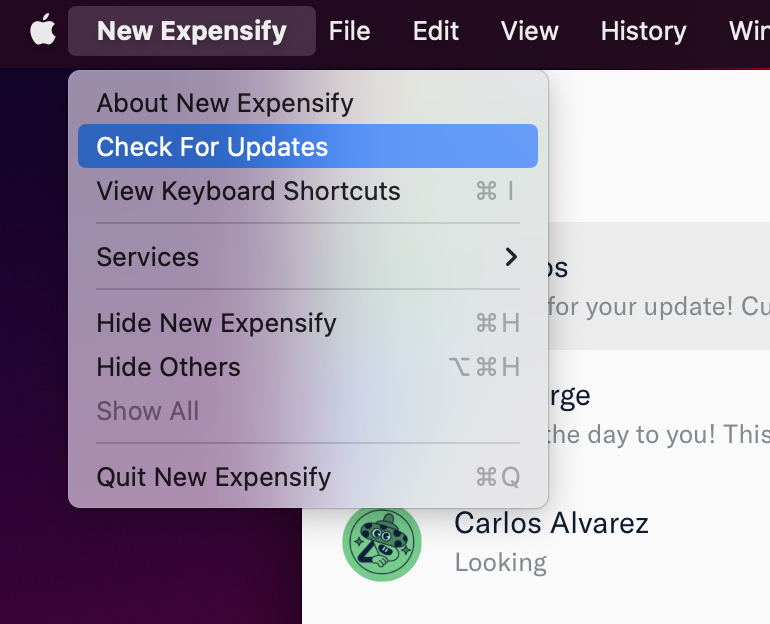
Add a "Check for Updates" system menu item
The "Check for Updates" appears until an update is downloaded (either manually or automatically), then it gets swapped by the "Update New Expensify" system menu item

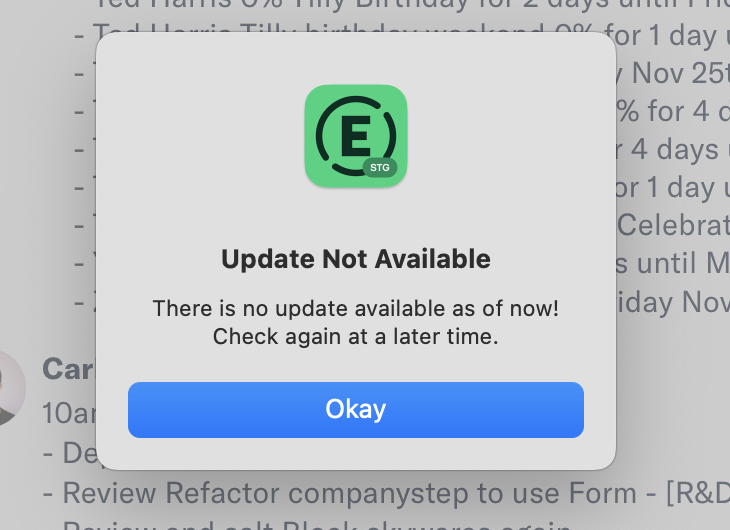
Since the "Update available" notification is displayed only after an update is downloaded I've included a feedback dialog
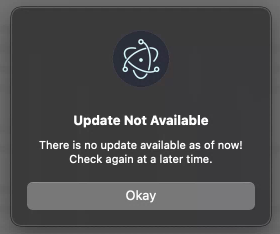
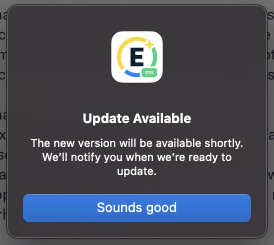
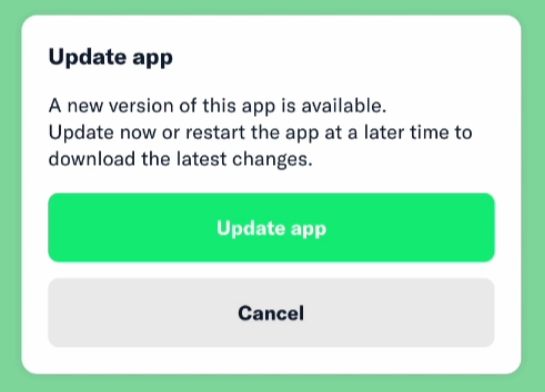
The dialog is shown soon after clicking "Check for Updates" and the user is informed whether an update is available and being downloaded, or not update is available right now

Note: As other content (menu items) in desktop/main.js the texts are not localized.
Dialogs, notifications, menus localization is out current scope

Fixed Issues

$ #11817
PROPOSAL: N/A

Tests

To test in dev (temporarily) add the following file inside ./desktop/dev-app-update.yml

provider: s3
bucket: staging-expensify-cash
channel: latest
updaterCacheDirName: new.expensify.desktop-updater

This would allow the "Check For Update" menu item to work in dev (otherwise the checkForUpdates action fails with an error)

Testing on DEV

In DEV update checks resolve with no update available (even when there's a new version):

  • Verify "Check for updates" menu item appears in DEV
  • Verify pressing "Check for updates" shows a dialog with the result shortly
  • Verify "Update New Expensify" menu item does not appear

Testing building and running the staging/prod app

  1. Build the desktop app for staging and/or prod: npm run desktop-build or npm run desktop-build-staging
  2. Install desktop-build/NewExpensify.dmg to Applications
  3. Go offline before you launch the installed app - we do this in order to prevent the automatic update feature to download and install an update, so we can test the "Check for Update" functionality
  • Press on the system menu to see the "Check for updates" option - pressing it should shortly display a dialog that an update is available. The update is being downloaded - sometimes it takes a few minutes, before we get a system notification that the update is ready to be installed. At that point "Check for updates" should no longer be displayed in the system menu
    • You can discard or not press on the "Update ready" (downloaded) notification and see that "Check for updates" indeed is no longer in the system menu, but "Update New Expensify" is reviewed
    • Verify that pressing "Update New Expensify" still works - I couldn't easily check this, perhaps we can leave it for QA, otherwise we'd need to setup local update server - explained in more detail in this comment
    • Verify pressing the "Update ready" notification still works the same way as before - it displays the in-app modal that lets you apply the update ASAP

To simulates that there are no updates available in staging or prod, go to main package.json and set the app version, to the latest released version or newer.
Now build the desktop app and launch it

  • Verify the "Check for updates" option appears in the system menu

  • Verify pressing it shows a dialog that there are no updates right now

  • Verify "Check for Updates" works offline

    • launch the app offline
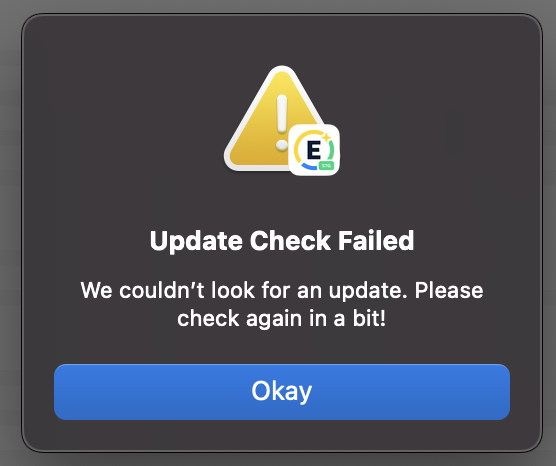
    • press "Check for Updates" - see a dialog explaining the check for updates failed
    • optionally resume connectivity and retry - now you should get actual results whether update exists or no

QA Steps

Preparation Steps

  1. Install desktop-build/NewExpensify.dmg to Applications
  2. Go offline before you launch the installed app - we do this in order to prevent the automatic update feature to download and install an update, so we can test the "Check for Update" functionality
  3. Launch the app, wait a bit then enable internet connectivity

Verify the new menu item exists

  • Find "Check for Updates" in the system menu - this item is displayed in the menu until an update have been downloaded
  • "Check for Updates" appears as disabled while an update is being downloaded - press "Check for Updates", then open the system menu again - the item should be disabled while checking/downloading a new version

Verify "Check for Updates" informs us of a new version

I'm not sure whether it would be possible to test this in staging right away - if this (PR) is the latest version on Staging, checking for updates would, of course, respond that there are no new versions

I think in order to test you should save the New Expensify.dmg somewhere and install it (again) after a newer version is available on staging.
Keep a New Expensify.dmg so you can start over and test again in case you need to - installing an older version of New Expensify would allow you to receive notifications that updates are available

Follow the Preparation Steps then

Verify applying the update works

After checking for updates and when update is available it would be downloaded automatically
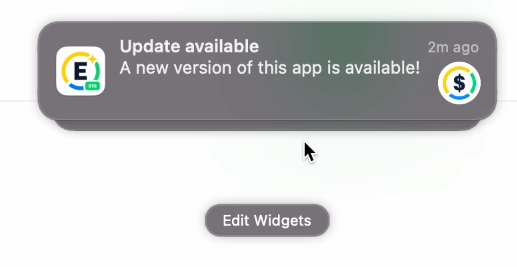
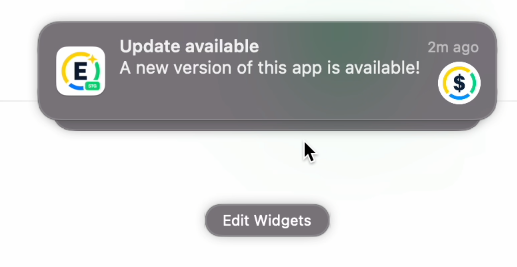
When the download is over you should receive a notification like this
image

Clicking on the Notification should bring focus to App and prompt you to install the update now or skip
image

  • Verify applying the "Update app" button on the prompt works - App should restart and be updated to the newer version
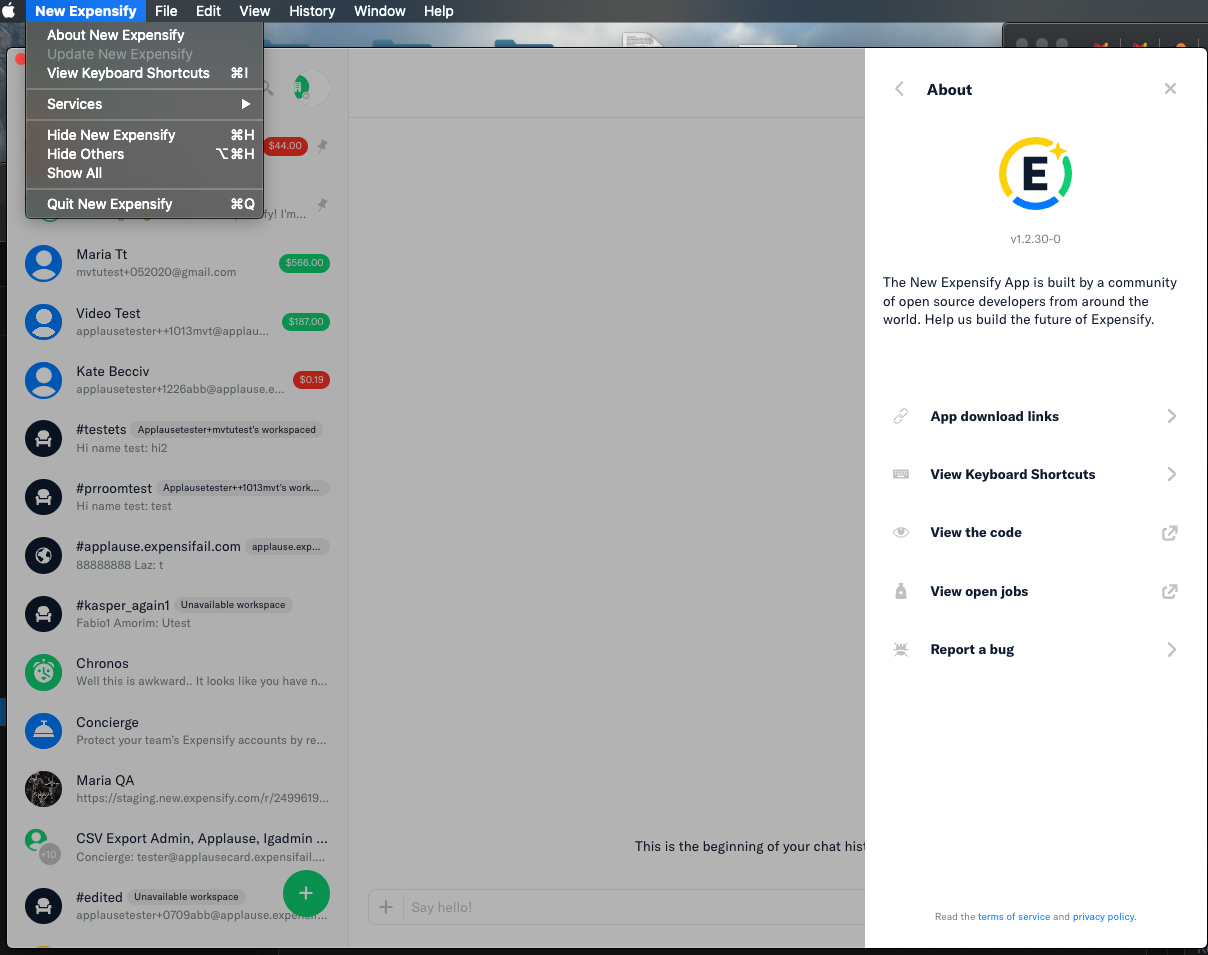
  • You can also apply the update form the system menu - the "Check for Updates" option should be replaced by an "Update New Expnsify" option:
    image
  • You can also dismiss the update and keep using App
  • When you Quit and restart App the update should be applied automatically (only if you've seen the Update Available notification, but dismissed it, or didn't use it) (e.g. you didn't quick App, before the update was downloaded)

Verify "Check for Updates" informs us of that there's no newer version

This should be the case initially when this PR is the latest code on staging, or after installing an update

Follow the Preparation Steps then

  • pressing system menu item "Check for Updates" shows that update is NOT available - a dialog informing you that you're using the latest version should appear

Verify "Check for Updates" doesn't crash the app when used offline

Follow the Preparation Steps but stay offline

  • Verify "Check for Updates" works offline
    • launch the app offline
    • press "Check for Updates" - see a dialog explaining the check for updates failed
    • optionally resume connectivity and retry - now you should get actual results whether update exists or no

Verify the auto update check on startup still works

Follow the Preparation Steps but don't go offline at all

  • Launching the app should automatically check, download and notify of existing updates - just launch the app and do nothing at all, but wait a few or several minutes - you should receive a system notification that update is available

Verify the auto update check the runs every 8 hrs still works

Follow the *Preparation Steps and do stay offline

Launch the app, wait for several seconds and resume internet connectivity

There are 2 cases

  • After 8 hours, if App is focused you get a notification that update is available
  • After 8 hours if App is not focused the update is applied automatically and App is restarted

PR Author Checklist

  • I linked the correct issue in the ### Fixed Issues section above

  • I wrote clear testing steps that cover the changes made in this PR

    • I added steps for local testing in the Tests section
    • I added steps for the expected offline behavior in the Offline steps section
    • I added steps for Staging and/or Production testing in the QA steps section
    • I added steps to cover failure scenarios (i.e. verify an input displays the correct error message if the entered data is not correct)
    • I turned off my network connection and tested it while offline to ensure it matches the expected behavior (i.e. verify the default avatar icon is displayed if app is offline)
    • I tested this PR with a High Traffic account against the staging or production API to ensure there are no regressions (e.g. long loading states that impact usability).
  • I included screenshots or videos for tests on all platforms

  • I ran the tests on all platforms & verified they passed on:

    • iOS / native
    • Android / native
    • iOS / Safari
    • Android / Chrome
    • MacOS / Chrome
    • MacOS / Desktop
  • I verified there are no console errors (if there's a console error not related to the PR, report it or open an issue for it to be fixed)

  • I followed proper code patterns (see Reviewing the code)

    • I verified that any callback methods that were added or modified are named for what the method does and never what callback they handle (i.e. toggleReport and not onIconClick)
    • I verified that comments were added to code that is not self explanatory
    • I verified that any new or modified comments were clear, correct English, and explained "why" the code was doing something instead of only explaining "what" the code was doing.
    • I verified any copy / text shown in the product was added in all src/languages/* files
    • I verified any copy / text that was added to the app is correct English and approved by marketing by adding the Waiting for Copy label for a copy review on the original GH to get the correct copy.
    • I verified proper file naming conventions were followed for any new files or renamed files. All non-platform specific files are named after what they export and are not named "index.js". All platform-specific files are named for the platform the code supports as outlined in the README.
    • I verified the JSDocs style guidelines (in STYLE.md) were followed
  • If a new code pattern is added I verified it was agreed to be used by multiple Expensify engineers

  • I followed the guidelines as stated in the Review Guidelines

  • I tested other components that can be impacted by my changes (i.e. if the PR modifies a shared library or component like Avatar, I verified the components using Avatar are working as expected)

  • I verified all code is DRY (the PR doesn't include any logic written more than once, with the exception of tests)

  • I verified any variables that can be defined as constants (ie. in CONST.js or at the top of the file that uses the constant) are defined as such

  • I verified that if a function's arguments changed that all usages have also been updated correctly

  • If a new component is created I verified that:

    • A similar component doesn't exist in the codebase
    • All props are defined accurately and each prop has a /** comment above it */
    • The file is named correctly
    • The component has a clear name that is non-ambiguous and the purpose of the component can be inferred from the name alone
    • The only data being stored in the state is data necessary for rendering and nothing else
    • For Class Components, any internal methods passed to components event handlers are bound to this properly so there are no scoping issues (i.e. for onClick={this.submit} the method this.submit should be bound to this in the constructor)
    • Any internal methods bound to this are necessary to be bound (i.e. avoid this.submit = this.submit.bind(this); if this.submit is never passed to a component event handler like onClick)
    • All JSX used for rendering exists in the render method
    • The component has the minimum amount of code necessary for its purpose, and it is broken down into smaller components in order to separate concerns and functions
  • If a new CSS style is added I verified that:

    • A similar style doesn't already exist
    • The style can't be created with an existing StyleUtils function (i.e. StyleUtils.getBackgroundAndBorderStyle(themeColors.componentBG)
  • If the PR modifies a generic component, I tested and verified that those changes do not break usages of that component in the rest of the App (i.e. if a shared library or component like Avatar is modified, I verified that Avatar is working as expected in all cases)

  • If the PR modifies a component related to any of the existing Storybook stories, I tested and verified all stories for that component are still working as expected.

  • I have checked off every checkbox in the PR author checklist, including those that don't apply to this PR.

PR Reviewer Checklist

The reviewer will copy/paste it into a new comment and complete it after the author checklist is completed

  • I have verified the author checklist is complete (all boxes are checked off).
  • I verified the correct issue is linked in the ### Fixed Issues section above
  • I verified testing steps are clear and they cover the changes made in this PR
    • I verified the steps for local testing are in the Tests section
    • I verified the steps for Staging and/or Production testing are in the QA steps section
    • I verified the steps cover any possible failure scenarios (i.e. verify an input displays the correct error message if the entered data is not correct)
    • I turned off my network connection and tested it while offline to ensure it matches the expected behavior (i.e. verify the default avatar icon is displayed if app is offline)
  • I checked that screenshots or videos are included for tests on all platforms
  • I included screenshots or videos for tests on all platforms
  • I verified tests pass on all platforms & I tested again on:
    • iOS / native
    • Android / native
    • iOS / Safari
    • Android / Chrome
    • MacOS / Chrome
    • MacOS / Desktop
  • If there are any errors in the console that are unrelated to this PR, I either fixed them (preferred) or linked to where I reported them in Slack
  • I verified proper code patterns were followed (see Reviewing the code)
    • I verified that any callback methods that were added or modified are named for what the method does and never what callback they handle (i.e. toggleReport and not onIconClick).
    • I verified that comments were added to code that is not self explanatory
    • I verified that any new or modified comments were clear, correct English, and explained "why" the code was doing something instead of only explaining "what" the code was doing.
    • I verified any copy / text shown in the product was added in all src/languages/* files
    • I verified any copy / text that was added to the app is correct English and approved by marketing by adding the Waiting for Copy label for a copy review on the original GH to get the correct copy.
    • I verified proper file naming conventions were followed for any new files or renamed files. All non-platform specific files are named after what they export and are not named "index.js". All platform-specific files are named for the platform the code supports as outlined in the README.
    • I verified the JSDocs style guidelines (in STYLE.md) were followed
  • If a new code pattern is added I verified it was agreed to be used by multiple Expensify engineers
  • I verified that this PR follows the guidelines as stated in the Review Guidelines
  • I verified other components that can be impacted by these changes have been tested, and I retested again (i.e. if the PR modifies a shared library or component like Avatar, I verified the components using Avatar have been tested & I retested again)
  • I verified all code is DRY (the PR doesn't include any logic written more than once, with the exception of tests)
  • I verified any variables that can be defined as constants (ie. in CONST.js or at the top of the file that uses the constant) are defined as such
  • If a new component is created I verified that:
    • A similar component doesn't exist in the codebase
    • All props are defined accurately and each prop has a /** comment above it */
    • The file is named correctly
    • The component has a clear name that is non-ambiguous and the purpose of the component can be inferred from the name alone
    • The only data being stored in the state is data necessary for rendering and nothing else
    • For Class Components, any internal methods passed to components event handlers are bound to this properly so there are no scoping issues (i.e. for onClick={this.submit} the method this.submit should be bound to this in the constructor)
    • Any internal methods bound to this are necessary to be bound (i.e. avoid this.submit = this.submit.bind(this); if this.submit is never passed to a component event handler like onClick)
    • All JSX used for rendering exists in the render method
    • The component has the minimum amount of code necessary for its purpose, and it is broken down into smaller components in order to separate concerns and functions
  • If a new CSS style is added I verified that:
    • A similar style doesn't already exist
    • The style can't be created with an existing StyleUtils function (i.e. StyleUtils.getBackgroundAndBorderStyle(themeColors.componentBG)
  • If the PR modifies a generic component, I tested and verified that those changes do not break usages of that component in the rest of the App (i.e. if a shared library or component like Avatar is modified, I verified that Avatar is working as expected in all cases)
  • If the PR modifies a component related to any of the existing Storybook stories, I tested and verified all stories for that component are still working as expected.
  • I have checked off every checkbox in the PR reviewer checklist, including those that don't apply to this PR.

Screenshots

Web

Mobile Web - Chrome

Mobile Web - Safari

Desktop

Screenshot 2022-11-09 at 16 31 08

Screen.Recording.2022-11-09.at.19.37.18.mov

Screenshot 2022-11-09 at 21 23 02

iOS

Android

@kidroca
Copy link
Contributor Author

kidroca commented Nov 9, 2022

I verified any copy / text that was added to the app is correct English and approved by marketing by adding the Waiting for Copy label for a copy review on the original GH to get the correct copy.

Obviously the texts here are a fruit of my imagination so we'll need to update them,
I'll post about that on the original issue

@kidroca kidroca marked this pull request as ready for review November 9, 2022 19:39
@kidroca kidroca requested a review from a team as a code owner November 9, 2022 19:39
@melvin-bot melvin-bot bot requested review from Santhosh-Sellavel and pecanoro and removed request for a team November 9, 2022 19:40
@kidroca
Copy link
Contributor Author

kidroca commented Nov 9, 2022

I haven't provided screenshots for all platforms - I just verified they still run/build - as you can see nothing is changed for other platforms

@Santhosh-Sellavel
Copy link
Collaborator

Santhosh-Sellavel commented Nov 11, 2022

Looks good we're waiting for a copy!

Screen.Recording.2022-11-11.at.7.45.07.AM.mov

Copy link
Collaborator

@Santhosh-Sellavel Santhosh-Sellavel left a comment

Choose a reason for hiding this comment

The reason will be displayed to describe this comment to others. Learn more.

@kidroca Are we still waiting for copy here?

@kidroca
Copy link
Contributor Author

kidroca commented Nov 14, 2022

@kidroca Are we still waiting for copy here?

Still waiting for copy, posted a comment on the ticket

@kidroca
Copy link
Contributor Author

kidroca commented Nov 15, 2022

Updated copies, ready for review ✔️

image

  • During development the app name in the menu is "Electron" and this Electron icon appear as default, for prod/staging the icon would be the Expensify icon like below

image

Screenshot 2022-11-15 at 20 40 18

@kidroca
Copy link
Contributor Author

kidroca commented Nov 17, 2022

Note: there's a lot of code related to updates/auto-updates and creating menu items that can be extracted in separate files

  • updater.js
  • appMenu.js

desktop/main.js needs better organization, because it becomes very cluttered/tangled
Can we capture a refactor ticket?

@Santhosh-Sellavel
Copy link
Collaborator

Note: there's a lot of code related to updates/auto-updates and creating menu items that can be extracted in separate files

  • updater.js
  • appMenu.js

desktop/main.js needs better organization, because it becomes very cluttered/tangled Can we capture a refactor ticket?

Please take this idea to slack, if not already!

@Santhosh-Sellavel
Copy link
Collaborator

In DEV update checks resolve with no update available (even when there's a new version):

  • Verify "Check for updates" menu item appears in DEV
  • Verify pressing "Check for updates" shows a dialog with the result shortly
  • Verify "Update New Expensify" menu item does not appear
DevTest.mov

@Santhosh-Sellavel
Copy link
Collaborator

@kidroca

While building for production/staging, should I keep this file ./desktop/dev-app-update.yml or remove it?

Should I add anything else?

I can just clone your branch, and build desktop-staging should do right?

@kidroca
Copy link
Contributor Author

kidroca commented Nov 19, 2022

@Santhosh-Sellavel

While building for production/staging, should I keep this file ./desktop/dev-app-update.yml or remove it?

It shouldn't matter, but just to be safe you can deleted it first

Should I add anything else?

No
Depending whether you want to get "Update Available" or "Update Not Available" you can change the main package.json version before building desktop

I can just clone your branch, and build desktop-staging should do right?

Yes

@Santhosh-Sellavel
Copy link
Collaborator

@kidroca Not sure what I am doing wrong, app always crashes when I open the generated desktop build. I was unable to verify update available case alone.

@kidroca
Copy link
Contributor Author

kidroca commented Nov 21, 2022

@kidroca Not sure what I am doing wrong, app always crashes when I open the generated desktop build. I was unable to verify update available case alone.

  • Are you using an M1 mac?
  • Can you include a screenshot or the content of the crash dialog?
  • is it only with my changes or does building from the main also results in the same crash?

@kidroca
Copy link
Contributor Author

kidroca commented Nov 21, 2022

@Santhosh-Sellavel
I remember I had a crash after building staging/prod as well

Could you check if this bug report and shared fix solves the crash for you: https://expensify.slack.com/archives/C01GTK53T8Q/p1667938306012479

@Santhosh-Sellavel
Copy link
Collaborator

Thanks, @kidroca It works!

@Santhosh-Sellavel
Copy link
Collaborator

Screen recording

Update Available & unable to check error

Screen.Recording.2022-11-21.at.8.52.38.PM.mov

No Update

Screen.Recording.2022-11-21.at.9.20.13.PM.mov

@Santhosh-Sellavel
Copy link
Collaborator

Santhosh-Sellavel commented Nov 21, 2022

@kidroca Need some clarification

Please check the above video for updates available flow

  1. Initially Check for updates is shown in the menu.
  2. After clicking the "Update available popup"
  3. For some time Check for updates is disabled, I assume the update is downloading
  4. When the download is complete there is no notification as said in the UpdateAvailable popup. Is this Expected?
  5. Now Update New Expensify is shown in the menu, but clicking it does nothing. Is this expected for now?

@kidroca
Copy link
Contributor Author

kidroca commented Nov 21, 2022

Thanks, @kidroca It works!

Could you kindly answer these questions:

  • Are you using an M1 mac?
  • Can you include a screenshot or the content of the crash dialog?
  • is it only with my changes or does building from the main also results in the same crash?

If this bug report and the fix I shared here: #12607 (comment) resolved the build issue, could you post on the slack thread and move the bug report forward - I can commit the fix (from slack), but I think someone from the core team should confirm, so a separate PR might be better

@kidroca
Copy link
Contributor Author

kidroca commented Nov 21, 2022

@kidroca Need some clarification

Please check the above video for updates available flow

For some time Check for updates is disabled, I assume the update is downloading

Yes

When the download is complete there is no notification

Where do you look for notifications?
A system notification like this one should appear image

Unless:

  • you or your mac is in a Focus/DND mode -> in that case you can still see the notification if you check all notification manually
  • you haven't allowed to receive notification by Expensify

Now Update New Expensify is shown in the menu, but clicking it does nothing. Is this expected for now?

It depends, it should work for QA with the staging app being built by Github Actions (I'll update Test/QA to mention testing this)

The Update New Expensify didn't nothing for me even before the changes in the current PR
I suspect it might be because:

  • I'm on a M1 mac
  • When building App electron sign the package with a local signature that doesn't match the signature of the downloaded update
  • Note: I think we also have to install New Expensify.dmg to applications

I see the following error in the log:

[2022-11-21 18:41:55.924] [info]  Checking for update
[2022-11-21 18:41:56.575] [info]  Found version 1.2.29-6 (url: New Expensify-1.2.29-6-mac.zip, NewExpensify.dmg)
[2022-11-21 18:41:56.576] [info]  Downloading update from New Expensify-1.2.29-6-mac.zip, NewExpensify.dmg
[2022-11-21 18:41:56.587] [info]  Checked for macOS Rosetta environment (isRosetta=false)
[2022-11-21 18:41:56.590] [info]  Checked 'uname -a': arm64=true
[2022-11-21 18:45:27.895] [info]  New version 1.2.29-6 has been downloaded to /Users/kidroca/Library/Application Support/Caches/new.expensify.desktop-updater/pending/New Expensify-1.2.29-6-mac.zip
[2022-11-21 18:45:27.928] [info]  / requested
[2022-11-21 18:45:27.933] [info]  /1849b1493dc-226e.zip requested
[2022-11-21 18:45:27.933] [info]  /1849b1493dc-226e.zip requested by Squirrel.Mac, pipe /Users/kidroca/Library/Application Support/Caches/new.expensify.desktop-updater/pending/New Expensify-1.2.29-6-mac.zip
[2022-11-21 18:45:29.376] [warn]  Error: Code signature at URL file:///Users/kidroca/Library/Caches/com.expensifyreactnative.chat.ShipIt/update.bWoM6v6/New%20Expensify.app/ did not pass validation: code failed to satisfy specified code requirement(s)
[2022-11-21 18:45:29.377] [error] Error: Error: Code signature at URL file:///Users/kidroca/Library/Caches/com.expensifyreactnative.chat.ShipIt/update.bWoM6v6/New%20Expensify.app/ did not pass validation: code failed to satisfy specified code requirement(s)

These items should be tested by QA as we can't simulate updates and applying updates locally
(We actually can, but it would just take a lot more time, instead since QA need to test it anyway it would be better to leave it to them)

@kidroca
Copy link
Contributor Author

kidroca commented Nov 21, 2022

Here's a video sample showing the system notification - because I'm in a Focus mode the notification does not appear, but I can see it in "Notifications"

Desktop.-.Check.for.Updates.-.Made.with.Clipchamp.mp4

I think since I have the App focused I should just see the in-app prompt that update is available, but that's another out of scope item

@Santhosh-Sellavel
Copy link
Collaborator

@kidroca
It occurs on the main too, yes I am using an M1 Mac.

@Santhosh-Sellavel
Copy link
Collaborator

Santhosh-Sellavel commented Nov 21, 2022

Reviewer Checklist

  • I have verified the author checklist is complete (all boxes are checked off).
  • I verified the correct issue is linked in the ### Fixed Issues section above
  • I verified testing steps are clear and they cover the changes made in this PR
    • I verified the steps for local testing are in the Tests section
    • I verified the steps for Staging and/or Production testing are in the QA steps section
    • I verified the steps cover any possible failure scenarios (i.e. verify an input displays the correct error message if the entered data is not correct)
    • I turned off my network connection and tested it while offline to ensure it matches the expected behavior (i.e. verify the default avatar icon is displayed if app is offline)
  • I checked that screenshots or videos are included for tests on all platforms
  • I included screenshots or videos for tests on all platforms
  • I verified tests pass on all platforms & I tested again on:
    • iOS / native
    • Android / native
    • iOS / Safari
    • Android / Chrome
    • MacOS / Chrome
    • MacOS / Desktop
  • If there are any errors in the console that are unrelated to this PR, I either fixed them (preferred) or linked to where I reported them in Slack
  • I verified proper code patterns were followed (see Reviewing the code)
    • I verified that any callback methods that were added or modified are named for what the method does and never what callback they handle (i.e. toggleReport and not onIconClick).
    • I verified that comments were added to code that is not self explanatory
    • I verified that any new or modified comments were clear, correct English, and explained "why" the code was doing something instead of only explaining "what" the code was doing.
    • I verified any copy / text shown in the product was added in all src/languages/* files
    • I verified any copy / text that was added to the app is correct English and approved by marketing by adding the Waiting for Copy label for a copy review on the original GH to get the correct copy.
    • I verified proper file naming conventions were followed for any new files or renamed files. All non-platform specific files are named after what they export and are not named "index.js". All platform-specific files are named for the platform the code supports as outlined in the README.
    • I verified the JSDocs style guidelines (in STYLE.md) were followed
  • If a new code pattern is added I verified it was agreed to be used by multiple Expensify engineers
  • I verified that this PR follows the guidelines as stated in the Review Guidelines
  • I verified other components that can be impacted by these changes have been tested, and I retested again (i.e. if the PR modifies a shared library or component like Avatar, I verified the components using Avatar have been tested & I retested again)
  • I verified all code is DRY (the PR doesn't include any logic written more than once, with the exception of tests)
  • I verified any variables that can be defined as constants (ie. in CONST.js or at the top of the file that uses the constant) are defined as such
  • If a new component is created I verified that:
    • A similar component doesn't exist in the codebase
    • All props are defined accurately and each prop has a /** comment above it */
    • The file is named correctly
    • The component has a clear name that is non-ambiguous and the purpose of the component can be inferred from the name alone
    • The only data being stored in the state is data necessary for rendering and nothing else
    • For Class Components, any internal methods passed to components event handlers are bound to this properly so there are no scoping issues (i.e. for onClick={this.submit} the method this.submit should be bound to this in the constructor)
    • Any internal methods bound to this are necessary to be bound (i.e. avoid this.submit = this.submit.bind(this); if this.submit is never passed to a component event handler like onClick)
    • All JSX used for rendering exists in the render method
    • The component has the minimum amount of code necessary for its purpose, and it is broken down into smaller components in order to separate concerns and functions
  • If a new CSS style is added I verified that:
    • A similar style doesn't already exist
    • The style can't be created with an existing StyleUtils function (i.e. StyleUtils.getBackgroundAndBorderStyle(themeColors.componentBG)
  • If the PR modifies a generic component, I tested and verified that those changes do not break usages of that component in the rest of the App (i.e. if a shared library or component like Avatar is modified, I verified that Avatar is working as expected in all cases)
  • If the PR modifies a component related to any of the existing Storybook stories, I tested and verified all stories for that component are still working as expected.
  • I have checked off every checkbox in the PR reviewer checklist, including those that don't apply to this PR.

Screenshots/Videos

Only the desktop-specific code is modified here, so only the desktop screens are Added!

Desktop

Update Available & unable to check error

Screen.Recording.2022-11-21.at.8.52.38.PM.mov

No Update

Screen.Recording.2022-11-21.at.9.20.13.PM.mov

Copy link
Collaborator

@Santhosh-Sellavel Santhosh-Sellavel left a comment

Choose a reason for hiding this comment

The reason will be displayed to describe this comment to others. Learn more.

Looks good tests well, all you @pecanoro!

@Santhosh-Sellavel
Copy link
Collaborator

@kidroca Notifications works It was turned off, and after enabling I received a notification. Also, let's verify Update New Expensify option works or not in the staging build once deployed, all good for now so approved!

cc: @pecanoro

@pecanoro
Copy link
Contributor

@kidroca It seems the checks are failing on the PR author list, can ou double check nothing is missing from https://raw.githubusercontent.com/Expensify/App/main/.github/PULL_REQUEST_TEMPLATE.md?

@kidroca
Copy link
Contributor Author

kidroca commented Nov 21, 2022

@kidroca It seems the checks are failing on the PR author list, can ou double check nothing is missing from https://raw.githubusercontent.com/Expensify/App/main/.github/PULL_REQUEST_TEMPLATE.md?

@pecanoro Just did and updated the PR with the new list of checks

Co-authored-by: Rocio Perez <pecanoro@users.noreply.github.com>
@pecanoro pecanoro merged commit 6dbbaea into Expensify:main Nov 23, 2022
@OSBotify
Copy link
Contributor

✋ This PR was not deployed to staging yet because QA is ongoing. It will be automatically deployed to staging after the next production release.

@OSBotify
Copy link
Contributor

🚀 Deployed to staging by @pecanoro in version: 1.2.31-0 🚀

platform result
🤖 android 🤖 success ✅
🖥 desktop 🖥 success ✅
🍎 iOS 🍎 success ✅
🕸 web 🕸 success ✅

@kidroca kidroca deleted the kidroca/feature/desktop-check-for-updates-menu-item branch November 25, 2022 14:05
@mvtglobally
Copy link

@kidroca @luacmartins Can you pls help out with this PR internally as well.
When the initial build updated, I wasn't getting the "Update New Expensify" active, but when we pushed CPs, the app updates automatically and I can't catch the notification without looking at my screen for 8 hrs.
Screen Shot 2022-11-24 at 5 46 29 PM
If there are no updates, its working fine

Recording.573.mp4

@luacmartins
Copy link
Contributor

@mvtglobally this works for me!
Screenshot 2022-11-25 at 11 13 02 AM
Screenshot 2022-11-25 at 11 13 13 AM

@kidroca
Copy link
Contributor Author

kidroca commented Nov 28, 2022

If there's no other way to test this right now - it can just be monitored over time

  • a "Check For Update" option should exist - it triggers a check "right now" and displays a result prompt (as seen in screenshots)
  • an "Update New Expensify" option is shown only when update have been downloaded and can be applied

@Santhosh-Sellavel
Copy link
Collaborator

@pecanoro Can you assign me to this issue for tracking payment thanks!

@luacmartins
Copy link
Contributor

The production deploy comment failed for this PR, but this was deployed to production on v1.2.32-2 on Nov 28.

@pecanoro
Copy link
Contributor

pecanoro commented Dec 6, 2022

@pecanoro Can you assign me to #11817 issue for tracking payment thanks!

@Santhosh-Sellavel You are already assigned, am I missing something? 😄

@Santhosh-Sellavel
Copy link
Collaborator

Rory Assigned me after I requested it here!

Sign up for free to join this conversation on GitHub. Already have an account? Sign in to comment

Labels

None yet

Projects

None yet

Development

Successfully merging this pull request may close these issues.

6 participants