Skip to content

Conversation

@roryabraham
Copy link
Contributor

@roryabraham roryabraham commented Apr 21, 2023

Details

Clears out the LoginPage state when the primaryLogin of the account in Onyx changes. This happens when you click on Create New Account or Log In in the footer of any of the public pages.

Fixed Issues

$ #17811

Tests

  1. On the sign in page, enter an email, then click continue.
  2. Scroll down and click Log In.
  3. Verify that you are taken to the previous form page, scrolled to the top, and the form field is emptied.
  4. Enter an email, then click continue.
  5. Scroll down and click Create New Account.
  6. Verify that you are taken to the previous form page, scrolled to the top, and the form field is emptied.
  • Verify that no errors appear in the JS console

Offline tests

n/a because the login flow uses the blocking form pattern.

QA Steps

Same as tests.

  • Verify that no errors appear in the JS console

PR Author Checklist

  • I linked the correct issue in the ### Fixed Issues section above
  • I wrote clear testing steps that cover the changes made in this PR
    • I added steps for local testing in the Tests section
    • I added steps for the expected offline behavior in the Offline steps section
    • I added steps for Staging and/or Production testing in the QA steps section
    • I added steps to cover failure scenarios (i.e. verify an input displays the correct error message if the entered data is not correct)
    • I turned off my network connection and tested it while offline to ensure it matches the expected behavior (i.e. verify the default avatar icon is displayed if app is offline)
    • I tested this PR with a High Traffic account against the staging or production API to ensure there are no regressions (e.g. long loading states that impact usability).
  • I included screenshots or videos for tests on all platforms
  • I ran the tests on all platforms & verified they passed on:
    • Android / native
    • Android / Chrome
    • iOS / native
    • iOS / Safari
    • MacOS / Chrome / Safari
    • MacOS / Desktop
  • I verified there are no console errors (if there's a console error not related to the PR, report it or open an issue for it to be fixed)
  • I followed proper code patterns (see Reviewing the code)
    • I verified that any callback methods that were added or modified are named for what the method does and never what callback they handle (i.e. toggleReport and not onIconClick)
    • I verified that comments were added to code that is not self explanatory
    • I verified that any new or modified comments were clear, correct English, and explained "why" the code was doing something instead of only explaining "what" the code was doing.
    • I verified any copy / text shown in the product is localized by adding it to src/languages/* files and using the translation method
      • If any non-english text was added/modified, I verified the translation was requested/reviewed in #expensify-open-source and it was approved by an internal Expensify engineer. Link to Slack message:
    • I verified all numbers, amounts, dates and phone numbers shown in the product are using the localization methods
    • I verified any copy / text that was added to the app is grammatically correct in English. It adheres to proper capitalization guidelines (note: only the first word of header/labels should be capitalized), and is approved by marketing by adding the Waiting for Copy label for a copy review on the original GH to get the correct copy.
    • I verified proper file naming conventions were followed for any new files or renamed files. All non-platform specific files are named after what they export and are not named "index.js". All platform-specific files are named for the platform the code supports as outlined in the README.
    • I verified the JSDocs style guidelines (in STYLE.md) were followed
  • If a new code pattern is added I verified it was agreed to be used by multiple Expensify engineers
  • I followed the guidelines as stated in the Review Guidelines
  • I tested other components that can be impacted by my changes (i.e. if the PR modifies a shared library or component like Avatar, I verified the components using Avatar are working as expected)
  • I verified all code is DRY (the PR doesn't include any logic written more than once, with the exception of tests)
  • I verified any variables that can be defined as constants (ie. in CONST.js or at the top of the file that uses the constant) are defined as such
  • I verified that if a function's arguments changed that all usages have also been updated correctly
  • If a new component is created I verified that:
    • A similar component doesn't exist in the codebase
    • All props are defined accurately and each prop has a /** comment above it */
    • The file is named correctly
    • The component has a clear name that is non-ambiguous and the purpose of the component can be inferred from the name alone
    • The only data being stored in the state is data necessary for rendering and nothing else
    • For Class Components, any internal methods passed to components event handlers are bound to this properly so there are no scoping issues (i.e. for onClick={this.submit} the method this.submit should be bound to this in the constructor)
    • Any internal methods bound to this are necessary to be bound (i.e. avoid this.submit = this.submit.bind(this); if this.submit is never passed to a component event handler like onClick)
    • All JSX used for rendering exists in the render method
    • The component has the minimum amount of code necessary for its purpose, and it is broken down into smaller components in order to separate concerns and functions
  • If any new file was added I verified that:
    • The file has a description of what it does and/or why is needed at the top of the file if the code is not self explanatory
  • If a new CSS style is added I verified that:
    • A similar style doesn't already exist
    • The style can't be created with an existing StyleUtils function (i.e. StyleUtils.getBackgroundAndBorderStyle(themeColors.componentBG))
  • If the PR modifies code that runs when editing or sending messages, I tested and verified there is no unexpected behavior for all supported markdown - URLs, single line code, code blocks, quotes, headings, bold, strikethrough, and italic.
  • If the PR modifies a generic component, I tested and verified that those changes do not break usages of that component in the rest of the App (i.e. if a shared library or component like Avatar is modified, I verified that Avatar is working as expected in all cases)
  • If the PR modifies a component related to any of the existing Storybook stories, I tested and verified all stories for that component are still working as expected.
  • If a new page is added, I verified it's using the ScrollView component to make it scrollable when more elements are added to the page.
  • If the main branch was merged into this PR after a review, I tested again and verified the outcome was still expected according to the Test steps.
  • I have checked off every checkbox in the PR author checklist, including those that don't apply to this PR.

Screenshots/Videos

Web
Web.mov
Mobile Web - Chrome
AndroidmWeb.mov
Mobile Web - Safari
iOSmWeb.mov
Desktop
desktop.mov
iOS
iOS.mov
Android
Android.mov

@roryabraham roryabraham self-assigned this Apr 21, 2023
@roryabraham roryabraham marked this pull request as ready for review April 21, 2023 22:15
@roryabraham roryabraham requested a review from a team as a code owner April 21, 2023 22:15
@roryabraham roryabraham requested review from Santhosh-Sellavel and removed request for a team April 21, 2023 22:15
@melvin-bot melvin-bot bot requested review from aldo-expensify and fedirjh April 21, 2023 22:15
@MelvinBot
Copy link

@fedirjh @aldo-expensify One of you needs to copy/paste the Reviewer Checklist from here into a new comment on this PR and complete it. If you have the K2 extension, you can simply click: [this button]

@roryabraham roryabraham requested review from a team and removed request for aldo-expensify and fedirjh April 21, 2023 22:15
@melvin-bot melvin-bot bot requested review from aldo-expensify and mananjadhav and removed request for a team April 21, 2023 22:16
@MelvinBot
Copy link

@mananjadhav @aldo-expensify One of you needs to copy/paste the Reviewer Checklist from here into a new comment on this PR and complete it. If you have the K2 extension, you can simply click: [this button]

@Santhosh-Sellavel
Copy link
Collaborator

On it now

Copy link
Contributor

@aldo-expensify aldo-expensify left a comment

Choose a reason for hiding this comment

The reason will be displayed to describe this comment to others. Learn more.

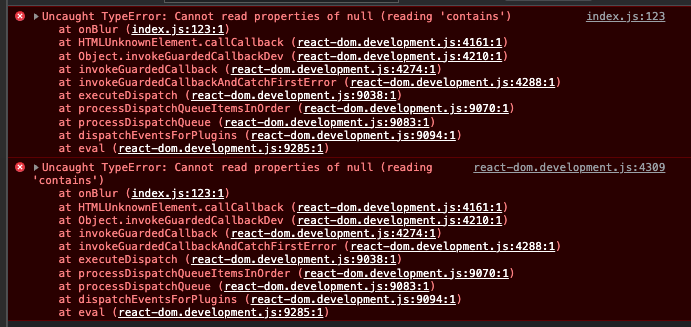
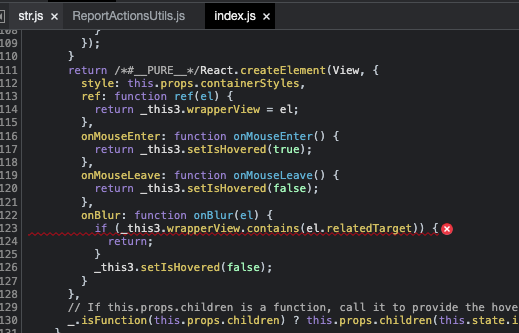
I'm getting this console error when I click "Create A New Account":

Screen.Recording.2023-04-21.at.3.31.35.PM.mov

image

image

@Santhosh-Sellavel
Copy link
Collaborator

Santhosh-Sellavel commented Apr 21, 2023

Reviewer Checklist

  • I have verified the author checklist is complete (all boxes are checked off).
  • I verified the correct issue is linked in the ### Fixed Issues section above
  • I verified testing steps are clear and they cover the changes made in this PR
    • I verified the steps for local testing are in the Tests section
    • I verified the steps for Staging and/or Production testing are in the QA steps section
    • I verified the steps cover any possible failure scenarios (i.e. verify an input displays the correct error message if the entered data is not correct)
    • I turned off my network connection and tested it while offline to ensure it matches the expected behavior (i.e. verify the default avatar icon is displayed if app is offline)
  • I checked that screenshots or videos are included for tests on all platforms
  • I included screenshots or videos for tests on all platforms
  • I verified tests pass on all platforms & I tested again on:
    • Android / native
    • Android / Chrome
    • iOS / native
    • iOS / Safari
    • MacOS / Chrome / Safari
    • MacOS / Desktop
  • If there are any errors in the console that are unrelated to this PR, I either fixed them (preferred) or linked to where I reported them in Slack
  • I verified proper code patterns were followed (see Reviewing the code)
    • I verified that any callback methods that were added or modified are named for what the method does and never what callback they handle (i.e. toggleReport and not onIconClick).
    • I verified that comments were added to code that is not self explanatory
    • I verified that any new or modified comments were clear, correct English, and explained "why" the code was doing something instead of only explaining "what" the code was doing.
    • I verified any copy / text shown in the product is localized by adding it to src/languages/* files and using the translation method
    • I verified all numbers, amounts, dates and phone numbers shown in the product are using the localization methods
    • I verified any copy / text that was added to the app is grammatically correct in English. It adheres to proper capitalization guidelines (note: only the first word of header/labels should be capitalized), and is approved by marketing by adding the Waiting for Copy label for a copy review on the original GH to get the correct copy.
    • I verified proper file naming conventions were followed for any new files or renamed files. All non-platform specific files are named after what they export and are not named "index.js". All platform-specific files are named for the platform the code supports as outlined in the README.
    • I verified the JSDocs style guidelines (in STYLE.md) were followed
  • If a new code pattern is added I verified it was agreed to be used by multiple Expensify engineers
  • I verified that this PR follows the guidelines as stated in the Review Guidelines
  • I verified other components that can be impacted by these changes have been tested, and I retested again (i.e. if the PR modifies a shared library or component like Avatar, I verified the components using Avatar have been tested & I retested again)
  • I verified all code is DRY (the PR doesn't include any logic written more than once, with the exception of tests)
  • I verified any variables that can be defined as constants (ie. in CONST.js or at the top of the file that uses the constant) are defined as such
  • If a new component is created I verified that:
    • A similar component doesn't exist in the codebase
    • All props are defined accurately and each prop has a /** comment above it */
    • The file is named correctly
    • The component has a clear name that is non-ambiguous and the purpose of the component can be inferred from the name alone
    • The only data being stored in the state is data necessary for rendering and nothing else
    • For Class Components, any internal methods passed to components event handlers are bound to this properly so there are no scoping issues (i.e. for onClick={this.submit} the method this.submit should be bound to this in the constructor)
    • Any internal methods bound to this are necessary to be bound (i.e. avoid this.submit = this.submit.bind(this); if this.submit is never passed to a component event handler like onClick)
    • All JSX used for rendering exists in the render method
    • The component has the minimum amount of code necessary for its purpose, and it is broken down into smaller components in order to separate concerns and functions
  • If any new file was added I verified that:
    • The file has a description of what it does and/or why is needed at the top of the file if the code is not self explanatory
  • If a new CSS style is added I verified that:
    • A similar style doesn't already exist
    • The style can't be created with an existing StyleUtils function (i.e. StyleUtils.getBackgroundAndBorderStyle(themeColors.componentBG)
  • If the PR modifies code that runs when editing or sending messages, I tested and verified there is no unexpected behavior for all supported markdown - URLs, single line code, code blocks, quotes, headings, bold, strikethrough, and italic.
  • If the PR modifies a generic component, I tested and verified that those changes do not break usages of that component in the rest of the App (i.e. if a shared library or component like Avatar is modified, I verified that Avatar is working as expected in all cases)
  • If the PR modifies a component related to any of the existing Storybook stories, I tested and verified all stories for that component are still working as expected.
  • If a new page is added, I verified it's using the ScrollView component to make it scrollable when more elements are added to the page.
  • If the main branch was merged into this PR after a review, I tested again and verified the outcome was still expected according to the Test steps.
  • I have checked off every checkbox in the PR reviewer checklist, including those that don't apply to this PR.

Screenshots/Videos

Web & Desktop
Screen.Recording.2023-04-22.at.4.45.12.AM.mov
Mobile Web - Chrome
Mobile Web - Safari
iOS
Simulator.Screen.Recording.-.iPhone.14.-.2023-04-22.at.05.05.32.mp4
Android
Screen.Recording.2023-04-22.at.5.00.07.AM.mov

aldo-expensify
aldo-expensify previously approved these changes Apr 21, 2023
Copy link
Contributor

@aldo-expensify aldo-expensify left a comment

Choose a reason for hiding this comment

The reason will be displayed to describe this comment to others. Learn more.

Ahh, you can ignore #17812 (review) . This also happens in main

@Santhosh-Sellavel
Copy link
Collaborator

@roryabraham Earlier we would reset the email for when we do the same on Login Page also. But now it's persisted

Before

RPReplay_Final1682117012.MP4

Now

Screen_Recording_20230422_041313_New.Expensify.mp4

@roryabraham
Copy link
Contributor Author

@Santhosh-Sellavel I kind of think the new behavior is better, if you're still on the same screen you were on before and just scroll up, I'm not sure why it would be expected that the login you just entered clears.

@Santhosh-Sellavel
Copy link
Collaborator

Thanks for confirming, makes sense to me as well!

@Santhosh-Sellavel
Copy link
Collaborator

@roryabraham This didn't reset the first time (when users signup) alone.

Simulator.Screen.Recording.-.iPhone.14.-.2023-04-22.at.05.15.15.mp4

@roryabraham
Copy link
Contributor Author

@Santhosh-Sellavel I'm not able to reproduce that

@Santhosh-Sellavel
Copy link
Collaborator

Santhosh-Sellavel commented Apr 22, 2023

@roryabraham an new test account on login for signup. It occurs only first time when it happens.

PrimaryLogin is empty in both prevprops & this.props

@roryabraham
Copy link
Contributor Author

roryabraham commented Apr 22, 2023

I am able to reproduce an unrelated error (not sure if it will happen w/o our internal back-end dev environment)

Steps to reproduce:

  1. Enter an email you've never used before.

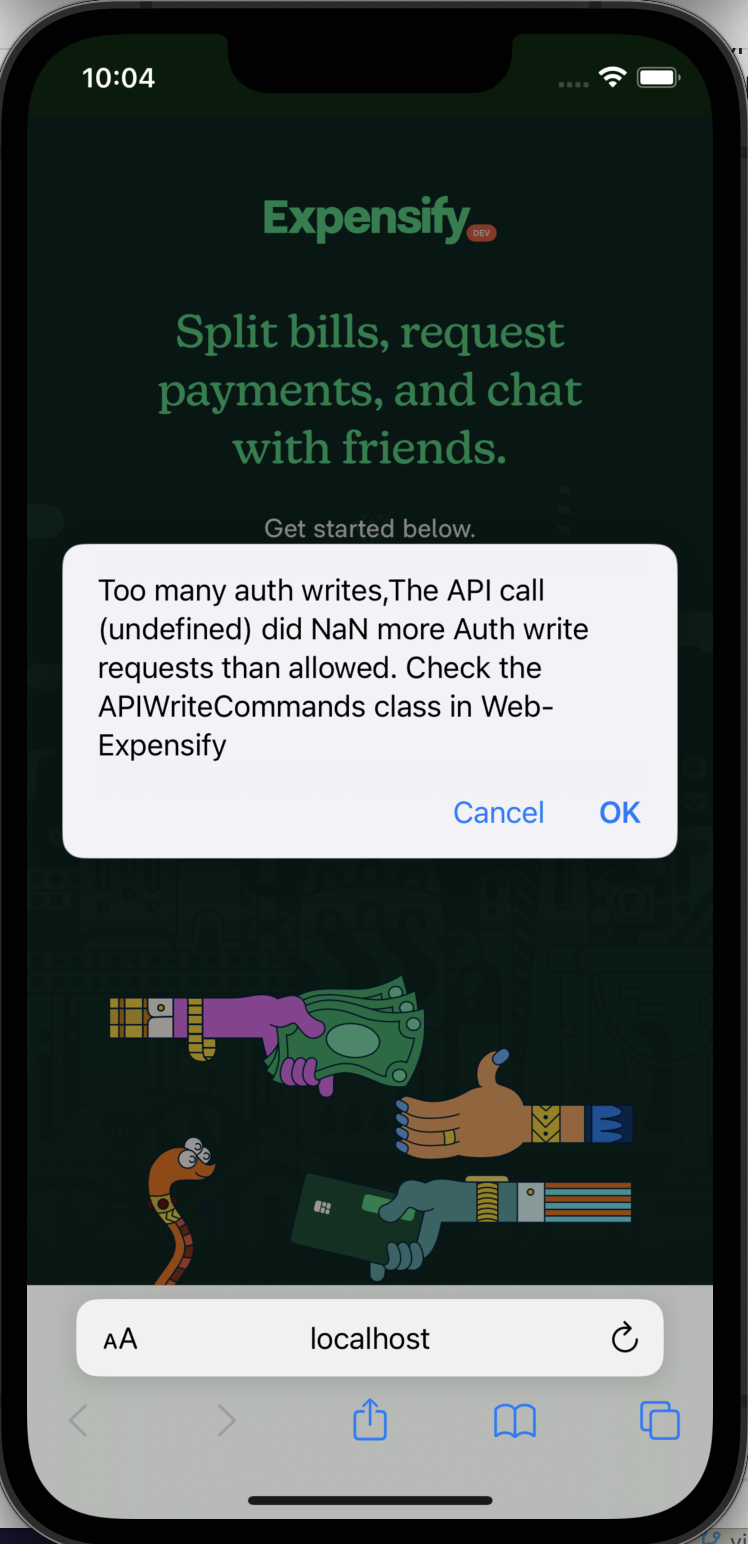
  2. Get a Too many writes error modal:

    image
  3. Click Ok

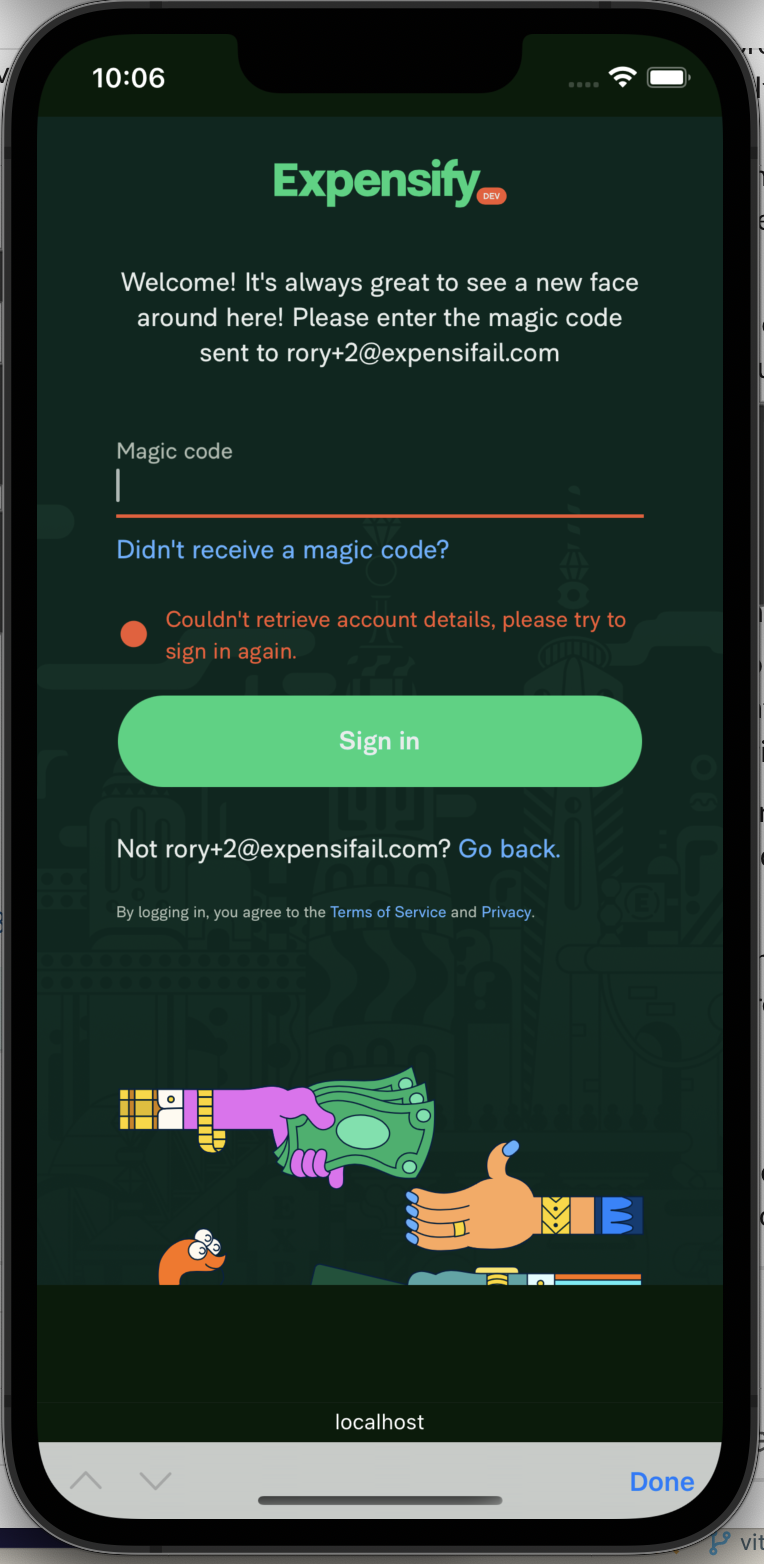
  4. See an error on the next page (probably indicating that account.primaryLogin wasn't correctly updated in Onyx:

    image
  5. Go back, and the email is still present (b/c account.primaryLogin wasn't cleared in Onyx, which is what triggers the form to clear).

@Santhosh-Sellavel
Copy link
Collaborator

I am able to reproduce an unrelated error (not sure if it will happen w/o our internal back-end dev environment)

Interesting, yeah It might due to internal dev.

@Santhosh-Sellavel
Copy link
Collaborator

Here is a recording this should help @roryabraham

SignupCase.mov

@aldo-expensify
Copy link
Contributor

I am able to reproduce an unrelated error (not sure if it will happen w/o our internal back-end dev environment)

@roryabraham yeah, I think when the backend sends that "too many writes" error the response comes with an error code or something, so the UI sometimes shows and error that is not real :/. This confused me while testing another flow too.

@roryabraham
Copy link
Contributor Author

Okay, after resolving the dev auth write issue, I was still able to reproduce the bug @Santhosh-Sellavel found. Looking for a solution now.

@roryabraham
Copy link
Contributor Author

roryabraham commented Apr 25, 2023

@Santhosh-Sellavel @aldo-expensify fixed:

Web.mov

@Santhosh-Sellavel
Copy link
Collaborator

@roryabraham

on pressing Go back also now email gets reset now.

Screen.Recording.2023-04-26.at.11.49.39.PM.mov

@roryabraham
Copy link
Contributor Author

@Santhosh-Sellavel thanks for your thorough testing. I'd again say the new behavior is better / expected. After all, the link you just clicked said Not <old email>? Go back. So when you click Go back it would make sense that we clear that old email.

@Santhosh-Sellavel
Copy link
Collaborator

Santhosh-Sellavel commented Apr 27, 2023

@Santhosh-Sellavel thanks for your thorough testing. I'd again say the new behavior is better / expected. After all, the link you just clicked said Not <old email>? Go back. So when you click Go back` it would make sense that we clear that old email.

Some time ago we made it intentional as there may be a little typo, so allowing users to correct mistakes.
Can you check this internally to confirm, so this does not come as a regression again?

@roryabraham
Copy link
Contributor Author

Thanks for the context, @Santhosh-Sellavel. I've updated this to preserve the existing behavior for Go back

@Santhosh-Sellavel
Copy link
Collaborator

Santhosh-Sellavel commented Apr 27, 2023

Thanks, @roryabraham. The login gets cleared again when we get server errors.

This build

Screen.Recording.2023-04-28.at.1.56.36.AM.mov
Simulator.Screen.Recording.-.iPhone.14.-.2023-04-28.at.01.53.55.mp4

On Staging same errors login is persisted

Screen.Recording.2023-04-28.at.1.58.32.AM.mov

Sorry, couldn't catch this sooner!

@roryabraham
Copy link
Contributor Author

np, fixed

@Santhosh-Sellavel
Copy link
Collaborator

@roryabraham

This PR looks so simple but ends up being a much-complicated one. We are just running into regressions back and forth.
Before moving we must just discuss and reach a consensus before move this forward.

When should we clear & when should we persist the login details?
IMO

  • We should clear Login when we press Login/Create Account from the Footer
  • On All other cases we should persist and leave it as it was earlier.

I performed the following steps and attached the video below

  1. Entered email in the login field
  2. Scroll down and click Login/Create New Account
  3. Login Filed is persisted. We are okay with New behavior. ✅
  4. Click continue
  5. Go back
  6. Login Filed is persisted. ✅
  7. Repeat step 2
  8. Login field is cleared ❌ (Inconsistent)
  9. Now entered email which would trigger a server error
  10. Repeat step 2
  11. Login field is cleared ❌ (Inconsistent)
  12. Enter a new account for signup
  13. Go back
  14. Login field is cleared ❌ (Inconsistent Go back not working while signup)
  15. Enter existing account
  16. Go back
  17. Login Filed is persisted. ✅
Screen.Recording.2023-04-29.at.12.57.44.AM.mov

@roryabraham
Copy link
Contributor Author

You make a good point about how this is inconsistent. Maybe we should just say that for the sake of consistency, and for the same reasons listed here, we should never clear the login. So just close this PR and the linked issue

@roryabraham
Copy link
Contributor Author

I thought about auto-selecting the previous login as a convenience in case the user wants to totally change it, but that doesn't work because you can't setSelection on an email input. So I guess we should just :donothing:

@Santhosh-Sellavel
Copy link
Collaborator

Alright, let's close this one, thanks, everyone!

Sign up for free to join this conversation on GitHub. Already have an account? Sign in to comment

Labels

None yet

Projects

None yet

Development

Successfully merging this pull request may close these issues.

5 participants