Skip to content

Conversation

@rameshhpathak
Copy link
Contributor

<If necessary, assign reviewers that know the area or changes well. Feel free to tag any additional reviewers you see fit.>

Details

Fixed Issues

Fixes #1970

Tests

  1. Go to /iou/split on web. Verify that the currency is based on your location.
  2. Click on the currency, a list with all currencies should show.
  3. Search for a currency, or scroll down to your desired currency
  4. Click on the currency to select and click on the Confirm button the confirm selection
  5. Verify that the selected currency shows now in the amount page
  6. Refresh the page, and verify that the same currency shows in the amount page

QA Steps

Tested On

  • Web
  • Mobile Web
  • Desktop
  • iOS
  • Android

Screenshots

Web

Screenshot 2021-03-27 at 15 03 41

Screenshot 2021-03-27 at 15 05 30

Screenshot 2021-03-27 at 15 05 39

Screenshot 2021-03-27 at 15 05 47

Mobile Web

Desktop

iOS

Screen.Recording.2021-03-27.at.15.24.24.mov

Android

Screenshot 2021-03-27 at 15 28 28

Screenshot 2021-03-27 at 15 28 39

Screenshot 2021-03-27 at 15 28 44

Screenshot 2021-03-27 at 15 28 51

@rameshhpathak rameshhpathak requested a review from a team as a code owner March 27, 2021 16:37
@github-actions
Copy link
Contributor

github-actions bot commented Mar 27, 2021

CLA Assistant Lite bot All contributors have signed the CLA ✍️ ✅

@botify botify requested review from cead22 and removed request for a team March 27, 2021 16:37
@rameshhpathak
Copy link
Contributor Author

I have read the CLA Document and I hereby sign the CLA

@rameshhpathak rameshhpathak marked this pull request as draft March 27, 2021 16:42
@rameshhpathak rameshhpathak force-pushed the create-currency-modal branch from 3fb86e7 to 835e58a Compare March 27, 2021 17:09
@rameshhpathak rameshhpathak force-pushed the create-currency-modal branch from 835e58a to da4c998 Compare March 27, 2021 18:32
@rameshhpathak
Copy link
Contributor Author

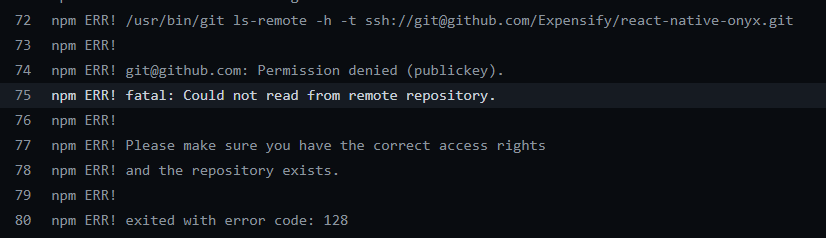
@Julesssss @iwiznia any idea on why this is not accessing react-native-onyx? It works OK on local environment

{() => (
<>
<View style={[styles.flex1, styles.w100]}>
<View style={[styles.ph5, styles.pv3]}>
Copy link
Contributor

Choose a reason for hiding this comment

The reason will be displayed to describe this comment to others. Learn more.

Since this entire area is already wrapped in 20px padding, let's remove the padding top from this view.

@shawnborton
Copy link
Contributor

Maybe this is just a matter of pulling master, but by default, our modal views should not have a bottom border under the title. So the border you see here should not be included:
image

CC @Julesssss in case maybe this needs to be changed elsewhere.

@Julesssss Julesssss self-requested a review March 29, 2021 14:02
@Julesssss
Copy link
Contributor

Maybe this is just a matter of pulling master, but by default, our modal views should not have a bottom border under the title. So the border you see here should not be included:

Yeah, this change will need to be made elsewhere. I'll create an issue for it.

@iwiznia
Copy link
Contributor

iwiznia commented Mar 29, 2021

@Julesssss @iwiznia any idea on why this is not accessing react-native-onyx? It works OK on local environment

What do you mean exactly? What's not working? I see you are using Onyx already...

@rameshhpathak
Copy link
Contributor Author

@Julesssss @iwiznia any idea on why this is not accessing react-native-onyx? It works OK on local environment

What do you mean exactly? What's not working? I see you are using Onyx already...

The checks are failing with this error after not able to access onyx.
onyx

@Julesssss
Copy link
Contributor

Julesssss commented Mar 30, 2021

Hi @rameshhpathak,

I'm really not sure why this happened, but I was able to solve this by making your commit in my name. You can see here that the tests are failing for JSLint errors now, instead of the auth error.

I would suggest that you try cherry-picking your changes onto a clean branch/PR to see if that solves the issue (this is probably the quickest path forward)

@Julesssss
Copy link
Contributor

Maybe you know this already, but the Podfile wasn't updated either, so you'll need to run pod install from /ios

@rameshhpathak
Copy link
Contributor Author

Hi @rameshhpathak,

I'm really not sure why this happened, but I was able to solve this by making your commit in my name. You can see here that the tests are failing for JSLint errors now, instead of the auth error.

I would suggest that you try cherry-picking your changes onto a clean branch/PR to see if that solves the issue (this is probably the quickest path forward)

I'll do that. Thank you for your help.

@Julesssss
Copy link
Contributor

Hey @rameshhpathak, any luck with the suggested fix?

@rameshhpathak
Copy link
Contributor Author

rameshhpathak commented Mar 31, 2021

Hey @rameshhpathak, any luck with the suggested fix?

Hey @Julesssss, I couldn't find time to do it yesterday. Been trying - failed three times today - latest: #2182 . I will try separating out into bits and try pushing commit by commit later today

@rameshhpathak
Copy link
Contributor Author

@Julesssss I installed it fresh in this PR #2194 . WIll close this PR now :) Thank you for your help!!!

Sign up for free to join this conversation on GitHub. Already have an account? Sign in to comment

Labels

None yet

Projects

None yet

Development

Successfully merging this pull request may close these issues.

[Pay on Thursday 27th May] [IOU] Create Currency Modal, with geolocation and Location permissions

4 participants