Teams use Cursor, Copilot, and other AI tools to write code—but rarely know how much of the codebase is AI-generated. This tool uses git-ai Git Notes (refs/notes/ai) to pull commits and AI attribution from GitLab, then computes AI code ratio by time range, repo, or department. Results are shown in tables and charts for review, reporting, and trend tracking.

Built on git-ai (a Git extension for tracking AI-generated code) and its Git AI Standard.
- AI code ratio across multiple repos within a date range
- Department/group config with filtering by group
- Summary stats plus per-repo details (lines, commits, ratio)
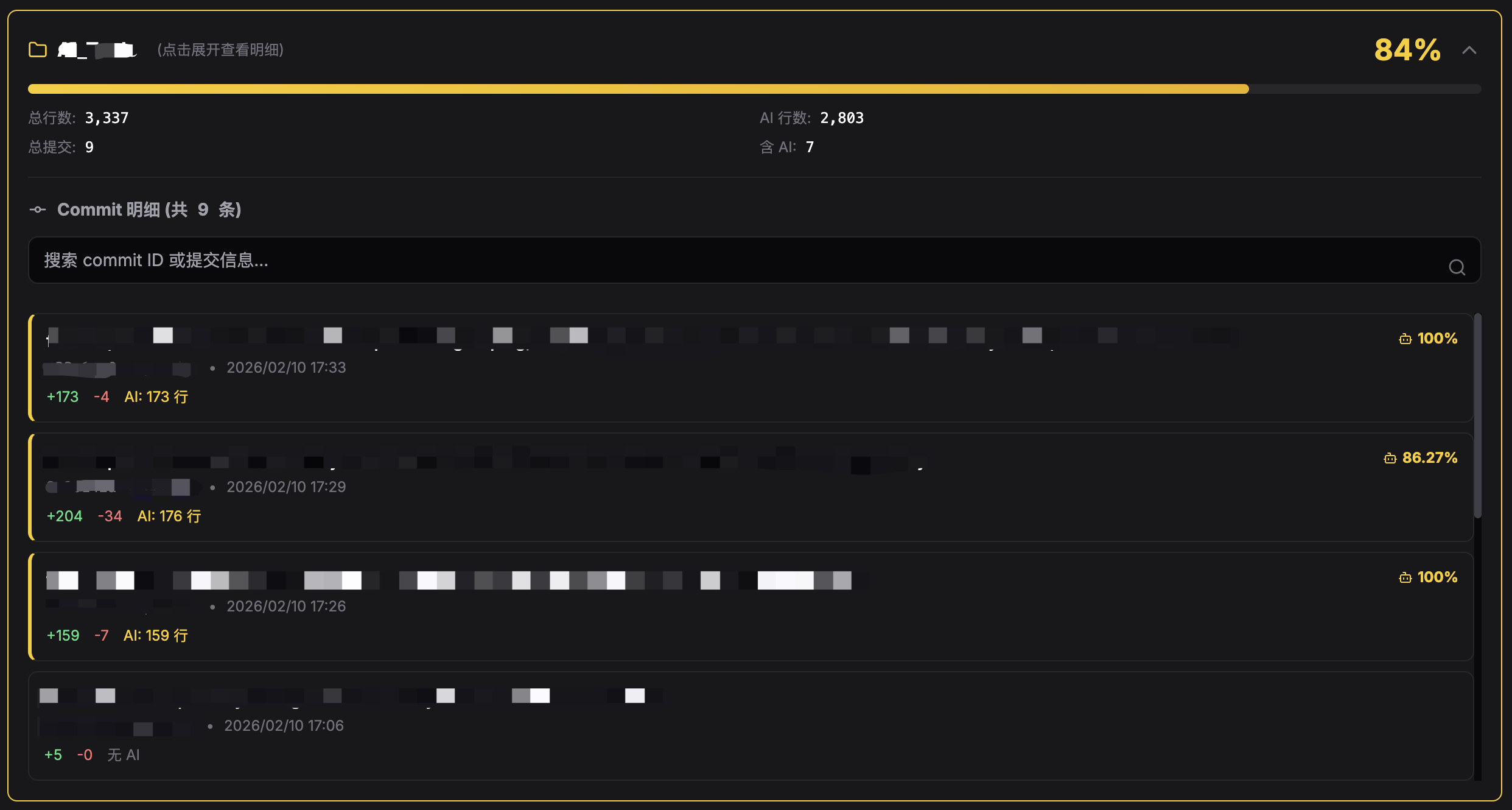
- Expandable commit details: Click any repo card to view individual commit breakdown with AI attribution
- Smart commit search: For repos with 5+ commits, filter by commit ID or message in real-time
- Dark-themed web UI with date picker and result charts
- Python 3.8+
- A GitLab instance with Git Notes
refs/notes/ai(e.g. from Cursor or other AI coding tools that write AI line data)
pip install -r requirements.txtCopy the example env file and set your GitLab token:
cp .env.example .env
# Edit .env and set GITLAB_PRIVATE_TOKEN| Variable | Required | Description |
|---|---|---|
GITLAB_PRIVATE_TOKEN |
Yes | GitLab Personal Access Token with read_api and read_repository |
GITLAB_BASE_URL |
No | GitLab base URL; default https://gitlab.com |
GIT_AI_REPOS_CONFIG |
No | Path to repos config JSON; default repos_config.json in project root |
Edit repos_config.json.
Simple format (no groups):
{
  "repos": [
    {
      "id": "123456",
      "name": "My Project",
      "branch": "main"
    }
  ]
}
By department/group:
{
  "Frontend": [
    { "id": "111", "name": "web-app", "branch": "main" }
  ],
  "Backend": [
    { "id": "222", "name": "api-server", "branch": "master" }
  ]
}id: GitLab project ID (from project page or URL)name: Display namebranch: Branch to analyze
python app.pyOpen http://127.0.0.1:8888 in your browser, pick a date range and optional department, then click the start button to run the stats.
After running stats, you'll see:
- Overall Summary: Total AI percentage, lines of code, commits
- Repository Cards: Each repo shows AI ratio, progress bar, and commit counts
Click any repository card to expand and view individual commits:
- Commit message and SHA
- Author and date
- Lines added vs. AI-generated lines
- AI percentage per commit
When a repository has more than 5 commits, a search box appears automatically:
- Filter by commit ID: Type any part of the SHA (e.g.,
a3f2b) - Filter by message: Search commit messages (e.g.,
fix bug,add feature) - Real-time filtering: Results update as you type
- Dynamic count: Shows how many commits match your search
- Clear search: Remove search text to show all commits again
- Commits: GitLab API returns commits in the given time range per repo/branch, with
additionsanddeletions. - AI Notes: For each commit, the app fetches the Note under
refs/notes/ai; if present, it parses the JSON. - Stats: It aggregates
accepted_lines(AI-accepted lines) andadditions(total new lines) per commit and computes the ratio.
The AI note format must match what Cursor and similar tools write (e.g. prompts and each prompt’s accepted_lines).
.
├── app.py              # Flask entry
├── git_ai_stats.py     # Stats and API logic
├── index.html          # Frontend
├── repos_config.json   # Repo config (you configure this)
├── requirements.txt
├── .env.example
├── README.md
└── README_ZH.md
MIT