Kerboscript syntax for Vim. Maintained (so far).
Depends on your plugin manager. For vim-plug users:
Plug 'Freedzone/kerbovim'Highlights:
- booleans
- bound vars
- braces, brackets, etc
- built-ins
- comments
- conditionals
- constants
- delegates declarations and references
- function declarations and calls
- keywords
- loops
- numbers, floats (all notations)
- operators (boolean and math)
- statements
- strings
- todo
- types
Indent:
- indent: 4 spaces
- enabled
autoindent - could not make
cindentandsmartindentwork. Dot delimiter results in very poor experience

If you wish to enhance your experience with features like autocomplete, hover symbol highlight, signature help, refactoring, etc., I highly suggest to try out kos-language-server.
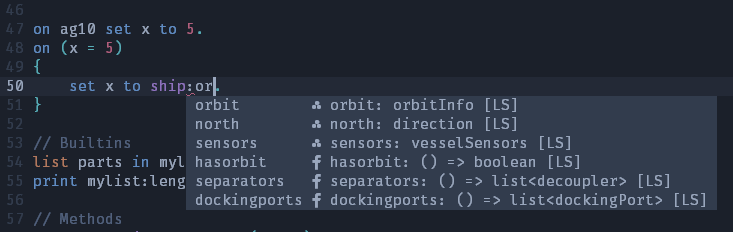
To pair up KLS with Vim I used an intellisense engine - coc.nvim.
The configuration is rather simple. KLS should be available in PATH on your system. In your coc-settings.json put:
{
    "suggest": {
        "autoTrigger": "always",
        "enablePreview": true,
        "minTriggerInputLength": 2
    },
    "languageserver": {
        "kls": {
            "command": "kls",
            "args": ["--stdio"],
            "shell": true,
            "filetypes": ["kerboscript"],
            "initializationOptions": {},
            "settings": {}
        }
    }
}
If you want to display diagnostic info through ALE, add this option:
    "diagnostic": {
        "displayByAle": true
    },
For snippets, install vim plugin UltiSnips