Problem with license selection and Terms of Access/'Enable access request' button #8832

Description

What steps does it take to reproduce the issue?
In 5.11, create a new dataset with metadata and files. Once created, go to the Terms tab and click 'Edit Terms Requirements' to select a different license. Pick a different license, and try to save. It doesn't give an error, it just doesn't save the changes or leave the 'Edit Terms Requirements' page.
-
When does this issue occur?
When you try to save your changed license choice. -
Which page(s) does it occurs on?
On all the newly created datasets. -
What happens?
It doesn't allow us to change the license because neither the 'Enable access request' button is ticked nor are there any 'Terms of Access for Restricted Files', even though there are no restricted files in the dataset and the option to select or fill them in is greyed out.
I can get it to work by first restricting a file and tick the 'Enable access request' button there, then unrestrict said file. If I then go to Terms and edit them to select a different license, it does work because the 'Enable access request' button (though again greyed out) is now ticked.
I don't get this issue in the demo.dataverse.org environment. There it already has the 'Enable access request' button ticked by default, even though it's greyed out. So, I'm wondering if it's a setting that we don't know about. -
To whom does it occur (all users, curators, superusers)?
All users. -
What did you expect to happen?
That I could change the license selection and save it. Or that the 'Enable access request' button is always ticked for newly created datasets and the licenses even when there are no files restricted.
Which version of Dataverse are you using?
5.11
Any related open or closed issues to this bug report?
no
Screenshots:
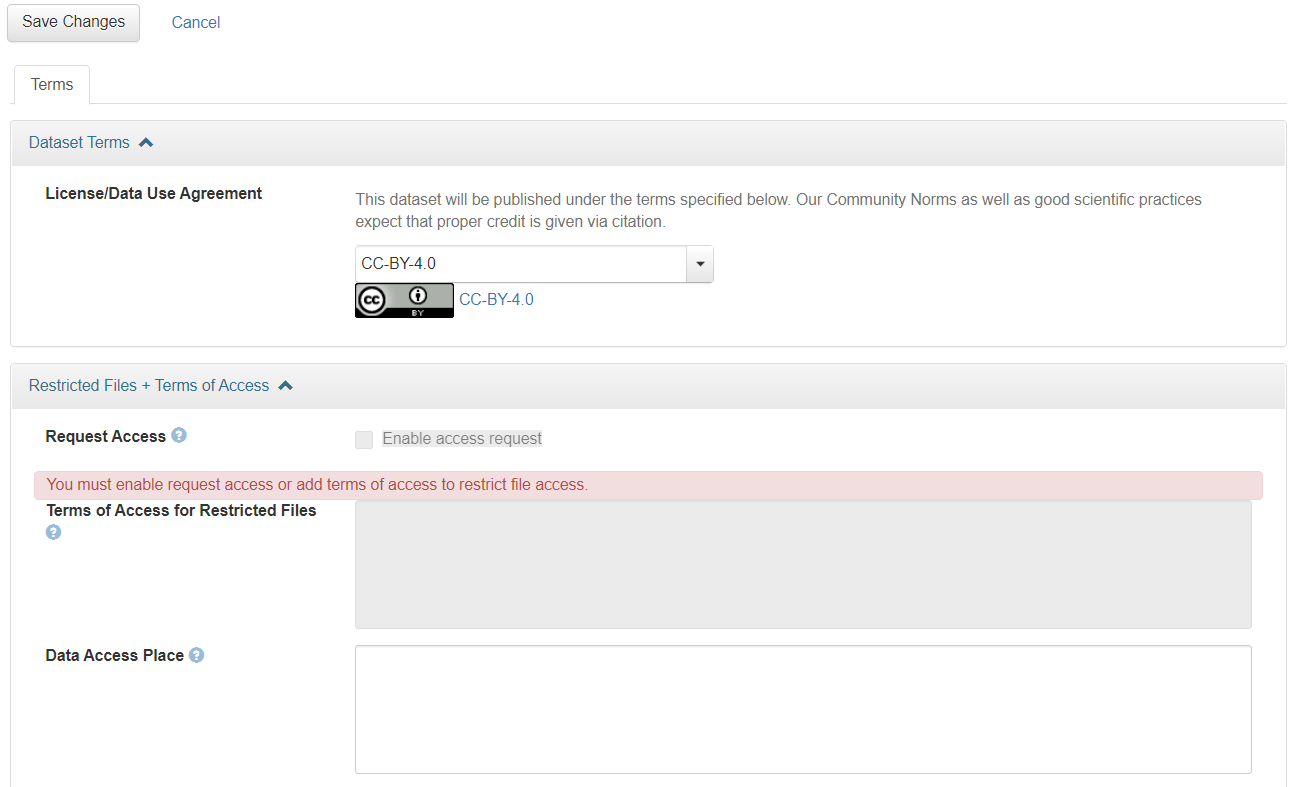
As you can see, the error is given because neither the 'Enable access request' button is selected nor Terms of Access are supplied. But I also can't select either of them, because they're greyed out due to a lack of restricted files in this dataset.