


This is the official repository for ECCV 2024 Tracking Meets LoRA: Faster Training, Larger Model, Stronger Performance (LoRAT).
[Models] [Raw Results] [Poster]
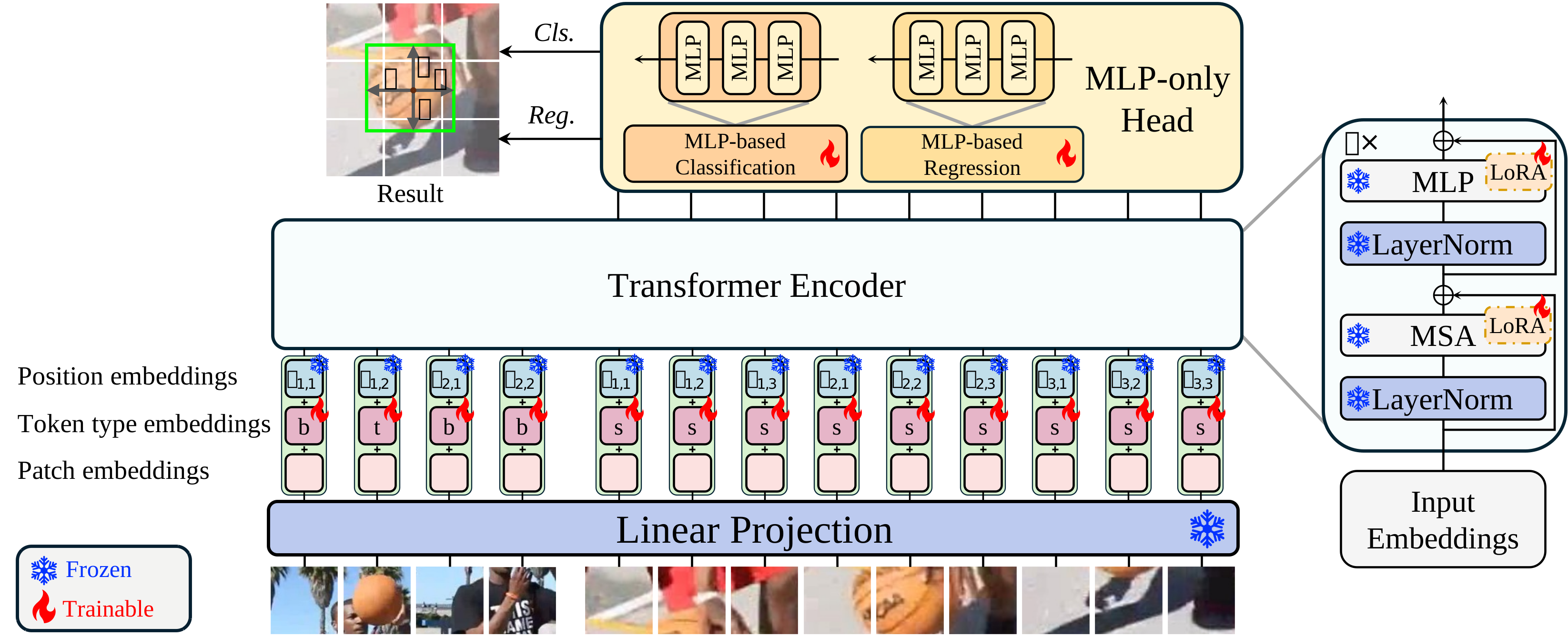
Update: results on VastTrack
| Variant | SUC | P | P norm |
|---|---|---|---|
| B-224 | 38.7 | 37.8 | 41.1 |
| B-378 | 40.4 | 40.7 | 43.4 |
| L-224 | 41.6 | 42.3 | 45.0 |
| L-378 | 43.9 | 45.8 | 47.7 |
| g-224 | 43.0 | 44.7 | 47.2 |
| g-378 | 46.0 | 48.8 | 50.4 |
[June 14, 2025] Update codebase:
- Add MAE, CLIP, EVA02 backbones (see config/LoRAT_timm).
- Resumable checkpointing.
- Fix grad accumulation.
- Refactor the tracker evaluation pipeline.
- Add support for compiled autograd.
- Data pipeline supports specifying dtype; BF16 training and FP16 inference are allowed.
- Initial support for DeepSpeed.
- CPU inference enhancements.
- MPS on macOS supported.
- Compatibility with latest VOT Toolkit.
- Some minor bug fixes and code refactoring.
[June 26, 2025] Update codebase:
- Improve training reproducibility for future work.
[June 30, 2025] Add SPMTrack. https://github.com/WenRuiCai/SPMTrack
[July 24, 2025] Update codebase:
- Add fault-tolerant distributed training with torchrun.
- Better resumable checkpointing.
[September 12, 2025] Update codebase:
- Add extra VOT stacks support (vot2020/shortterm & vot2022/shorttermbox), see trackit.core.third_party.vot.supported_stacks.
- For better clarity, yaml loader is enhanced with !combine tag, now you can run
./run.sh LoRAT L-224instead of./run.sh LoRAT dinov2 --mixin large.
[December 5, 2025] Update codebase:
- Add LoRATv2 (NeurIPS 2025 Spotlight) link
Assuming you have a working python environment with pip installed.
apt update
apt install -y libturbojpegCan be skipped if using NGC container. PyTorch version should be >= 2.0.
pip install torch torchvisionpip install -r requirements.txtThis codebase should also work on Windows and macOS for debugging purposes.
The paths should be organized as follows:
LaSOT
├── airplane
├── basketball
...
├── training_set.txt
└── testing_set.txt

LaSOT_Extension
├── atv
├── badminton
...
└── wingsuit

GOT-10k
├── train
│   ├── GOT-10k_Train_000001
│   ...
├── val
│   ├── GOT-10k_Val_000001
│   ...
└── test
    ├── GOT-10k_Test_000001
    ...

TrackingNet
├── TEST
├── TRAIN_0
...
└── TRAIN_11

COCO
├── annotations
│   ├── instances_train2017.json
│   └── instances_val2017.json
└── images
    ├── train2017
    │   ├── 000000000009.jpg
    │   ├── 000000000025.jpg
    │   ...
    └── val2017
        ├── 000000000139.jpg
        ├── 000000000285.jpg
        ...
TNL2K_TEST
├── advSamp_Baseball_game_002-Done
├── advSamp_Baseball_video_01-Done
...
Copy consts.template.yaml as consts.yaml and fill in the paths.
LaSOT_PATH: '/path/to/lasot'
LaSOT_Extension_PATH: '/path/to/lasot_ext'
GOT10k_PATH: '/path/to/got10k'
TrackingNet_PATH: '/path/to/trackingnet'
COCO_2017_PATH: '/path/to/coco2017'
TNL2K_TEST_PATH: '/path/to/tnl2k_test'Register an account at wandb, then login with the command:
wandb loginNote: Our code performs evaluation automatically when model training is complete.
- Model weight is saved in
/path/to/output/run_id/checkpoint/epoch_{last}/model.safetensors. - Performance metrics can be found on terminal output and wandb dashboard.
- Tracking results are saved in
/path/to/output/run_id/eval/epoch_{last}/.
# Train and evaluate LoRAT-B-224 model on all GPUs
./run.sh LoRAT B-224 --output_dir /path/to/output
# Train and evaluate LoRAT-L-224 model on all GPUs
./run.sh LoRAT L-224 --output_dir /path/to/output
# Train and evaluate LoRAT-g-378 model on all GPUs
./run.sh LoRAT g-378 --output_dir /path/to/output
# Train and evaluate LoRAT-L-224 model following GOT-10k protocol on all GPUs
./run.sh LoRAT L-224 --output_dir /path/to/output --mixin got10k
# Train and evaluate on specific GPUs
./run.sh LoRAT B-224 --output_dir /path/to/output --device_ids 0,1,2,3
# Train and evaluate on multiple nodes
./run.sh LoRAT B-224 --output_dir /path/to/output --nnodes $num_nodes --node_rank $node_rank --master_address $master_node_ip --date 2024.03.07-04.59.08-976343
You can set the default settings, e.g. output_dir, in run.sh.
# Train and evaluate LoRAT-B-224 model on single GPU
python main.py LoRAT B-224 --output_dir /path/to/output

# Train and evaluate LoRAT-B-224 model on CPU
python main.py LoRAT B-224 --output_dir /path/to/output --device cpu

# Train and evaluate LoRAT-B-224 model on all GPUs
python main.py LoRAT B-224 --distributed_nproc_per_node $num_gpus --distributed_do_spawn_workers --output_dir /path/to/output

# Train and evaluate LoRAT-B-224 model on multiple nodes, run_id need to be set manually
python main.py LoRAT B-224 --master_address $master_address --distributed_node_rank $node_rank distributed_nnodes $num_nodes --distributed_nproc_per_node $num_gpus --distributed_do_spawn_workers --output_dir /path/to/output --run_id $run_id
See python main.py --help for more options.
Note: If you encounter any issues with torch.compile, disable is with --mixin disable_torch_compile.
Note: You can disable wandb logging with --disable_wandb.
Our code performs evaluation automatically when model training is complete. You can run evaluation only with the following command:
# evaluation only, on all datasets, defined in config/_dataset/test.yaml
./run.sh LoRAT B-224 --output_dir /path/to/output --mixin evaluation --weight_path /path/to/weight.bin
The evaluated datasets are defined in config/_dataset/test.yaml.
Note that, as defined in config/LoRAT/run.yaml, we evaluate LaSOT Extension dataset three times. The final performance is the average of the three evaluations.
Results are saved in /path/to/output/run_id/eval/epoch_{last}/, where run_id is the current run ID, and epoch_{last} is the last epoch.
You can use the analysis scripts in pytracking derived codebase to re-calculate the metrics. OSTrack is recommended. Recent SOT codebases have slightly different metrics implementations compared with earlier ones, e.g. this line in Stack v.s. Pytracking.
Once the full evaluation is done, result files are saved in /path/to/output/run_id/eval/epoch_{last}/TrackingNet-test.zip.
Submit this file to the TrackingNet evaluation server to get the result of TrackingNet test split.
# Train and evaluate LoRAT-B-224 model following GOT-10k protocol on all GPUs
./run.sh LoRAT B-224 --output_dir /path/to/output --mixin got10k
Submit /path/to/output/run_id/eval/epoch_{last}/GOT10k-test.zip to the GOT-10k evaluation server to get the result of GOT-10k test split.
Evaluation only:
# evaluation only, on GOT-10k dataset
./run.sh LoRAT B-224 --output_dir /path/to/output --mixin got10k --mixin evaluation --weight_path /path/to/weight.bin
Note that, as defined in config/LoRAT/_mixin/got10k.yaml, we evaluate GOT-10k dataset three times.
pip install vot-toolkitprepare the VOT dataset by running the following command:
cd /path/to/vot_workspace
vot initialize vot_stack(vots2024/main|tests/multiobject)
fill the path to the VOT dataset in consts.yaml
VOTS2023_PATH: '/path/to/vots2023_workspace/sequences'
VOT_TESTS_MULTIOBJECT_PATH: '/path/to/vot_tests_workspace/sequences'# Run VOT experiment (vots2024/main stack) on LoRAT-g-378 with SAM-H segmentation model
python vot_main.py vots2024/main LoRAT g-378 /path/to/output --mixin segmentify_sam_h --tracker_name LoRAT --weight_path /path/to/lorat_model_weight.binBy default, vot_main.py will automatically attach vot.yaml. VOT toolkit related data pipeline is defined in this file.
If you encounter problems, you can enable file logging with --enable_file_logging switch.
This page describes how to create a custom dataset for training and evaluation.
Add --mixin resumable to the command line to enable resumable checkpointing. This allows you to resume training from the last saved checkpoint if the training process is interrupted.
./run.sh LoRAT B-224 --output_dir /path/to/output --mixin resumableOr you can set the default value in run.yaml to:
checkpoint:
  - type: "regular"
    epoch_trigger:
      interval: 10
      last: true
    resumable: true # false --> true
    max_to_keep: 5
Now the training process will save checkpoints every 10 epochs, and the last checkpoint will be saved as recovery.yaml in the checkpoint directory.
Load the last checkpoint by specifying the --resume argument:
./run.sh LoRAT B-224 --output_dir /path/to/output --mixin resumable --resume /path/to/output/run_id/checkpoint/recovery.yaml@inproceedings{lorat,
title={Tracking Meets LoRA: Faster Training, Larger Model, Stronger Performance},
author={Lin, Liting and Fan, Heng and Zhang, Zhipeng and Wang, Yaowei and Xu, Yong and Ling, Haibin},
booktitle={ECCV},
year={2024}
}