MIDI CC-related corrections have been implemented.
ChangeLog.
See the Update firmware section at the bottom of this page for instructions.
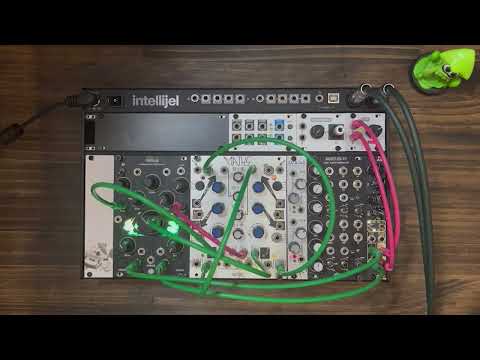
Helical is a 16-voice polyphonic synthesizer based on Autoregressive Algorithmic Synthesis.
It continuously generates new phrases and sonic patterns using an autoregressive model.
Each oscillator is equipped with its own sequencer, wavetable oscillator, envelope generator, and VCA.
Users can customize scales, LED colors, and wavetables using an SD card and dedicated editors.

This synthesis method uses past values to determine the next parameters.
In Helical, each oscillator’s previous pitch determines the next duration, and the previous duration influences the next pitch.
This helical influence from past to future creates natural-sounding sequences rather than random ones.


New pitch and duration are calculated when the oscillator's envelope finishes.

Unlike conventional rhythm concepts based on BPM, Helical explores new rhythmic expressions.
(You can sync with external clocks by sending them to the CV input of the Poly knob.)

Helical splits its output into Arc and Orbit for every 8 voices.
- If Orbit is unpatched, Arc outputs all voices in Mono mode.
Sets the number of active voices (0–8 for polyphonic, 0–16 in Mono mode).
- Voices keep playing until their envelopes finish, even if the Poly knob is turned to CCW (min).
- Oscillators are inactive by default. Increasing the Poly value brings them into an active state.
- If Poly is set to 0 and an external clock is connected to its CV input, Helical syncs to it.
In this mode, the Helicity knob acts as a clock divider.
Sets the root note.
- Outside the 1–5V range, 1V/Oct tracking may become unstable.
- In Chromatic Mode, root changes take effect after the current note finishes.
- Turn the knob to change scale.
- Press + turn to change wavetable.
- If Lock is ON (switch up), the scale changes instantly.
- If OFF (switch down), changes apply after the note ends.
Default scale presets:
0: Major(R)
1: Lydian(R)
2: Mixolydian(R)
3: Major Pentatonic(R)
4: Natural Minor(R)
5: Dorian(R)
6: Phrygian(R)
7: Minor Pentatonic(R)
8: I M7(R)
9: II m7(R)
10: III m7(R)
11: IV M7(R)
12: V 7(R)
13: VI m7(R)
14: Whole tone
15: Chromatic
(R) = Root Emphasize enabled
When Root Emphasize is on, the lowest octave uses only root-related notes. Higher octaves follow the full scale.
Sets portamento between notes.
- When Helicity is high: glide time = 0–1s
- When Helicity is low: glide time depends on the current note length
Applies to pitch changes like Scale/Root/Reload.
Sets pitch range when calculating from duration.
- CCW: Only root note
- CW: Range up to G9
Smoothly morphs between wavetable frames in a preset.
Sets the scaling factor for converting pitch into duration.
Duration = sqrt(Pitch) * Helicity
Range: 0.002x to 300x
Sets attack/decay ratio of the envelope.
- Settings apply per-note when a new envelope triggers.
- Allows varied textures like fast attack, slow fade, reversed envelopes.
- At 20–35% and 85–100% of knob position, curve changes to logarithmic.

Manually re-calculate parameters for oscillator units.
- If reloOd input is unpatched, triggers on reloAd apply to all oscillators.
Disables pitch/duration calculation when envelopes complete.
Use Wave Edit to create custom wavetable presets.

- Each group of 8 wavetables = 1 Helical preset
- Rename your
.wavfile tobuf_wt.wavand place it on the SD card
Requirements for custom wave files:
- 256 samples per table
- 64 tables
- Total: 16384 samples
Use the Scale Editor on GitHub.
By connecting the USB Micro-B port to Cuh (MIDI Expander), Helical acts as a USB MIDI device and sends:
- Note messages
- CC messages for all knobs and Lock switch
Cuh blocks power from USB Hosts for safety.
Helical/Cuh act as MIDI Devices only. To use with MIDI Hosts, an external converter is required.
To calibrate all knobs and CV inputs: If you are using the Addition, please make sure to calibrate its knobs.
- Turn off power and disconnect all patch cables.
- Hold reloAd and relOad buttons while powering on. Release when left LED turns red.
- Turn all knobs fully CCW.
- Press and release reloAd (bottom-left button).
- When right LED turns red, turn all knobs fully CW.
- Press and release relOad (bottom-right button).
If calibration succeeds, Helical boots normally. Otherwise, retry from step 1.
For accurate V/OCT calibration:
- Send 0V to RootIn during step 3, and 5V during step 5.
Hidden Settings
Assigns random volume per note within a defined range.
- Double-click the Scale knob to enter Dynamic Setting Mode (LED blinks fast).
- Hold reloAd + turn Scale knob = set volume center.
- Hold relOad + turn Scale knob = set volume width.
- Click Scale knob to exit.
You can also edit volCenter and volWidth (0–100%) in setting.txt on the SD card.
MIDI velocities are mapped from the internal volume range to 0–127.
Hold Scale knob while powering on to toggle.
On = pitch steps in semitones.
Off = pitch changes linearly with Root knob.
You can also set this in setting.txt:
chromaticMode 1   # on
chromaticMode 0   # off
Hold reloAd + press and turn Scale knob = set master volume.
Hold relOad + press and turn Scale knob = set fine tuning.
Most parameters can be set from the panel, but fine-tuning is possible by editing setting.txt.
If something breaks after editing, restore the factoryPreset file.
| Setting | Description | Range |
|---|---|---|
| finetune | Fine tuning | -32767 ~ 32767 |
| scale | Default scale index | 0 ~ 9 |
| wavetable | Default wavetable | 0 ~ 9 |
| volCenter | Dynamics center | 0 ~ 100 (%) |
| volWidth | Dynamics width | 0 ~ 100 (%) |
| chromaticMode | Chromatic Mode toggle | 0 (off) / 1 (on) |
| masterVol | Master volume | 0 ~ 65535 |
| envMode | Envelope behavior | 0 (old) / 1 (new) |
finetune 0
scale 8
wavetable 0
volCenter 46
volWidth 35
chromaticMode 1
masterVol 43007
envMode 1Contains raw calibration values for knobs. Usually doesn't need to be edited manually.
If needed, the format is:
poly_min root_min glide_min ... length_min poly_max root_max ... length_maxEach value = 0 ~ 65536.
Note: min > max is the correct form (they are inverted internally).
Only official Helical firmware is supported.
Writing custom Daisy firmware may damage the unit and void the warranty.
To update:
- Download the
.zipfirmware file from here. Then unzip the file.- If you download from the firmware page, don’t use “Right-click > Save As.” Instead, click “Download Raw File,” then unzip the file.
- Visit Daisy Web Programmer and follow the instructions, using the
.binfile you unzipped in step 1. - Disconnect USB and power the Eurorack case to boot.
When updating from v1.XX to v2.XX, please replace the scale.txt file on the SD card with the one found here.
-
LED flashing red/green/blue:
- SD card not detected. Check insertion.
- Try replacing contents with factory preset files.
-
LED flashing red/white/yellow: (Not implemented)
- Wavetable load failure. Ensure file is named
buf_wt.wavand has valid format.
- Wavetable load failure. Ensure file is named
-
Not booting after firmware update:
- Reflash the firmware.
-
Other issues:
- Daisy may be inserted backward. Contact your dealer or us.
- Width: 16HP
- Max Depth: 40mm
- Power: 240mA @+12V, 12mA @-12V
- Audio Codec: 48kHz / 24bit
- Control Rate:
- Helicity CV: audio-rate
- Others: 1kHz
- CV Input Range: ± 5V (range affected by knob position)
- Fixed an issue where CC messages were still being sent even when ccEnable was set to 0.
- Added MIDI Output and CV modulation support via Cuh Expander. See MIDI
- Modified envelope behavior. See Env
- Added Dynamics Setting. See Dynamics
- Expanded max scales to 16. Improved live scale switching. See Scale
- Added Calibration Mode. See Calibration
- Changed Glide behavior. See Glide
- Improved SD card error handling. See Troubleshooting
- Removed brightness setting.
- Various minor fixes.
Helical would not exist without the support of the following individuals:
- Hananosuke Takimoto
- Tanipoyo
- Yoshimi Tajima (Panel design)
Sdkc Instruments warrants this product to be free of defects in materials and manufacturing for 1 year from date of purchase (proof required).
The warranty does not cover:
- Incorrect power supply voltages
- Reversed Eurorack bus connection
- Misuse or abuse
- Knob or faceplate removal
- Unauthorized firmware modifications
- Environmental damage (e.g., heat, humidity)
If warranty service is needed, contact your dealer. If covered, Sdkc Instruments will repair or replace the product.
Sdkc Instruments is not liable for any injury or damage resulting from use or misuse of the product.
For inquiries, please email:
sdkc.store[a]gmail.com (replace [a] with @)