Skip to content

Conversation

@lesterong
Copy link
Contributor

@lesterong lesterong commented Jun 20, 2023

What is the purpose of this pull request?

  • Others, please explain: Dependency Update

Overview of changes:

  • Upgrade PlantUML to version 1.2023.10 (Fixes Upgrade PlantUML version #1792)
  • Update corresponding images generated by PlantUML
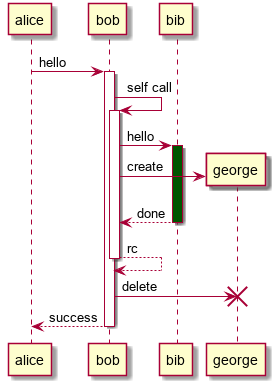
  • Adjusted the annotations example in user guide due to the change in theme to the latest PlantUML version

Left: Before
Middle: After
Right: After, annotation positions adjusted
image

Top: Before
Middle: After
Bottom: After, annotation positions adjusted
image

Anything you'd like to highlight/discuss:

  • There is a slight layout shift as the default theme has now changed in this version of PlantUML.
  • There is also a change in the diagram generated by class.puml as PlantUML has changed how they handle namespaces. This behaviour can be disabled using set separator none.

Left: Before
Right: After
image

  • This update seems to have broken the usecase.puml diagram as it no longer allows for two elements with the same name, though this can be fixed by providing an alias.
image
  • There seems to be a change in font and font size as well, so the Gantt Chart text no longer fits in the box.
image

Proposed commit message: (wrap lines at 72 characters)
Bump PlantUML to 1.2023.10


Checklist: ☑️

  • Updated the documentation for feature additions and enhancements
  • Added tests for bug fixes or features
  • Linked all related issues
  • No unrelated changes

Migration Guide

The PlantUML plugin has been updated from 1.2020.7 to 1.2023.10.

Changes
(For detailed changes, please view them on plantuml website)

  1. The default theme has been updated in this version of PlantUML. To use the old theme, use the skin rose directive.
theme change
  1. There is a slight shift in the layout with the new default theme, and the position of annotations on PlantUML diagrams may have to be updated.
  2. PlantUML now separates namespaces by default. This behavior can be disabled using the set separator none command.
separators change
  1. PlantUML no longer allows for two elements with the same name. A possible workaround is to provide an alias to one of the elements, so their names do not conflict.
'alias as c provided
rectangle checkout as c {
  (checkout) .> (payment) : include
}
element with same name alias
  1. PlantUML does not render underlines in class diagrams using the Creole syntax. A possible workaround is to use the HTML syntax to define underlines. For example, <u>Class Name</u> will render an underline, but not __Class Name__.
Creole Syntax vs HTML Syntax underline
  1. The font used in Gantt Charts has been updated. As a result, some of the text may appear outside of the bars.
Gantt charts change

@damithc
Copy link
Contributor

damithc commented Jun 20, 2023

Before should_ be like this (as per https://markbind.org/userGuide/components/imagesAndDiagrams.html#diagrams)?
image

@lesterong
Copy link
Contributor Author

Before should_ be like this (as per https://markbind.org/userGuide/components/imagesAndDiagrams.html#diagrams)? image

Thanks @damithc, you are right 🙂 . I have since updated my comment to be clearer and better reflect the changes.

@itsyme
Copy link
Contributor

itsyme commented Jun 29, 2023

hi @lesterong! thanks for the work! perhaps it would be good to check out how the cs2103 website would look after the bump as it is one of our most content heavy websites which is heavily used. feel free to ping me if you need any help!

@yucheng11122017
Copy link
Contributor

Hi @lesterong thanks so much for the work! It looks p good.
Minor nit: Do you know why the text in docs/userGuide/diagrams/gantt.png "Hire test writers" is outside the box? Is it because of an sizing issue?

@lesterong
Copy link
Contributor Author

Hi @lesterong thanks so much for the work! It looks p good. Minor nit: Do you know why the text in docs/userGuide/diagrams/gantt.png "Hire test writers" is outside the box? Is it because of an sizing issue?

Hi @yucheng11122017, yes that is correct. It appears that PlantUML is now using a different font, and it no longer fits in the bar. I tried increasing the length of the 'Hire test writers' bar, and the text fits in the bar as expected.

Copy link
Contributor

@yucheng11122017 yucheng11122017 left a comment

Choose a reason for hiding this comment

The reason will be displayed to describe this comment to others. Learn more.

LGTM!
Minor point for anyone reviewing: the images in the deploy preview are still the old ones since absolute links are used instead of relative ones.
May need to update this as well

@lesterong
Copy link
Contributor Author

LGTM! Minor point for anyone reviewing: the images in the deploy preview are still the old ones since absolute links are used instead of relative ones. May need to update this as well

hi @yucheng11122017, what about the usecase.puml diagram? It is broken after the dependency upgrade as seen here.

@lesterong
Copy link
Contributor Author

hi @lesterong! thanks for the work! perhaps it would be good to check out how the cs2103 website would look after the bump as it is one of our most content heavy websites which is heavily used. feel free to ping me if you need any help!

hi @itsyme, great idea! Upon some initial testing, I also found that the new version of PlantUML seems to be having some issues rendering the underlines if they are specified using the Creole syntax (__text__) in class diagrams. Using the HTML syntax (<u>text</u>) appears to work fine.

@startuml
skinparam classAttributeIconSize 0
skinparam shadowing false
hide circle
hide empty members
class a as "__adam:Student__"
class e as "__eve:Student__"
class h as "__h1:Hall__"
class d1 as "__history:Degree__"
class d2 as "__english:Degree__"
a -- d1
a -right- h
e -left- h
e -- "major" d2
@enduml

Before
image

After
image

Using the Creole syntax with object diagrams seems to work fine as well.

@tlylt tlylt self-requested a review July 1, 2023 14:09
@tlylt
Copy link
Contributor

tlylt commented Jul 1, 2023

LGTM! Minor point for anyone reviewing: the images in the deploy preview are still the old ones since absolute links are used instead of relative ones. May need to update this as well

hi @yucheng11122017, what about the usecase.puml diagram? It is broken after the dependency upgrade as seen here.

though this can be fixed by providing an alias.

Does it work if you apply the fix that you mentioned?

@lesterong
Copy link
Contributor Author

Does it work if you apply the fix that you mentioned?

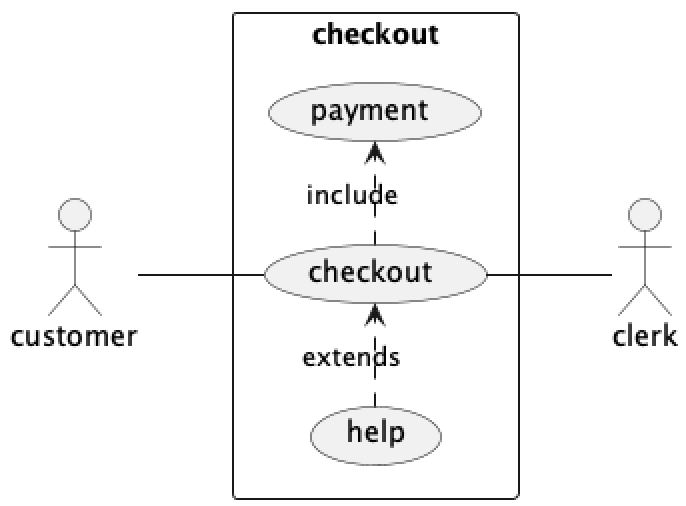
Hi @tlylt, yes it does. For example, we can provide an alias c to checkout.

@startuml
left to right direction
skinparam packageStyle rectangle
actor customer
actor clerk
'alias provided for checkout
rectangle checkout as c {
  customer -- (checkout)
  (checkout) .> (payment) : include
  (help) .> (checkout) : extends
  (checkout) -- clerk
}
@enduml

The diagram generated will be as follows:
image

Let me know if this is the desired workaround.

@tlylt
Copy link
Contributor

tlylt commented Jul 2, 2023

Does it work if you apply the fix that you mentioned?

Hi @tlylt, yes it does. For example, we can provide an alias c to checkout.

@startuml
left to right direction
skinparam packageStyle rectangle
actor customer
actor clerk
'alias provided for checkout
rectangle checkout as c {
  customer -- (checkout)
  (checkout) .> (payment) : include
  (help) .> (checkout) : extends
  (checkout) -- clerk
}
@enduml

The diagram generated will be as follows: image

Let me know if this is the desired workaround.

Yes, that would suffice. Could you draft up a migration guide for this PlantUML update in the PR description, highlighting the noticeable changes and the required settings/changes needed to handle cases such as the above? This would greatly help current users and will be included in the release note.

@lesterong
Copy link
Contributor Author

Yes, that would suffice. Could you draft up a migration guide for this PlantUML update in the PR description, highlighting the noticeable changes and the required settings/changes needed to handle cases such as the above? This would greatly help current users and will be included in the release note.

Hi @tlylt, I have drafted up a migration guide in the PR description, do take a look and let me know if there are any changes to be made! 🙂

@tlylt
Copy link
Contributor

tlylt commented Jul 4, 2023

Hi @tlylt, I have drafted up a migration guide in the PR description, do take a look and let me know if there are any changes to be made! 🙂

Thanks @lesterong, looks good to me. Could you help with:

  • add in relevant screenshots into the migration guide so that it is clearer what important visual changes are there
  • I saw that in the latest plantuml version, there's a possibility to download a version without GraphViz. Could you investigate this further and double check on https://plantuml.com/graphviz-dot to find out if this GraphViz dependency should still be mentioned and any new updated information should be included in our documentation? I briefly looked through and it seems like there are now 1. an alternative and 2. doesn't seem to need it on Windows anymore

@lesterong
Copy link
Contributor Author

Thanks @lesterong, looks good to me. Could you help with:

  • add in relevant screenshots into the migration guide so that it is clearer what important visual changes are there
  • I saw that in the latest plantuml version, there's a possibility to download a version without GraphViz. Could you investigate this further and double check on https://plantuml.com/graphviz-dot to find out if this GraphViz dependency should still be mentioned and any new updated information should be included in our documentation? I briefly looked through and it seems like there are now 1. an alternative and 2. doesn't seem to need it on Windows anymore

Hi @tlylt, I have added in some screenshots for the migration guide, do take a look and let me know if there are any changes to be made!

As for the GraphViz dependency, I'm still playing around and testing with the version that uses Smetana (a Java port of Dot). Here's the link to PlantUML's Smetana page for reference.

@tlylt
Copy link
Contributor

tlylt commented Jul 8, 2023

As for the GraphViz dependency, I'm still playing around and testing with the version that uses Smetana (a Java port of Dot). Here's the link to PlantUML's Smetana page for reference.

Do help to check if the use of Smetana has any limitations or undesirable changes. If it's all good, we can consider passing in that directive when we invoke Plantuml to have the layout engine use Smetana by default

@lesterong
Copy link
Contributor Author

As for the GraphViz dependency, I'm still playing around and testing with the version that uses Smetana (a Java port of Dot). Here's the link to PlantUML's Smetana page for reference.

Do help to check if the use of Smetana has any limitations or undesirable changes. If it's all good, we can consider passing in that directive when we invoke Plantuml to have the layout engine use Smetana by default

Hello @tlylt, I did some more testing with Smetana and it seems like there are still some issues with Smetana, particularly with arrows and nested layouts.

For example, the state.puml does not render correctly using Smetana.

With GraphViz Dot

With Smetana

Another example would be the component.puml diagram.

With GraphViz Dot

With Smetana

Similar issues are also reported in PlantUML's repo:

@tlylt
Copy link
Contributor

tlylt commented Jul 9, 2023

Hello @tlylt, I did some more testing with Smetana and it seems like there are still some issues with Smetana, particularly with arrows and nested layouts.

Thanks for checking, @lesterong! In that case, I see no reason to update our setup to use Smetana by default. Could you help me with adding a side note on that alternative (and the issues around it - just the high level description in a few sentences) in https://markbind-master.netlify.app/userguide/components/imagesanddiagrams#diagrams ?

Other than that will get this PR merged soon 👍

@lesterong
Copy link
Contributor Author

Hello @tlylt, I did some more testing with Smetana and it seems like there are still some issues with Smetana, particularly with arrows and nested layouts.

Thanks for checking, @lesterong! In that case, I see no reason to update our setup to use Smetana by default. Could you help me with adding a side note on that alternative (and the issues around it - just the high level description in a few sentences) in https://markbind-master.netlify.app/userguide/components/imagesanddiagrams#diagrams ?

Other than that will get this PR merged soon 👍

Great @tlylt! I have added a bullet point on Smetana here. Do take a look and let me know if there are any changes required!

Copy link
Contributor

@tlylt tlylt left a comment

Choose a reason for hiding this comment

The reason will be displayed to describe this comment to others. Learn more.

LGTM. @damithc do you have any comments/concerns with the diagrams generated by the new version? If not will be merging this PR in.

Copy link
Contributor

@damithc damithc left a comment

Choose a reason for hiding this comment

The reason will be displayed to describe this comment to others. Learn more.

LGTM. Thanks for the good work @lesterong and for the reviews (@tlylt @yucheng11122017). Just a minor comment only.

@lesterong lesterong force-pushed the upgrade-plantuml-version branch from d029a52 to 7f98993 Compare July 11, 2023 10:58
@tlylt
Copy link
Contributor

tlylt commented Jul 11, 2023

  • I saw that in the latest plantuml version, there's a possibility to download a version without GraphViz. Could you investigate this further and double check on plantuml.com/graphviz-dot to find out if this GraphViz dependency should still be mentioned and any new updated information should be included in our documentation? I briefly looked through and it seems like there are now 1. an alternative and 2. doesn't seem to need it on Windows anymore

@lesterong sorry I think this item is not completely done:

Installation under Windows
Starting from 1.2020.21
If you use a recent version (that is at least version 1.2020.21), you don't need to manually install GraphViz anymore !
A minimalistic graphviz dot.exe is packed into PlantUML and will be automagically unzipped in some temporary folder if needed (that is, if no installed GraphViz is available).
This is really the prefered option under Windows.
Caveat: Before 1.2020.25, there was an error message during graph generation, so please use 1.2020.25 or more recent.

On top of the alternative layout engine, the new version also brings the possibility of omitting the Graphviz installation on Windows machines. Could you verify?

Also, curious how did you generate and update the images in UG? I think this process is not captured in our DG.

For the above, we may need to update the docs if necessary (hopefully this is the last thing to do in this PR :)

@tlylt tlylt removed this from the v5.0.0 milestone Jul 11, 2023
@lesterong
Copy link
Contributor Author

On top of the alternative layout engine, the new version also brings the possibility of omitting the Graphviz installation on Windows machines. Could you verify?

My apologies, I will check on it by this weekend with a Windows PC, and update on it.

Also, curious how did you generate and update the images in UG? I think this process is not captured in our DG.

For the above, we may need to update the docs if necessary (hopefully this is the last thing to do in this PR :)

I generated the diagrams using the PlantUML plugin in IntelliJ.

@tlylt
Copy link
Contributor

tlylt commented Jul 12, 2023

I generated the diagrams using the PlantUML plugin in IntelliJ.

Hmm...best to generate them via MarkBind as well, to verify that it's actually working.

@lesterong
Copy link
Contributor Author

I generated the diagrams using the PlantUML plugin in IntelliJ.

Hmm...best to generate them via MarkBind as well, to verify that it's actually working.

I did serve the site locally to test as well, I used the plugin mainly for convenience. But I will double check on this to be sure! 👍🏼

@lesterong
Copy link
Contributor Author

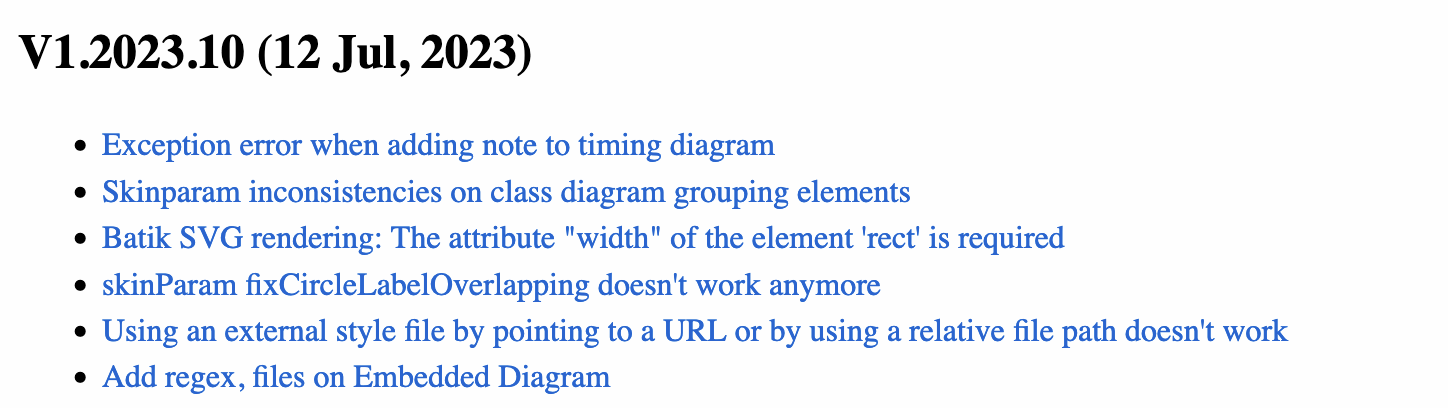
As of 12 July 2023, it seems like PlantUML has just released V1.2023.10. Do I upgrade to that version, or leave it at V1.2023.9? The change log from PlantUML is linked here.

image

@tlylt
Copy link
Contributor

tlylt commented Jul 15, 2023

As of 12 July 2023, it seems like PlantUML has just released V1.2023.10. Do I upgrade to that version, or leave it at V1.2023.9? The change log from PlantUML is linked here.

image

Sure @lesterong if it doesn't take too much time (need to verify that things still work), ideally I would like the PR to be ready soon or by tmr, to make the cut for v5 release.

Meaning if it is going to take longer than that, would be great if you could wrap up this PR first and keep that as a follow-up item.

@lesterong
Copy link
Contributor Author

As of 12 July 2023, it seems like PlantUML has just released V1.2023.10. Do I upgrade to that version, or leave it at V1.2023.9? The change log from PlantUML is linked here.
image

Sure @lesterong if it doesn't take too much time (need to verify that things still work), ideally I would like the PR to be ready soon or by tmr, to make the cut for v5 release.

Meaning if it is going to take longer than that, would be great if you could wrap up this PR first and keep that as a follow-up item.

No worries, I'll get it up by tomorrow afternoon 🙂. I'm currently testing it on Windows.

@lesterong lesterong force-pushed the upgrade-plantuml-version branch from 35d5c82 to bae6901 Compare July 15, 2023 13:57
@lesterong lesterong force-pushed the upgrade-plantuml-version branch from bae6901 to 603c18d Compare July 15, 2023 14:01
@lesterong lesterong changed the title Upgrade PlantUML version to 1.2023.9 Upgrade PlantUML version to 1.2023.10 Jul 15, 2023
@lesterong
Copy link
Contributor Author

lesterong commented Jul 15, 2023

On top of the alternative layout engine, the new version also brings the possibility of omitting the Graphviz installation on Windows machines. Could you verify?

Hi @tlylt, I have verified that on Windows, PlantUML works without a Graphviz installation. I used a Windows 11 machine without a Graphviz Dot installation, and tested it using markbind serve -d on the docs. With 2023.1.10, it now generates a the correct image instead of the error image.

image

I have also re-tested generating all the .puml files (both within markbind docs and the se-edu book) with version 2023.1.10 instead of 2023.1.9 using markbind serve -d, and I do not see any other issues.

For the above, we may need to update the docs if necessary (hopefully this is the last thing to do in this PR :)

With that said, do I go ahead and update the user and developer guides to specify that a Graphviz installation is not required for Windows?

@tlylt
Copy link
Contributor

tlylt commented Jul 15, 2023

I have also re-tested generating all the .puml files (both within markbind docs and the se-edu book) with version 2023.1.10 instead of 2023.1.9 using markbind serve -d, and I do not see any other issues.

For the above, we may need to update the docs if necessary (hopefully this is the last thing to do in this PR :)

With that said, do I go ahead and update the user and developer guides to specify that a Graphviz installation is not required for Windows?

Thank you. Could you update the docs to mention that & in dev docs add in the steps you took to generate and update the puml images properly (basically how-to guide for upgrading puml) ? (Under Development -> Workflow -> Dependency management, add at the end of that)

@lesterong
Copy link
Contributor Author

I have also re-tested generating all the .puml files (both within markbind docs and the se-edu book) with version 2023.1.10 instead of 2023.1.9 using markbind serve -d, and I do not see any other issues.

For the above, we may need to update the docs if necessary (hopefully this is the last thing to do in this PR :)

With that said, do I go ahead and update the user and developer guides to specify that a Graphviz installation is not required for Windows?

Thank you. Could you update the docs to mention that & in dev docs add in the steps you took to generate and update the puml images properly (basically how-to guide for upgrading puml) ? (Under Development -> Workflow -> Dependency management, add at the end of that)

Sure. I will do up a draft by tonight, so we can get it sorted out by tomorrow. 👍🏼

@damithc
Copy link
Contributor

damithc commented Jul 15, 2023

Thank you. Could you update the docs to mention that & in dev docs add in the steps you took to generate and update the puml images properly (basically how-to guide for upgrading puml) ? (Under Development -> Workflow -> Dependency management, add at the end of that)

Guys, is this regarding the UML diagrams used to illustrate the image annotation feature? In that case, we can just keep using the same images as before (i.e., they don't need to be updated every time PlantUML is updated) because that feature has nothing to do with PlantUML, right?

@lesterong
Copy link
Contributor Author

Thank you. Could you update the docs to mention that & in dev docs add in the steps you took to generate and update the puml images properly (basically how-to guide for upgrading puml) ? (Under Development -> Workflow -> Dependency management, add at the end of that)

Guys, is this regarding the UML diagrams used to illustrate the image annotation feature? In that case, we can just keep using the same images as before (i.e., they don't need to be updated every time PlantUML is updated) because that feature has nothing to do with PlantUML, right?

Correct me if I'm wrong, but I believe @tlylt is referring to all the diagrams in the user guide, not just the annotation diagrams, i.e. all the png images that has been updated in this PR.

@tlylt
Copy link
Contributor

tlylt commented Jul 15, 2023

Thank you. Could you update the docs to mention that & in dev docs add in the steps you took to generate and update the puml images properly (basically how-to guide for upgrading puml) ? (Under Development -> Workflow -> Dependency management, add at the end of that)

Guys, is this regarding the UML diagrams used to illustrate the image annotation feature? In that case, we can just keep using the same images as before (i.e., they don't need to be updated every time PlantUML is updated) because that feature has nothing to do with PlantUML, right?

@damithc we reused two UML diagrams for image annotation, which resulted in this coupling. I think would be good to decouple it for the reason you mentioned.

@lesterong could you undo the annotation.md changes and copy the two original UML images used (and rename them) and put them in docs/images (so that they are tgt with annotateSampleImage.png). Update the link in annotation page accordingly.

@lesterong
Copy link
Contributor Author

@lesterong could you undo the annotation.md changes and copy the two original UML images used (and rename them) and put them in docs/images (so that they are tgt with annotateSampleImage.png). Update the link in annotation page accordingly.

Hi @tlylt, I have reverted the changes in annotations.md, added two images annotateSampleObject.png and annotateSampleSequence.png, and updated annotations.md to point to the two images.

Thank you. Could you update the docs to mention that & in dev docs add in the steps you took to generate and update the puml images properly (basically how-to guide for upgrading puml) ? (Under Development -> Workflow -> Dependency management, add at the end of that)

I have also updated the user guide and developer guides to point out that Graphviz is optional in Windows:

Updated user guide imagesAndDiagrams.md
image

Updated developer guide settingUp.md
image

  • Not sure if it's better to split up the Java and Graphviz into two separate bullet points, or is this sufficient?

And also added a section on updating PlantUML in the workflows page

image

Do take a look and let me know if there are any changes to be made. Thanks!

@tlylt
Copy link
Contributor

tlylt commented Jul 16, 2023

And also added a section on updating PlantUML in the workflows page

@lesterong this change is not pushed? I don't see it anywhere.

@lesterong
Copy link
Contributor Author

My apologies, will push it now

Copy link
Contributor

@tlylt tlylt left a comment

Choose a reason for hiding this comment

The reason will be displayed to describe this comment to others. Learn more.

LGTM, thank you @lesterong 🚀

@tlylt tlylt added this to the v5.0.0 milestone Jul 16, 2023
@tlylt tlylt merged commit db46352 into MarkBind:master Jul 16, 2023
WillCWX pushed a commit to WillCWX/markbind that referenced this pull request Jul 29, 2023
Sign up for free to join this conversation on GitHub. Already have an account? Sign in to comment

Labels

None yet

Projects

None yet

Development

Successfully merging this pull request may close these issues.

Upgrade PlantUML version

5 participants