EngPrompt - AI-Optimized Multilingual Translation for GitHub Copilot 🚀


EngPrompt is a powerful VS Code extension that enhances your GitHub Copilot experience by automatically transforming prompts from any language into AI-optimized English. Whether you're coding in Spanish, Japanese, German, or any other language, EngPrompt ensures your communications with GitHub Copilot are crystal clear and technically precise.
Key Benefits:
- Seamless GitHub Copilot integration
- Universal language support (not limited to any specific language)
- AI-optimized technical English output
- Markdown checklist generation for project planning
- Real-time translation maintaining technical accuracy
Perfect for global development teams using GitHub Copilot who want to maximize their AI pair programming experience while working in their preferred language.
Before we embark on this magical journey, make sure you have:
- 💳 Active GitHub Copilot subscription
- 📦 VS Code 1.95.0 or higher
- 🤖 GitHub Copilot Chat extension
- Three distinct translation modes for different needs
- Maintains technical terminology accuracy
- Ensures precise documentation standards
- Optimizes your prompts for better AI/ML understanding
Available Commands:
- Default mode for English translation
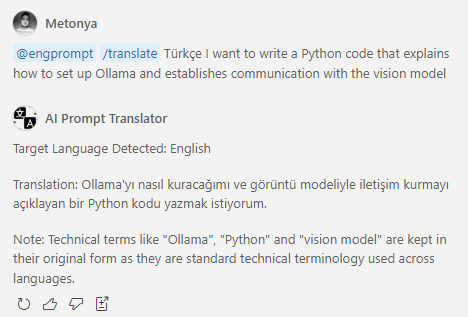
- Intelligent multilingual translation (automatically detects desired language)
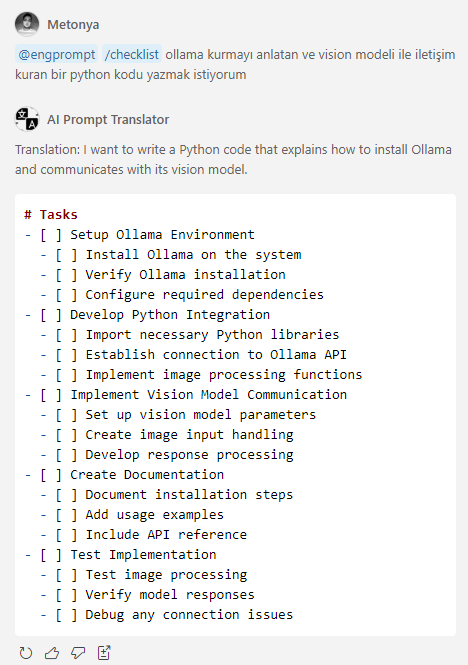
- Checklist generation in English
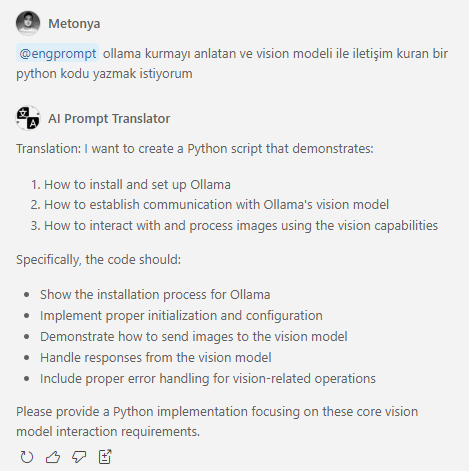
Multilingual Translation: Simply express your desired target language naturally in your prompt, and AI will understand!
Examples:
@engprompt /translate what is ollama tr
@engprompt /translate Hello World Türkçe
The AI automatically detects the target language from your natural request - whether you mention it at the end (tr, Türkçe), or include it naturally in your sentence. No specific format is required!
- Transforms requirements into structured task lists
- Creates hierarchical markdown checklists
- Organizes complex processes into manageable steps
- Perfect for project planning and documentation
@engprompt- Convert your text to optimized technical English@engprompt /translate- Translate your text to any target language (use "to [Language]:" syntax)@engprompt /checklist- Generate a structured markdown checklist in English
- Better AI Interactions: Get improved responses from GitHub Copilot and other AI tools by converting your native language queries into optimized English prompts
- Documentation: Create clear, professional documentation even when writing in your native language
- Project Planning: Convert requirements written in your native language into well-structured English checklists
- Team Communication: Ensure technical concepts are accurately conveyed across language barriers
- Type your text in any language
- Choose the appropriate command:
@engpromptfor English translation@engprompt /translatefor specific language translation@engprompt /checklistfor English checklist generation
- Get clear, technically precise output in your desired format
- Clone the repository
- Install dependencies:
npm install
- Compile the extension:
npm run compile
- Press F5 in VS Code to start debugging
This will open a new VS Code window with the extension loaded
Want to package the extension for distribution? Easy peasy:
- Install vsce globally:
npm install -g @vscode/vsce
- Package the extension:
This creates a
vsce package
.vsixfile you can distribute!