M06-LAB15: Error Storage account, Resource group not found, error in main.bicep & typos #411

Description

Contact Details
What happened?
Exercise : 01
Task: 03
Step: 05
Description of issue:
After Step 5, there is an additional step required to change the code of securityProfile of main.bicep else cloud shell gives an error.
Repro steps:
-
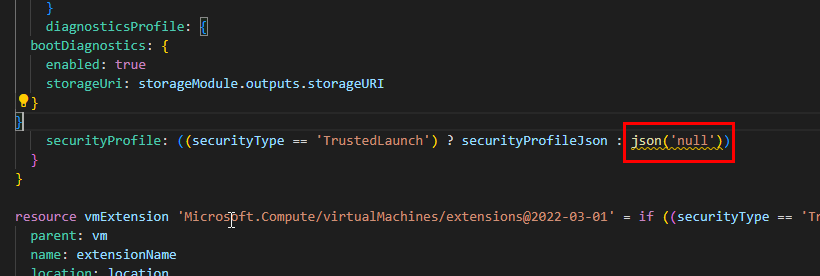
After step 5 is done we need to change the bicep code under securityProfile as
securityProfile: ((securityType == 'TrustedLaunch') ? securityProfileJson : null) -
By default under securityProfileJson the value is set as (Json('null'))
-
So the solution is found under https://learn.microsoft.com/en-gb/azure/azure-resource-manager/bicep/linter-rule-simplify-json-null
-
Also visual studio code was showing an error for the json('null')

Exercise : 01
Task: 03
Step: 06
Description of issue:
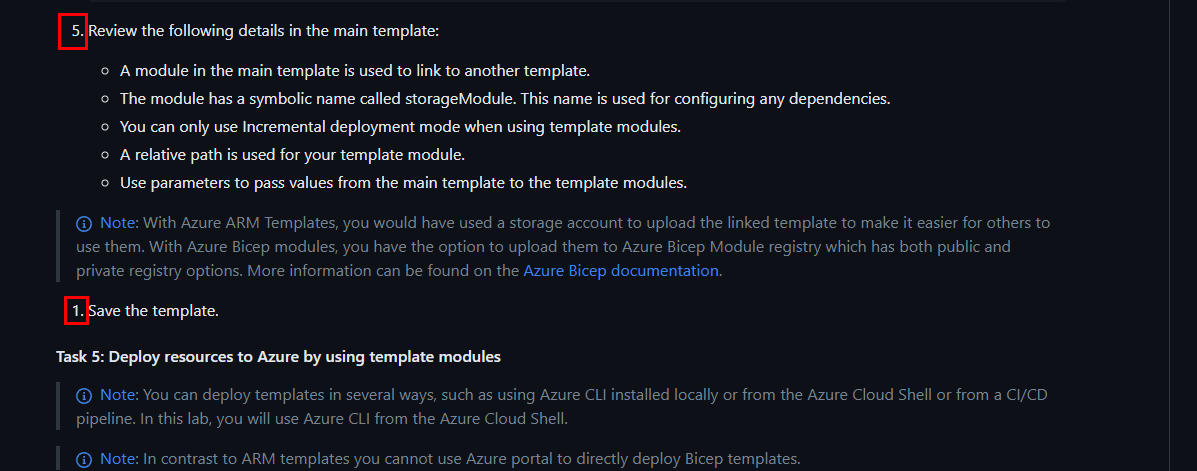
Step 6 is indicated as step 1 so typo error.
Repro steps:
Its a typo error that step 6 of saving the file is visible as step 1
Exercise: 01
Task: 04
Step: 00
Description of issue:
Task 04 is written as Task 05 so its a typo
Repro steps:
Task 04 is shown as Task 05, the task is next after task04.
Exercise : 01
Task: 04
Step: 10
Description of issue:
Last command is showing error as ResourceGroupNotFound

Repro steps:
-
When we run all set of commands then then its showing error and this error is due to the resource group is created with name az400m06l15deployment in the second command.
i.e.az group create --name az400m06l15deployment --location $LOCATION -
When we run last command i.e
az deployment group create --name az400m06l15deployment --resource-group az400m06l15-RG --template-file main.bicepthe command will try to find resource with name az400m06l15-RG and we have created different resource group with name az400m06l15deployment in above command. -
So this gives error of resourcegroupnotfound

Lab
Lab 14 Azure deployments using Azure Resource Manager templates
Relevant screenshots
No response
Do you want to help us? 👏
- Create a Pull Request by following this project's Contribution Guide