
- It builds a Docker container from Google Cloud Source Repositories or GitHub with Google Cloud Build.
- It publishes the image to the Container Registry as
eu.gcr.io/$PROJECT_ID/cloudbuild-android. - It has OpenJDK, Android
sdkmanager, Gradle, as well as a simple Android application for testing. - It supports publishing to Bucket & Firebase App Distribution with Cloud KMS decryption for credentials.
- Android NDK and Firebase Crashlytics NDK crash reporting can be enabled be uncommenting a few lines.
- This image first needs to be built itself, in order to build Android applications with it.
- Hosting the built image would be a) less customizable and b) the traffic would be charged.
- In order to get started, import to Cloud Source Repositories and set up a build trigger there.
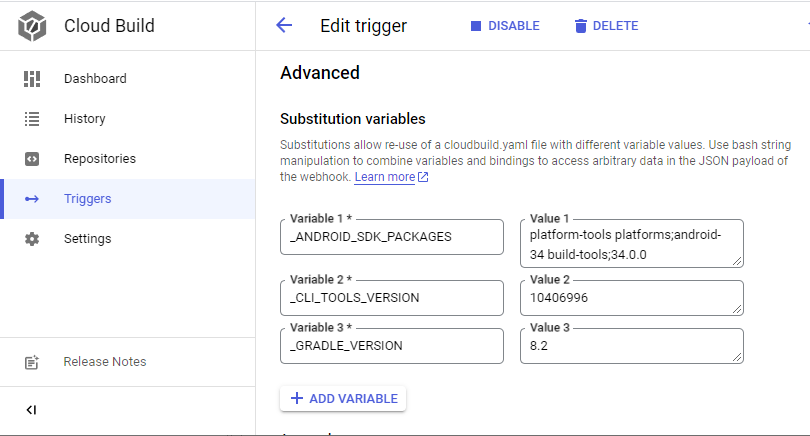
- After having successfully built it, a new container should show up below
eu.gcr.io/$PROJECT_ID/cloudbuild-android. - This container can then be used in another Android project's (or another Git branch's)
cloudbuild.yaml, in order not to build it every time.
An important difference is, that:
- when the
Dockerfileruns./gradlew build, the components and dependencies in thebuild.gradleget pre-installed. - when the
Dockerfileruns./gradlew, only the Gradle wrapper gets pre-installed (this is the current situation).
One can pre-install SDK packages with the sdkmanager, when passing _ANDROID_SDK_PACKAGES.
And one can change the version of the Gradle wrapper, when passing _GRADLE_WRAPPER_VERSION.
At the moment these are both statically set in cloudbuild.yaml, but the code is there.
_ANDROID_SDK_PACKAGES~platform-tools platforms;android-32 build-tools;32.0.0_GRADLE_WRAPPER_VERSION~7.2
These examples assume that you already have the image in your project's private container registry.
Hostname eu.gcr.io (also bucket name eu.artifacts) can be replaced with us.gcr.io or gcr.io.
a) This uploads debug APK files with gsutil to gs://eu.artifacts.$PROJECT_ID.appspot.com/android/:
# cloudbuild.yaml

steps:

- name: eu.gcr.io/$PROJECT_ID/cloudbuild-android
  id: 'docker-pull'
  args: ['cp', '-a', '.', '/persistent_volume']
  volumes:
  - name: data
    path: /persistent_volume

- name: gcr.io/cloud-builders/docker
  id: 'gradle-build'
  volumes:
  - name: data
    path: /persistent_volume
  args: ['run', '-v', 'data:/workspace', '--rm', 'eu.gcr.io/$PROJECT_ID/cloudbuild', '/bin/sh', '-c', 'cd /workspace && ./gradlew mobile:assembleDebug && mv mobile/build/outputs/apk/debug/mobile-debug.apk mobile/build/outputs/apk/debug/$REPO_NAME-$SHORT_SHA-debug.apk && ls -la mobile/build/outputs/apk/debug/$REPO_NAME-$SHORT_SHA-debug.apk']

- name: gcr.io/cloud-builders/gsutil
  id: 'publish-gsutil'
  args: ['cp', '/persistent_volume/mobile/build/outputs/apk/debug/$REPO_NAME-$SHORT_SHA-debug.apk', 'gs://eu.artifacts.$PROJECT_ID.appspot.com/android/']
  volumes:
  - name: data
    path: /persistent_volume

timeout: 1200s
b) Cloud KMS can be used decrypt files; this requires IAM roles/cloudkms.cryptoKeyEncrypterDecrypter for the service account:

The first step mounts volume data. The second step runs gcloud kms decrypt (there are scripts in the /scripts directory, for encrypting the *.enc files). The Gradle task in the third step runs mobile:assembleRelease mobile:appDistributionUploadRelease, which uploads a signed release APK to Firebase App Distribution. This requires a separate service account with a google-service-account.json, because it is not possible to access the Cloud Build service account credentials.
# cloudbuild.yaml

steps:

- name: eu.gcr.io/$PROJECT_ID/cloudbuild-android
  id: 'docker-pull'
  args: ['cp', '-a', '.', '/persistent_volume']
  volumes:
  - name: data
    path: /persistent_volume

- name: gcr.io/cloud-builders/gcloud
  id: 'kms-decode'
  entrypoint: 'bash'
  waitFor: ['docker-pull']
  args:
    - '-c'
    - |
      mkdir -p /persistent_volume/.android
      gcloud kms decrypt --ciphertext-file=credentials/keystore.properties.enc --plaintext-file=/persistent_volume/keystore.properties --location=global --keyring=android-gradle --key=default
      gcloud kms decrypt --ciphertext-file=credentials/google-service-account.json.enc --plaintext-file=/persistent_volume/credentials/google-service-account.json --location=global --keyring=android-gradle --key=default
      gcloud kms decrypt --ciphertext-file=credentials/google-services.json.enc --plaintext-file=/persistent_volume/mobile/google-services.json --location=global --keyring=android-gradle --key=default
      gcloud kms decrypt --ciphertext-file=credentials/debug.keystore.enc --plaintext-file=/persistent_volume/.android/debug.keystore --location=global --keyring=android-gradle --key=default
      gcloud kms decrypt --ciphertext-file=credentials/release.keystore.enc --plaintext-file=/persistent_volume/.android/release.keystore --location=global --keyring=android-gradle --key=default
      rm -v ./credentials/*.enc
  volumes:
    - name: data
      path: /persistent_volume

- name: gcr.io/cloud-builders/docker
  id: 'firebase-distribution'
  waitFor: ['kms-decode']
  env:
    - 'BUILD_NUMBER=$BUILD_ID'
  volumes:
    - name: data
      path: /persistent_volume
  args: [
    'run',
    '--rm', 'eu.gcr.io/$PROJECT_ID/cloudbuild',
    '-v', 'data:/workspace',
    '/bin/sh', '-c', 'cd /workspace && ./gradlew mobile:assembleRelease mobile:appDistributionUploadRelease'
  ]

timeout: 1200s
- Creating a Serverless Mobile Delivery Pipeline
- Simplify your CI processes with GitHub and Google Cloud Build
- Marketplace Google Cloud Build for GitHub integration.
- Google Cloud Build (official).