
A Discord bot that helps Pokémon GO communities to organize raids in Discord.
DeliBot is a Discord bot written in Python 3.6.
Join the server to get help, make a suggestion or just chat!
Invite - https://discord.gg/f2mkW8g
- Invite DeliBot - https://discordapp.com/oauth2/authorize?client_id=354229190666616844&scope=bot&permissions=1342532672
- Go to a channel in your server and run
!installone time.
- Everyone are able to use the
!raid-command. - DeliBot updates the Raid on every reaction.
- DeliBot will delete the Raid 2 hours after creation.
- DeliBot will remove your command-message (when you type e.g
!raid). - Click on your team emoji and If you are coming with extra players, you can react and combine 'One', 'Two' and 'Three' up to six extra players (note that those extra players will only count towards 'Total :' as they have no name).
!install- Imports necessary emojis to the server.
Server configuration
!set_gmt- Set the GMT for the server.!set_language- Set the language for the server.!set_ex_scan- Set where to scan for EX-Raid pass images.!set_profile_scan- Set where to scan for team images.!set_raid_channel- Set where to post Raids by default.!set_ex_channel- Set where to post EX-Raids by default.!unset_ex_scan- Unset where to scan for EX-Raid pass images.!unset_profile_scan- Unset where to scan for team images.!unset_raid_channel- Unset where to post Raids by default.!unset_ex_channel- Unset where to post EX-Raids by default.!set_role_permission- Delibot will ask you to tag a role by using@. The role will be granted permission to edit and delete any Raid, also permission to useadd_gym/del_gym.!unset_role_permission- This will remove the role you had set.!set_overview- Set where to show an overview-message of active raids, updates every 2nd minute.
!create gym {gym name} {lat} {lon}- Adds the Gym to the database, so it will appear as a hyperlink on Raids.
But If you don't care about the image, any other hyperlink works.

!delete gym {gym name}- Delete a hyperlinked Gym from the database.
-
!help- Displays available commands and other info. -
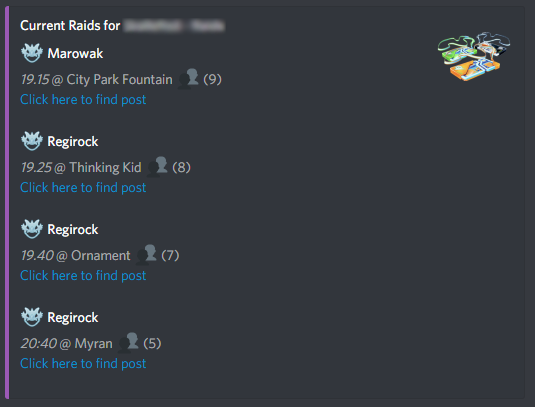
!list raids- List of ongoing Raids. -
!list quests- List of todays Research tasks. -
!list gyms- List of the added Gyms. -
!find {name}- Get the Google Maps link to a location. -
!valor- Sets your role to Valor. -
!mystic- Sets your role to Mystic. -
!instinct- Sets your role to Instinct. -
!pokebox- Useless but fun feature! -
!raid- Opens a private message dialog with Delibot, to create a Raid by answering questions. -
!raid {boss} {time} {location*}- Starts a Raid with the given information, lasts for 2 hours.
|{boss}- Needs to be one connected name, e.g. "Entei".
|{time}- Needs to be one connected time, e.g. "12:00".
|{location*}- Can be multiple lines, e.g. "Center of town". -
!exraid {boss} {time} {day} {location*}- Just like "!raid" but it lasts for 14 days. |{day}- Needs to be one connected day, e.g. "Monday" or "Monday-(01/01/2017)" -
!trade {pokémon have*} , {pokémon want*}- Text & Image of what you want to trade in a clean message.
|{pokémon have*}- The pokémon you want to trade away, e.g. "shiny aron".
|{pokémon want*}- The pokémon you want to have, e.g. "shiny ash pichu". -
!want {pokémon want*}- Text & Image of what you want to have in a clean message.
|{pokémon want*}- The pokémon you want to have, e.g. "shiny ash pichu". -
!offer {pokémon have*}- Text & Image of what you want to offer in a clean message.
|{pokémon have*}- The pokémon you want to trade away, e.g. "shiny aron". -
!community_day {region} {GMT}- Information window about the next Community-day.
|{region}- Needs to be one region, e.g. "asia", "europe", or "america".
|{GMT}- Your timezone from GMT+0, e.g. If you live in GMT+2 you type "+2".
(If you have usedset_gmtyou only need the region) -
!research {quest*} , {reward*} , {pokestop*}- Clean message dislaying the quest.
|{quest*}- Can be multiple lines, e.g. "Catch 10 pokémon".
|{reward*}- Can be multiple lines, e.g. "1 rare candy".
|{pokestop*}- Can be multiple lines, e.g. "The gitstop".
Get the stats of a user.
!stats- Your own stats.!stats @user- Stats for a user.!stats server- Total stats for this server.!stats overall- Total stats for all servers.!stats leaderboard- Leaderboard for best stats on this server.
Arguments marked with * can contain more than one word.
Do not include the { } brackets.
(Names are censored on github)
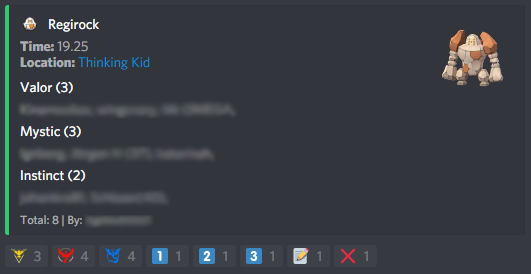
For e.g. "!raid entei 19:30 on github" will display:
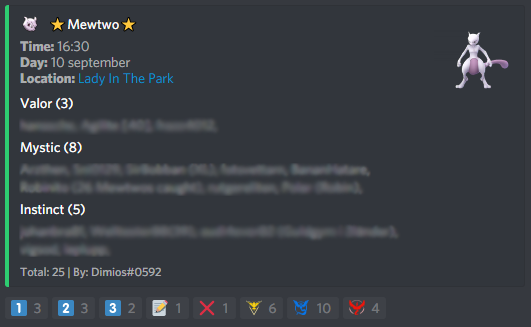
For e.g. "!exraid mewtwo 19:30 sunday on github" will display:
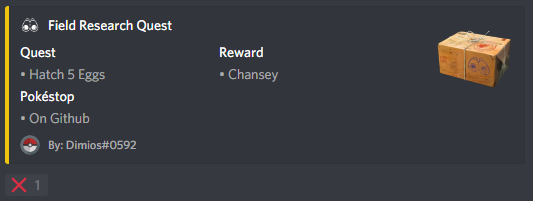
For e.g "!research hatch 5 eggs, chansey, on github" will display:
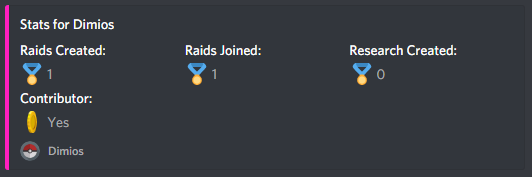
For e.g "!stats" will display:
For e.g "!list raids" will display:
!raid = !Raid / !r / !R
!exraid = !Exraid / !xr / !Xr
!trade = !Trade / !t / !T
!want = !Want / !w / !W
!offer = !Offer / !o / !O
!community_day = !community / !cday / !cd
!research = !rs / !Research / !Q / !Quest / !quest
If you want to contribute with something / contact me, then hit me up on:
Discord - Widdin#6289 / Dimios#0592