This is the bare skeleton you need for a Discord bot - it covers most of the quirks of the Discord API that you normally need weeks to find out
WTFPL license - do whatever you wanna do with this code, you don't even have to credit me!
This project is outdated and will probably not work with the current version v12
Download or clone the repository and follow these steps to set up and run your bot:
- Make sure you have Node.js and npm (Node Package Manager) installed
- Open a terminal in the folder you downloaded and run the command
npm ito install the required packages - Open the
.envfile and enter your bot token there (you get it from the Discord Developer Portal) - Invite your bot to a guild by using this URL (insert client ID first): https://discordapp.com/oauth2/authorize?client_id=CLIENT_ID_HERE&scope=bot&permissions=8
- Run the bot in the terminal by using
node .or by double clicking the batch file
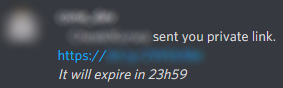
- If you publish your bot token somewhere, people will hijack your bot. This has happened to me and some of my friends. The hijackers will run a second instance of your bot (which is possible) and send DMs to random users containing a malicious URL. If you notice anything like that, make sure to re-generate the bot token on the Discord Developer Portal and to never ever publish it anywhere again.
Click here to view some of these messages
- The Discord API is really unstable and can throw many client errors. This is mostly covered by the error catcher in the code but if you are still getting crashes, you might wanna check out my package Node-Wrap - it will restart your bot on crash and also provides the ability to easily and quickly restart your bot. For a practical example of how to use Node-Wrap, check out the bots mentioned further down this list.
- You might wanna read through the Discord API documentation, the Discord.js documentation and the Discord.js guide.
- If you want some other practical examples to look at, you might wanna check out the bots of the Jabrils Community, or my own bot, sBot - you can also join the Discord server of the Jabrils Community to get help while you are coding your bot.
- Once you are done with your bot and want it to get added by other people, make sure to add it to the Discord bot archive discordbots.org