Update the directory of generated DLL files #1325


Description

Bug description
I installed OpenFAST on my MacBook with cmake commands. The installation was successful, but some issues happened with the Regression Test.
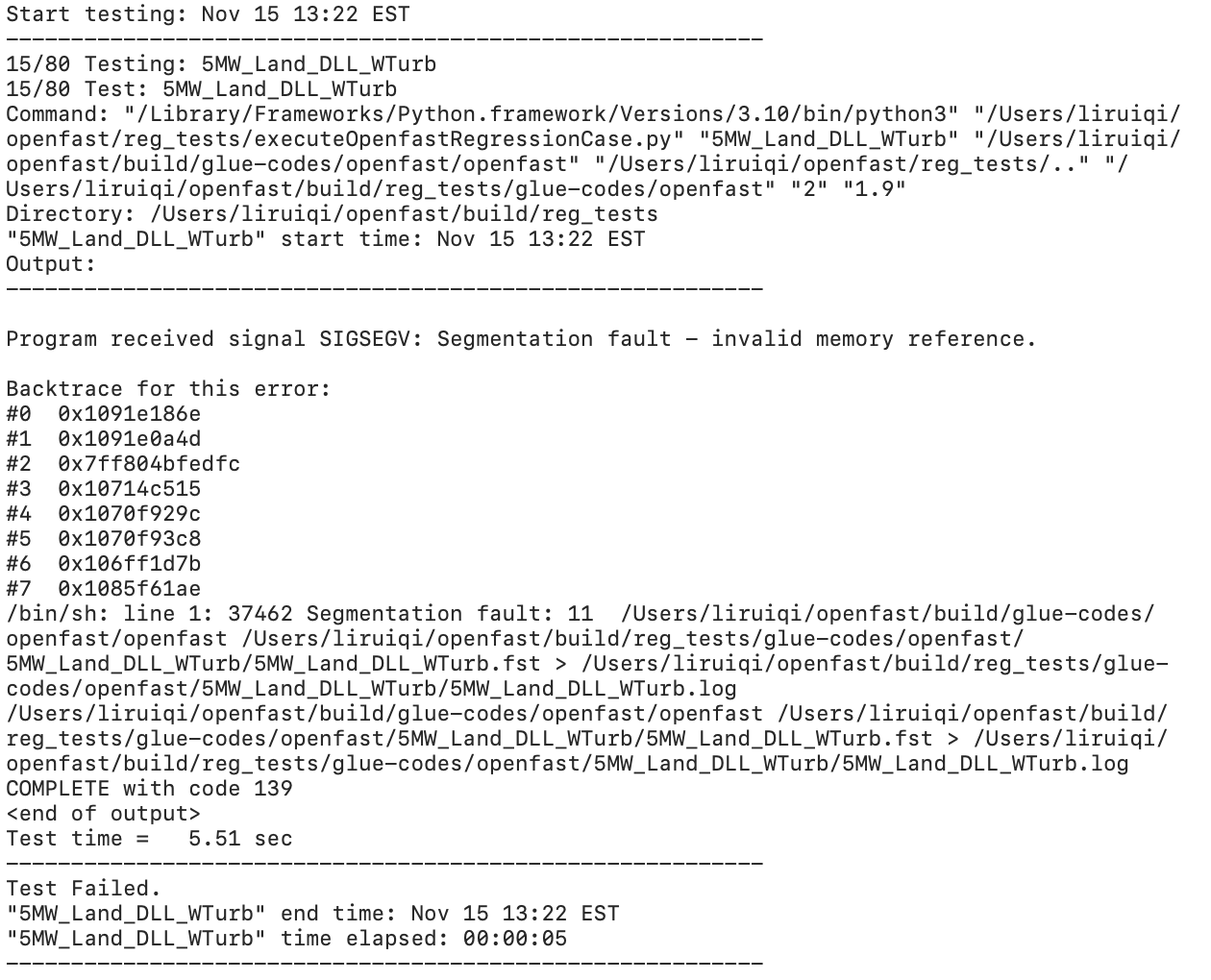
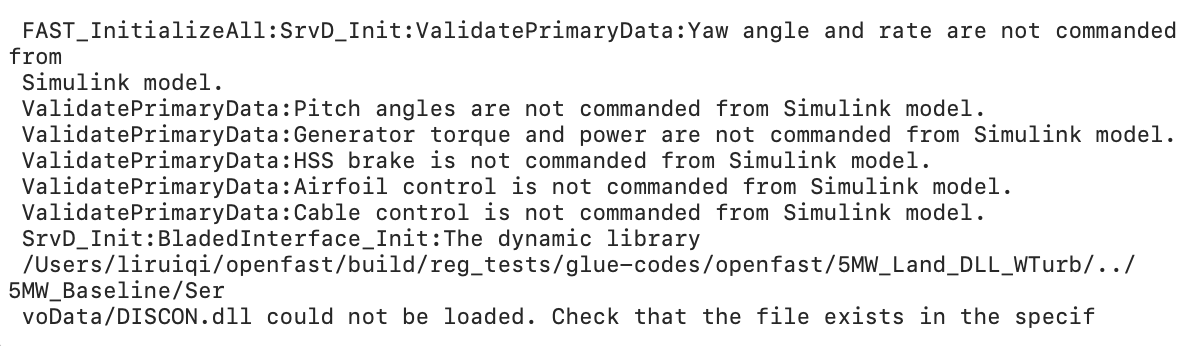
When running the regression tests, almost all those 5MW tests were failed on my computer. The reason of the failure was that the project could not find DISCON.dll, DISCON_ITIBarge.dll, DISCON_OC3Hywind.dll in correct folders. Those DLL files were generated somewhere in the openfast/build folder. After I moved those DLL files properly, those tests became passed.
The original location of those files were
openfast/build/reg_tests/glue-codes/openfast/5MW_Baseline/ServoData/DISCON/build/DISCON.dll
openfast/build/reg_tests/glue-codes/openfast/5MW_Baseline/ServoData/DISCON_ITI/build/DISCON_ITIBarge.dll
openfast/build/reg_tests/glue-codes/openfast/5MW_Baseline/ServoData/DISCON_OC3/build/DISCON_OC3Hywind.dll
openfast/build/reg_tests/glue-codes/python/5MW_Baseline/ServoData/DISCON/build/DISCON.dll
openfast/build/reg_tests/glue-codes/python/5MW_Baseline/ServoData/DISCON_ITI/build/DISCON_ITIBarge.dll
openfast/build/reg_tests/glue-codes/python/5MW_Baseline/ServoData/DISCON_OC3/build/DISCON_OC3Hywind.dll.
I moved those DLL files respectively into the following locations, and then the problem was solved.
openfast/build/reg_tests/glue-codes/openfast/5MW_Baseline/ServoData/DISCON.dll
openfast/build/reg_tests/glue-codes/openfast/5MW_Baseline/ServoData/DISCON_ITIBarge.dll
openfast/build/reg_tests/glue-codes/openfast/5MW_Baseline/ServoData/DISCON_OC3Hywind.dll
openfast/build/reg_tests/glue-codes/python/5MW_Baseline/ServoData/DISCON.dll
openfast/build/reg_tests/glue-codes/python/5MW_Baseline/ServoData/DISCON_ITIBarge.dll
openfast/build/reg_tests/glue-codes/python/5MW_Baseline/ServoData/DISCON_OC3Hywind.dll.
Since I solved the problem by simply moving the files, there are probably some mistakes of file linking, in the settings of the regression tests.
To Reproduce
Steps to reproduce the behavior:
- Download OpenFAST v3.3.0, which folder will be called
openfastin the following.
Download the unit test folder and use it to replaceopenfast/unit_tests/pfunit.
Download the regression test folder and use it to replaceopenfast/reg_tests/r-test. - Install OpenFAST through the following commands on Terminal in MacBook. (The settings may differ for other users.)
cd openfast/build
cmake .. -D CMAKE_Fortran_COMPILER=/usr/local/bin/gfortran-12
cmake .. -D CMAKE_INSTALL_PREFIX=/usr/local/
cmake .. -D BUILD_TESTING=ON
make install - Run the regression tests. Here we take a single test
5MW_Land_DLL_WTurbas an example.
ctest -R 5MW_Land_DLL_WTurb - Then, my observation was a failed result.

- Open
openfast/build/reg_tests/glue-codes/openfast/5MW_Land_DLL_WTurb/5MW_Land_DLL_WTurb.log, and this is what i saw at the end of the file.
- The issue was solved after i moved
openfast/build/reg_tests/glue-codes/openfast/5MW_Baseline/ServoData/DISCON/build/DISCON.dll
to
openfast/build/reg_tests/glue-codes/openfast/5MW_Baseline/ServoData/DISCON.dll,
as I said on top.
Expected behavior
The regression test should be passed without moving any files by users.
OpenFAST Version
OpenFAST v3.3.0
**************************************************************************************************
 OpenFAST

 Copyright (C)  National Renewable Energy Laboratory
 Copyright (C)  Envision Energy USA LTD

 This program is licensed under Apache License Version 2.0 and comes with ABSOLUTELY NO WARRANTY.
 See the "LICENSE" file distributed with this software for details.
 **************************************************************************************************

 OpenFAST-v3.3.0
 Compile Info:
  - Architecture: 64 bit
  - Precision: double
  - Date: Nov 15 2022
  - Time: 13:20:00
 Execution Info:
  - Date: 11/15/2018
  - Time: 13:22:00
System Information (please complete the following information):
- OS: macOS 12.4
- Compiler: GFortran 12
- Compiler settings: