Add documentation pages from OpenMS Wiki #24
Conversation


|
|
||
| Try to restart travis, it sometimes hangs and since it builds on shared infrastructure, the next build may work better. This needs to be done by a OpenMS core developer. | ||
|
|
||
| Since we use extensive caching, the build may take much longer when many files are touched and may never complete in that case (running into the travis time limit). In that case we can rebuild the cache using the following approach: |

There was a problem hiding this comment.
Since we use extensive caching
Since extensive caching is used,
There was a problem hiding this comment.
In that case we can rebuild
In that case, rebuild
|
|
||
| Since we use extensive caching, the build may take much longer when many files are touched and may never complete in that case (running into the travis time limit). In that case we can rebuild the cache using the following approach: | ||
| ```bash | ||
| $ git cherry-pick 89c5cd7f2d9d343b3d63fc6bab18e08dcd969c05 |
There was a problem hiding this comment.
89c5cd7f2d9d343b3d63fc6bab18e08dcd969c05
`<git-sha>`.
|
|
||
| # Now wait for the build to complete | ||
|
|
||
| $ git revert 89c5cd7f2d9d343b3d63fc6bab18e08dcd969c05 |
There was a problem hiding this comment.
| $ git push origin develop | ||
| ``` | ||
|
|
||
| ## Working in Integrated Development Environments (IDEs) |
|
|
||
| ### Why are there no `source/TEST` and `source/APPLICATIONS/TOPP|UTILS` folder? | ||
|
|
||
| All source files added to an IDE are associated with their targets. You can find the source files for each test within its own subproject. The same is true for the `TOPP` and `UTILS` classes. |
|
|
||
| ### I'm getting the error "Error C2471: cannot update program database" | ||
|
|
||
| This is a bug in Visual Studio and there is a [bug fix] (http://code.msdn.microsoft.com/KB946040) Only apply it if you encounter the error. The bug fix might have unwanted side effects! |
There was a problem hiding this comment.
delete space after [bug fix], it is rendering incorrectly.

|
|
||
| ### Visual Studio can't read the clang-format file. | ||
|
|
||
| Depending on the Visual Studio version you're using you might get an error like `Error while formating with ClangFormat`. This is because Visual Studio is using an outdated version of clang-format. Unfortunately there is no easy way to update this using Visual Studio itself. |
There was a problem hiding this comment.
you're using you might get an error like
it might error with
| ### Visual Studio can't read the clang-format file. | ||
|
|
||
| Depending on the Visual Studio version you're using you might get an error like `Error while formating with ClangFormat`. This is because Visual Studio is using an outdated version of clang-format. Unfortunately there is no easy way to update this using Visual Studio itself. | ||
| There is a plugin provided by LLVM designed to fix this problem, but the plugin doesn't work with every Visual Studio version. However, you can update clang-format by hand using the pre-build clang-format binary. Both the binary and a link to the plugin can be found [here](https://llvm.org/builds/). |
There was a problem hiding this comment.
you can update clang-format by hand using the pre-build clang-format binary. Both the binary and a link to the plugin can be found
In that case, update clang-format manually using the pre-build clang-format binary.
|
|
||
| Depending on the Visual Studio version you're using you might get an error like `Error while formating with ClangFormat`. This is because Visual Studio is using an outdated version of clang-format. Unfortunately there is no easy way to update this using Visual Studio itself. | ||
| There is a plugin provided by LLVM designed to fix this problem, but the plugin doesn't work with every Visual Studio version. However, you can update clang-format by hand using the pre-build clang-format binary. Both the binary and a link to the plugin can be found [here](https://llvm.org/builds/). | ||
| To update clang-format by hand just download the binary and exchange it with the clang-format binary in your Visual Studio folder. |
|
|
||
| ### The indexer gets stuck at some file which ``#includes seqan`` | ||
|
|
||
| It seems that SeqAn code is just too confusing for older eclipse C++ indexers. You should upgrade to eclipse galileo (CDT 6.0.x). Also, increase the available memory limit in eclipse.ini, e.g. -Xmx1024m for one gig. |
There was a problem hiding this comment.
You should
It is recommended to
There was a problem hiding this comment.
`eclipse.ini`, e.g. `-Xmx1024m`
|
|
||
| ### The parser is confused after OPENMS_DLLAPI and does not recognize standard C++ headers | ||
|
|
||
| Go to ``Project -> Properties -> C/C++ Include Paths and Preprocessor Symbols -> Add Preprocessor symbol -> "OPENMS_DLLAPI="``. This tells eclipse that the macro is defined empty. In the same dialog you can also add an external include path to e.g. ``/usr/include/c++/4.3.3/``, etc. The issue with C++ headers was fixed in the latest galileo release. |
There was a problem hiding this comment.
delete:
you can also
|
|
||
| ### How do I run a single test? | ||
|
|
||
| You can can execute an OpenMS class test using the CTest regular expressions: |
There was a problem hiding this comment.
delete:
You can can
|
|
||
| ctest -V -R "^<class>_test" | ||
|
|
||
| # To build a class test, you simply call the respective make target in ./source/TEST: |
There was a problem hiding this comment.
delete:
you simply
|
|
||
| make <class>_test | ||
| ``` | ||
| To run a TOPP test, you can use: |
| ``` | ||
| ### How do I debug uncaught exceptions? | ||
|
|
||
| You can dump a core if an uncaught exception occurs, by setting the environment variable `OPENMS_DUMP_CORE`. |
There was a problem hiding this comment.
am i seeing a repeat?
|
|
||
| ### (Linux) Why is no core dumped, although a fatal error occured? | ||
|
|
||
| Try the `ulimit -c` unlimited command. It sets the maximum size of a core to unlimited. |
|
|
||
| ### How can I wrap my new class with PyOpenMS? | ||
|
|
||
| You will have to create a new file `src/pyOpenMS/pxds/CLASS_NAME.pxd` that is explained in the [pyOpenMS documentation](https://pyopenms.readthedocs.io/en/latest/wrap_classes.html?highlight=Wrapping%20classes#wrapping-workflow-and-wrapping-new-classes). |
There was a problem hiding this comment.
delete:
You will have to
|
|
||
| ### How can I wrap my new method with PyOpenMS? | ||
|
|
||
| You will have to add an entry to `src/pyOpenMS/pxds/CLASS_NAME.pxd` with the signature of your new method(s). |
There was a problem hiding this comment.
delete:
You will have to
|
|
||
| ### Where can I find the definition of the main page? | ||
|
|
||
| You can find a definition of the main page [here](https://github.com/OpenMS/OpenMS/edit/develop/doc/doxygen/public/Main.doxygen). |
| Pull Request Checklist | ||
| ====================== | ||
|
|
||
| Before you open a pull request, make sure you check the following: |
There was a problem hiding this comment.
Before you open a pull request, make sure you check the following:
Before opening a pull request, please check the following:
| * **Is the code documented?** | ||
|
|
||
| Document all new classes, including their methods and parameters. | ||
| It is also recommended that you also document non-public members and methods. |
| Make sure to: | ||
| * **Rebase before you open a pull request.** | ||
|
|
||
| To include all recent changes, rebase your branch on `develop` before you open a pull request. |
There was a problem hiding this comment.
you open a pull request.
opening a pull request.
|
|
||
| A list of known issues in the current OpenMS release can be found [here](https://abibuilder.informatik.uni-tuebingen.de/archive/openms/Documentation/nightly/html/known_dev_bugs.html). Please check if your OpenMS version matches the current version and if the bug has already been reported. | ||
|
|
||
| In order to report a new bug, please use either our [GitHub issues system](write-and-label-github-issues.md) or [contact us](contact-us.md). |
There was a problem hiding this comment.
In order to report a new bug, please use either our GitHub issues system or contact us.
In order to report a new bug, please create a [GitHub issue] following our bug reporting guidelines, you can also contact us.
|
|
||
| 1. Go to the [OpenMS codebase](https://github.com/OpenMS/OpenMS). | ||
| 2. Click **Issues** in the menu at the top of the screen. | ||
| 3. Click **New issue**. |
There was a problem hiding this comment.
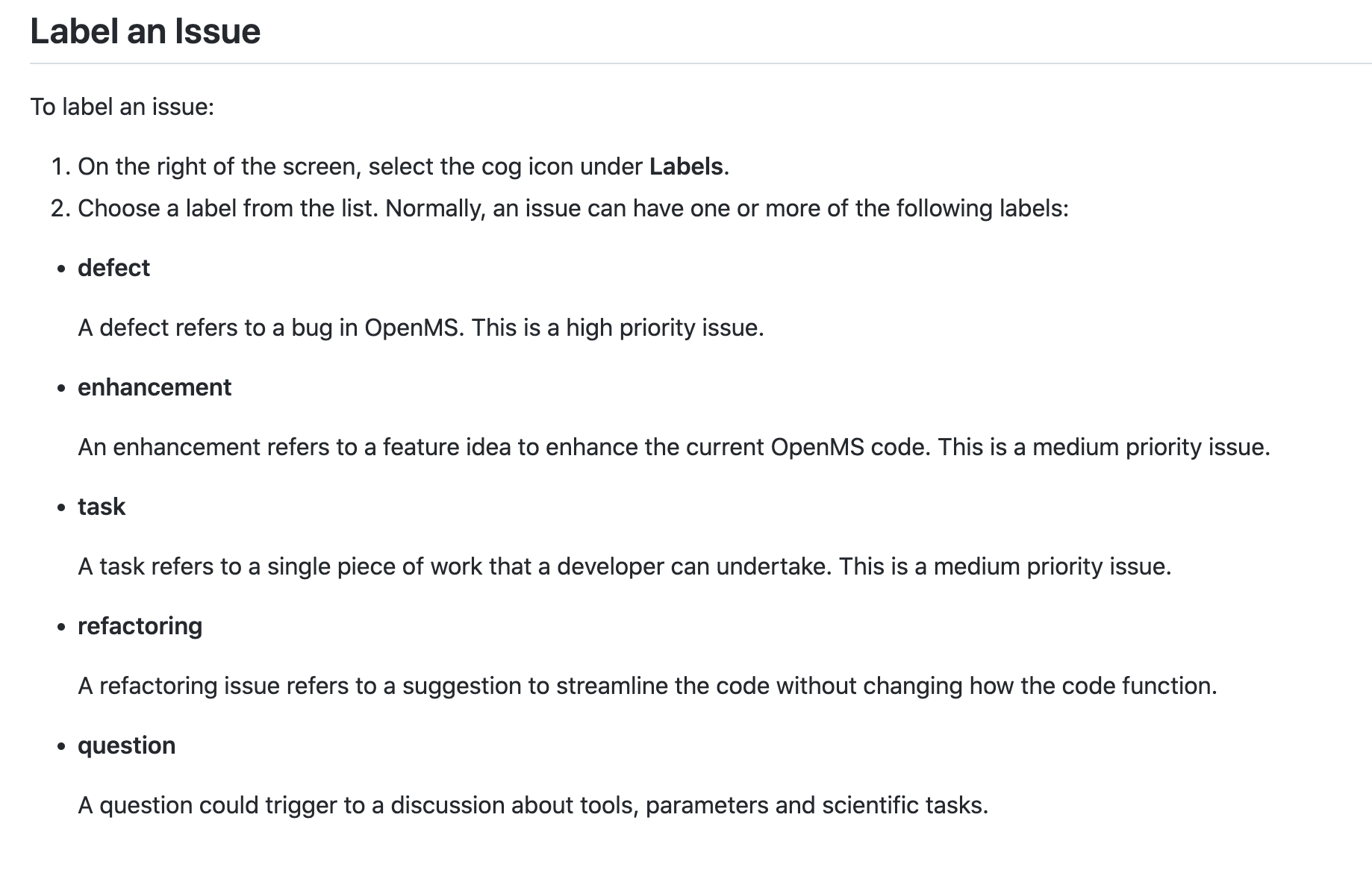
| To label an issue: | ||
| 1. On the right of the screen, select the cog icon under **Labels**. | ||
| 2. Choose a label from the list. Normally, an issue can have one or more of the following labels: | ||
| * **defect** |
There was a problem hiding this comment.
i think one more space on left will indent these bullet points properly inside 2..


|
=> #40. |
3 participants


Describe the change
PR checklist
I'm adding all the files listed in the title.
There are too many changes to include screenshots.
CHANGELOG.mdis updated.