GeoTIFFs not correctly hidden on zoom out #40

Description

Hi,
I posted about this on the mailing list maybe a year ago, but having encountered the problem again I thought I'd post on the issue tracker.
When viewing GeoTIFF imagery on an ImageTileLayer, the images are only supposed to be displayed once you are zoomed in far enough. Once you zoom out past a certain level, a grey box is displayed instead, showing the geographical extent of the image. I assume at this point the image itself is supposed to be hidden, however, it continues being displayed at the same on-screen pixel size that it was before zooming out. The result is that you get a false impression of the geographical size of the image, where it appears much bigger geographically than it really is. The following image illustrates the problem:
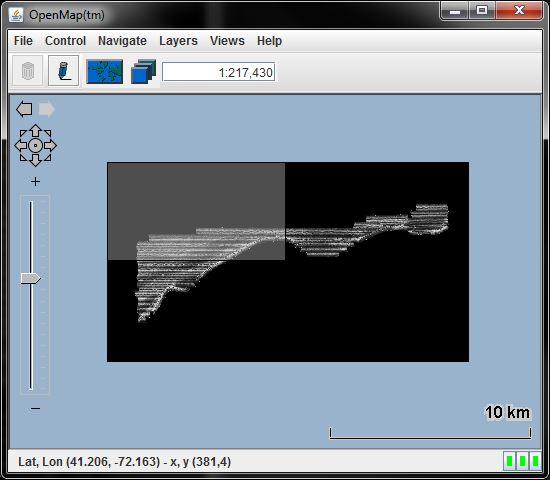
Steps to reproduce:
- Using OpenMap 5.1.15, include the JAI JARs and static libraries required for GeoTIFF display on the path/classpath
- Add an
ImageTileLayer, e.g. inopenmap.properties:
openmap.layers=(...) geotiff
openmap.startUpLayers=(...) geotiff
geotiff.class=com.bbn.openmap.layer.imageTile.ImageTileLayer
geotiff.prettyName=GeoTiffs
- Run OpenMap
- Edit the ImageTile layer, click Add and locate a GeoTIFF file (see below for example).
- Once the file appears in the list, select it and click "Go To" to zoom to the location of the GeoTIFF at its best-fit size
- Zoom out at least twice using the on-screen "-" button.
I have also encountered the issue using programmatically created ImageTiles, so I am wondering if the issue is somewhere around ImageTile's updateImageForProjection() / shouldFetchForProjection() methods, but I can't see an obvious path by which it could display both the image and the grey box. Is it maybe keeping the image graphic in the layer's graphic list and not removing it when the projection no longer requires it to be rendered?
(I have uploaded an example GeoTIFF file here for you to try if you don't have a suitable file. The image was converted for OpenMap from the US government open data set available here.)