Easily manage your Caddy2 servers using a modern web UI, built on the MEVN stack (MongoDB, Express, Vue, Node.js).
Caution: CaddyManager is in early development. Please backup your Caddy configurations and data before testing. Use at your own risk.
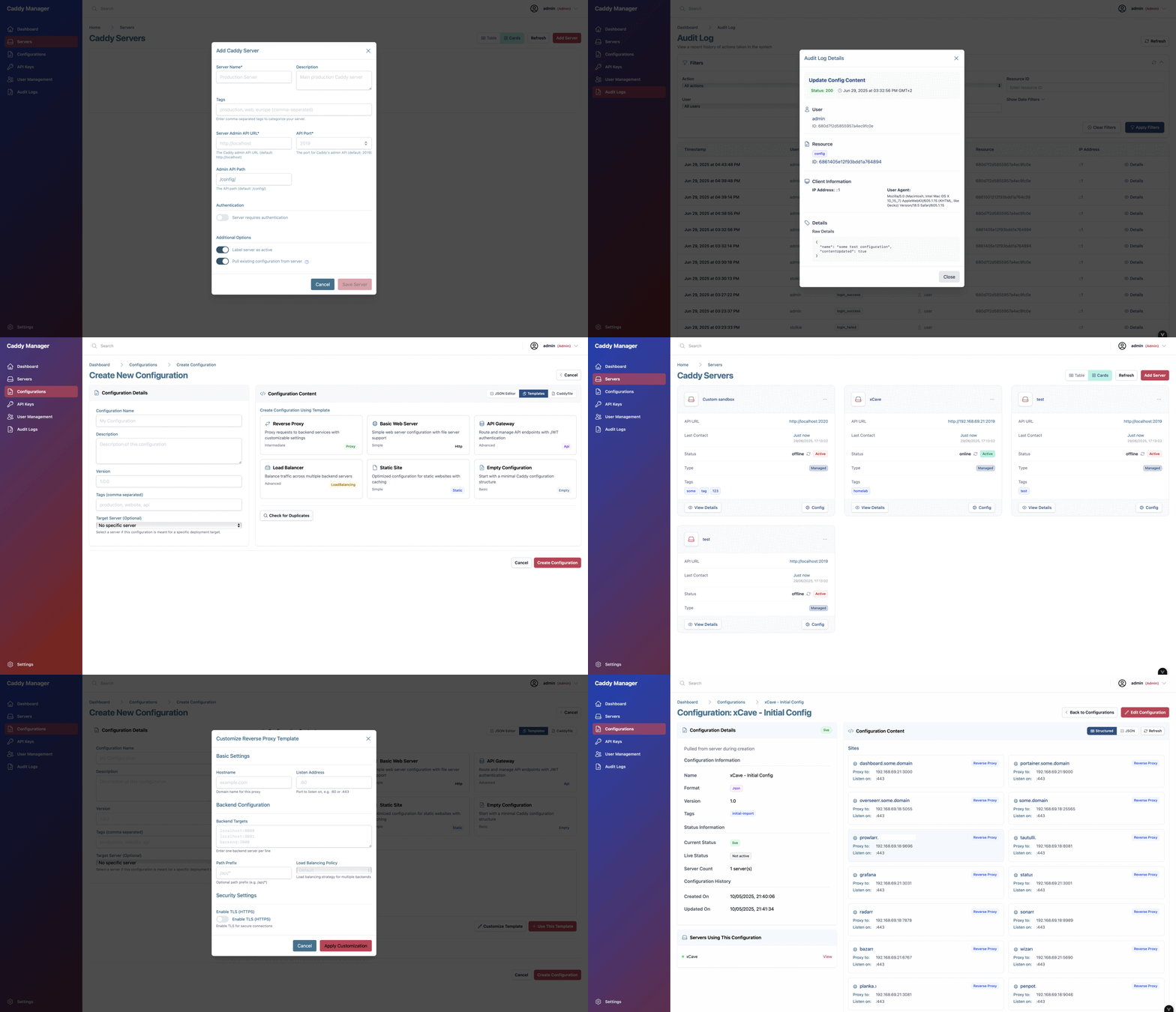
- Multi-Server Management:
- Add, remove, and monitor multiple Caddy2 servers from a single dashboard.
- Configuration Editor:
- Create, edit, and validate Caddyfiles with syntax highlighting and templates.
- User Authentication:
- Secure login, JWT-based sessions, and role-based access control.
- API Key Management:
- Generate and revoke API keys for programmatic access.
- Audit Logging:
- Track all user and system actions for security and compliance.
- Real-Time Status:
- Live server health checks and status updates.
- Integrated Swagger API Docs:
- Explore and test backend APIs directly from the UI.
- Responsive Design:
- Works great on desktop and mobile devices.
This project is in active development, gearing up for a v0.1 release. Feedback and testing are appreciated!
Below is a sample docker-compose.yml for running both backend and frontend. Instead of referencing .env files, environment variables are listed explicitly for clarity:
services:
  # MongoDB database for persistent storage
  mongodb:
    image: mongo:8.0
    container_name: caddymanager-mongodb
    restart: unless-stopped
    environment:
      - MONGO_INITDB_ROOT_USERNAME=mongoadmin
      - MONGO_INITDB_ROOT_PASSWORD=someSecretPassword  # Change for production!
    ports:
      - "27017:27017"  # Expose for local dev, remove for production
    volumes:
      - mongodb_data:/data/db
    networks:
      - caddymanager

  # Backend API server
  backend:
    image: caddymanager/caddymanager-backend:latest
    container_name: caddymanager-backend
    restart: unless-stopped
    depends_on:
      - mongodb
    environment:
      - PORT=3000
      - MONGODB_URI=mongodb://mongoadmin:someSecretPassword@mongodb:27017/caddymanager?authSource=admin
      - CORS_ORIGIN=http://localhost:5173
      - LOG_LEVEL=debug
      - DEFAULT_CADDY_ADMIN_USER=admin
      - DEFAULT_CADDY_ADMIN_PASSWORD=caddyrocks
      - CADDY_SANDBOX_URL=http://localhost:2019
      - PING_INTERVAL=30000
      - PING_TIMEOUT=2000
      - AUDIT_LOG_MAX_SIZE_MB=100
      - AUDIT_LOG_RETENTION_DAYS=90
      - JWT_SECRET=your_jwt_secret_key_here  # Change for production!
      - JWT_EXPIRATION=24h
    ports:
      - "3000:3000"  # Expose API
    networks:
      - caddymanager

  # Frontend web UI
  frontend:
    image: caddymanager/caddymanager-frontend:latest
    container_name: caddymanager-frontend
    restart: unless-stopped
    depends_on:
      - backend
    environment:
      - API_BASE_URL=http://backend:3000/api/v1
      - APP_NAME=Caddy Manager
      - DARK_MODE=true
    ports:
      - "80:80"  # Expose web UI
    networks:
      - caddymanager

networks:
  caddymanager:
    driver: bridge

volumes:
  mongodb_data:

# Notes:
# - For production, use strong passwords and consider secrets management.
# - The backend connects to MongoDB using the service name 'mongodb'.
# - The frontend connects to the backend using the service name 'backend'.
# - Remove or restrict published ports in production environments.Create a .env file in the frontend/ directory with the following variables:
API_BASE_URL=http://localhost:3000/api/v1
APP_NAME=Caddy Manager
DARK_MODE=true
API_BASE_URL: The base URL for backend API requests - should be the url for your backend apiAPP_NAME: The display name for the app UI.DARK_MODE: Set totrueto enable dark mode by default. Currently not integrated fully.
Create a .env file in the backend/ directory with the following variables:
PORT=3000
MONGODB_URI=mongodb://mongoadmin:someSecretPassword@localhost:27017/caddymanager?authSource=admin
CORS_ORIGIN=http://localhost:5173
LOG_LEVEL=debug
# Credentials for the Caddy admin endpoint (not CaddyManager login)
DEFAULT_CADDY_ADMIN_USER=admin
DEFAULT_CADDY_ADMIN_PASSWORD=caddyrocks
CADDY_SANDBOX_URL=http://localhost:2019
PING_INTERVAL=30000
PING_TIMEOUT=2000
AUDIT_LOG_MAX_SIZE_MB=100
AUDIT_LOG_RETENTION_DAYS=90
JWT_SECRET=your_jwt_secret_key_here  # Change for production!
JWT_EXPIRATION=24h
PORT: Port for the backend server.MONGODB_URI: MongoDB connection string (update credentials as needed).CORS_ORIGIN: Allowed origin for frontend requests - should be the url of your frontend.LOG_LEVEL: Logging verbosity.DEFAULT_CADDY_ADMIN_USER/DEFAULT_CADDY_ADMIN_PASSWORD: Credentials for the Caddy admin endpoint, not for logging into CaddyManager.CADDY_SANDBOX_URL: URL for the Caddy sandbox server (for testing) and/or validating configs.PING_INTERVAL/PING_TIMEOUT: Health check intervals (ms).AUDIT_LOG_MAX_SIZE_MB/AUDIT_LOG_RETENTION_DAYS: Audit log settings.JWT_SECRET/JWT_EXPIRATION: JWT credential settings
Note: The default CaddyManager user when first creating the app is
adminwith passwordcaddyrocks. You can change this after logging in.
Tip: Copy
.env.exampleto.envin each directory and adjust values as needed for your environment.
- Caddy Documentation
- CaddyManager Docs
- Swagger API Docs (after starting backend)
Contributions are welcome! Please open issues and pull requests to help improve CaddyManager.
- Frontend: Vue 3, Vite, Pinia, Vue Router
- Backend: Node.js, Express, MongoDB
- Caddy Integration: RESTful API for Caddy2 server management
For local testing with real Caddy servers, see development/USAGE.md for scripts to:
- Build and run a custom Caddy sandbox server with popular plugins
- Spin up multiple vanilla Caddy servers for multi-server testing
- Clone the repository:
git clone https://github.com/YOUR_USERNAME/caddymanager.git cd caddymanager - Install dependencies:
cd backend && npm install
cd ../frontend && npm install
- Configure environment:
- Copy
.env.exampleto.envin bothbackend/andfrontend/and update values as needed.
- Copy
- Run the app:
- Start backend:
cd backend && npm start
- Start frontend:
cd frontend && npm run dev
- Start backend:
-
Access the Web UI:
- Open your browser and go to
http://localhost(or the address where your frontend is running).
- Open your browser and go to
-
Sign In:
- Log in using the admin credentials you set in your backend
.env(DEFAULT_CADDY_ADMIN_USER/DEFAULT_CADDY_ADMIN_PASSWORD).
- Log in using the admin credentials you set in your backend
-
Add and Manage Servers:
- Navigate to the "Servers" section to add, edit, or remove Caddy servers.
- You can monitor server status and view details for each server.
-
Edit Configurations:
- Use the "Configurations" section to create, edit, and validate Caddyfiles.
- Built-in syntax highlighting and templates help you avoid errors.
-
User & API Key Management:
- Manage users and roles in the "User Management" section (admin only).
- Generate and revoke API keys for programmatic access in the "API Keys" section.
-
Audit Logs & Status:
- View audit logs for all user/system actions in the "Audit Logs" section (admin only).
-
API Documentation:
- Explore and test backend APIs via the integrated Swagger UI at
/api-docs(e.g.,http://localhost:3000/api-docs).
- Explore and test backend APIs via the integrated Swagger UI at
This project is open source and available under the MIT License.
This project is not endorsed by, directly affiliated with, maintained, authorized, or sponsored by Caddy, Matthew Holt, Stack Holdings GmbH, or ZeroSSL. The name "Caddy" is a registered trademark of Stack Holdings GmbH. All information about Caddy, its history, and trademarks is provided for reference only.
Have questions, feedback, or want to contribute? Feel free to reach out:
- Email: bastian@bastianstolk.com
- Open an issue or pull request on GitHub