Added functionality to reset timed exams. #399
Conversation


|
This is now functional. |

Fetched Upstream Updates
Fetch 7/5/2017
Merge Upstream 7/6/2017

 bnmnetp
left a comment
bnmnetp
left a comment
bnmnetp
left a comment
There was a problem hiding this comment.
I temporarily fixed the problem with True in my local branch. And then attempted to reset the exam. However when I press the reset button it looks like the exam is submitted because it now shows me all the answers and feedback. In addition I have two rows written to the database at the same instant. One shows the reset and the other just shows as though I had submitted. I'm using Safari, I'm going to try this same exercise in Chrome just to verify.
runestone/assess/js/timed.js
Outdated
| if (window.confirm("Only reset the exam if you encountered problems completing it. The Instructor will be notified of the reset.")) { | ||
| eventInfo = {"event":"timedExam","act":"reset","div_id":this.divid, | ||
| "course":eBookConfig.course,"correct":this.score,"incorrect":this.incorrect, | ||
| "skipped":this.skipped,"time":this.timeTaken,"reset":True} |
There was a problem hiding this comment.
the "reset":True should be "reset":true Capital True is Python.
bnmnetp
left a comment
bnmnetp
left a comment
There was a problem hiding this comment.
I get the same behavior in chrome.
- I cleared the database and local storage.
- I answered a couple of questions and then closed the tab.
- I opened the tab and went back to the quiz. The reset button was available so I tried to reset the quiz.
after my reset it showed me the feedback for everything.
|
Did the page refresh after you hit the reset button? And, if so, were you able to retake the quiz and submit answers? @bnmnetp |

|
The page did refresh, but I was not able to answer any of the unanswered questions. |
|
Fixes on the server-side |
|
I'm still trying to get this to work the way I think it should. Maybe we didn't have a good understanding on this one.
What I would expect to happen
|
|
Our understandings of what you were looking for were a bit off, but I have not been able to replicate the issue you are having with not being able to answer the questions after the reset. I am still working on getting my VM back up and running as I am having issues installing, but I will start to work on implementing the behavior you are looking for when I can. |
|
OK, please describe for me your understanding of what I should expect. Once we have compared notes we can decide on the best course. |
|
|
Might I suggest, that feedback would be kept hidden until the entire exam is completed. This would eliminate the possibility of being able to read the question without the timer running and the lack of the green and red highlighting would be an indication to a student browsing by or double checking the submission that the exam was not finished properly. Such a design might behave like:
4b. Hit start exam again and resume the exam as before but without the ability to edit previously answered questions. |
|
@conzty01, I like your second option a lot. |
Merge Upstream 7/11 9:23AM
|
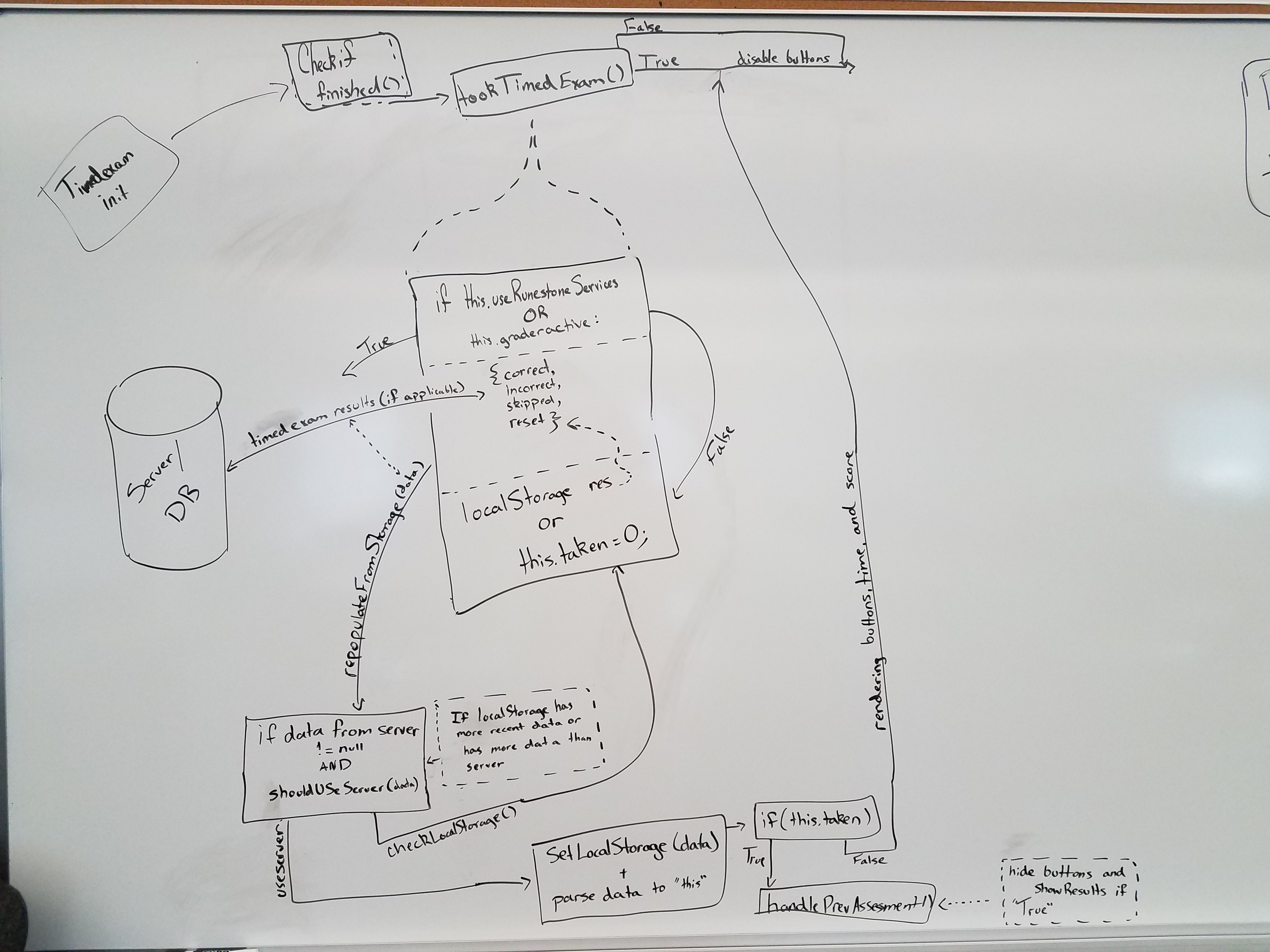
So, my newly installed VM doesn't have the same functionality with the reset feature that it did before the crash, so I believe we are in the same boat now. Because of the lack of functionality and the new approach that you would like from my last comment, I have gone through the |
|
|
|
The bulk of the loading of the timed exam is in done in the |
|
So, if there is not a full timed_exam entry in localStorage but there are individual entries for one or more of the timed elements that is a really strong indication that the exam was interrupted or force quit somehow right? I think you will already want to invent a local storage way to keep track of the time. So maybe you could also use local storage to keep track of whether the exam was submitted or not?? |
|
@conzty01 Not sure my response made sense, and I'm not sure I understand your flowchart. Maybe we should do a hangout tomorrow morning to really work this out. |
Fetch Upstream 7/12/17 8:39AM
|
|
I've updated the reset function if you'd like to take a look, @bnmnetp , but I am still working on being able to resume an incomplete exam. |
Fetch Upstream 07/17/17 8:36AM
Alert now occurs when the server determines an exam is not a candidate for resetting.
Merge Upstream 07/18/17 8:49AM
Fetch upstream 07/19/17 1:05PM
|
It seems to me that this is a good point to stop with this one. I can see some benefit to being able to restore answers prior to some kind of catastrophic end to the exam, but the additional complexity it would add to all of the components and the already fragile nature of the timed_exams make me think that a simple reset capability is all that is needed. |
Fetch Upstream 07/21/17 10:30AM
bnmnetp
left a comment
bnmnetp
left a comment
There was a problem hiding this comment.
It seems like almost all of the changes I made to runestone base are undone by this PR. Can you identify exactly what you intended to change so I can make sure all of mine are restored?
| @@ -1,35 +1,7 @@ | |||
| /** | |||
There was a problem hiding this comment.
This should not have been deleted. Any idea why it was?
|
|
||
| } | ||
|
|
||
| RunestoneBase.prototype.init = function(opts) { |
There was a problem hiding this comment.
this should not have been deleted either
|
|
||
| RunestoneBase.prototype.checkServer = function (eventInfo) { | ||
| // Check if the server has stored answer | ||
| if (this.useRunestoneServices || this.graderactive) { |
| data.div_id = this.divid; | ||
| data.course = eBookConfig.course; | ||
| data.event = eventInfo; | ||
| if (this.sid) { |
| for (var i = 0; i < this.newChildren.length; i++) { | ||
| var tmpChild = this.newChildren[i]; | ||
| opts = {'orig':tmpChild, 'useRunestoneServices':eBookConfig.useRunestoneServices} | ||
| if ($(tmpChild).children("[data-component]")) { |
There was a problem hiding this comment.
these should not have disappeared either
bnmnetp
left a comment
bnmnetp
left a comment
There was a problem hiding this comment.
With the exception of a . instead of a , on line 899 causing getAssessResults to fail every time, this seems to work fine now. I fixed the problem, and will include it in my merge.
2 participants


This is still a 'work in progress'. What needs to be added is a way for the javascript to check with the server and see if the exam has been taken before it will activate the reset button. It also needs to record that the exam has been reset.