Write a comment. Get working R code. Instantly.

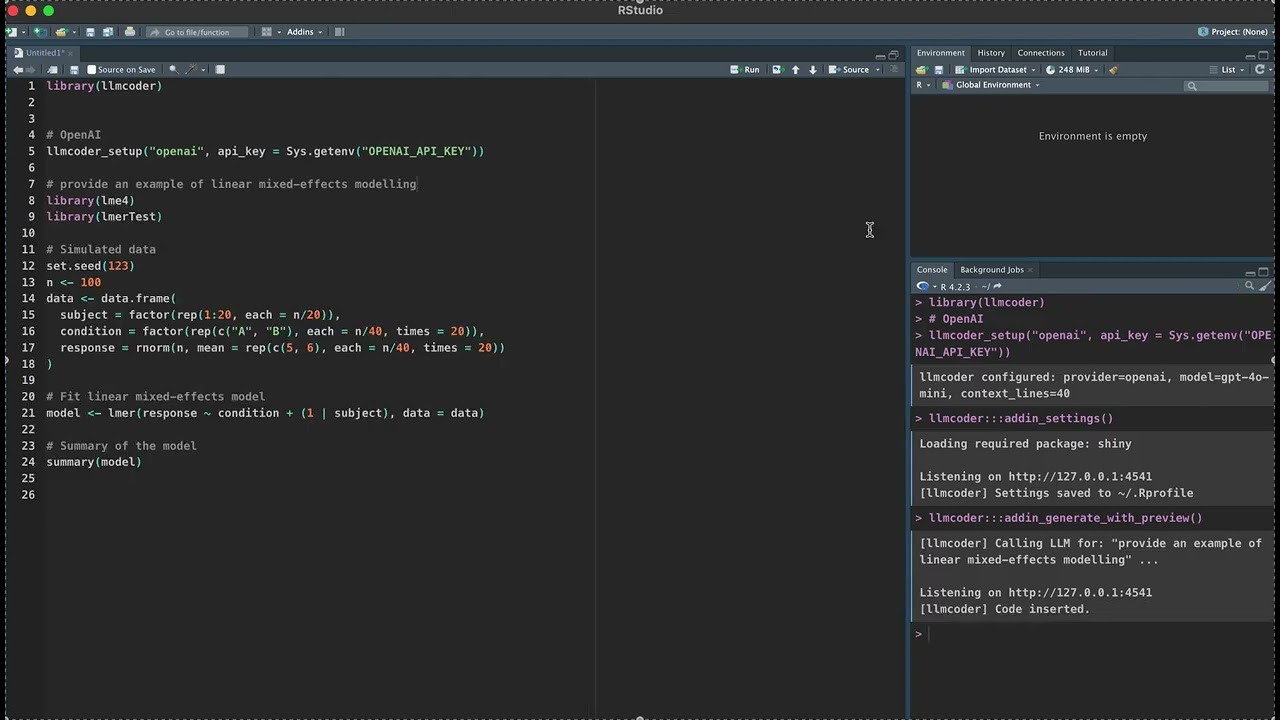
llmcoder is an RStudio addin that integrates large language model (LLM)
assistance directly into your coding workflow. Write a # comment, press a
shortcut, and receive working R code below — no browser, no copy-pasting.
It also auto-fixes console errors, explains selected code as inline comments,
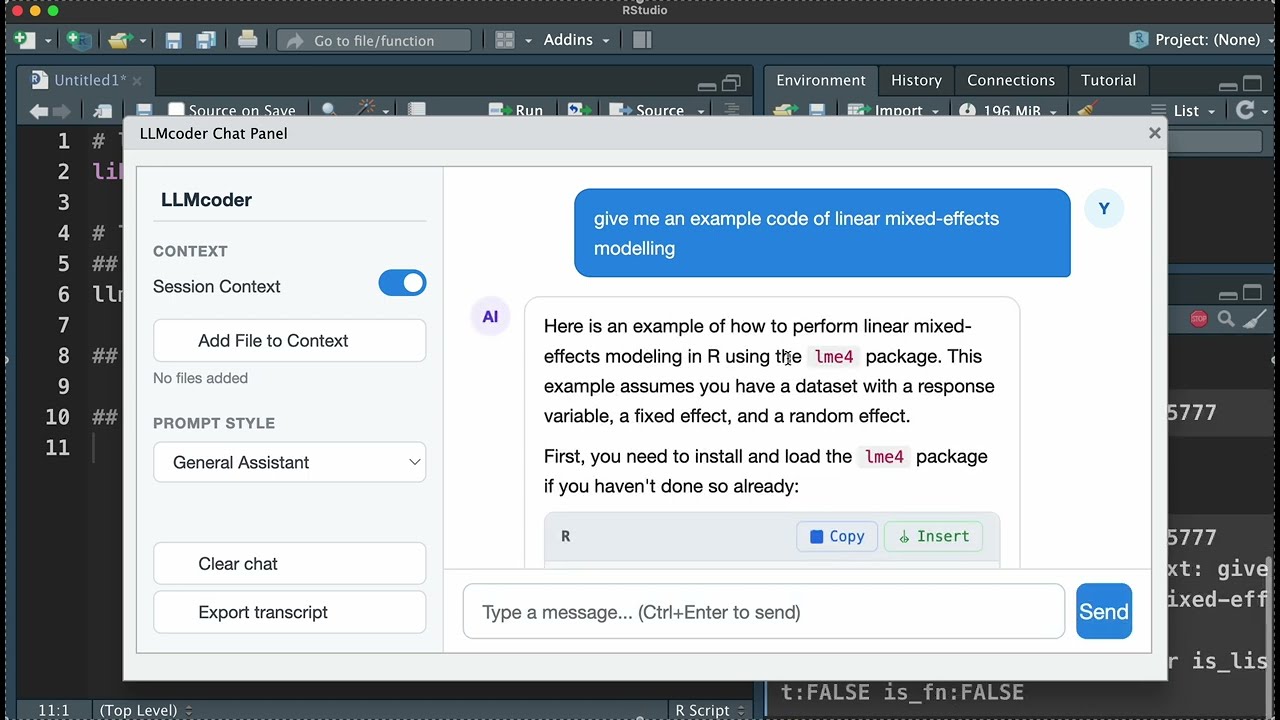
and now includes a multi-turn Chat Panel with full session-context awareness.
| Feature | Description |
|---|---|
| Chat Panel | Multi-turn conversational interface inside RStudio with session awareness |
| Session Context | Chat automatically knows your loaded packages, global objects, source file, and history |
| One-Click Run | Each R code block in chat has a Run button that sends code directly to the console |
| Prompt Styles | Switch between General, R Code Helper, Statistics Advisor, Research (Psycho) personas |
| Transcript Export | Save your chat as a .txt file for reproducibility |
| Context File Browser | Select files from your workspace to include as context — no manual path entry |
# From CRAN
install.packages("llmcoder")

# Development version (GitHub)
remotes::install_github("ShiyangZheng/llmcoder")library(llmcoder)
# OpenAI
llmcoder_setup("openai", api_key = Sys.getenv("OPENAI_API_KEY"))
# Anthropic Claude
llmcoder_setup("anthropic", api_key = Sys.getenv("ANTHROPIC_API_KEY"))
# DeepSeek — very cheap, great code quality
llmcoder_setup("deepseek", api_key = Sys.getenv("DEEPSEEK_API_KEY"))
# Groq — ultra-fast open-model inference
llmcoder_setup("groq", api_key = Sys.getenv("GROQ_API_KEY"))
# Ollama — fully local, no API key needed
llmcoder_setup("ollama", model = "qwen2.5-coder:7b")
# OpenRouter — unified gateway to 100+ models
llmcoder_setup("openrouter", api_key = Sys.getenv("OPENROUTER_API_KEY"),
model = "anthropic/claude-3.5-sonnet")
# LM Studio or any OpenAI-compatible server
llmcoder_setup("custom", api_key = "lm-studio",
model = "local-model", custom_url = "http://localhost:1234/v1")Or configure via the GUI: Addins → LLMcoder Settings.
LLMcoder Chat Panel (Ctrl+Shift+L)
Open a full conversational interface inside RStudio:
┌─────────────────────────────────────────────────────────────────┐
│  LLMcoder Chat Panel                                    [Done] │
├──────────────┬──────────────────────────────────────────────────┤
│ LLMcoder     │                                                  │
│              │  [empty]                                          │
│ Context      │  Ask me anything about R, data analysis,         │
│ [✓] Session  │  statistics, or your code.                       │
│              │                                                  │
│ Prompt Style │                                                  │
│ [General  ▾] │                                                  │
│              │  AI: Here's the mixed-effects model...            │
│ [+ New Chat] │      ```r                                         │
│ [Clear]      │      lmer(RT ~ condition + (1|ppt) +             │
│ [Export]     │            (1|item), data = df)                  │
│              │      ``` [Run]                                    │
├──────────────┴──────────────────────────────────────────────────┤
│ [Type a message... Ctrl+Enter to send]              [ ▶ Send] │
└─────────────────────────────────────────────────────────────────┘
Features:
- Multi-turn conversation history (remembers everything you said)
- Session Context: auto-injects your loaded packages, global objects, source editor contents, and recent console history into every message
- Run button on every
```rcode block — sends code to the R console in one click - Toggle session context on/off, switch persona styles
- Export full transcript as a text file
- Context File Browser: click "Add File to Context" in the sidebar to select any workspace file — file contents are automatically included in the LLM context
Generate code from a comment (Ctrl+Shift+G)
Place your cursor on a # comment line and trigger the addin:
library(tidyverse)
data <- read_csv("data/idiom_results.csv")

# fit a mixed model: RT ~ condition + (1|participant) + (1|item)
Generated and inserted below:
library(lme4)
model <- lmer(RT ~ condition + (1 | participant) + (1 | item),
              data = data, REML = TRUE)
summary(model)
Fix the last console error (Ctrl+Shift+F)
Run code → error in console → trigger this addin → review diff-style fix → click Apply Fix.
Explain selected code (Ctrl+Shift+E)
Select a code block → inline # explanations appear above it.
Generate with preview (Ctrl+Shift+P)
Same as code generation, but opens an editable dialog before inserting.
| Provider | Default model | Notes |
|---|---|---|
openai |
gpt-4o-mini |
platform.openai.com |
anthropic |
claude-sonnet-4-20250514 |
console.anthropic.com |
deepseek |
deepseek-chat |
Very cheap, strong code |
groq |
llama-3.3-70b-versatile |
Extremely fast inference |
together |
meta-llama/Llama-3-70b-chat-hf |
Wide open-source model choice |
openrouter |
openai/gpt-4o-mini |
100+ models, one key |
ollama |
llama3 |
Fully local, no API key |
custom |
(must specify) | LM Studio, vLLM, llama.cpp, … |
Ollama quick start:
# macOS / Linux
curl -fsSL https://ollama.com/install.sh | sh
ollama pull qwen2.5-coder:7b
ollama serve # keep running in the backgroundllmcoder_setup("ollama", model = "qwen2.5-coder:7b")
ollama_list_models() # list all installed modelsBind in Tools → Modify Keyboard Shortcuts → search "llmcoder".
| Addin | Windows / Linux | macOS |
|---|---|---|
| LLMcoder Chat Panel | Ctrl+Shift+L |
Cmd+Shift+L |
| Generate Code from Comment | Ctrl+Shift+G |
Cmd+Shift+G |
| Generate Code (with Preview) | Ctrl+Shift+P |
Cmd+Shift+P |
| Fix Last Console Error | Ctrl+Shift+F |
Cmd+Shift+F |
| Explain Selected Code | Ctrl+Shift+E |
Cmd+Shift+E |
The addin sends the 40 lines above your comment as context (configurable), so the model can infer variable names, match your code style, and avoid re-importing packages already loaded.
llmcoder_setup("openai", api_key = "...", context_lines = 20L)API keys written to ~/.Rprofile are plaintext. Use ~/.Renviron for
better security:
OPENAI_API_KEY=sk-...
Then: llmcoder_setup("openai", api_key = Sys.getenv("OPENAI_API_KEY"))
citation("llmcoder")Zheng, S. (2026). llmcoder: LLM-Powered Code Generation and Error Fixing for RStudio. R package version 1.2.0. https://github.com/ShiyangZheng/llmcoder
MIT © Shiyang Zheng