A free, zero-backend stats dashboard for your Minecraft server.
Drop the raw stats JSON files your Minecraft server already writes into this repo, push, and GitHub Pages serves an interactive dashboard — per-player profiles, leaderboards, badges, charts, fun facts. No database, no server to maintain, no paid services.
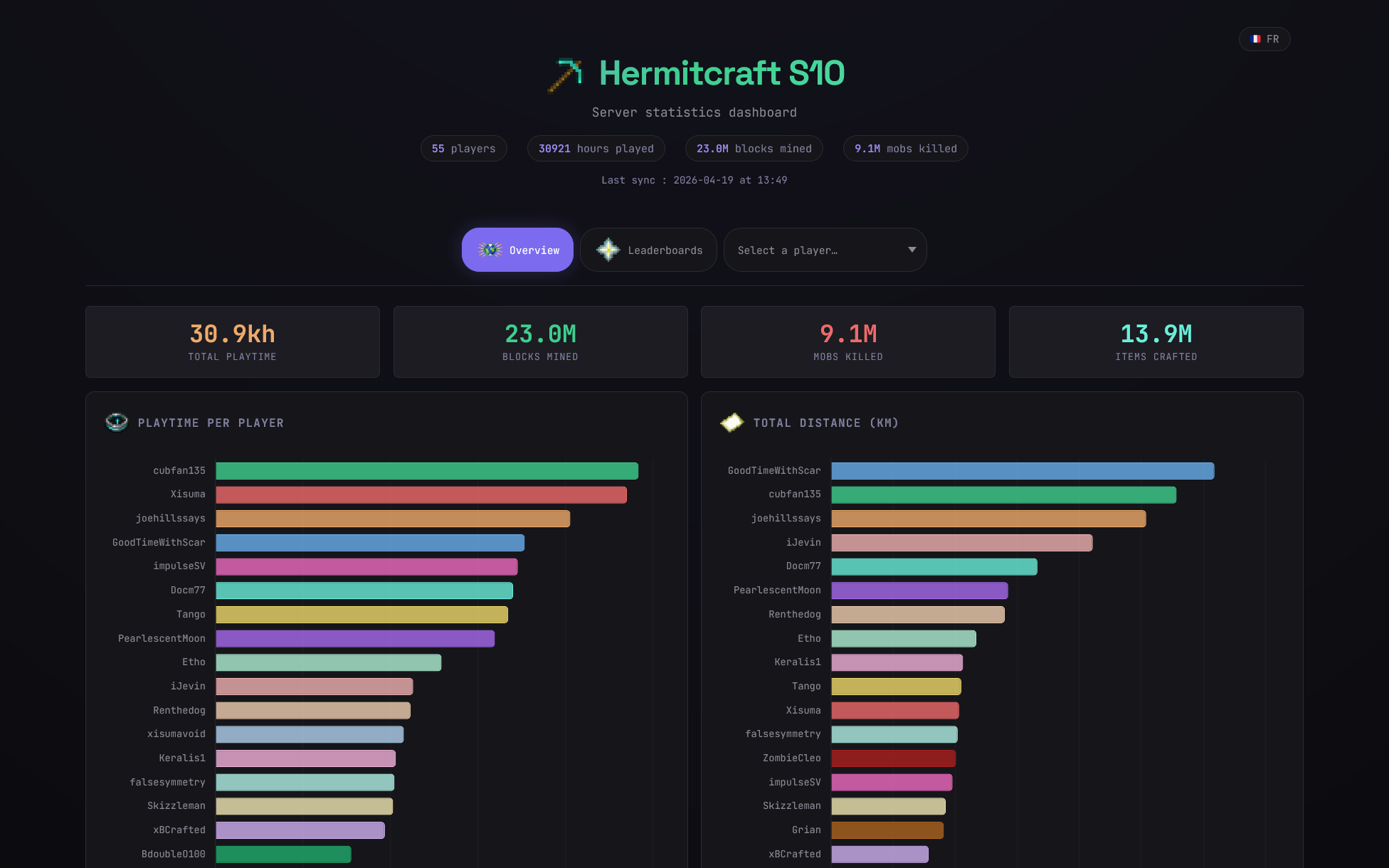
See a live example → A Tickstats dashboard built from the publicly available HermitCraft Season 10 world save.
- Per-player profiles — playtime, deaths, mobs killed, blocks mined, distances by travel mode, items crafted, with automatic archetype detection (Miner, Fighter, Explorer, Builder, Farmer)
- Badge system — 33 badges + 2 meta badges across 4 tiers (Bronze → Silver → Gold → Diamond) with progression tooltips
- 12 leaderboards grouped by activity category
- Interactive charts (Chart.js) — radar comparison, distance stacks, deaths aggregate, treemaps
- 2-player compare view — deep-linkable
#compare/<a>/<b>route with side-by-side radar and diff table - Activity heatmaps — GitHub-style 52-week × 7-day grid per player, plus a server-wide aggregate on the overview
- Activity streaks — current and longest consecutive-day runs derived from the snapshot archive
- Playtime sparkline — tiny 30-day trend line under each player's playtime figure
- Weekly rank movements — "Alice passed Bob on blocks mined (+2)" narrated from baseline vs. current rankings
- Fun facts auto-generated for each player
- Deep-linkable views — share a URL that opens straight to a specific player (
#player/<name>) - Daily historical snapshots — archived JSON under
snapshots/YYYY-MM-DD/, used to compute 7-day deltas displayed on the headline stat-tiles - 7-day deltas — playtime, blocks mined, mobs killed and items crafted show
↑ +X (Nj)against the closest snapshot in the [6, 30]-day window; hidden silently when no baseline exists - Multi-server — one dashboard per server folder, all hosted under the same repo
The UI is currently in French with English fallbacks in place; both languages are wired up through an i18n dict you can extend in stats/assets/app.js.
Two ways to use Tickstats. Pick the one that fits you:
| I want to... | Go to | Needs |
|---|---|---|
| Publish online so friends can see the dashboard at a URL | Deploy to GitHub Pages | A free GitHub account |
| Just view it on my own PC, no hosting, no accounts | Run locally (Windows beginner guide) | Windows + 5 minutes |
Click "Use this template" → "Create a new repository" at the top of this page. Make it public — GitHub Pages on the free plan only serves from public repos.
In your new repo: Settings → Pages → Build and deployment → Source: GitHub Actions. This must be set before the first deploy or the workflow will fail.
Your Minecraft server writes one JSON file per player (named by UUID) into a stats/ folder inside the world directory. Common paths:
| Setup | Path |
|---|---|
| Vanilla / Paper / Purpur | <world-folder>/stats/*.json |
| Forge / Fabric | <world-folder>/stats/*.json |
| Crafty Controller | servers/<server-uuid>/world/players/stats/*.json |
| Managed host (Aternos, Apex, etc.) | browse the world folder via the host's file manager |
You need read access to those files. That's it — nothing is modified on the server.
Clone your new repo locally, then:
mkdir -p stats/my-server/data
cp /path/to/world/stats/*.json stats/my-server/data/
git add stats/my-server/data/
git commit -m "Add my-server stats"
git push
Replace my-server with any name you like — it becomes part of the URL and the dashboard title. You can have multiple servers side by side (stats/smp/, stats/creative/, etc.).
Two GitHub Actions workflows run automatically:
update-stats.ymlregenerates the HTML dashboard from your JSONstatic.ymldeploys the site to Pages
Watch the Actions tab for progress — the whole pipeline takes ~1–2 minutes. Your dashboard is then served at:
https://<your-username>.github.io/<repo-name>/stats/<server-name>/
Whenever you want a refresh, copy the newer JSON files into the same stats/<server-name>/data/ folder, commit, and push. The rest is automatic.
Automating the copy step is up to you — cron + rsync, a scheduled PowerShell task, a webhook from your host, or just manual copy/paste. A daily sync is plenty for most cases.
If you don't want to publish anything online and just want to open your dashboard from your own PC, here's the shortest path. No Git, no GitHub account, no command-line experience needed beyond copy/paste.
Open the Start menu, type PowerShell, click Windows PowerShell, then paste:
winget install -e --id Python.Python.3.12Close PowerShell and reopen it so the new python command is picked up. Check it works:
python --versionYou should see Python 3.12.x. If not, restart your PC once.
On this GitHub page, click the green Code button → Download ZIP. Extract the ZIP anywhere you like — for example C:\Users\<you>\Desktop\tickstats. That folder is your working directory from now on.
Inside the extracted folder, create this sub-folder (replace my-server with any name you like):
stats\my-server\data\
Copy all the *.json files from your Minecraft world's stats\ folder into stats\my-server\data\. See the table in Locate your Minecraft stats files above if you're not sure where they live.
Back in PowerShell, go into the Tickstats folder and run the generator:
cd C:\Users\<you>\Desktop\tickstats
python scripts\generate.py stats\my-server\data --title "My Server"
That's it. The command creates stats\my-server\index.html.
Double-click stats\my-server\index.html in File Explorer. It opens in your browser — fully offline, nothing sent anywhere. To refresh after your Minecraft server writes new stats, replace the JSON files in stats\my-server\data\ and run the python scripts\generate.py ... command again.
Note: the first run needs internet access to resolve Minecraft UUIDs into player names (Mojang API). After that, the names are cached in
stats\my-server\.uuid_cache.jsonand further runs work offline.
No dependencies beyond Python 3.12+ stdlib. No pip install, no node_modules, no database.
| Component | Technology |
|---|---|
| Generation | Python 3.12+ (stdlib only) |
| Frontend | HTML5 / CSS3 / vanilla JavaScript (ES6+) |
| Charts | Chart.js 4.4.1 |
| Fonts | JetBrains Mono, Space Grotesk |
| CI/CD | GitHub Actions |
| Hosting | GitHub Pages |
├── scripts/
│   ├── generate.py          # Main generator (JSON → HTML)
│   ├── minecraft/
│   │   ├── badges.py        # Badge definitions + per-player tier computation
│   │   └── history.py       # Snapshot-based deltas, streaks, rank changes, aggregates
│   └── build_icons.py       # Pre-renders local Minecraft icon PNGs (stdlib only)
├── tests/                   # unittest suite (stdlib only) for history.py + badges.py
├── stats/
│   ├── assets/
│   │   ├── icons/           # Pre-rendered 256×256 Minecraft icon PNGs (committed)
│   │   ├── styles.css       # Shared dashboard stylesheet
│   │   ├── colors.js        # Player palette + block colors + chart palette
│   │   ├── i18n.js          # FR/EN translations + t() / label() helpers
│   │   └── app.js           # Shared dashboard runtime
│   └── <server-name>/       # One folder per server (repeatable)
│       ├── data/            # Raw JSON files (Minecraft stats)
│       ├── snapshots/       # Dated archive (YYYY-MM-DD/*.json), 1/day
│       ├── index.html       # Automatically generated dashboard
│       └── .uuid_cache.json # UUID → Mojang username cache
└── .github/workflows/
    ├── update-stats.yml     # Regenerates the dashboard on every change
    └── static.yml           # Deploys to GitHub Pages
- You push changes under
stats/*/data/** update-stats.ymldetects which servers changed and runsscripts/generate.pyfor each- The regenerated
index.htmlis auto-committed back to the repo (with[skip ci]) static.ymlpicks up the new commit and deploys it to Pages
Minecraft UUIDs are resolved to usernames via the Mojang session-server API. Results are cached in stats/<server>/.uuid_cache.json to avoid rate-limiting (Mojang is aggressive about this) — commit the cache alongside the rest so CI doesn't re-hit the API every run.
33 standard badges + 2 meta badges (all_rounder, legende) across 8 categories: Mining, Combat, Survival, Exploration, Farming, Crafting, Daily life, and Prestige. Each badge has 4 progressive thresholds (Bronze → Silver → Gold → Diamond). Thresholds and tiers are computed server-side in scripts/minecraft/badges.py; stats/assets/app.js is a pure renderer — no badge logic lives in JS.
scripts/minecraft/history.py looks for a snapshot directory in stats/<server>/snapshots/ whose age falls in the [6, 30]-day window and is closest to 7 days back. When one is found, generate.py computes per-player diffs for play_hours, total_mined, mob_kills and total_crafted, attaches them under player.delta_7d, and injects window.BASELINE_DATE into the page. The frontend then renders ↑ +X (Nj) sub-lines on the four overview tiles and the matching three player tiles, where N is the actual baseline age (so a 6-day baseline labels itself (6j), never a misleading (7j)). If no snapshot qualifies — empty snapshots/ folder, only fresh snapshots, or last snapshot older than 30 days — the deltas degrade silently.
stats/assets/styles.css, stats/assets/colors.js, stats/assets/i18n.js and stats/assets/app.js are shared across every server dashboard. generate.py only emits a ~30-line HTML shell that injects window.PLAYERS_DATA, window.SYNC, window.BASELINE_DATE, window.ICONS_HR, window.SERVER_DAILY, and window.RANK_CHANGES, then loads the four static files. Minecraft icons under stats/assets/icons/ are pre-rendered 256×256 PNGs (via scripts/build_icons.py) committed to the repo so the dashboard has no runtime CDN dependency for its core visuals.
Unit tests for the snapshot/delta logic live under tests/ and use the Python stdlib unittest runner — no extra dependencies. From the repo root:
python -m unittest discover -s tests