
UNIVERSITY OF WEST ATTICA
SCHOOL OF ENGINEERING
DEPARTMENT OF COMPUTER ENGINEERING AND INFORMATICS
University of West Attica · Department of Computer Engineering and Informatics
Software Development Methodologies
Vasileios Evangelos Athanasiou
Student ID: 19390005
Supervision
Supervisor: Georgios Prezerakos, Professor
Co-supervisor: Angelos Georgoulas, Assistant Professor
Athens, May 2023
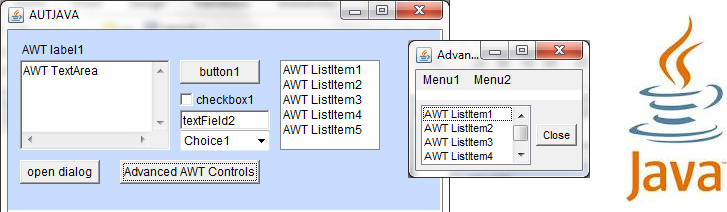
Practice creating Graphical User Interfaces (GUI) using Java AWT and Swing components.
| Section | Folder/File | Description |
|---|---|---|
| 1 | INSTALL.md |
Installation and execution instructions |
| 2 | README.md |
Project overview and usage guide |
| 3 | assign/ |
Assignment description documents |
| 3.1 | assign/SDM Exercise 3 (GUI).pdf |
Assignment description (English) |
| 3.2 | assign/ΜΑΕ Ασκήση 3 (GUI).pdf |
Assignment description (Greek) |
| 4 | src/ |
Java GUI source code projects |
| 4.1 | src/Ex3_1/ |
First GUI exercise project |
| 4.1.1 | src/Ex3_1/build/ |
Compiled build output |
| 4.1.2 | src/Ex3_1/build.xml |
Apache Ant build configuration |
| 4.1.3 | src/Ex3_1/manifest.mf |
Application manifest file |
| 4.1.4 | src/Ex3_1/nbproject/ |
NetBeans project configuration files |
| 4.1.5 | src/Ex3_1/src/ex3_1/ |
Java source code package |
| 4.2 | src/Ex3_2/ |
Second GUI exercise project |
| 4.2.1 | src/Ex3_2/build/ |
Compiled build output |
| 4.2.2 | src/Ex3_2/build.xml |
Apache Ant build configuration |
| 4.2.3 | src/Ex3_2/manifest.mf |
Application manifest file |
| 4.2.4 | src/Ex3_2/nbproject/ |
NetBeans project configuration files |
| 4.2.5 | src/Ex3_2/src/ex3_2/ |
Java source code package |
| 4.3 | src/Ex3_3/ |
Third GUI exercise project |
| 4.3.1 | src/Ex3_3/build/ |
Compiled build output |
| 4.3.2 | src/Ex3_3/build.xml |
Apache Ant build configuration |
| 4.3.3 | src/Ex3_3/manifest.mf |
Application manifest file |
| 4.3.4 | src/Ex3_3/nbproject/ |
NetBeans project configuration files |
| 4.3.5 | src/Ex3_3/src/ex3_3/ |
Java source code package |
All interfaces must be created entirely through code.
The use of visual GUI designers (such as drag-and-drop builders) is not allowed.
These exercises focus only on the graphical layout of the interface.
Event handling and functional logic will be implemented in future exercises.
- NetBeans IDE
Develop a basic calculator interface.
- Two Text Fields for number input
- Three Buttons
AddSubtractClear
- Result Label displaying a message such as:
Answer goes hereor the calculated expression.
Develop a complete calculator interface similar to a traditional calculator layout.
-
Display Area
- Positioned at the top
- Shows inputs and results
-
Numeric Keypad
- Digits
0–9
- Digits
-
Operator Keys
+-*/
-
Action Key
=
Develop a graphical interface for a pizza ordering system.
- Small
- Medium
- Large
- Pepperoni
- Anchovies
Must include the following options:
(Select a delivery option)
Eat-in
Take out
Home DeliveryDisplays a message such as:
Message goes here