

[ ] Content
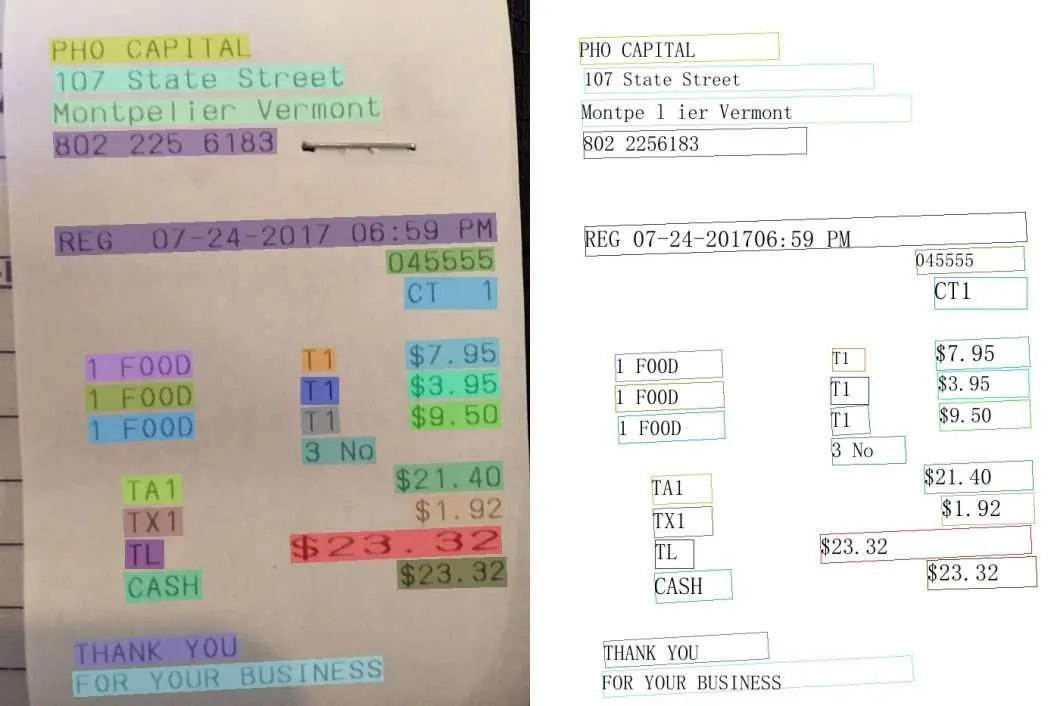
For the detection part, we have trained two models, the YoloV5 model, and PSENet model. The PseNet model is trained on just the Common Images, and the YOLOV5 model is trained on all the Images. At start we only used a YOLOV5 model, but after some experimentation, we felt we should use a better model architecture. So, we switched our focus to the PSENet Model. We experimented with a lot of different hyperparameters and Augmentations, and then generated the bounding boxes for the test images.
Yolo Model (Trained from Scratch) was Conservative where all its bounding boxes were concise, but it missed some Unconventional Text Shapes and Format. Our PSENET model (Trained from Scratch) didn’t perform well as compared to Yolo but was able to predict Textboxes which was not done by Yolo. To Take advantage of both the models, we used Non-Max Suppression Technique to Combine the Bounding Boxes of Both the Models. This eliminated the chance of redundancy in boxes and improved the Quality of Bounding Boxes predicted.
During our Analysis on the labels provided by the Host, we found that 50 unique characters had less than 3 occurrences in the whole 2,34,000 Boxes in the Training Data. On Further analysis we found that these are unnecessary and hinder the training of the Model. So, we eliminated the use of Labels which had occurrence of these characters while training. The Eliminated Data was less than 0.0007 % of the whole Data. This improved our model capability. Our CNN Model (With DenseNet Architecture) showed good performance while training and did the same on the unseen Data. We Tried Using CRNN Models too, but CNN Model performed well.
Our Future goal is to enhance the Recognizer model by adapting better architectures and to implement an End-End Model deployed in Mobile App which can perform this Bounding Box Detection and Text Recognition in Real Time.
- Run the main.py folder in the YOLOV5 folder to train and create the predictions and generate the output.csv file
- Type in this shell command “python detector/train.py” in the PSENet folder to train the model
- Type in this shell command “python detector/predict.py” in the PSENet folder to create predictions and generate the output.csv file
- Run Non Max Supression on PSENET and Yolo.ipynb to apply Non Max Suppression on Bounding Boxes of Yolo and PSENET outputs.
- Place Training Data and Test Data in official data folder.
- Run “Code to train the Train and Predict with Recognizer.ipynb” file to train the model and predict on the test day. It contains all the necessary shell commands.
For the detection process using a Tesla K40 GPU the inference time for the YoloV5 model for 500 images is around 3 minutes, and for PSENet model is 2 minutes. Considering the Latency while using the model real-time, we used DenseNet50V2 Architecture which is just 15 Mb in size and this can give us the ability to integrate in Edge Devices. All the Libraries used in our source code are open-sourced and standard libraries. We used GPU for Training and specifically used CPU for Predicted so that we could keep a factor on the Latency of the Model.
We used Mr. Andrew Ng’s iterative approach of idea ->Code ->Experiment ->Inference and that has helped us a lot in building this model. We first started with a Yolo model, and then went on to work with architectures better suited for text detection, we considered PSENet first. After that, we decided to try some other architectures like DB and EAST, but did not have enough time left to implement those Using Non-Max Suppression to efficiently combine the bounding box generated by PSENet and Yolo was key for us in getting Good Bounding Boxes. In Recognition Part, we tried various Model Architecture and found that the best model architecture for our case. It was a great experience to experiment with different approaches to Build a high-scoring Model.