
Python tool to draw graphs for Mikado refactoring.
- Learn what is the Mikado method
- Learn how to leverage Mikado graphs in your refactoring tasks
- Python package hosted on pypi
Start by saving this description file as as example.txt
_ Extend X with Y
    x Remove flag Z from X
        x Replace D with E
            x Check C
    # Ignore this line
    _ Add field X in Y
        x Do fix A
        _ Add B
        x Check C
Then run
pip install mikado-graph
mikado example.txt --view
A new window should display the graph below
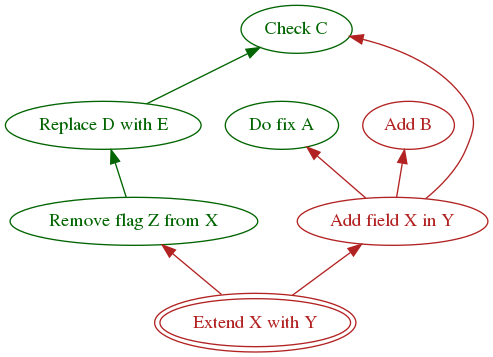
Explore the options using --help
mikado --helpAnd learn more about the description file format below.
Parent/child dependency is encoded by indentation. The indentation must be the multiple of 4 spaces.
There are three kinds of nodes in the graph
- Comments are prefixed by one of the following symbol:
//,# - Done tasks (drawn in green) are prefixed by one of the following symbols:
v,V,x,X - Pending tasks (drawn in red) are prefixed by any symbol that is not used by the above two choices.
We recommend using
_to keep the description file human readable
Deploy by running
python setup.py sdist bdist_wheel
twine upload dist/*graphvizwill always save a temporary file when asked to render the graph.