


A Twitter bot written in Python using Tweepy and hosted on a server. It will like and/or retweet tweets that contain single or multiple keywords and hashtags.
Starting February 9, we will no longer support free access to the Twitter API, both v2 and v1.1. A paid basic tier will be available instead 🧵
— Twitter Dev (@TwitterDev) February 2, 2023
Make sure to follow Twitter's Automation Rules to avoid getting your account banned.
- Python 3
- Pip - a python package manager
- Download this file, open a command prompt and navigate to the folder containing the
get-pip.pyinstaller, and runpython get-pip.pyto install - Run
pip --versionto check if it has installed correctly
- Download this file, open a command prompt and navigate to the folder containing the
- Tweepy - an easy-to-use python library for accessing Twitter's API
- Run
pip install tweepy
- Run
Since the TwitterAPI search index can only retrieve tweets posted within the past 7 days, if the hashtags or keywords are not super popular, I would recommend hosting it on PythonAnywhere and scheduling a task to run twitter-bot.py at a certain time everyday, so the script will not just stop when there are no more tweets to process.
Otherwise, you can deploy it on AWS EC2 to run the bot 24/7.
- PythonAnywhere - an online integrated development environment and web hosting service based on the Python programming language
- Amazon Web Services EC2 - a web service that provides secure, resizable compute capacity in the cloud
- PuTTY - an open-source terminal emulator, serial console and network file transfer application
- WinSCP - a client that allows secure file transfers between the client's local computer and the remote server
-
Apply for Twitter Developer Access with the account you want the bot to be used for.
-
Create a new Twitter Application to generate your private keys, secrets, and tokens.

- Make sure the app settings has Read and Write permissions.

- Create a file named
credentials.pyto hold the private information using the format below.- See File Structure for where the file should be placed.
TWITTER_API_KEY="xxxx"
TWITTER_API_KEY_SECRET="xxxx"
TWITTER_ACCESS_TOKEN="xxxx"
TWITTER_ACCESS_TOKEN_SECRET="xxxx"
-
Adjustments you can make in
config.pyto tweak the bot to your liking. (Keep in mind the TwitterAPI search index has a 7-day limit, no tweets will be found for a date older than one week.)- search_keywords - Keyword(s) and/or hashtag(s) that you want to retweet
- delay - Time to wait between processing requests in seconds
- Please be aware of the TwitterAPI rate limits
- result_type - Specify what type of search results you want to get
- "recent", "popular", or "mixed"
- number_of_tweets - Specify the number of tweets you want the bot to iterate through
- run_continuously - Set True if you want the bot to run continuously
- Also set True if you will be deploying the script
- retweet_tweets, like_tweets - Adjust booleans for whether you want to only retweet, only like, or do both
-
Run the script. Enjoy your Twitter bot!
python twitter-bot.py
Twitter-Retweet-Bot
 |-- config.py
 |-- credentials.py
 |-- requirements.txt
 |-- twitter-bot.py
Here is a tutorial on how to deploy / host the bot on a server.
- Create a free Beginner PythonAnywhere account.

- Go to Files, create a new Directory, upload the three
.pyfiles.
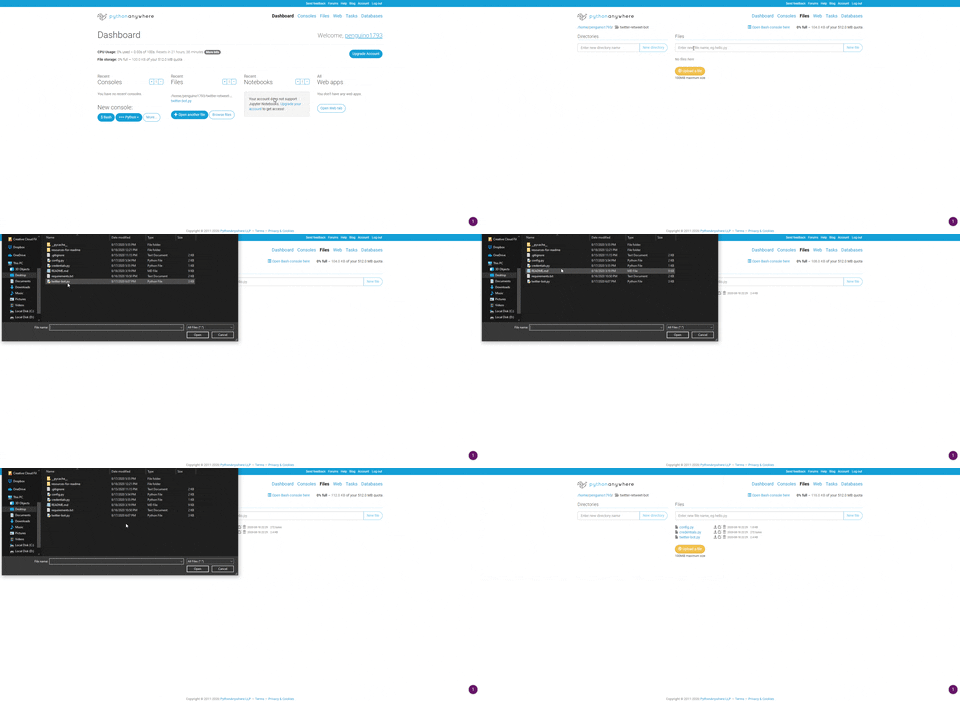
- Create a new bash console on your Dashboard and run pip with your python version to install tweepy

pip3.8 install --user tweepy
- Copy the file path, go to Tasks, enter the UTC time you want the script to run at, and enter the python version and file path with
twitter-bot.pyat the end.
python3.8 /home/account-name/directory-name/twitter-bot.py
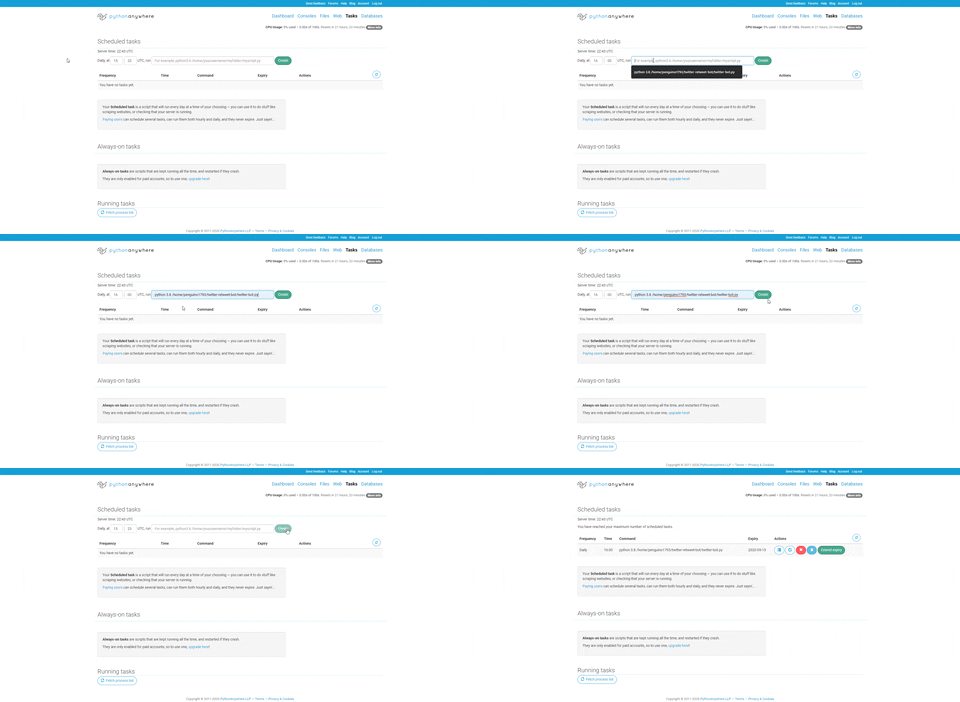
- After the task runs as the scheduled time, you can check the task log to see the bot running

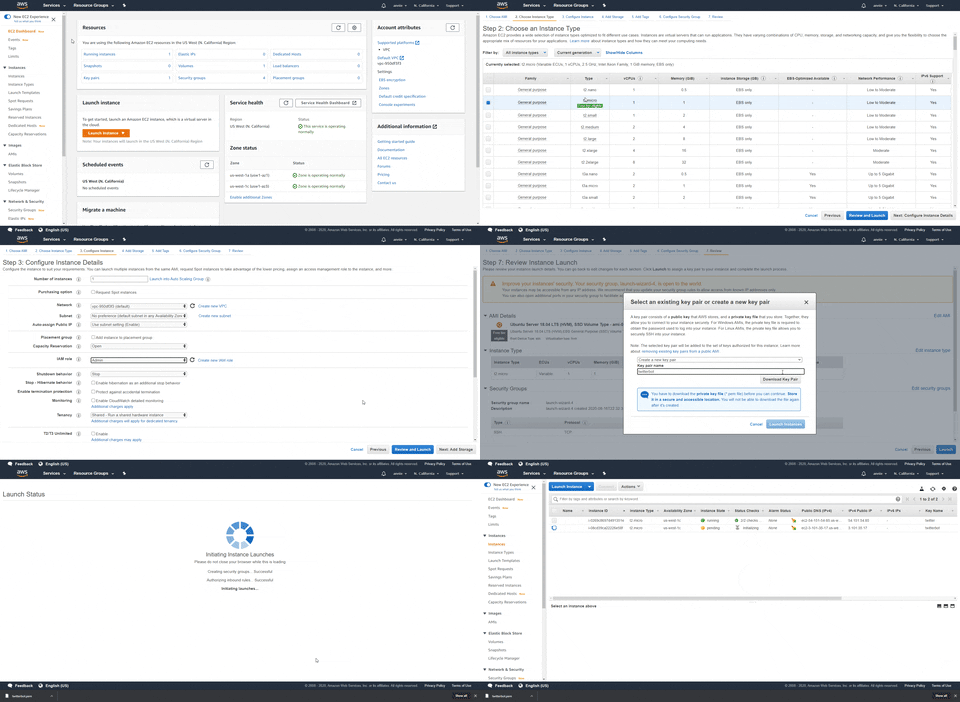
- Launch an EC2 instance on Amazon Web Services.
- See Additional Information for more details.
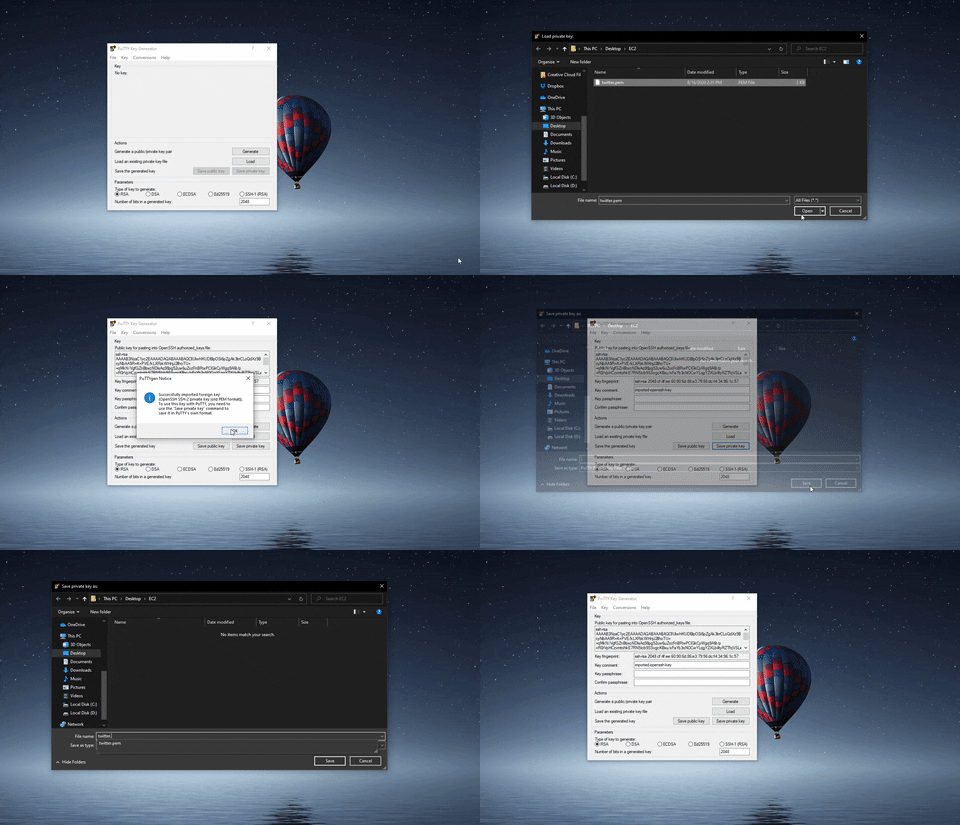
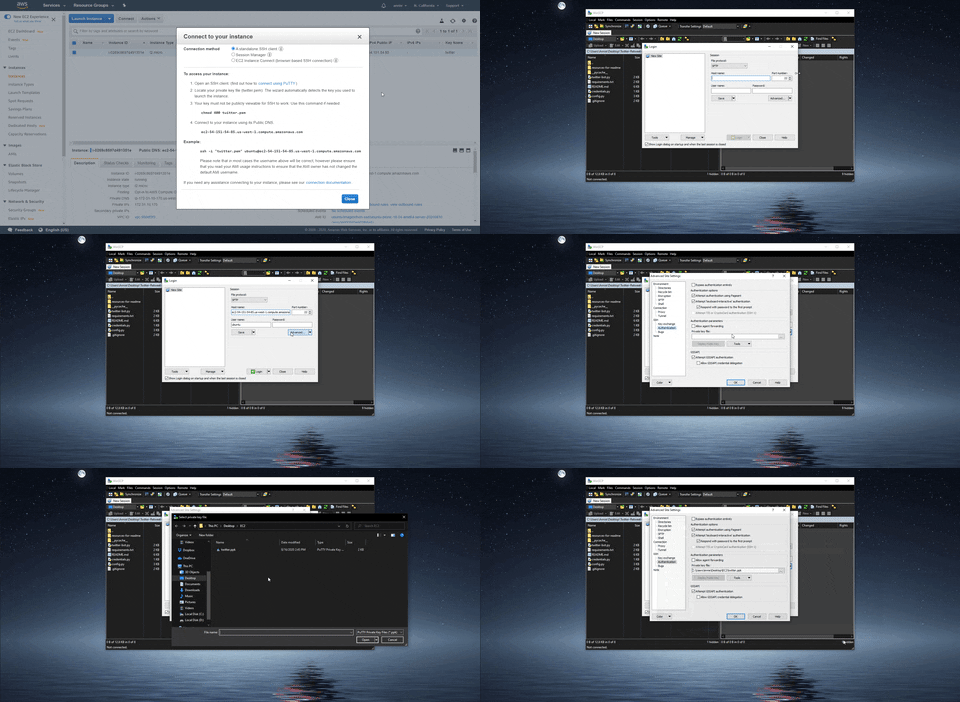
- Load the key-pair file (.pem) into PuTTYgen (which was downloaded when you installed PuTTY) and save the private key as a private key file (.ppk).
- Connect to your instance on WinSCP.
- The host name is ubuntu@[public DNS here].
- Click Advanced, go to Authentication under SSH, and load the previously generated private key file (.ppk).
- Login to the session.
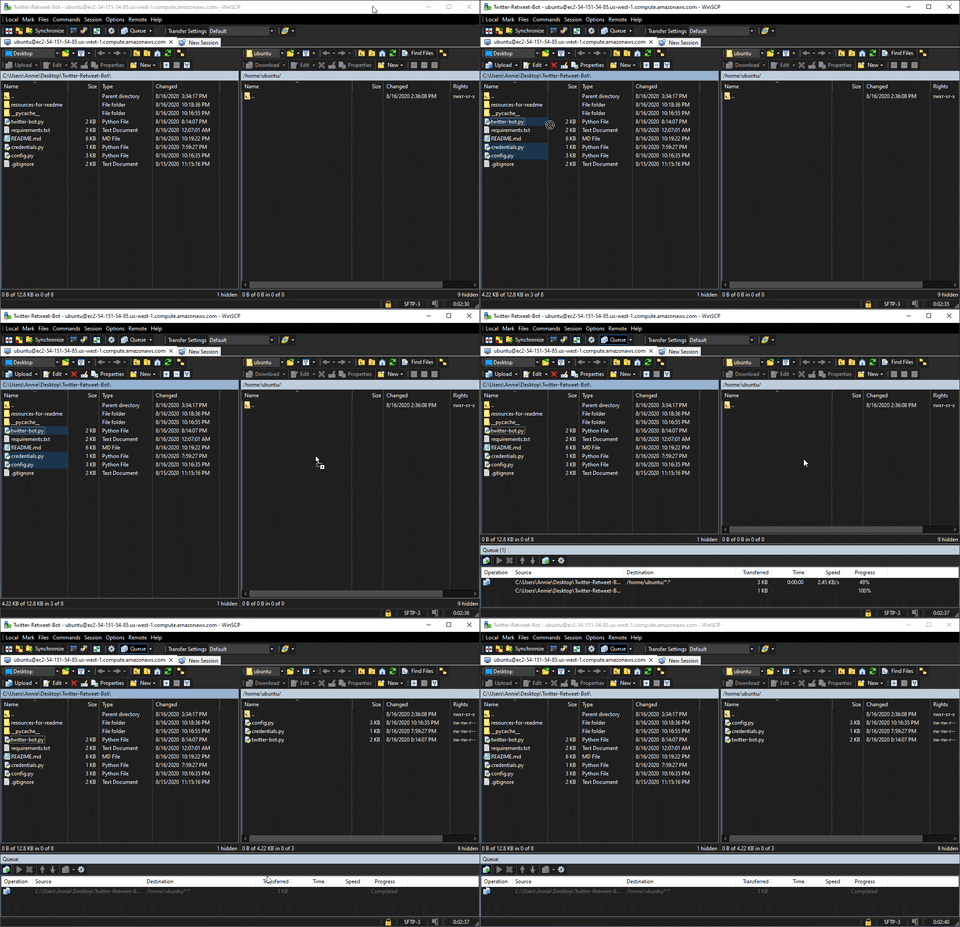
- Use WinSCP to transfer the project's .py files to the server.
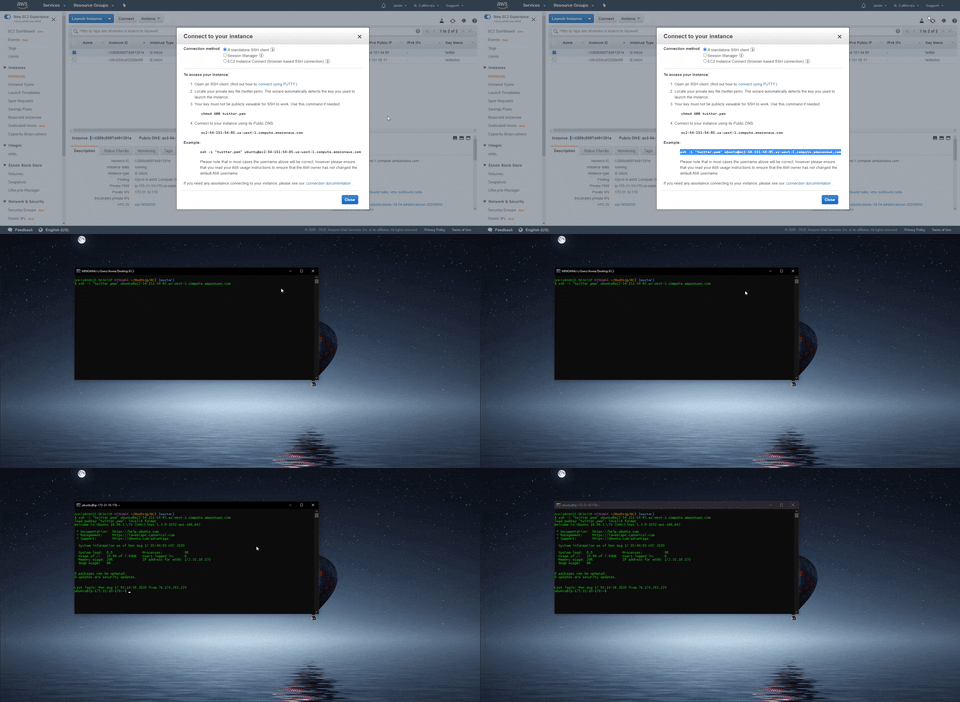
- Connect to your instance on a bash command line using one of the following ways.
- Install python and pip to the server on the bash command line.
sudo apt update
sudo apt upgrade
sudo apt install python3
sudo apt install python3-pip
pip3 install update pip
- Check if python and pip have been installed correctly.
python3 --version
pip3 --version
- Install tweepy to the server.
pip3 install tweepy
- Run the script. Enjoy!.
python3 twitter-bot.py
- See Additional Information for details on running the script continuously.
- I used the screen option.
Annie Wu (anniedotexe)
Copyright © 2021-2026 Annie Wu. All rights reserved.
I do not maintain this code anymore and will not respond to any questions sent to me.
If you like my content or find this code useful, give it a ⭐ or support me by buying me a coffee ☕💙
