AIP-50 Trigger UI based on FAB #27063
Conversation


 jscheffl
requested review from
ashb,
bbovenzi and
ryanahamilton
as code owners
jscheffl
requested review from
ashb,
bbovenzi and
ryanahamilton
as code owners
 boring-cyborg
bot
added
area:UI
boring-cyborg
bot
added
area:UI

|
Note that Pytests are not adjusted and are even failing for the WIP PR at the moment, will be fixed before the PR leaves the WIP phase. Still the function is working and can be inspected. |

|
This pull request has been automatically marked as stale because it has not had recent activity. It will be closed in 5 days if no further activity occurs. Thank you for your contributions. |
 github-actions
bot
added
the
stale
github-actions
bot
added
the
stale

|
@jens-scheffler-bosch |
 pierrejeambrun
removed
the
stale
pierrejeambrun
removed
the
stale
Great, looing forward to complete the missing pieces if the direction/proposal is accepted! |
|
@jens-scheffler-bosch Tested that locally and looks very cool. I think it is worth pushing that further with the addition you mentioned. (Doc, tests, cleaning the code etc.) I would mention that it would be great if this could integrate with the newly added |
|
To address your questions, (imho):
|
…fab-dag-trigger-ui
…fab-dag-trigger-ui
jscheffl
changed the title
|
Hi @pierrejeambrun - thanks again for the review! I now closed the gaps and made the pipeline green - functional-wise the AIP-50 implementation is completed now. Now time for a final review, then (in my view) ready to be merged. Recent commits changed:
|

| (Default) value that should be displayed when showing/loading the form.</li> | ||
| <li>Note: If you have elements changing a value, call <code>updateJSONconf()</code>.</li> | ||
| </ul> | ||
| Example: <code><input name='{name}' value='{value}' onchange='updateJSONconf()' /></code> |

There was a problem hiding this comment.
Rather than needing custom form's to use onchange='updateJSONconf()' can we change the even to pick up all inputs under the form automatically?
There was a problem hiding this comment.
I tried to apply this comment but when looking to my own example I realized that a "generic" solution might be hard. I fear this generates more problems than it helps users, because adding the event listeners globally might generate side effects when a custom form has other event listeners and the order is not right.


 jscheffl
left a comment
jscheffl
left a comment
jscheffl
left a comment
There was a problem hiding this comment.
Adedd screen shot snippets for Trigger form
| <td class="col-lg-2"> | ||
| <label for="element_{{ form_key }}" control-label=""> | ||
| {%- if "title" in form_details.schema and form_details.schema.title -%} | ||
| {{ form_details.schema.title }} | ||
| {%- else -%} | ||
| {{ form_key }} | ||
| {%- endif -%} | ||
| {%- if form_details.schema and form_details.schema.type and not "null" in form_details.schema.type and not "boolean" in form_details.schema.type -%} | ||
| <strong style="color: red"> *</strong> | ||
| {%- endif -%} | ||
| : </label> | ||
| </td> |
There was a problem hiding this comment.
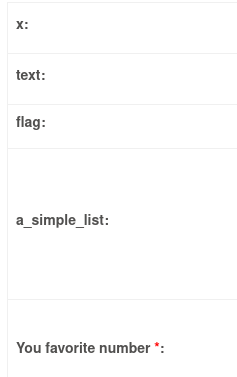
This block renders the form label, either using the key or the display label if given. A red star is added if field is required to have content before submit:
| <label for="element_{{ form_key }}" control-label=""> | ||
| <input class="switch-input" name="element_{{ form_key }}" id="element_{{ form_key }}" type="checkbox" | ||
| {%- if form_details.value %} checked="checked"{%- endif -%}/> | ||
| <span class="switch" aria-hidden="true"></span> | ||
| </label> |
There was a problem hiding this comment.
These lines render a boolean switch.

| <div class="input-group datetime datetimepicker"> | ||
| <span class="input-group-addon"><span class="material-icons cursor-hand">calendar_today</span></span> | ||
| <input class="form-control" name="element_{{ form_key }}" id="element_{{ form_key }}" type="text" valuetype="date" | ||
| {%- if not "null" in form_details.schema.type %} required=""{%- endif %} value="{% if form_details.value %}{{ form_details.value }}{% endif %}" /> | ||
| </div> |
There was a problem hiding this comment.
These lines render a date-time picker (Unfortunately I'm not able to screen-capture the pupp of the date/time picker but it is the same like on other UI parts:

| <div class="input-group datetime datepicker"> | ||
| <span class="input-group-addon"><span class="material-icons cursor-hand">calendar_today</span></span> | ||
| <input class="form-control" name="element_{{ form_key }}" id="element_{{ form_key }}" type="text" valuetype="date" | ||
| {%- if not "null" in form_details.schema.type %} required=""{%- endif %} value="{% if form_details.value %}{{ form_details.value }}{% endif %}" /> | ||
| </div> |
There was a problem hiding this comment.
Date picker (without time):

| <div class="input-group datetime timepicker"> | ||
| <span class="input-group-addon"><span class="material-icons cursor-hand">calendar_today</span></span> | ||
| <input class="form-control" name="element_{{ form_key }}" id="element_{{ form_key }}" type="text" valuetype="date" | ||
| {%- if not "null" in form_details.schema.type %} required=""{%- endif %} | ||
| value="{% if form_details.value %}{{ form_details.value[0:2] }}00-01-01 {{ form_details.value }}{% endif %}" /> | ||
| </div> |
There was a problem hiding this comment.
Time picker (w/o date):

| <input class="form-control" name="element_{{ form_key }}" id="element_{{ form_key }}" placeholder="" type="text" | ||
| value="{% if form_details.value %}{{ form_details.value }}{% endif %}" | ||
| {%- if form_details.schema and form_details.schema.minLength %} minlength="{{ form_details.schema.minLength }}"{% endif %} | ||
| {%- if form_details.schema and form_details.schema.maxLength %} maxlength="{{ form_details.schema.maxLength }}"{% endif %} | ||
| {%- if form_details.schema and form_details.schema.type and not "null" in form_details.schema.type %} required=""{% endif %} /> |
There was a problem hiding this comment.
...aaaand final leftover, if not any specific type then a simple text field is rendered incl. optional min/max length:

| {%- if form_details.schema and form_details.schema.type and not "null" in form_details.schema.type %} required=""{% endif %} /> | ||
| {% endif %} | ||
| {% if form_details.description -%} | ||
| <span class="help-block">{{ form_details.description }}</span> |
There was a problem hiding this comment.
This makes the help text/description either as markup (if it is HTML) or plain text:

| <div class="col-md-2"> | ||
| <label for="recent_configs">Recent Configurations</label> | ||
| <label for="recent_configs">Select Recent Configurations</label> | ||
| <select class="form-control" name="recent_configs" id="recent_configs"> | ||
| <option value="">empty config</option> | ||
| {% for conf in recent_confs %} | ||
| <option value="{{ conf }}">{{ conf }}</option> | ||
| <option value="{{ conf }}">Default parameters</option> | ||
| {% for run_id, recent_conf in recent_confs.items() %} | ||
| <option value="{{ recent_conf }}">{{ run_id }}: {{ recent_conf }}</option> | ||
| {% endfor %} |
There was a problem hiding this comment.
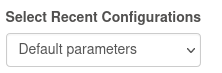
This section is the select of the recent configs which can be applied to the form:
| <div class="panel-heading"> | ||
| <h4 class="panel-title"> | ||
| <a class="accordion-toggle" data-toggle="collapse" data-parent="#accordion_section_{{ form_section | lower() | replace(' ', '_') }}" href="#accordion_section_{{ form_section | lower() | replace(' ', '_') }}_href" | ||
| data-original-title="" title="" id="{{ form_section | lower() | replace(' ', '_') }}_toggle">{{ form_section }}<span class="caret"></span></a> | ||
| </h4> | ||
| </div> |
There was a problem hiding this comment.
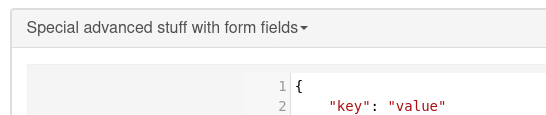
If the form defines multiple sections, this generate a new section header - each section is folded by default and can be un-folded:
| <div class="panel-group" id="accordion_json_conf"> | ||
| <div class="panel panel-default"> | ||
| <div class="panel-heading"> | ||
| <h4 class="panel-title"> | ||
| <a class="accordion-toggle" data-toggle="collapse" data-parent="#accordion_json_conf" href="#accordion_json_conf_href" data-original-title="" title="" id="generated_json_toggle">Generated Configuration JSON<span class="caret"></span></a> | ||
| </h4> | ||
| </div> | ||
| <div id="accordion_json_conf_href" class="panel-collapse collapse"> | ||
| <div class="panel-body"> | ||
| <textarea name="conf" id="json">{{ conf }}</textarea> | ||
| </div> | ||
| </div> | ||
| </div> | ||
| </div> |
There was a problem hiding this comment.
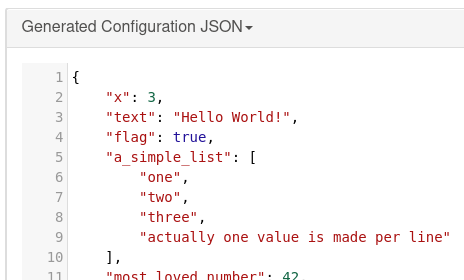
Below the form the generated JSON can be seen - if you want to re-use this for future reference:
 bbovenzi
left a comment
bbovenzi
left a comment
bbovenzi
left a comment
There was a problem hiding this comment.
Great work! I played around with the example dags too. They were really helpful.
pierrejeambrun
added
changelog:skip

|
Thank you for this!! Or the only reasonable way would be waiting until it goes into a stable release? I'm running Airflow 2.5.1 with Docker Compose in dev mode, following: Thank you. |
|
Hello @mayeulk,
I would say that you could cherry pick only the changes related to AIP-50 and apply that to your own version (if you really can't wait). This is a new feature, so it will be part of the next minor release. I would recommend to wait just a little bit longer. 😄 |
|
Hello @pierrejeambrun, |

7 participants


This PR adds a trigger UI based on ideas and discussion from AIP-50 Trigger DAG UI Extension with Flexible User Form Concept based on current FAB UI infrastructure. (Note: Initially it was a PoC PR, now functionally complete).
Due to the feedback received on AIP-50 the PR is based on the
Paramstoolings already available and leverages with minimal changes 80% of desired scope. Also the parallel implementation of #27805 was integrated.Coverage/Scope of this PR:
paramsor usage of existingparamsdict a form as UI is generated dynamicallyparamsare defined on a DAG a form is generatedparamsare defined the previous JSON based entry is presentedhiddenwas implemented by using the JSON schema attributeconstantwhich assumes that only one constant value is permitted, no additional flag needed.related: #26215 #27805
closes: #11054
FYI @clellmann @wolfdn @AutomationDev85