[ResourceLimit] Limit CPU resource usage of each query #6442

Description

Is your feature request related to a problem? Please describe.
At present, some users are executing complex queries, and the CPU or IO may be full, which affects the execution of other queries.
Users may not pay attention to the latency of these queries, but pay more attention to whether they can be successfully executed without affecting the normal use of the cluster. So we need to provide a mechanism to limit the resource overhead of a single query.
Doris currently only supports limiting the memory overhead of a single query, but does not support limiting the CPU and IO.
Describe the solution you'd like
Achieving CPU and IO limits is a complicated matter, but we can use a simple way to achieve it according to the characteristics of Doris' query execution plan.
Doris's execution plan is a volcano model. And use the push method to get data from top to bottom, and the bottom olap scan node is usually the final node. If we can limit the resource usage of the scan node, it will indirectly limit the resource overhead of the entire query (because the data is not reached, the upper node will not work)
The scan node runs the scan task through a thread pool, and the scan task of a query will be split into several execution fragments for execution. Here we limit the number of scanning threads that can be used by a query to slow down the data scanning speed, thereby limiting the overall resource overhead.
Detail
I add a new session variable "cpu_resource_limit" and a new user property "cpu_resource_limit".
The default value is -1, which is unlimited. And user can set limit for a single query in a session,
or set the limit for a certain user, so that all queries the user execute will use this limit.
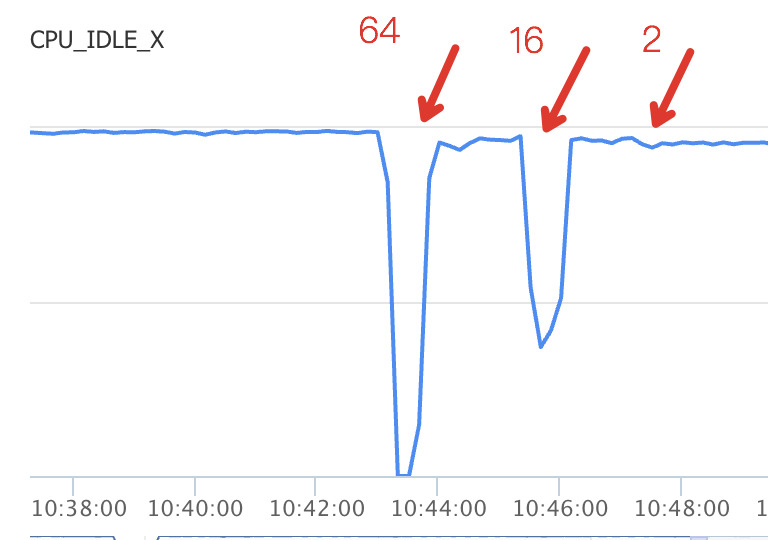
This graph shows the cpu idle of different cpu_resource_limit setting. You can see that with the limit goes lower, the cpu usage getting lower too.
(Don't care about the execution time, all queries in this graph is timeout for 5min, we just focus on the cpu usage)