Affected Version
It's been verified on 0.16 and 0.19, and I think 0.17 and 0.18 are also affected.
Description
Steps to reproduce this problem:
- start a realtime ingestion task for one data source
- issue a kill task for the same data source through menu item "Delete unused segments" on the web-console UI
The kill task is created successfully but its status is always WAITING even after the ingestion task for current segment completes and a new ingestion task starts for another new segment.
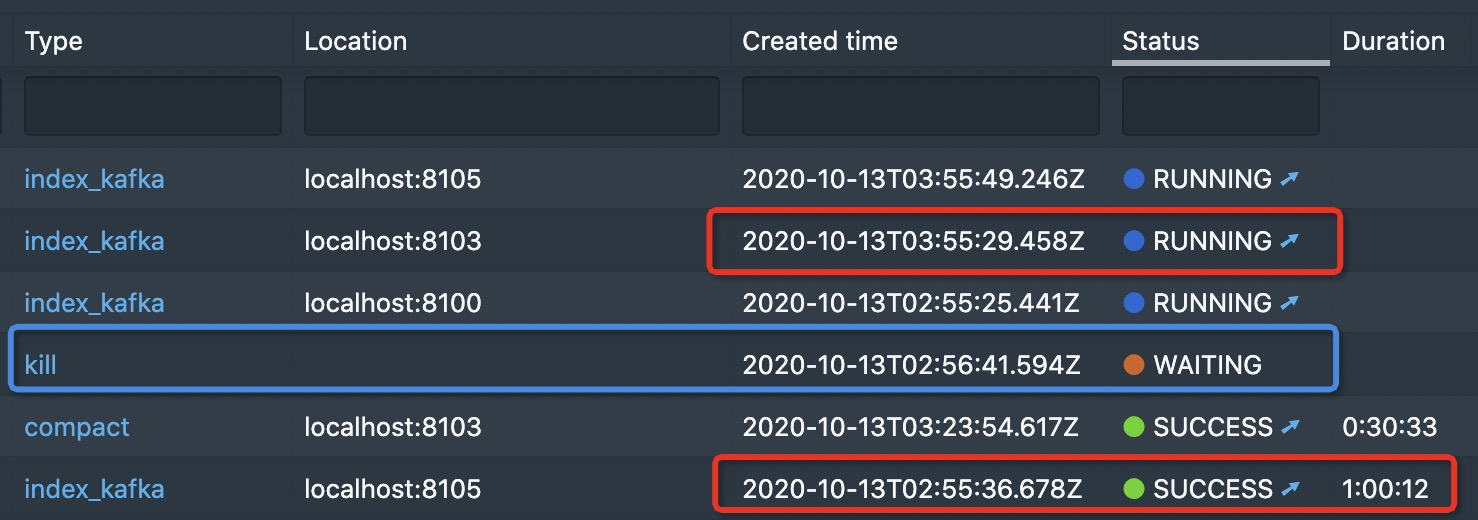
From the image above, we can see:
- ingestion task started at 02:55
- kill task started at 02:26
- an hour(segment granularity) later, ingestion task finished at about 03:55, and a new task started at 03:55
There's no chance for the kill task to be scheduled, and its status is always WAITING.
Analysis
When launching a kill-task from web console, a kill-task request with interval ranging from year 1000 to year 3000 is sent to druid backend service. While there's a running ingestion task which holds time chunk lock, this kill request couldn't obtain the time chunk lock because the given interval overlaps the interval of ingesting segment.
To solve this, I think there're two ways to solve it as follows, both of which requires some modifications on web console
- do it as the way 'Mark as unused segment by interval' does, ask for a given interval from user instead of using year 3000 as the end interval
or
- set
forceTimeChunkLock of context parameter to false in the kill task request

Affected Version
It's been verified on 0.16 and 0.19, and I think 0.17 and 0.18 are also affected.
Description
Steps to reproduce this problem:
The kill task is created successfully but its status is always WAITING even after the ingestion task for current segment completes and a new ingestion task starts for another new segment.
From the image above, we can see:
There's no chance for the kill task to be scheduled, and its status is always WAITING.
Analysis
When launching a kill-task from web console, a kill-task request with
intervalranging from year 1000 to year 3000 is sent to druid backend service. While there's a running ingestion task which holds time chunk lock, this kill request couldn't obtain the time chunk lock because the given interval overlaps the interval of ingesting segment.To solve this, I think there're two ways to solve it as follows, both of which requires some modifications on web console
or
forceTimeChunkLockofcontextparameter tofalsein the kill task request