Skip to content
This repository was archived by the owner on Aug 20, 2025. It is now read-only.

Conversation

@mmiklavc
Copy link
Contributor

@mmiklavc mmiklavc commented Mar 27, 2019

Contributor Comments

https://issues.apache.org/jira/browse/METRON-2053

The rationale for this work is to decouple the platform from Storm dependencies and enable us to integrate with other streaming frameworks. Of particular interest is Spark, but I'll save the meat of that conversation for a proper DISCUSS thread.

Pull Request Checklist

For all changes:

  • Is there a JIRA ticket associated with this PR? If not one needs to be created at Metron Jira.
  • Does your PR title start with METRON-XXXX where XXXX is the JIRA number you are trying to resolve? Pay particular attention to the hyphen "-" character.
  • Has your PR been rebased against the latest commit within the target branch (typically master)?

For code changes:

  • Have you included steps to reproduce the behavior or problem that is being changed or addressed?

  • Have you included steps or a guide to how the change may be verified and tested manually?

  • Have you ensured that the full suite of tests and checks have been executed in the root metron folder via:

    mvn -q clean integration-test install && dev-utilities/build-utils/verify_licenses.sh 
    
  • Have you written or updated unit tests and or integration tests to verify your changes?

  • n/a If adding new dependencies to the code, are these dependencies licensed in a way that is compatible for inclusion under ASF 2.0?

  • Have you verified the basic functionality of the build by building and running locally with Vagrant full-dev environment or the equivalent?

For documentation related changes:

  • Have you ensured that format looks appropriate for the output in which it is rendered by building and verifying the site-book? If not then run the following commands and the verify changes via site-book/target/site/index.html:

    cd site-book
    mvn site
    

Note:

Please ensure that once the PR is submitted, you check travis-ci for build issues and submit an update to your PR as soon as possible.
It is also recommended that travis-ci is set up for your personal repository such that your branches are built there before submitting a pull request.

@mmiklavc
Copy link
Contributor Author

mmiklavc commented Mar 28, 2019

Testing Plan

  • Setup Test Environment
  • Verify Basics
  • Profiler
  • PCAP
  • Flatfile loader
  • Streaming enrichment

Setup Test Environment

  • Build full dev metron/metron-deployment/development/centos6$ vagrant up
  • Login to full dev ssh root@node1, password "vagrant"
  • Set some environment variables - Note: set your metron version accordingly if using this test script in the future for a later version.
# version info
export METRON_VERSION=0.7.1
export SOLR_VERSION=6.6.2

# paths
export METRON_HOME=/usr/metron/${METRON_VERSION}
export HDP_HOME=/usr/hdp/current
export KAFKA_HOME=/usr/hdp/current/kafka-broker
export SOLR_HOME=/var/solr/solr-${SOLR_VERSION}
export ELASTIC_HOME=/usr/share/elasticsearch
export KIBANA_HOME=/usr/share/kibana
export STORM_LOGS=/var/log/storm/workers-artifacts

# host info
export METRON_HOST=node1
export ZOOKEEPER=${METRON_HOST}:2181
export BROKERLIST=${METRON_HOST}:6667
export STORM_UI=http://${METRON_HOST}:8744
export ELASTIC=http://${METRON_HOST}:9200
export ES_HOST=http://${METRON_HOST}:9200
export KIBANA=http://${METRON_HOST}:5000

Verify Basics

Verify data is flowing through the system, from parsing to indexing

  1. Open Ambari and navigate to the Metron service http://node1:8080/#/main/services/METRON/summary
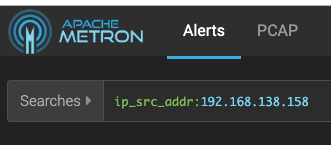
  2. Open the Alerts UI
  3. image
  4. Verify alerts show up in the main UI - click the search icon (you may need to wait a moment for them to appear)
    image
  5. Head back to Ambari and select the Kibana service http://node1:8080/#/main/services/KIBANA/summary
  6. Open the Kibana dashboard via the "Metron UI" option in the quick links
  7. image
  8. Verify the dashboard is populating
  9. image

Profiler

Verify profiler still works in Storm and the REPL.

Pulled from https://github.com/apache/metron/blob/master/metron-analytics/metron-profiler-storm/README.md

  1. First, we'll configure the profiler to emit a profile every 1 minute rather than every 15, for expediency:

    • First, stop the profiler
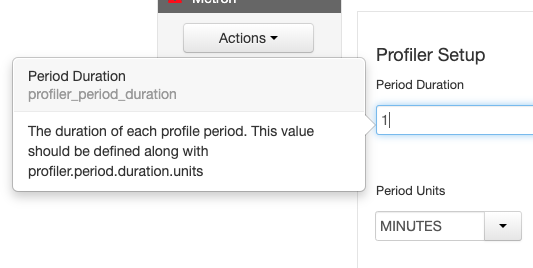
    • In Ambari, set the profiler period duration to 1 minute via the Profiler config section.
    • image
    • Pull down latest global config to the local file system
      $METRON_HOME/bin/zk_load_configs.sh -m PULL -o ${METRON_HOME}/config/zookeeper -z $ZOOKEEPER -f
    • Adjust $METRON_HOME/config/zookeeper/global.json to adjust the capture duration:
      "profiler.client.period.duration" : "1",
      "profiler.client.period.duration.units" : "MINUTES"
      
    • Push the changes back up to Zookeeper
      $METRON_HOME/bin/zk_load_configs.sh -m PUSH -i $METRON_HOME/config/zookeeper/ -z $ZOOKEEPER
  2. Start the Stellar Shell with the -z command line argument so that a connection to Zookeeper is established. This is required when deploying a new profile definition as shown in the steps below.

    [root@node1 ~]# source /etc/default/metron
    [root@node1 ~]# $METRON_HOME/bin/stellar -z $ZOOKEEPER
    Stellar, Go!
    [Stellar]>>>
    
  3. If you haven't already, define your profile.

    [Stellar]>>> conf := SHELL_EDIT()
    [Stellar]>>> conf
    {
      "profiles": [
        {
          "profile": "hello-world",
          "onlyif":  "exists(ip_src_addr)",
          "foreach": "ip_src_addr",
          "init":    { "count": "0" },
          "update":  { "count": "count + 1" },
          "result":  "count"
        }
      ]
    }
    
  4. Check what is already deployed.

    Pushing a new profile configuration is destructive. It will overwrite any existing configuration. Check what you have out there. Manually merge the existing configuration with your new profile definition.

    [Stellar]>>> existing := CONFIG_GET("PROFILER")
    
  5. Deploy your profile. This will push the configuration to to the live, actively running Profiler topology. This will overwrite any existing profile definitions.

    [Stellar]>>> CONFIG_PUT("PROFILER", conf)
    
  6. Exit the Stellar REPL and now restart the profiler

  7. Make sure the sensor stubs are running.

    service sensor-stubs start

  8. Wait a few minutes - we want to wait some multiple of the period duration to ensure that the profiler has been able to flush data to HBase multiple times before we check in the next step.

  9. Check the profiler is writing to HBase

    echo "count 'profiler'" | hbase shell
    HBase Shell; enter 'help<RETURN>' for list of supported commands.
    Type "exit<RETURN>" to leave the HBase Shell
    Version 1.1.2.2.6.5.1050-37, r897822d4dd5956ca186974c10382e9094683fa29, Tue Dec 11 02:04:10 UTC 2018
    
    count 'profiler'
    24 row(s) in 0.9550 seconds
    
  10. Start the Stellar REPL back up again

    [root@node1 ~]# $METRON_HOME/bin/stellar -z $ZOOKEEPER
    Stellar, Go!
    [Stellar]>>>
    
  11. Read values from the profiler. We'll first print out the help on PROFILE_GET and PROFILE_FIXED for context. The ip_src_addr I'm using below, "192.168.66.1," is pulled from one of the records in the alerts UI.

    [Stellar]>>> ?PROFILE_GET
    PROFILE_GET
    Description: Retrieves a series of values from a stored profile.
    
    Arguments:
        profile - The name of the profile.
        entity - The name of the entity.
        periods - The list of profile periods to fetch. Use PROFILE_WINDOW or PROFILE_FIXED.
        groups - Optional - The groups to retrieve. Must correspond to the 'groupBy' list used during profile creation. Defaults to an empty list, meaning no groups.
        config_overrides - Optional - Map (in curly braces) of name:value pairs, each overriding the global config parameter of the same name. Default is the empty Map, meaning no overrides.
    
    Returns: The selected profile measurements.
    
    [Stellar]>>> ?PROFILE_FIXED
    PROFILE_FIXED
    Description: The profiler periods associated with a fixed lookback starting from now.
    
    Arguments:
        durationAgo - How long ago should values be retrieved from?
        units - The units of 'durationAgo'.
        config_overrides - Optional - Map (in curly braces) of name:value pairs, each overriding the global config parameter of the same name. Default is the empty Map, meaning no overrides.
    
    Returns: The selected profile measurement periods.  These are ProfilePeriod objects.
    
    [Stellar]>>> PROFILE_GET("hello-world","192.168.66.1",PROFILE_FIXED(30, "MINUTES"))
    [158, 191, 184, 205, 178, 194, 180]
    
  12. You should see an array of the profile measurements, as indicated in the command output above.

PCAP

Steps adapted from #1157 (comment)

Get PCAP data into Metron:

  1. Install and setup pycapa (this has been updated in master recently) - https://github.com/apache/metron/blob/master/metron-sensors/pycapa/README.md#centos-6
  2. (if using singlenode vagrant) You can kill the enrichment, profiler, indexing, and sensor topologies to free up resources, if needed, via for i in bro enrichment random_access_indexing batch_indexing yaf snort;do storm kill $i;done
  3. Start the pcap topology if it's not already running via $METRON_HOME/bin/start_pcap_topology.sh
  4. Start the pycapa packet capture producer on eth1 via pycapa --producer --kafka-topic pcap --interface eth1 --kafka-broker $BROKERLIST
  5. Watch the topology in the Storm UI and kill the packet capture utility from before, when the number of packets ingested is over 3k.
  6. Ensure that at at least 3 files exist on HDFS by running hdfs dfs -ls /apps/metron/pcap/input
  7. Choose a file (denoted by $FILE) and dump a few of the contents using the pcap_inspector utility via $METRON_HOME/bin/pcap_inspector.sh -i $FILE -n 5
  8. Choose one of the lines and note the protocol.
  9. Note that when you run the commands below, the resulting file will be placed in the execution directory where you kicked off the job from.

Run a fixed filter query

  1. Switch to the metron user (your user needs permissions to the /apps/metron/interim and /apps/metron/output directories) su - metron
  2. Run a fixed filter query by executing the following command with the values noted above (match your start_time format to the date format provided - default is to use millis since epoch)
  3. $METRON_HOME/bin/pcap_query.sh fixed -st <start_time> -df "yyyyMMdd" -p <protocol_num> -rpf 500
  4. Verify the MR job finishes successfully. Upon completion, you should see multiple files named with relatively current datestamps in your current directory, e.g. pcap-data-20160617160549737+0000.pcap
  5. Copy the files to your local machine and verify you can them it in Wireshark. I chose a middle file and the last file. The middle file should have 500 records (per the records_per_file option), and the last one will likely have a number of records <= 500.

Flatfile loader

Make sure no classpath issues have broken it.

Steps adapted from #432 (comment)

Preliminaries

  • Download the alexa 1m dataset:
wget http://s3.amazonaws.com/alexa-static/top-1m.csv.zip
unzip top-1m.csv.zip
  • Stage import file
head -n 10000 top-1m.csv > top-10k.csv
# plop it on HDFS
hdfs dfs -put top-10k.csv /tmp
  • Create an extractor.json for the CSV data by editing extractor.json and pasting in these contents:
{
  "config" : {
    "columns" : {
       "domain" : 1,
       "rank" : 0
                }
    ,"indicator_column" : "domain"
    ,"type" : "alexa"
    ,"separator" : ","
             },
  "extractor" : "CSV"
}

The extractor.json will get used by flatfile_loader.sh in the next step

Import from HDFS via MR

# truncate hbase
echo "truncate 'enrichment'" | hbase shell
# import data into hbase 
$METRON_HOME/bin/flatfile_loader.sh -i /tmp/top-10k.csv -t enrichment -c t -e ./extractor.json -m MR
# count data written and verify it's 10k
echo "count 'enrichment'" | hbase shell

Streaming Enrichment

  1. Start by doing some prep and cleaning

    • Clear out the enrichments table in HBase
    echo "truncate 'enrichment'" | hbase shell
    
    • Stop the sensor stubs
    service sensor-stubs stop
    
    • Clear out the ES indexes
    curl -XDELETE "http://localhost:9200/bro*"
    curl -XDELETE "http://localhost:9200/yaf*"
    curl -XDELETE "http://localhost:9200/snort*"
    
  2. Pull down latest config from Zookeeper

    $METRON_HOME/bin/zk_load_configs.sh -m PULL -o ${METRON_HOME}/config/zookeeper -z $ZOOKEEPER -f
    
  3. Create a file named user.json in the parser directory. touch ${METRON_HOME}/config/zookeeper/parsers/user.json

  4. Enter these contents (note that the package for SimpleHbaseEnrichmentWriter has changed)

    {
     "parserClassName" : "org.apache.metron.parsers.csv.CSVParser"
     ,"writerClassName" : "org.apache.metron.writer.hbase.SimpleHbaseEnrichmentWriter"
     ,"sensorTopic":"user"
     ,"parserConfig":
     {
        "shew.table" : "enrichment"
       ,"shew.cf" : "t"
       ,"shew.keyColumns" : "ip"
       ,"shew.enrichmentType" : "user"
       ,"columns" : {
          "user" : 0
         ,"ip" : 1
                    }
     }
    }
    
  5. Push the changes back up to Zookeeper

    $METRON_HOME/bin/zk_load_configs.sh -m PUSH -i $METRON_HOME/config/zookeeper/ -z $ZOOKEEPER
    
  6. Create the user Kafka topic

    ${HDP_HOME}/kafka-broker/bin/kafka-topics.sh --create --zookeeper $ZOOKEEPER --replication-factor 1 --partitions 1 --topic user
    
  7. Start the topology

    ${METRON_HOME}/bin/start_parser_topology.sh -s user -z $ZOOKEEPER
    
  8. Create a simple file with named user.csv with user mapping to IP, e.g.

    mmiklavcic,192.168.138.158
    
  9. Push the data to Kafka

    tail user.csv | ${HDP_HOME}/kafka-broker/bin/kafka-console-producer.sh --broker-list $BROKERLIST --topic user
    
  10. Verify data makes it to the enrichment table.

    echo "scan 'enrichment'" | hbase shell
    
  11. Modify the bro parser to use the new enrichment via Stellar vim $METRON_HOME/config/zookeeper/enrichments/bro.json

    {
      "enrichment" : {
        "fieldMap": {
          "geo": ["ip_dst_addr", "ip_src_addr"],
          "host": ["host"],
          "stellar" : {
            "config" : {
              "user" : "ENRICHMENT_GET('user', ip_src_addr, 'enrichment', 't')"
            }
          }
        }
      },
      "threatIntel": {
        "fieldMap": {
          "hbaseThreatIntel": ["ip_src_addr", "ip_dst_addr"]
        },
        "fieldToTypeMap": {
          "ip_src_addr" : ["malicious_ip"],
          "ip_dst_addr" : ["malicious_ip"]
        }
      }
    }
    
  12. Push the changes back up to Zookeeper

    $METRON_HOME/bin/zk_load_configs.sh -m PUSH -i $METRON_HOME/config/zookeeper/ -z $ZOOKEEPER
    
  13. Start the bro sensor stub again if you stopped it earlier

    service sensor-stubs start bro
    
  14. Verify you get enriched results in the Alerts UI
    image

@mmiklavc
Copy link
Contributor Author

I ran through the full test script provided above and everything works as expected.

Things to note

  • I notice a few instances where there are SLF4J logger warnings in the REST logs and from the REPL on startup. I'm unsure whether these are new or not.
  • Using zk_load_configs.sh seems to dump a whole lot of logging detail to the CLI - I'm not sure if this is intentional or not, but I'm not a fan of having this be the default.
  • I need to refactor the enrichment documentation just a touch - most of it belongs with metron-enrichment-storm, but some config related documentation can probably live in the root metron-enrichment module.

@merrimanr
Copy link
Contributor

The SLF4J logger warnings in REST are preexisting to this PR.


<p><b>Configuration</b></p>
<p>The first argument to the logger is a java.util.function.Supplier&lt;Map&lt;String, Object&gt;&gt;. The offers flexibility in being able to provide multiple configuration &#x201c;suppliers&#x201d; depending on your individual usage requirements. The example above, taken from org.apache.metron.enrichment.bolt.GenericEnrichmentBolt, leverages the global config to dymanically provide configuration from Zookeeper. Any updates to the global config via Zookeeper are reflected live at runtime. Currently, the PerformanceLogger supports the following options:</p>
<p>The first argument to the logger is a java.util.function.Supplier&lt;Map&lt;String, Object&gt;&gt;.
Copy link
Contributor

Choose a reason for hiding this comment

The reason will be displayed to describe this comment to others. Learn more.

Probably don't want to change the site book.

Copy link
Contributor Author

Choose a reason for hiding this comment

The reason will be displayed to describe this comment to others. Learn more.

Hm, that's odd. Must have been an IntelliJ mixup.

<groupId>org.apache.httpcomponents</groupId>
<artifactId>httpclient</artifactId>
<version>${global_httpclient_version}</version>
<!--<scope>test</scope>-->
Copy link
Contributor

Choose a reason for hiding this comment

The reason will be displayed to describe this comment to others. Learn more.

Commented out bits

Copy link
Contributor Author

Choose a reason for hiding this comment

The reason will be displayed to describe this comment to others. Learn more.

Done

* {
* "parserClassName": "org.apache.metron.parsers.csv.CSVParser",
* "writerClassName": "org.apache.metron.enrichment.writer.SimpleHbaseEnrichmentWriter",
* "writerClassName": "org.apache.metron.writer.hbase.SimpleHbaseEnrichmentWriter",
Copy link
Contributor

Choose a reason for hiding this comment

The reason will be displayed to describe this comment to others. Learn more.

I believe this would constitute a breaking change. Need to add a note on this in the Upgrading doc.

Copy link
Contributor Author

Choose a reason for hiding this comment

The reason will be displayed to describe this comment to others. Learn more.

Done

</exclusion>
</exclusions>
</dependency>
</dependency>-->
Copy link
Contributor

Choose a reason for hiding this comment

The reason will be displayed to describe this comment to others. Learn more.

Not needed

Copy link
Contributor Author

Choose a reason for hiding this comment

The reason will be displayed to describe this comment to others. Learn more.

Done

<type>test-jar</type>
<scope>test</scope>
</dependency>
</dependency>-->
Copy link
Contributor

Choose a reason for hiding this comment

The reason will be displayed to describe this comment to others. Learn more.

Not needed?

Copy link
Contributor Author

Choose a reason for hiding this comment

The reason will be displayed to describe this comment to others. Learn more.

Done

</resource>
<resource>
<directory>${metron_dir}/metron-platform/metron-enrichment/target/</directory>
<directory>${metron_dir}/metron-platform/metron-enrichment/metron-enrichment-common/target/</directory>
Copy link
Contributor

Choose a reason for hiding this comment

The reason will be displayed to describe this comment to others. Learn more.

Do we need a deployable artifact for metron-enrichment-common? Wouldn't the deployable bits come from metron-enrichment-storm alone?

Copy link
Contributor Author

Choose a reason for hiding this comment

The reason will be displayed to describe this comment to others. Learn more.

Took me a minute to remember why I did this. It seems like that would be correct, but then I saw that we had metron-parsers-common. I wasn't entirely sure why we need common as a separate deployable unit, but I found that it's what we use for zk_load_configs.sh. For enrichment, I put the Zookeeper configs into metron-enrichment-common because it could be used independent of metron-enrichment-storm (say we were to add Spark support, for instance). So the rpm/deb files will lay down the common bits that will include the enrichment configs.

Apparently the flux files got mixed up in there, so I'm removing those references.

%package        enrichment-common
Summary:        Metron Enrichment Common Files
Group:          Applications/Internet
Provides:       enrichment-common = %{version}

%description    enrichment-common
This package installs the Metron Enrichment Common files

%files          enrichment-common
%defattr(-,root,root,755)
%dir %{metron_root}
%dir %{metron_home}
%dir %{metron_home}/bin
%dir %{metron_home}/config
%dir %{metron_home}/config/zookeeper
%dir %{metron_home}/config/zookeeper/enrichments
%{metron_home}/bin/latency_summarizer.sh
%{metron_home}/config/zookeeper/enrichments/bro.json
%{metron_home}/config/zookeeper/enrichments/snort.json
%{metron_home}/config/zookeeper/enrichments/websphere.json
%{metron_home}/config/zookeeper/enrichments/yaf.json
%{metron_home}/config/zookeeper/enrichments/asa.json
%{metron_home}/flux/enrichment/remote-splitjoin.yaml
%{metron_home}/flux/enrichment/remote-unified.yaml
%attr(0644,root,root) %{metron_home}/lib/metron-enrichment-common-%{full_version}-uber.jar

Woops...

%{metron_home}/flux/enrichment/remote-splitjoin.yaml
%{metron_home}/flux/enrichment/remote-unified.yaml
# rpm -qa|grep metron
metron-data-management-0.7.1-201904050407.noarch
metron-parsing-storm-0.7.1-201904050407.noarch
metron-profiler-repl-0.7.1-201904050407.noarch
metron-pcap-0.7.1-201904050407.noarch
metron-config-0.7.1-201904050407.noarch
metron-common-0.7.1-201904050407.noarch
metron-metron-management-0.7.1-201904050407.noarch
metron-parsers-0.7.1-201904050407.noarch
metron-enrichment-0.7.1-201904050407.noarch
metron-profiler-spark-0.7.1-201904050407.noarch
metron-indexing-0.7.1-201904050407.noarch
metron-solr-0.7.1-201904050407.noarch
metron-rest-0.7.1-201904050407.noarch
metron-alerts-0.7.1-201904050407.noarch
metron-performance-0.7.1-201904050407.noarch
metron-parsers-common-0.7.1-201904050407.noarch
metron-profiler-storm-0.7.1-201904050407.noarch
metron-elasticsearch-0.7.1-201904050407.noarch
metron-maas-service-0.7.1-201904050407.noarch
# grep parsers-common bin/*
bin/zk_load_configs.sh:export JAR=metron-parsers-common-$METRON_VERSION-uber.jar

@mmiklavc
Copy link
Contributor Author

mmiklavc commented Apr 5, 2019

@nickwallen I believe I've addressed all of your comments so far. I also finished refactoring the enrichment documentation.

@nickwallen
Copy link
Contributor

+1 Looks good. I ran through all the test scenarios and did not encounter any problems.

@asfgit asfgit closed this in 14efe83 Apr 8, 2019
@mmiklavc mmiklavc changed the title Metron-2053: Refactor metron-enrichment to decouple Storm dependencies METRON-2053: Refactor metron-enrichment to decouple Storm dependencies Apr 8, 2019
Sign up for free to subscribe to this conversation on GitHub. Already have an account? Sign in.

Labels

None yet

Projects

None yet

Development

Successfully merging this pull request may close these issues.

3 participants