src/storage/./pooled_storage_manager.h:157: cudaMalloc failed: out of memory #16803


Description

github
https://github.com/ymzx/pixellink-mxnet.git
in this resources, you can download the project and run srcipt follow the README.md, the error message you can see later.
I also have upload the train data, so everyone can run this project in your local machine.
if GPU memory is not enough, how can i know the size of memory I really need?
Description
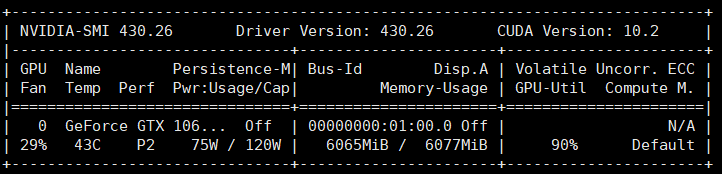
it will get cudaMalloc failed: out of memory when i run pixellink model which likes FCN structure.

at first epoch, i can see the GPU memory usage is increasing, then, script is dead.
Ubuntu 18.04
net backbone is VGG16
NVIDIA Corporation GP106 [GeForce GTX 1060 6GB]
batchsize = 8
512*512 per image
I am so amazed that why 8 images can take up 6GB memory
Error Message
Traceback (most recent call last):
File "main.py", line 36, in
main()
File "main.py", line 33, in main
train(config.epoch, dataloader, my_net, optimizer, ctx, iter_num)
File "/home/djw/text_pixellink_GPU/pixellink-mxnet/train.py", line 25, in train
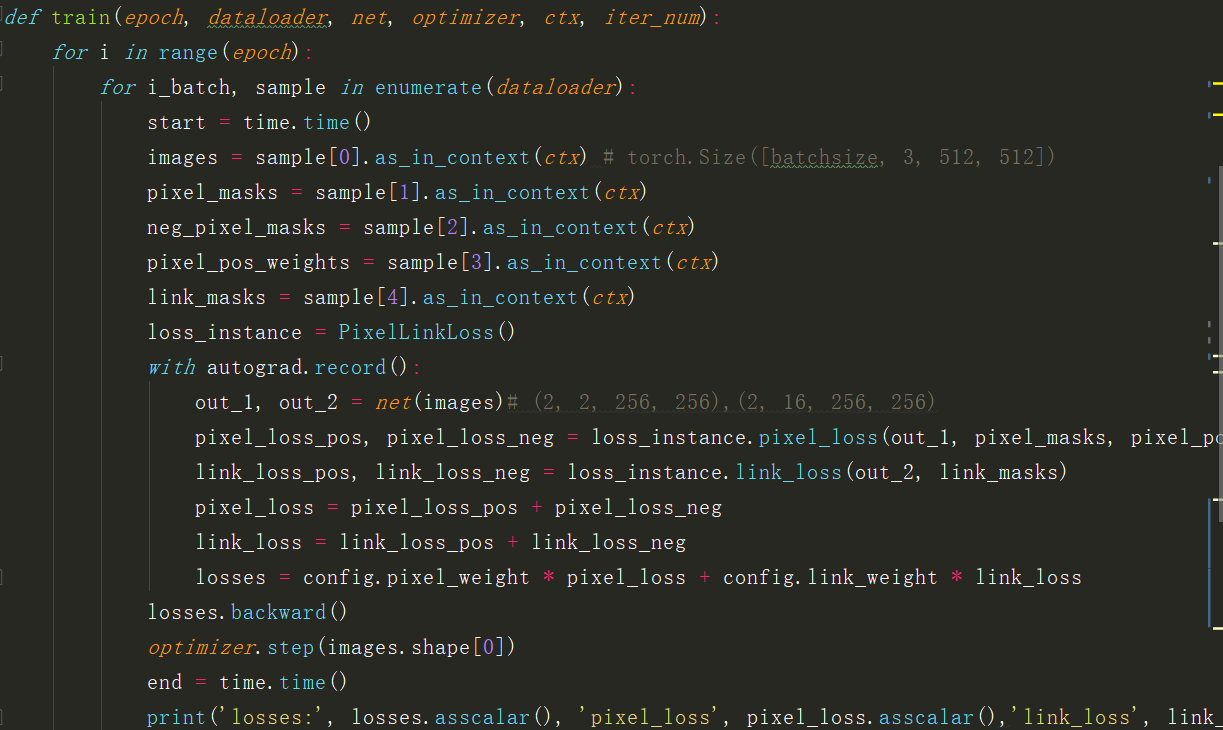
pixel_loss_pos, pixel_loss_neg = loss_instance.pixel_loss(out_1, pixel_masks, pixel_pos_weights, neg_pixel_masks)
File "/home/djw/text_pixellink_GPU/pixellink-mxnet/loss.py", line 43, in pixel_loss
wrong_input = self.pixel_cross_entropy[i][0].asnumpy()[np.where(neg_pixel_masks[i].asnumpy()==1)]
File "/home/dqy/ocr/anaconda3/envs/SSD/lib/python3.6/site-packages/mxnet/ndarray/ndarray.py", line 1996, in asnumpy
ctypes.c_size_t(data.size)))
File "/home/dqy/ocr/anaconda3/envs/SSD/lib/python3.6/site-packages/mxnet/base.py", line 253, in check_call
raise MXNetError(py_str(_LIB.MXGetLastError()))
mxnet.base.MXNetError: [20:57:05] src/storage/./pooled_storage_manager.h:157: cudaMalloc failed: out of memory
Stack trace:
[bt] (0) /home/dqy/ocr/anaconda3/envs/SSD/lib/python3.6/site-packages/mxnet/libmxnet.so(+0x4b04cb) [0x7fe6696cf4cb]
[bt] (1) /home/dqy/ocr/anaconda3/envs/SSD/lib/python3.6/site-packages/mxnet/libmxnet.so(+0x2e653eb) [0x7fe66c0843eb]
[bt] (2) /home/dqy/ocr/anaconda3/envs/SSD/lib/python3.6/site-packages/mxnet/libmxnet.so(+0x2e6af0f) [0x7fe66c089f0f]
[bt] (3) /home/dqy/ocr/anaconda3/envs/SSD/lib/python3.6/site-packages/mxnet/libmxnet.so(mxnet::NDArray::CheckAndAlloc() const+0x1cc) [0x7fe669747aac]
[bt] (4) /home/dqy/ocr/anaconda3/envs/SSD/lib/python3.6/site-packages/mxnet/libmxnet.so(+0x2667fdd) [0x7fe66b886fdd]
[bt] (5) /home/dqy/ocr/anaconda3/envs/SSD/lib/python3.6/site-packages/mxnet/libmxnet.so(mxnet::imperative::PushFCompute(std::function<void (nnvm::NodeAttrs const&, mxnet::OpContext const&, std::vector<mxnet::TBlob, std::allocatormxnet::TBlob > const&, std::vector<mxnet::OpReqType, std::allocatormxnet::OpReqType > const&, std::vector<mxnet::TBlob, std::allocatormxnet::TBlob > const&)> const&, nnvm::Op const*, nnvm::NodeAttrs const&, mxnet::Context const&, std::vector<mxnet::engine::Var*, std::allocatormxnet::engine::Var* > const&, std::vector<mxnet::engine::Var*, std::allocatormxnet::engine::Var* > const&, std::vector<mxnet::Resource, std::allocatormxnet::Resource > const&, std::vector<mxnet::NDArray*, std::allocatormxnet::NDArray* > const&, std::vector<mxnet::NDArray*, std::allocatormxnet::NDArray* > const&, std::vector<unsigned int, std::allocator > const&, std::vector<mxnet::OpReqType, std::allocatormxnet::OpReqType > const&)::{lambda(mxnet::RunContext)#1}::operator()(mxnet::RunContext) const+0x20f) [0x7fe66b8874af]
[bt] (6) /home/dqy/ocr/anaconda3/envs/SSD/lib/python3.6/site-packages/mxnet/libmxnet.so(+0x25b5647) [0x7fe66b7d4647]
[bt] (7) /home/dqy/ocr/anaconda3/envs/SSD/lib/python3.6/site-packages/mxnet/libmxnet.so(+0x25c1cd1) [0x7fe66b7e0cd1]
[bt] (8) /home/dqy/ocr/anaconda3/envs/SSD/lib/python3.6/site-packages/mxnet/libmxnet.so(+0x25c51e0) [0x7fe66b7e41e0]
To Reproduce
What have you tried to solve it?
- set batchsize = 2 or 4 , after about 10 epoch, also get out of memory as above.
- windos is ok with batchsize = 4 and run successful
Environment
x86_64
DISTRIB_ID=Ubuntu
DISTRIB_RELEASE=18.04
DISTRIB_CODENAME=bionic
DISTRIB_DESCRIPTION="Ubuntu 18.04.2 LTS"
NAME="Ubuntu"
VERSION="18.04.2 LTS (Bionic Beaver)"
ID=ubuntu
ID_LIKE=debian
PRETTY_NAME="Ubuntu 18.04.2 LTS"
VERSION_ID="18.04"
HOME_URL="https://www.ubuntu.com/"
SUPPORT_URL="https://help.ubuntu.com/"
BUG_REPORT_URL="https://bugs.launchpad.net/ubuntu/"
PRIVACY_POLICY_URL="https://www.ubuntu.com/legal/terms-and-policies/privacy-policy"
VERSION_CODENAME=bionic
UBUNTU_CODENAME=bionic
net backbone is VGG16
NVIDIA Corporation GP106 [GeForce GTX 1060 6GB]
paste outputs here
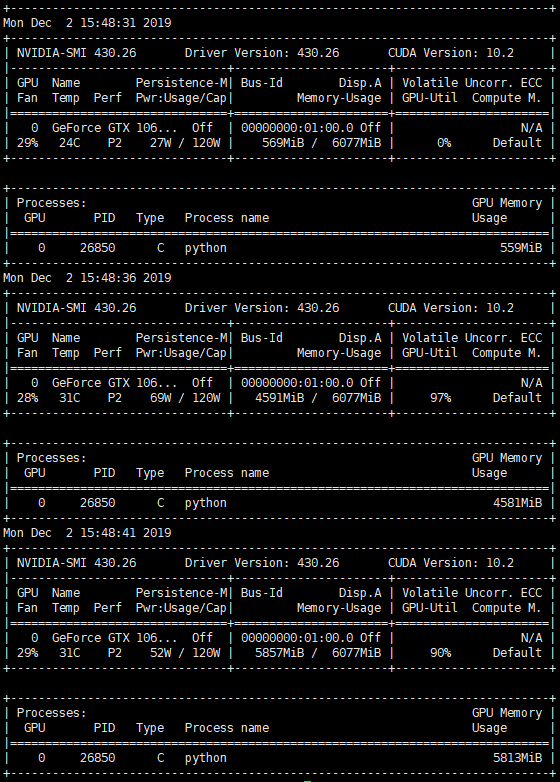
以上为初始阶段,程序运行过程中,GPU占用情况
nvidia-smi -l