This repository was archived by the owner on Nov 17, 2023. It is now read-only.
-
Notifications
You must be signed in to change notification settings - Fork 6.7k
[MXNET-121] Docs page for ONNX module. #10140
Merged
Merged
Changes from all commits
Commits
Show all changes
6 commits
Select commit
Hold shift + click to select a range
File filter
Filter by extension
Conversations
Failed to load comments.
Loading
Jump to
Jump to file
Failed to load files.
Loading
Diff view
Diff view
There are no files selected for viewing
This file contains hidden or bidirectional Unicode text that may be interpreted or compiled differently than what appears below. To review, open the file in an editor that reveals hidden Unicode characters.
Learn more about bidirectional Unicode characters
| Original file line number | Diff line number | Diff line change |
|---|---|---|
| @@ -0,0 +1,49 @@ | ||
| # ONNX-MXNet API | ||
|
|
||
| ## Overview | ||
|
|
||
| [ONNX](https://onnx.ai/) is an open format to represent deep learning models. With ONNX as an intermediate representation, it is easier to move models between state-of-the-art tools and frameworks for training and inference. | ||
|
|
||
| The `mxnet.contrib.onnx` package refers to the APIs and interfaces that implement ONNX model format support for Apache MXNet. | ||
|
|
||
| With ONNX format support for MXNet, developers can build and train models with a [variety of deep learning frameworks](http://onnx.ai/supported-tools), and import these models into MXNet to run them for inference and training using MXNet’s highly optimized engine. | ||
|
|
||
| ```eval_rst | ||
| .. warning:: This package contains experimental APIs and may change in the near future. | ||
| ``` | ||
|
|
||
| ### Installation Instructions | ||
| - To use this module developers need to **install ONNX**, which requires protobuf compiler to be installed separately. Please follow the [instructions to install ONNX and its dependencies](https://github.com/onnx/onnx#installation). Once installed, you can go through the tutorials on how to use this module. | ||
|
|
||
|
|
||
| This document describes all the ONNX-MXNet APIs. | ||
|
|
||
| ```eval_rst | ||
| .. autosummary:: | ||
| :nosignatures: | ||
|
|
||
| mxnet.contrib.onnx.import_model | ||
| ``` | ||
|
|
||
| ## ONNX Tutorials | ||
|
|
||
| ```eval_rst | ||
| .. toctree:: | ||
| :maxdepth: 1 | ||
|
|
||
| /tutorials/onnx/super_resolution.md | ||
| /tutorials/onnx/inference_on_onnx_model.md | ||
| ``` | ||
|
|
||
| ## API Reference | ||
|
|
||
| <script type="text/javascript" src='../../_static/js/auto_module_index.js'></script> | ||
|
|
||
| ```eval_rst | ||
|
|
||
| .. automodule:: mxnet.contrib.onnx | ||
| :members: import_model | ||
|
|
||
| ``` | ||
|
|
||
| <script>auto_index("api-reference");</script> | ||
This file contains hidden or bidirectional Unicode text that may be interpreted or compiled differently than what appears below. To review, open the file in an editor that reveals hidden Unicode characters.
Learn more about bidirectional Unicode characters
| Original file line number | Diff line number | Diff line change |
|---|---|---|
|
|
@@ -151,4 +151,5 @@ imported by running: | |
|
|
||
| contrib/contrib.md | ||
| contrib/text.md | ||
| contrib/onnx.md | ||
| ``` | ||
This file contains hidden or bidirectional Unicode text that may be interpreted or compiled differently than what appears below. To review, open the file in an editor that reveals hidden Unicode characters.
Learn more about bidirectional Unicode characters
This file contains hidden or bidirectional Unicode text that may be interpreted or compiled differently than what appears below. To review, open the file in an editor that reveals hidden Unicode characters.
Learn more about bidirectional Unicode characters
This file contains hidden or bidirectional Unicode text that may be interpreted or compiled differently than what appears below. To review, open the file in an editor that reveals hidden Unicode characters.
Learn more about bidirectional Unicode characters
| Original file line number | Diff line number | Diff line change |
|---|---|---|
| @@ -0,0 +1,114 @@ | ||
| # Importing an ONNX model into MXNet | ||
|
|
||
| In this tutorial we will: | ||
|
|
||
| - learn how to load a pre-trained ONNX model file into MXNet. | ||
| - run inference in MXNet. | ||
|
|
||
| ## Prerequisites | ||
| This example assumes that the following python packages are installed: | ||
| - [mxnet](http://mxnet.incubator.apache.org/install/index.html) | ||
| - [onnx](https://github.com/onnx/onnx) (follow the install guide) | ||
| - Pillow - A Python Image Processing package and is required for input pre-processing. It can be installed with ```pip install Pillow```. | ||
| - matplotlib | ||
|
|
||
|
|
||
| ```python | ||
| from PIL import Image | ||
| import numpy as np | ||
| import mxnet as mx | ||
| import mxnet.contrib.onnx as onnx_mxnet | ||
| from mxnet.test_utils import download | ||
| from matplotlib.pyplot import imshow | ||
| ``` | ||
|
|
||
| ### Fetching the required files | ||
|
|
||
|
|
||
| ```python | ||
| img_url = 'https://s3.amazonaws.com/onnx-mxnet/examples/super_res_input.jpg' | ||
| download(img_url, 'super_res_input.jpg') | ||
| model_url = 'https://s3.amazonaws.com/onnx-mxnet/examples/super_resolution.onnx' | ||
| onnx_model_file = download(model_url, 'super_resolution.onnx') | ||
| ``` | ||
|
|
||
| ## Loading the model into MXNet | ||
|
|
||
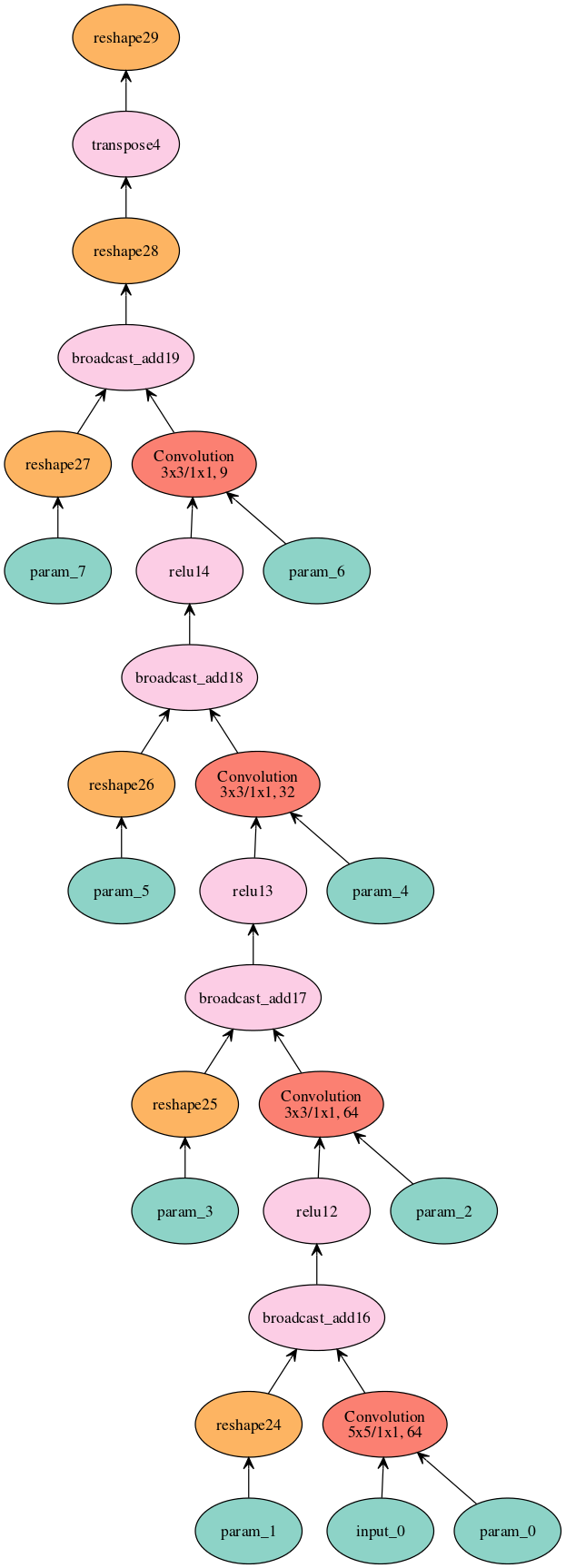
| To completely describe a pre-trained model in MXNet, we need two elements: a symbolic graph, containing the model's network definition, and a binary file containing the model weights. You can import the ONNX model and get the symbol and parameters objects using ``import_model`` API. The paameter object is split into argument parameters and auxilliary parameters. | ||
|
|
||
|
|
||
| ```python | ||
| sym, arg, aux = onnx_mxnet.import_model(onnx_model_file) | ||
| ``` | ||
|
|
||
| We can now visualize the imported model (graphviz needs to be installed) | ||
|
|
||
|
|
||
| ```python | ||
| mx.viz.plot_network(sym, node_attrs={"shape":"oval","fixedsize":"false"}) | ||
| ``` | ||
|
|
||
|
|
||
|
|
||
|
|
||
|  | ||
|
|
||
|
|
||
|
|
||
| ## Input Pre-processing | ||
|
|
||
| We will transform the previously downloaded input image into an input tensor. | ||
|
|
||
|
|
||
| ```python | ||
| img = Image.open('super_res_input.jpg').resize((224, 224)) | ||
| img_ycbcr = img.convert("YCbCr") | ||
| img_y, img_cb, img_cr = img_ycbcr.split() | ||
| test_image = np.array(img_y)[np.newaxis, np.newaxis, :, :] | ||
| ``` | ||
|
|
||
| ## Run Inference using MXNet's Module API | ||
|
|
||
| We will use MXNet's Module API to run the inference. For this we will need to create the module, bind it to the input data and assign the loaded weights from the two parameter objects - argument parameters and auxilliary parameters. | ||
|
|
||
|
|
||
| ```python | ||
| mod = mx.mod.Module(symbol=sym, data_names=['input_0'], context=mx.cpu(), label_names=None) | ||
| mod.bind(for_training=False, data_shapes=[('input_0',test_image.shape)], label_shapes=None) | ||
| mod.set_params(arg_params=arg, aux_params=aux, allow_missing=True, allow_extra=True) | ||
| ``` | ||
|
|
||
| Module API's forward method requires batch of data as input. We will prepare the data in that format and feed it to the forward method. | ||
|
|
||
|
|
||
| ```python | ||
| from collections import namedtuple | ||
| Batch = namedtuple('Batch', ['data']) | ||
|
|
||
| # forward on the provided data batch | ||
| mod.forward(Batch([mx.nd.array(test_image)])) | ||
| ``` | ||
|
|
||
| To get the output of previous forward computation, you use ``module.get_outputs()`` method. | ||
| It returns an ``ndarray`` that we convert to a ``numpy`` array and then to Pillow's image format | ||
|
|
||
|
|
||
| ```python | ||
| output = mod.get_outputs()[0][0][0] | ||
| img_out_y = Image.fromarray(np.uint8((output.asnumpy().clip(0, 255)), mode='L')) | ||
| result_img = Image.merge( | ||
| "YCbCr", [ | ||
| img_out_y, | ||
| img_cb.resize(img_out_y.size, Image.BICUBIC), | ||
| img_cr.resize(img_out_y.size, Image.BICUBIC) | ||
| ]).convert("RGB") | ||
| result_img.save("super_res_output.jpg") | ||
| ``` | ||
|
|
||
| Here's the input image and the resulting output images compared. As you can see, the model was able to increase the spatial resolution from ``256x256`` to ``672x672``. | ||
|
|
||
| | Input Image | Output Image | | ||
| | ----------- | ------------ | | ||
| |  |  | | ||
|
|
||
| <!-- INSERT SOURCE DOWNLOAD BUTTONS --> |
This file contains hidden or bidirectional Unicode text that may be interpreted or compiled differently than what appears below. To review, open the file in an editor that reveals hidden Unicode characters.
Learn more about bidirectional Unicode characters
This file contains hidden or bidirectional Unicode text that may be interpreted or compiled differently than what appears below. To review, open the file in an editor that reveals hidden Unicode characters.
Learn more about bidirectional Unicode characters
This file contains hidden or bidirectional Unicode text that may be interpreted or compiled differently than what appears below. To review, open the file in an editor that reveals hidden Unicode characters.
Learn more about bidirectional Unicode characters
Add this suggestion to a batch that can be applied as a single commit.
This suggestion is invalid because no changes were made to the code.
Suggestions cannot be applied while the pull request is closed.
Suggestions cannot be applied while viewing a subset of changes.
Only one suggestion per line can be applied in a batch.
Add this suggestion to a batch that can be applied as a single commit.
Applying suggestions on deleted lines is not supported.
You must change the existing code in this line in order to create a valid suggestion.
Outdated suggestions cannot be applied.
This suggestion has been applied or marked resolved.
Suggestions cannot be applied from pending reviews.
Suggestions cannot be applied on multi-line comments.
Suggestions cannot be applied while the pull request is queued to merge.
Suggestion cannot be applied right now. Please check back later.
There was a problem hiding this comment.
Choose a reason for hiding this comment
The reason will be displayed to describe this comment to others. Learn more.
also for re training and transfer learning usecases right?
There was a problem hiding this comment.
Choose a reason for hiding this comment
The reason will be displayed to describe this comment to others. Learn more.
yes