This repository was archived by the owner on Nov 17, 2023. It is now read-only.
-
Notifications
You must be signed in to change notification settings - Fork 6.7k
[MXNET-1198] MXNet Java API #13162
Merged
[MXNET-1198] MXNet Java API #13162
Changes from all commits
Commits
Show all changes
25 commits
Select commit
Hold shift + click to select a range
64b9ac7
[MXNET-984] Add Java NDArray and introduce Java Operator Builder clas…
lanking520 2bc818e
Java Inference api and SSD example (#12830)
andrewfayres 94f3665
NativeResource Management in Scala (#12647) (#12883)
andrewfayres 58d4efb
Added unit tests for Resource Scope in Java (#12955)
piyushghai f759984
Bumping down minimum java support from 8 to 7 (#12965)
piyushghai 5aaa729
[MXNET-984] Java NDArray Documentation Generation (#12835)
lanking520 743301c
First pass at adding JavaDocs for new java api classes (#12963)
andrewfayres 7e776c9
[MXNET-1160] add Java build/run example (#12969)
lanking520 62d2800
Maven Surefire bug workaround (#13097)
zachgk 2df7a61
use ResourceScope in Model/Trainer/FeedForward.scala (#12882) (#13164)
lanking520 149ea17
[MXNET-1187] Added Tutorial for Java under mxnet.io/docs/tutorials (#…
piyushghai 3664a7c
[MXNET-1202] Change Builder class into a better way (#13159)
lanking520 1bb5b7f
[MXNET-1041] Add Java benchmark (#13095)
lanking520 fb4cad9
[MXNET-918] [Introduce Random module / Refact code generation (#13038…
lanking520 efd925e
Merge branch 'master' into java-api
nswamy 6b39c6b
Fixed missing break statement (#13257)
piyushghai 6f940cf
Java Benchmark failure (#13258)
lanking520 218a7a9
Addressing PR feedback for merging Java API into master (#13277)
andrewfayres 52bead0
clean up the NDArray follow the comments (#13281)
lanking520 7d51241
[MXNET-1181] Added command line alternative to IntelliJ in install in…
piyushghai 3ec9030
add defaults and clean up the tests (#13295)
lanking520 f52b9aa
[MXNET-1187] Added Java SSD Inference Tutorial for website (#13201)
piyushghai 1c54aaa
Merge branch 'master' into java-api
yzhliu bb7bbaf
[MXNET-1182] Predictor example (#13237)
lanking520 ab8772c
Reducing the length of setup tutorial (#13306)
piyushghai File filter
Filter by extension
Conversations
Failed to load comments.
Loading
Jump to
Jump to file
Failed to load files.
Loading
Diff view
Diff view
There are no files selected for viewing
This file contains hidden or bidirectional Unicode text that may be interpreted or compiled differently than what appears below. To review, open the file in an editor that reveals hidden Unicode characters.
Learn more about bidirectional Unicode characters
This file contains hidden or bidirectional Unicode text that may be interpreted or compiled differently than what appears below. To review, open the file in an editor that reveals hidden Unicode characters.
Learn more about bidirectional Unicode characters
| Original file line number | Diff line number | Diff line change |
|---|---|---|
| @@ -0,0 +1,171 @@ | ||
| # Run MXNet Java Examples Using the IntelliJ IDE (macOS) | ||
|
|
||
| This tutorial guides you through setting up a simple Java project in IntelliJ IDE on macOS and demonstrates usage of the MXNet Java APIs. | ||
|
|
||
| ## Prerequisites: | ||
| To use this tutorial you need the following pre-requisites: | ||
|
|
||
| - [Java 8 JDK](http://www.oracle.com/technetwork/java/javase/downloads/index.html) | ||
| - [Maven](https://maven.apache.org/install.html) | ||
| - [OpenCV](https://opencv.org/) | ||
| - [IntelliJ IDEA](https://www.jetbrains.com/idea/) (One can download the community edition from [here](https://www.jetbrains.com/idea/download)) | ||
|
|
||
| ### MacOS Prerequisites | ||
|
|
||
| You can run the following commands to install the prerequisites. | ||
| ``` | ||
| /usr/bin/ruby -e "$(curl -fsSL https://raw.githubusercontent.com/Homebrew/install/master/install)" | ||
| brew update | ||
| brew tap caskroom/versions | ||
| brew cask install java8 | ||
| brew install maven | ||
| brew install opencv | ||
| ``` | ||
|
|
||
| You can also run this tutorial on an Ubuntu machine after installing the following prerequisites. | ||
| ### Ubuntu Prerequisites | ||
|
|
||
| Run the following commands to install the prerequisites. | ||
|
|
||
| ```bash | ||
| wget https://github.com/apache/incubator-mxnet/blob/master/ci/docker/install/ubuntu_core.sh | ||
| sudo ./ubuntu_core.sh | ||
| wget https://github.com/apache/incubator-mxnet/blob/master/ci/docker/install/ubuntu_scala.sh | ||
| sudo ./ubuntu_scala.sh | ||
| ``` | ||
|
|
||
| Note : You might need to run `chmod u+x ubuntu_core.sh` and `chmod u+x ubuntu_scala` before running the scripts. | ||
|
|
||
| The `ubuntu_scala.sh` installs the common dependencies required for both MXNet Scala and MXNet Java packages. | ||
|
|
||
| ## Set Up Your Project | ||
|
|
||
| **Step 1.** Install and setup [IntelliJ IDEA](https://www.jetbrains.com/idea/) | ||
|
|
||
| **Step 2.** Create a new Project: | ||
|
|
||
| 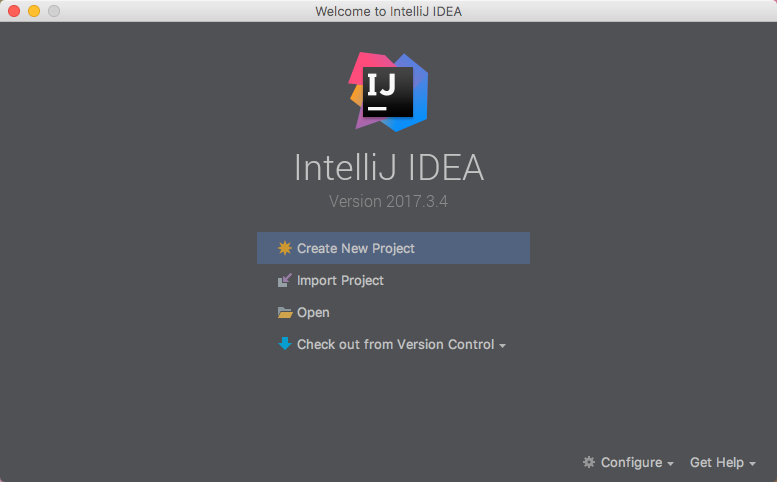 | ||
|
|
||
| From the IntelliJ welcome screen, select "Create New Project". | ||
|
|
||
| Choose the Maven project type. | ||
|
|
||
| Select the checkbox for `Create from archetype`, then choose `org.apache.maven.archetypes:maven-archetype-quickstart` from the list below. More on this can be found on a Maven tutorial : [Maven in 5 Minutes](https://maven.apache.org/guides/getting-started/maven-in-five-minutes.html). | ||
|
|
||
|  | ||
|
|
||
| click `Next`. | ||
|
|
||
|  | ||
|
|
||
| Set the project's metadata. For this tutorial, use the following: | ||
|
|
||
| **GroupId** | ||
| ``` | ||
| mxnet | ||
| ``` | ||
| **ArtifactId** | ||
| ``` | ||
| ArtifactId: javaMXNet | ||
| ``` | ||
| **Version** | ||
| ``` | ||
| 1.0-SNAPSHOT | ||
| ``` | ||
|
|
||
|  | ||
|
|
||
| Review the project's properties. The settings can be left as their default. | ||
|
|
||
|  | ||
|
|
||
| Set the project's location. The rest of the settings can be left as their default. | ||
|
|
||
|  | ||
|
lanking520 marked this conversation as resolved.
|
||
|
|
||
| After clicking Finish, you will be presented with the project's first view. | ||
| The project's `pom.xml` will be open for editing. | ||
|
|
||
| **Step 3.** Add the following Maven dependency to your `pom.xml` file under the `dependencies` tag: | ||
|
|
||
| ```html | ||
| <dependency> | ||
| <groupId>org.apache.mxnet</groupId> | ||
| <artifactId>mxnet-full_2.11-osx-x86_64-cpu</artifactId> | ||
| <version>1.4.0</version> | ||
| </dependency> | ||
| ``` | ||
|
|
||
| To view the latest MXNet Maven packages, you can check [MXNet Maven package repository](https://search.maven.org/#search%7Cga%7C1%7Cg%3A%22org.apache.mxnet%22) | ||
|
|
||
| Note : | ||
| - Change the osx-x86_64 to linux-x86_64 if your platform is linux. | ||
| - Change cpu into gpu if you have a gpu backed machine and want to use gpu. | ||
|
|
||
|
|
||
| **Step 4.** Import dependencies with Maven: | ||
|
|
||
| - Note the prompt in the lower right corner that states "Maven projects need to be imported". If this is not visible, click on the little greed balloon that appears in the lower right corner. | ||
|
|
||
|  | ||
|
|
||
| Click "Import Changes" in this prompt. | ||
|
|
||
| **Step 5.** Build the project: | ||
| - To build the project, from the menu choose Build, and then choose Build Project. | ||
|
|
||
| **Step 6.** Navigate to the App.java class in the project and paste the code from HelloWorld.java from [Java Demo project](https://github.com/apache/incubator-mxnet/blob/java-api/scala-package/mxnet-demo/java-demo/src/main/java/sample/HelloWorld.java) on MXNet repository, overwriting the original hello world code. | ||
| You can also grab the entire [Java Demo project](https://github.com/apache/incubator-mxnet/tree/java-api/scala-package/mxnet-demo/java-demo) and run it by following the instructions on the [README](https://github.com/apache/incubator-mxnet/blob/java-api/scala-package/mxnet-demo/java-demo/README.md) | ||
|
|
||
| **Step 7.** Now run the App.java. | ||
|
|
||
| The result should be something similar to this: | ||
|
|
||
| ``` | ||
| Hello World! | ||
| (1,2) | ||
| Process finished with exit code 0 | ||
| ``` | ||
|
|
||
| ### Troubleshooting | ||
|
|
||
| If you get an error, check the dependencies at the beginning of this tutorial. For example, you might see the following in the middle of the error messages, where `x.x` would the version it's looking for. | ||
|
|
||
| ``` | ||
| ... | ||
| Library not loaded: /usr/local/opt/opencv/lib/libopencv_calib3d.x.x.dylib | ||
| ... | ||
| ``` | ||
|
|
||
| This can be resolved be installing OpenCV. | ||
|
|
||
| ### Command Line Build Option | ||
|
|
||
| - You can also compile the project by using the following command at the command line. Change directories to this project's root folder then run the following: | ||
|
|
||
| ```bash | ||
| mvn clean install dependency:copy-dependencies | ||
| ``` | ||
| If the command succeeds, you should see a lot of info and some warning messages, followed by: | ||
|
|
||
| ```bash | ||
| [INFO] ------------------------------------------------------------------------ | ||
| [INFO] BUILD SUCCESS | ||
| [INFO] ------------------------------------------------------------------------ | ||
| [INFO] Total time: 3.475 s | ||
| [INFO] Finished at: 2018-11-08T05:06:31-08:00 | ||
| [INFO] ------------------------------------------------------------------------ | ||
| ``` | ||
| The build generates a new jar file in the `target` folder called `javaMXNet-1.0-SNAPSHOT.jar`. | ||
|
|
||
| To run the App.java use the following command from the project's root folder and you should see the same output as we got when the project was run from IntelliJ. | ||
| ```bash | ||
| java -cp target/javaMXNet-1.0-SNAPSHOT.jar:target/dependency/* mxnet.App | ||
| ``` | ||
|
|
||
| ## Next Steps | ||
| For more information about MXNet Java resources, see the following: | ||
|
|
||
| * [Java Inference API](https://mxnet.incubator.apache.org/api/java/infer.html) | ||
| * [Java Inference Examples](https://github.com/apache/incubator-mxnet/tree/java-api/scala-package/examples/src/main/java/org/apache/mxnetexamples/infer/) | ||
| * [MXNet Tutorials Index](http://mxnet.io/tutorials/index.html) | ||
This file contains hidden or bidirectional Unicode text that may be interpreted or compiled differently than what appears below. To review, open the file in an editor that reveals hidden Unicode characters.
Learn more about bidirectional Unicode characters
| Original file line number | Diff line number | Diff line change |
|---|---|---|
| @@ -0,0 +1,186 @@ | ||
| # Multi Object Detection using pre-trained SSD Model via Java Inference APIs | ||
|
|
||
| This tutorial shows how to use MXNet Java Inference APIs to run inference on a pre-trained Single Shot Detector (SSD) Model. | ||
|
|
||
| The SSD model is trained on the Pascal VOC 2012 dataset. The network is a SSD model built on Resnet50 as the base network to extract image features. The model is trained to detect the following entities (classes): ['aeroplane', 'bicycle', 'bird', 'boat', 'bottle', 'bus', 'car', 'cat', 'chair', 'cow', 'diningtable', 'dog', 'horse', 'motorbike', 'person', 'pottedplant', 'sheep', 'sofa', 'train', 'tvmonitor']. For more details about the model, you can refer to the [MXNet SSD example](https://github.com/apache/incubator-mxnet/tree/master/example/ssd). | ||
|
|
||
| ## Prerequisites | ||
|
|
||
| To complete this tutorial, you need the following: | ||
| * [MXNet Java Setup on IntelliJ IDEA](/java/mxnet_java_on_intellij.html) (Optional) | ||
| * [wget](https://www.gnu.org/software/wget/) To download model artifacts | ||
| * SSD Model artifacts | ||
| * Use the following script to get the SSD Model files : | ||
| ```bash | ||
| data_path=/tmp/resnet50_ssd | ||
| mkdir -p "$data_path" | ||
| wget https://s3.amazonaws.com/model-server/models/resnet50_ssd/resnet50_ssd_model-symbol.json -P $data_path | ||
| wget https://s3.amazonaws.com/model-server/models/resnet50_ssd/resnet50_ssd_model-0000.params -P $data_path | ||
| wget https://s3.amazonaws.com/model-server/models/resnet50_ssd/synset.txt -P $data_path | ||
| ``` | ||
| * Test images : A few sample images to run inference on. | ||
| * Use the following script to download sample images : | ||
| ```bash | ||
| image_path=/tmp/resnet50_ssd/images | ||
| mkdir -p "$image_path" | ||
| cd $image_path | ||
| wget https://cloud.githubusercontent.com/assets/3307514/20012567/cbb60336-a27d-11e6-93ff-cbc3f09f5c9e.jpg -O dog.jpg | ||
| wget https://cloud.githubusercontent.com/assets/3307514/20012563/cbb41382-a27d-11e6-92a9-18dab4fd1ad3.jpg -O person.jpg | ||
| ``` | ||
|
|
||
| Alternately, you can get the entire SSD Model artifacts + images in one single script from the MXNet Repository by running [get_ssd_data.sh script](https://github.com/apache/incubator-mxnet/blob/master/scala-package/examples/scripts/infer/objectdetector/get_ssd_data.sh) | ||
|
|
||
| ## Time to code! | ||
| 1\. Following the [MXNet Java Setup on IntelliJ IDEA](/java/mxnet_java_on_intellij.html) tutorial, in the same project `JavaMXNet`, create a new empty class called : `ObjectDetectionTutorial.java`. | ||
|
|
||
| 2\. In the `main` function of `ObjectDetectionTutorial.java` define the downloaded model path and the image data paths. This is the same path where we downloaded the model artifacts and images in a previous step. | ||
|
|
||
| ```java | ||
| String modelPathPrefix = "/tmp/resnet50_ssd/resnet50_ssd_model"; | ||
| String inputImagePath = "/tmp/resnet50_ssd/images/dog.jpg"; | ||
| ``` | ||
|
|
||
| 3\. We can run the inference code in this example on either CPU or GPU (if you have a GPU backed machine) by choosing the appropriate context. | ||
|
|
||
| ```java | ||
|
|
||
| List<Context> context = getContext(); | ||
| ... | ||
|
|
||
| private static List<Context> getContext() { | ||
| List<Context> ctx = new ArrayList<>(); | ||
| ctx.add(Context.cpu()); // Choosing CPU Context here | ||
|
|
||
| return ctx; | ||
| } | ||
| ``` | ||
|
|
||
| 4\. To provide an input to the model, define the input shape to the model and the Input Data Descriptor (DataDesc) as shown below : | ||
|
|
||
| ```java | ||
| Shape inputShape = new Shape(new int[] {1, 3, 512, 512}); | ||
| List<DataDesc> inputDescriptors = new ArrayList<DataDesc>(); | ||
| inputDescriptors.add(new DataDesc("data", inputShape, DType.Float32(), "NCHW")); | ||
| ``` | ||
|
|
||
| The input shape can be interpreted as follows : The input has a batch size of 1, with 3 RGB channels in the image, and the height and width of the image is 512 each. | ||
|
|
||
| 5\. To run an actual inference on the given image, add the following lines to the `ObjectDetectionTutorial.java` class : | ||
|
|
||
| ```java | ||
| BufferedImage img = ObjectDetector.loadImageFromFile(inputImagePath); | ||
| ObjectDetector objDet = new ObjectDetector(modelPathPrefix, inputDescriptors, context, 0); | ||
| List<List<ObjectDetectorOutput>> output = objDet.imageObjectDetect(img, 3); // Top 3 objects detected will be returned | ||
| ``` | ||
|
|
||
| 6\. Let's piece all of the above steps together by showing the final contents of the `ObjectDetectionTutorial.java`. | ||
|
|
||
| ```java | ||
| package mxnet; | ||
|
|
||
| import org.apache.mxnet.infer.javaapi.ObjectDetector; | ||
| import org.apache.mxnet.infer.javaapi.ObjectDetectorOutput; | ||
| import org.apache.mxnet.javaapi.Context; | ||
| import org.apache.mxnet.javaapi.DType; | ||
| import org.apache.mxnet.javaapi.DataDesc; | ||
| import org.apache.mxnet.javaapi.Shape; | ||
|
|
||
| import java.awt.image.BufferedImage; | ||
| import java.util.ArrayList; | ||
| import java.util.Arrays; | ||
| import java.util.List; | ||
|
|
||
| public class ObjectDetectionTutorial { | ||
|
|
||
| public static void main(String[] args) { | ||
|
|
||
| String modelPathPrefix = "/tmp/resnet50_ssd/resnet50_ssd_model"; | ||
|
|
||
| String inputImagePath = "/tmp/resnet50_ssd/images/dog.jpg"; | ||
|
|
||
| List<Context> context = getContext(); | ||
|
|
||
| Shape inputShape = new Shape(new int[] {1, 3, 512, 512}); | ||
|
|
||
| List<DataDesc> inputDescriptors = new ArrayList<DataDesc>(); | ||
| inputDescriptors.add(new DataDesc("data", inputShape, DType.Float32(), "NCHW")); | ||
|
|
||
| BufferedImage img = ObjectDetector.loadImageFromFile(inputImagePath); | ||
| ObjectDetector objDet = new ObjectDetector(modelPathPrefix, inputDescriptors, context, 0); | ||
| List<List<ObjectDetectorOutput>> output = objDet.imageObjectDetect(img, 3); | ||
|
|
||
| printOutput(output, inputShape); | ||
| } | ||
|
|
||
|
|
||
| private static List<Context> getContext() { | ||
| List<Context> ctx = new ArrayList<>(); | ||
| ctx.add(Context.cpu()); | ||
|
|
||
| return ctx; | ||
| } | ||
|
|
||
| private static void printOutput(List<List<ObjectDetectorOutput>> output, Shape inputShape) { | ||
|
|
||
| StringBuilder outputStr = new StringBuilder(); | ||
|
|
||
| int width = inputShape.get(3); | ||
| int height = inputShape.get(2); | ||
|
|
||
| for (List<ObjectDetectorOutput> ele : output) { | ||
| for (ObjectDetectorOutput i : ele) { | ||
| outputStr.append("Class: " + i.getClassName() + "\n"); | ||
| outputStr.append("Probabilties: " + i.getProbability() + "\n"); | ||
|
|
||
| List<Float> coord = Arrays.asList(i.getXMin() * width, | ||
| i.getXMax() * height, i.getYMin() * width, i.getYMax() * height); | ||
| StringBuilder sb = new StringBuilder(); | ||
| for (float c: coord) { | ||
| sb.append(", ").append(c); | ||
| } | ||
| outputStr.append("Coord:" + sb.substring(2)+ "\n"); | ||
| } | ||
| } | ||
| System.out.println(outputStr); | ||
|
|
||
| } | ||
| } | ||
| ``` | ||
|
|
||
| 7\. To compile and run this code, change directories to this project's root folder, then run the following: | ||
| ```bash | ||
| mvn clean install dependency:copy-dependencies | ||
| ``` | ||
|
|
||
| The build generates a new jar file in the `target` folder called `javaMXNet-1.0-SNAPSHOT.jar`. | ||
|
|
||
| To run the ObjectDetectionTutorial.java use the following command from the project's root folder. | ||
| ```bash | ||
| java -cp target/javaMXNet-1.0-SNAPSHOT.jar:target/dependency/* mxnet.ObjectDetectionTutorial | ||
| ``` | ||
|
|
||
| You should see a similar output being generated for the dog image that we used: | ||
| ```bash | ||
| Class: car | ||
| Probabilties: 0.99847263 | ||
| Coord:312.21335, 72.02908, 456.01443, 150.66176 | ||
| Class: bicycle | ||
| Probabilties: 0.9047381 | ||
| Coord:155.9581, 149.96365, 383.83694, 418.94516 | ||
| Class: dog | ||
| Probabilties: 0.82268167 | ||
| Coord:83.82356, 179.14001, 206.63783, 476.78754 | ||
| ``` | ||
|
|
||
|  | ||
|
|
||
| The results returned by the inference call translate into the regions in the image where the model detected objects. | ||
|
|
||
|  | ||
|
|
||
| ## Next Steps | ||
| For more information about MXNet Java resources, see the following: | ||
|
|
||
| * [Java Inference API](/api/java/infer.html) | ||
| * [Java Inference Examples](https://github.com/apache/incubator-mxnet/tree/java-api/scala-package/examples/src/main/java/org/apache/mxnetexamples/infer/) | ||
| * [MXNet Tutorials Index](/tutorials/index.html) |
This file contains hidden or bidirectional Unicode text that may be interpreted or compiled differently than what appears below. To review, open the file in an editor that reveals hidden Unicode characters.
Learn more about bidirectional Unicode characters
| Original file line number | Diff line number | Diff line change |
|---|---|---|
| @@ -1,5 +1,8 @@ | ||
| .flattened-pom.xml | ||
| core/src/main/scala/org/apache/mxnet/NDArrayAPIBase.scala | ||
| core/src/main/scala/org/apache/mxnet/NDArrayBase.scala | ||
| core/src/main/scala/org/apache/mxnet/javaapi/NDArrayBase.scala | ||
| core/src/main/scala/org/apache/mxnet/SymbolAPIBase.scala | ||
| core/src/main/scala/org/apache/mxnet/SymbolBase.scala | ||
| examples/scripts/infer/images/ | ||
| examples/scripts/infer/models/ |
Oops, something went wrong.
Add this suggestion to a batch that can be applied as a single commit.
This suggestion is invalid because no changes were made to the code.
Suggestions cannot be applied while the pull request is closed.
Suggestions cannot be applied while viewing a subset of changes.
Only one suggestion per line can be applied in a batch.
Add this suggestion to a batch that can be applied as a single commit.
Applying suggestions on deleted lines is not supported.
You must change the existing code in this line in order to create a valid suggestion.
Outdated suggestions cannot be applied.
This suggestion has been applied or marked resolved.
Suggestions cannot be applied from pending reviews.
Suggestions cannot be applied on multi-line comments.
Suggestions cannot be applied while the pull request is queued to merge.
Suggestion cannot be applied right now. Please check back later.
Uh oh!
There was an error while loading. Please reload this page.